
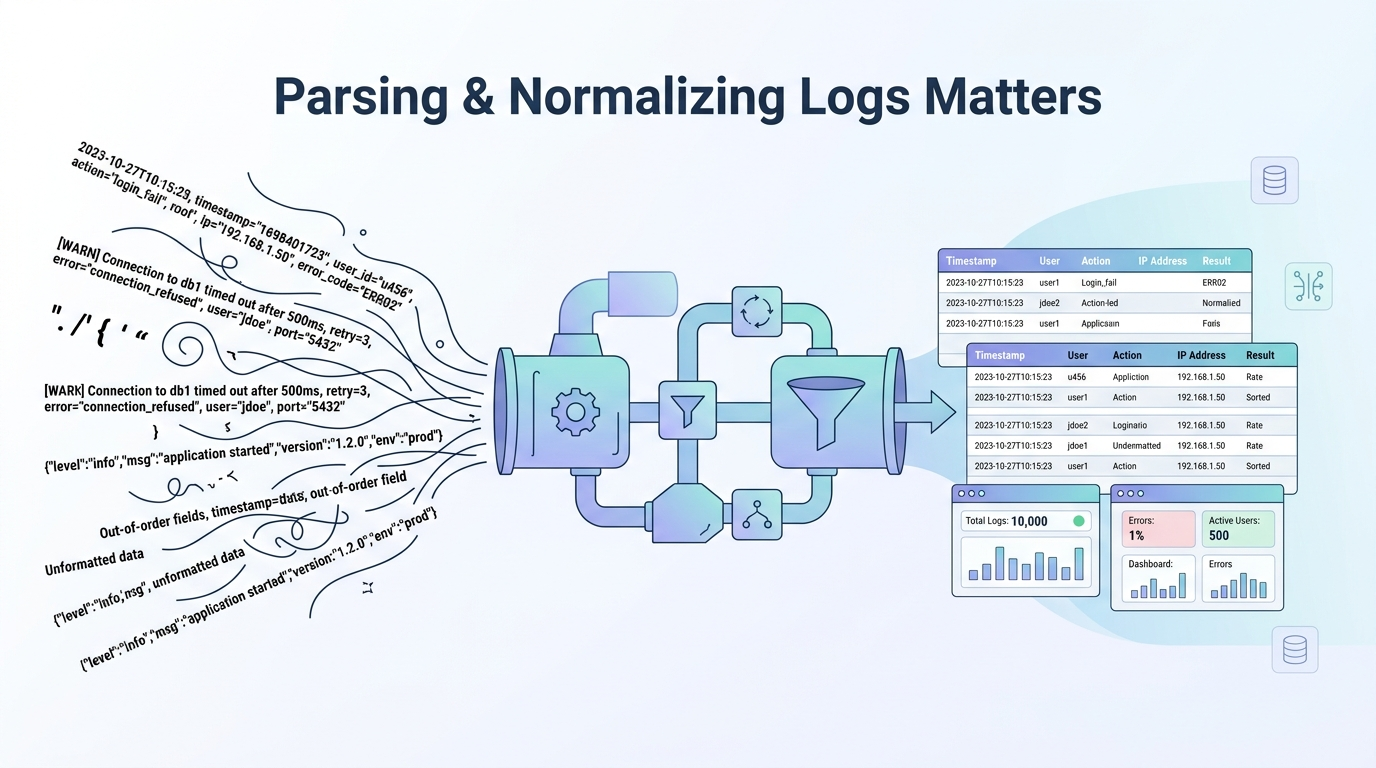
Parsing normalizing log data formats is how raw, messy logs become structured, searchable, and actually useful. Most logs arrive inconsistent and hard to work with, and we’ve seen how quickly that creates confusion. In many environments, the difference between noisy data and clear signals comes down to how early teams shape their logs.
When parsing is delayed, dashboards break and alerts lose meaning. Teams start second-guessing their own systems. This guide shares how parsing and normalization work in practice, what methods hold up, and how to build pipelines that stay reliable. Keep reading to see what actually works.
Clean Log Wins: Parsing & Normalization That Hold Up
This section sums up how strong parsing and normalization turn messy logs into clear signals that teams can trust and act on.
- Parsing and normalization turn raw logs into structured, searchable data you can rely on
- Standard schemas help systems work together without extra effort
- Weak normalization leads to missed alerts and wasted time
What Is Log Parsing and Why Does It Matter?
Log parsing pulls structure out of raw text. It takes a line that looks like noise and breaks it into fields that systems can understand. Things like timestamps, IP addresses, event types, and messages become usable once parsed.
In most environments we’ve worked with, logs arrive unstructured. That includes system logs, application logs, and cloud outputs. Without parsing, these logs sit there as strings. You cannot filter them properly, and you cannot build reliable alerts.
We treat parsing as the first real checkpoint in any pipeline. A poorly parsed log might miss key fields, which means detections fail silently. That is a real risk, not a theoretical one.
Once parsing is done correctly, logs start to support real use cases. Teams can track login attempts, detect anomalies, or monitor application health. For example, extracting source IPs allows correlation across systems. Pulling status codes helps identify failing services.
We’ve learned this the hard way in network threat detection work. When parsing is weak, attackers blend in. When parsing is solid, patterns start to stand out.
At its core, parsing turns logs into something you can trust. Without it, the rest of the pipeline is guesswork.
How Does Log Normalization Standardize Data Across Systems?
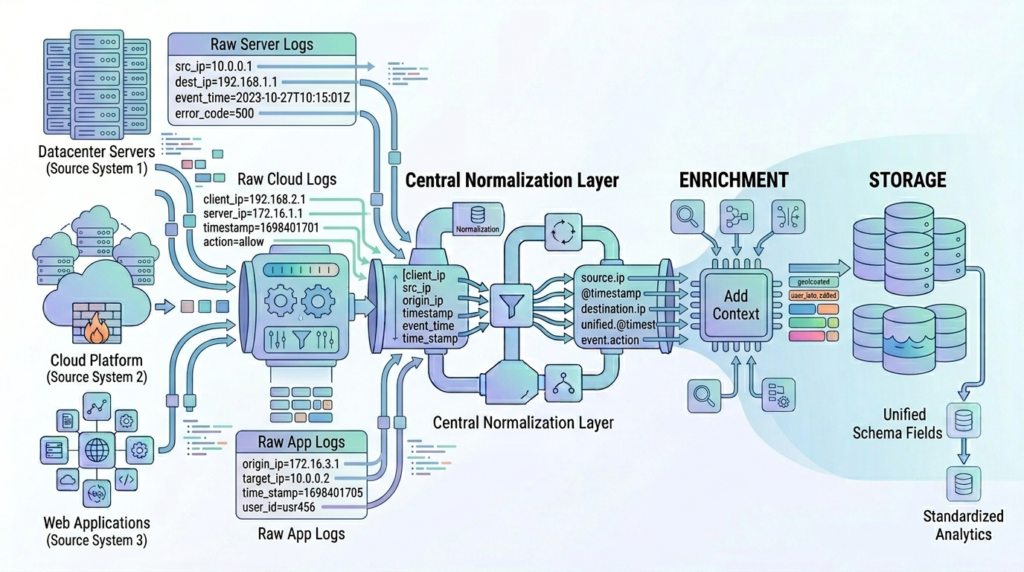
Parsing gives structure, but it does not fix inconsistency. Different systems name the same thing in different ways. One log might say “src_ip” while another says “client_ip”.
Normalization fixes that problem. It aligns fields, formats, and values so everything speaks the same language. Once that happens, logs from different sources can be analyzed together.
As highlighted by Graylog
“Normalization is the process of standardizing the data so that… no matter how it comes in, it gets stored in like formats. So that data is stored in the same field, regardless of where it came from.” – Graylog
Normalization usually starts with a few basic steps. Field names get standardized. Timestamps are aligned into a single format. Data types are corrected so numbers stay numbers and not strings.
After that, mapping becomes important. Systems need to follow a shared schema. That allows queries to work across logs without special handling for each source.
Here is a simple comparison:
| Before Normalization | After Normalization |
| src_ip | source.ip |
| client_ip | source.ip |
| time | @timestamp |
| severity level | log.level |
In our work, normalization is what makes cross-source detection possible. Firewall logs, endpoint logs, and cloud logs start to connect.
What Is the Step-by-Step Process for Parsing Log Data?
Parsing follows a clear sequence, even if the tools vary. Each step builds on the previous one, and skipping any part usually causes issues later.
- Ingestion. Logs are collected from different sources such as servers, containers, or cloud systems. Agents handle this step and move data into the pipeline. If ingestion is unstable, logs get lost before parsing even begins.
- Pattern matching. This is where the system tries to understand the structure of each log line. Some formats are predictable, while others are not. Flexible methods help here, but they must be written carefully.
- Field extraction. The parser identifies key parts of the log and assigns them to fields. This includes timestamps, message content, and identifiers. At this stage, logs shift from raw text to structured data.
- Validation. This step checks whether parsing worked as expected. If a parser fails, the log might end up incomplete or incorrect. We’ve seen entire dashboards break because of silent parsing errors.
In our experience, validation is often ignored. That leads to hidden failures. Adding checks early saves time later.
How Does Normalization Work After Parsing?
Credits: Matt Nichols
Once logs are parsed, they still need alignment. Normalization takes those structured fields and makes them consistent across systems.
We usually start with simple transformations. Field names are mapped into a shared schema. Timestamps are adjusted into a common time zone. These steps remove basic inconsistencies.
After that, normalization expands into enrichment. This is where logs gain more context. IP addresses can be linked to geographic data. Known threat indicators can be matched against external data.
Filtering also plays a role. Removing duplicates and low-value entries reduces noise and improves performance.
In real-world setups, we often deal with many log sources at once. With normalization, they form a single dataset that can be queried and analyzed together. This becomes especially clear when comparing approaches in SIEM vs log management tools. Where structured data directly impacts detection performance.
This matters most in threat detection. An attack rarely shows up in one place. It appears across multiple systems. Normalized logs make those connections visible.
We’ve built pipelines where normalization directly improved detection accuracy. Once fields aligned, correlations that were invisible before became obvious.
Normalization is not just cleanup. It is what turns structured logs into something that actually works at scale.
Which Techniques Are Used for Log Parsing and Normalization?
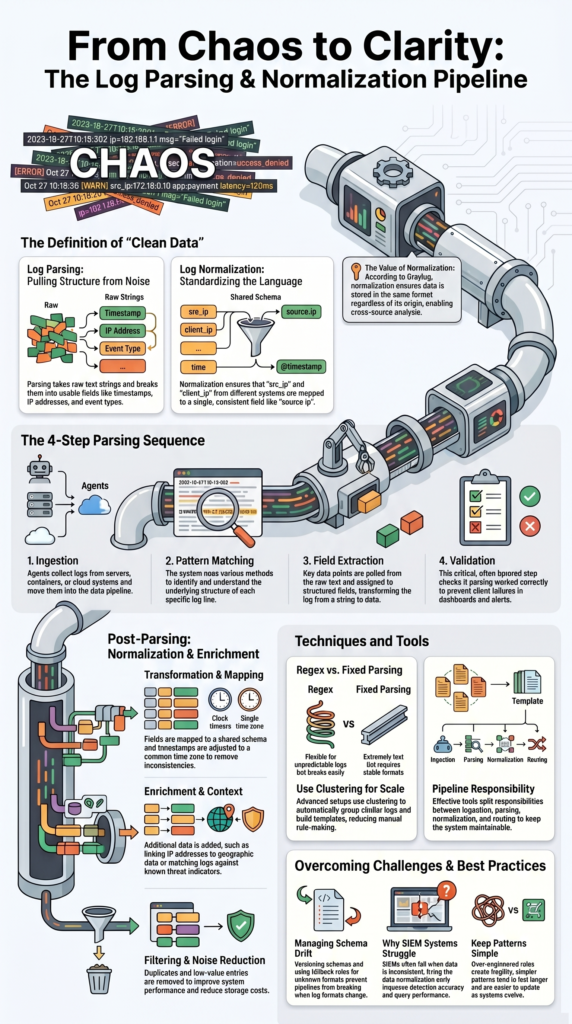
Different techniques handle different types of logs. Choosing the right one depends on how predictable the log format is. Some methods focus on flexibility. Others focus on speed. In practice, we rarely rely on just one.
Here is a simple comparison:
| Technique | Strength | Limitation |
| Regex | Flexible | Breaks on format changes |
| Pattern-based | Easier to reuse | Slightly slower |
| Fixed parsing | Very fast | Needs stable format |
We often mix approaches. Fixed parsing handles clean, consistent logs. More flexible methods handle logs that change often.
In more advanced setups, teams use clustering methods to group similar logs together. This helps build templates automatically. It reduces manual work, especially in large environments where formats evolve.
From experience, most parsing failures come from overly complex rules. Simpler patterns tend to last longer and break less often.
Normalization techniques follow a similar idea. Mapping fields into a shared schema is the foundation. After that, enrichment and filtering add value.
The key is balance. Over-engineered parsing creates fragility. Under-engineered parsing misses important data. Good pipelines stay simple where possible and flexible where needed.
What Tools Are Best for Parsing and Normalizing Logs?
Tools help, but they do not solve the problem on their own. What matters is how they are used. Some tools handle ingestion and parsing together. Others focus more on transformation and routing. The choice depends on scale and environment.
In our work, we focus less on the tool itself and more on pipeline design. A well-designed pipeline can perform well even with simple tools. A poorly designed one fails regardless of the platform. It’s clearer when evaluating differences through a practical log management system features comparison, where capabilities vary significantly across platforms.
Here is how tools typically differ:
| Capability | What It Handles |
| Ingestion | Collecting logs from sources |
| Parsing | Extracting structured fields |
| Normalization | Aligning schemas and formats |
| Routing | Sending logs to storage systems |
We usually place threat detection logic early in the pipeline. This reduces noise before logs reach storage. It also lowers cost and improves performance.
Another lesson we’ve learned: avoid overloading a single tool. Splitting responsibilities across stages makes systems easier to maintain.
At the end of the day, tools are only part of the system. The real value comes from how parsing and normalization rules are built, tested, and updated over time.
Why Do SIEM Systems Struggle with Log Normalization?
SIEM systems often struggle because log formats never stay the same. Vendors update their formats, applications change behavior, and new data sources appear. This creates what we call schema drift. Fields change names, structures shift, and existing rules stop working.
We’ve seen teams spend a large part of their time fixing broken parsers. It becomes a constant cycle. One change leads to another, and the system never feels stable.
There are a few common issues behind this:
- Rigid schemas that do not adapt well
- High log volume slowing down processing
- Frequent format changes from different sources
- Repeated parsing fixes that waste time
In practice, normalization fails when it cannot keep up with change. Static rules break quickly in dynamic environments.
Another issue is scale. As log volume grows, small inefficiencies turn into major problems. Poor normalization increases storage costs and reduces query performance.
We’ve worked with teams that had to rebuild pipelines from scratch because early assumptions did not hold. That is avoidable with better planning.
SIEM systems do not fail because they lack features. They fail when the data feeding them is inconsistent. Fix the data, and the system improves.
How Can You Handle Schema Drift and Failing Parsers?
Schema drift is unavoidable. The goal is not to stop it but to manage it. We handle this by building flexibility into the pipeline. One of the first steps is versioning schemas. This allows changes to be tracked instead of breaking everything at once.
Dynamic parsing also helps. Instead of relying on one strict pattern, the system can adapt to variations. This reduces failures when formats shift slightly.
Automation plays a big role. Manual fixes do not scale. We rely on validation checks to catch issues early. When parsing fails, fallback rules handle the log instead of dropping it.
A few practical steps we use:
- Track schema versions over time
- Add validation checks to every stage
- Use fallback parsing for unknown formats
- Monitor parser accuracy continuously
Clustering techniques also help identify new log patterns. Instead of reacting to every change manually, the system learns from incoming data.
From experience, the biggest improvement comes from visibility. If you cannot see parsing failures, you cannot fix them. Handling schema drift is about staying ahead of change, not reacting to it after things break.
What Are the Best Practices for Efficient Log Parsing and Normalization?
Strong pipelines follow a few consistent principles. These are not complex, but they require discipline.
First, combine speed and flexibility. Use fast parsing where formats are stable, and flexible parsing where they are not.
Second, normalize early. Waiting until later stages creates more work and increases the chance of errors.
Third, keep patterns simple. Complex parsing rules tend to fail more often. Clear, focused rules last longer.
Here are the practices we rely on:
- Use shared schemas across all log sources
- Validate parsing results regularly
- Monitor accuracy with clear metrics
- Add enrichment only when it adds value
- Remove unnecessary logs to reduce noise
We also focus on detection needs. Parsing and normalization should support real use cases, not just data storage.
In our threat modeling work, clean data makes a noticeable difference. Detection rules become simpler. Alerts become more reliable.
Another important point is testing. Pipelines should be tested with real data, not just sample logs. Efficiency is not about speed alone. It is about building systems that stay reliable over time.
How to Build a Scalable Log Parsing and Normalization Pipeline?
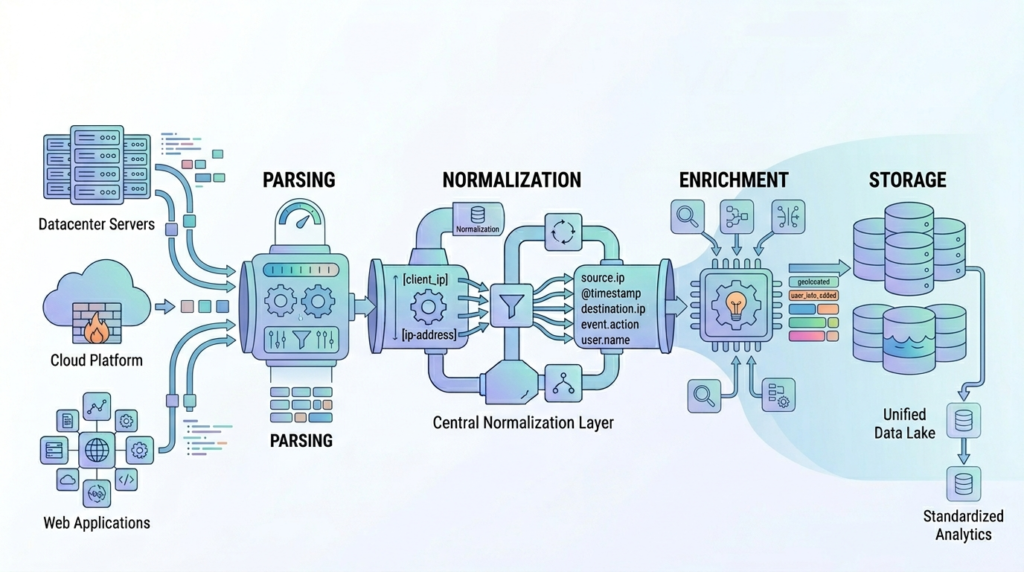
A scalable pipeline follows a layered design. Each stage has a clear role, and data flows from one to the next.
Logs are collected from all sources and moved into the system. This stage must handle scale and avoid data loss. Strong pipelines often rely on well-defined centralized log management strategies to ensure consistent data flow across environments.
Next comes parsing. Logs are structured into fields that systems can use. Normalization follows. Fields are aligned into a shared schema. Then comes enrichment. Additional context is added where needed. Finally, logs are stored and indexed. Queries must remain fast even as data grows.
A simple structure looks like this:
- Ingestion
- Parsing
- Normalization
- Enrichment
- Storage
Insights from Elastic Observability Labs indicate
“Every log processing pipeline does the same three things: Things usually start with extracting fields from raw log messages, normalizing them to a consistent schema, and cleaning up whatever you don’t need.” – Elastic Observability Labs
We design pipelines with threat detection in mind. Clean, structured data allows faster correlation and better analysis.
Scalability also depends on efficiency. Poor parsing increases storage costs. Weak normalization slows queries. We’ve seen pipelines handle massive volumes without issues when each layer is designed properly.
FAQ
What is the difference between log parsing and log normalization?
Log parsing converts raw log lines into readable fields using pattern matching, regex parsing, or tokenization. Log normalization then standardizes those fields into a common format, such as schema normalization or severity mapping.
Many teams confuse these steps, but they serve different purposes. Parsing extracts data, while normalization makes data consistent across systems for easier search and analysis.
How do structured logging and unstructured logs affect parsing?
Structured logging, such as JSON logs or key-value pairs, is easier to process because fields are clearly defined. Unstructured logs and semi-structured logs require more work, often using grok patterns or a dissect parser. In practice, structured logging reduces errors and speeds up processing, while unstructured logs need more careful field extraction and validation.
Why is timestamp standardization important in log data?
Timestamp standardization ensures logs from different systems align in time. Without it, timezone conversion issues can cause confusion and break event correlation. This makes troubleshooting harder. Standardized timestamps improve log aggregation, event ordering, and alert accuracy, especially in distributed systems and cloud logs where timing is critical.
How do parser failures and schema drift impact log pipelines?
Parser failures occur when log patterns no longer match changing formats. Schema drift happens when fields change, disappear, or new ones are added. Both issues can break pipelines and cause data loss. Adding log validation, error handling, and flexible schema normalization helps maintain stability and keeps pipelines working as systems evolve.
What role does log enrichment play in observability?
Log enrichment adds useful context, such as metadata addition, source IP extraction, and user agent parsing. This extra data helps teams understand events more clearly. It improves troubleshooting, supports threat hunting, and strengthens correlation across systems. Enriched logs also connect better with metrics and traces in an observability stack for deeper analysis.
When Raw Logs Keep Getting in the Way
You’re pulling in logs from everywhere, but the data doesn’t line up, and it slows your team down. Alerts feel off, context is missing, and you end up second guessing what you see. It’s frustrating. Bad data leads to bad decisions.
We’ve seen that fixing parsing early makes everything else easier, and helps turn messy logs into something teams can actually trust. It connects clean data with real threat context so responses stay sharp. If you’re ready to fix weak points in your pipeline, start here.
References
- https://graylog.org/resources/log-wrangling-make-your-logs-work-for-you/#content
- https://www.elastic.co/observability-labs/blog/elastic-streams-ai-pipeline-generation
