
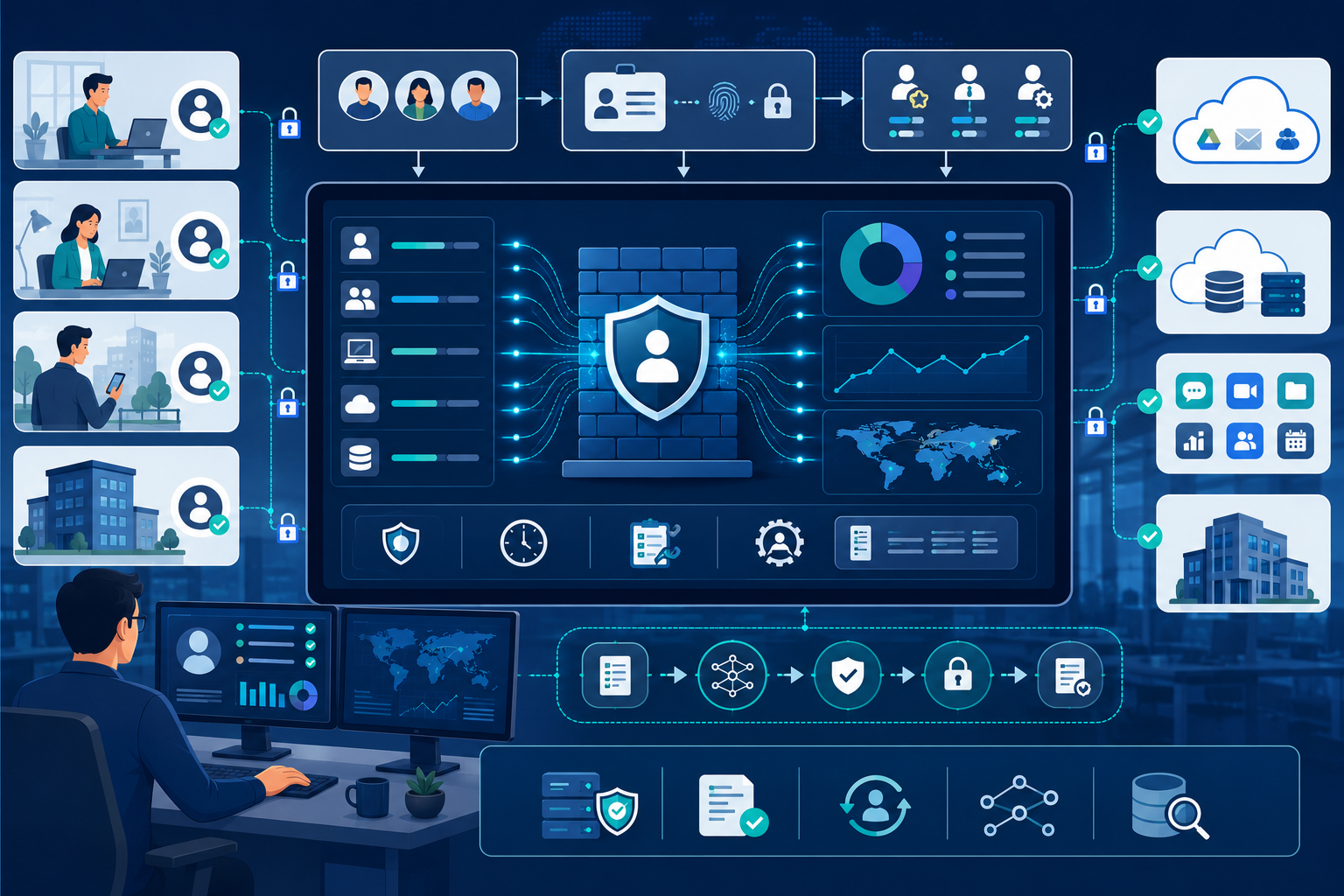
Static IP-based firewall rules no longer cut it in today’s borderless, hybrid workplace. Employees constantly switch locations and networks, rendering traditional perimeter checks obsolete. Integrating user identity awareness firewall policies shifts protection from rigid network zones to people-centric access control.
Enhanced by advanced Network Threat Detection, modern firewalls authenticate real-time identity data to ensure the right users reach the right resources securely from anywhere. Keep reading to explore how identity-driven protection transforms network access and simplifies governance.
Identity-Aware Security: Key Takeaways on User Identity Awareness Firewall Policies
Here is how incorporating user identity awareness firewall policies upgrades your security architecture for today’s dynamic, hybrid workforce:
- Location-Agnostic Policy Enforcement: Secures hybrid and remote teams by tying access permissions directly to verified user identities rather than volatile IP addresses.
- Granular Attack Surface Reduction: Enforces strict least-privilege access across all user groups, making it significantly easier to spot compromised credentials and insider threats.
- Seamless Ecosystem Synergy: Integrates directly with your existing identity providers (IdPs) to streamline policy management and transform abstract network traffic into accountable user activity.
Why Are IP-Based Firewall Policies Obsolete?
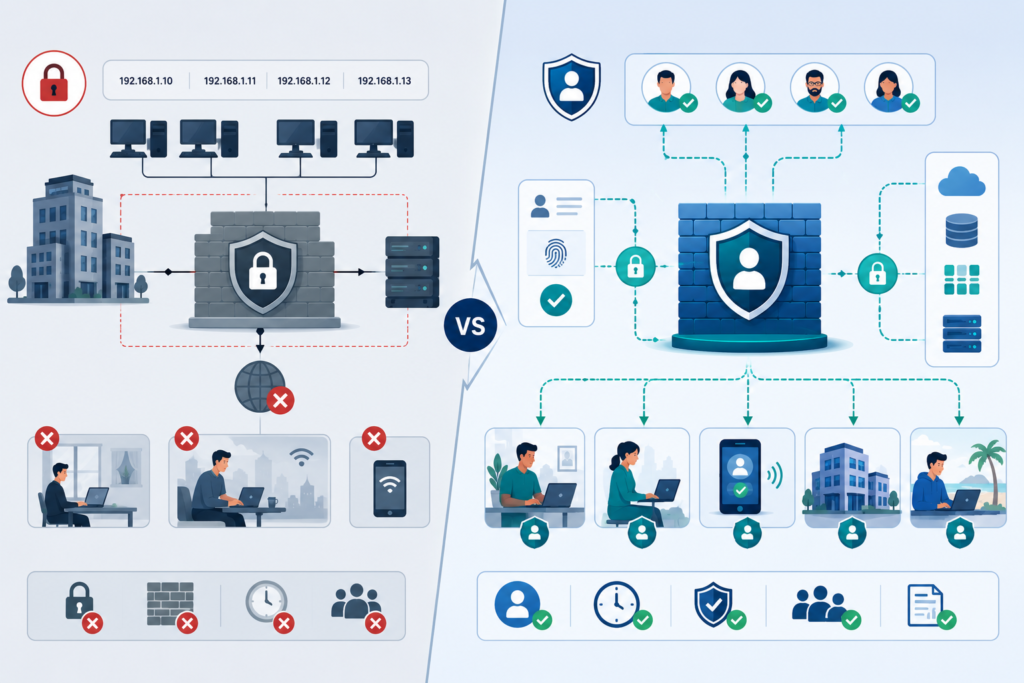
They were built for a different time. When everyone worked in the office, on a company desktop, plugged into the wall, an IP address was a reliable proxy for identity and location.
The “10.10.10.0/24” subnet was the marketing department. That world is gone. Now, that IP could be a personal laptop on a VPN, an iPhone on cellular data, or a contractor’s device halfway across the globe.
“An anonymous network only has visibility at the Internet Protocol (IP) or media access control (MAC) address level, and cannot determine whether a user is a contractor, a guest or an employee.” – Thecyberwire
I was consulting for a mid-sized firm that had a massive spreadsheet of firewall rules. Each line was a cryptic series of IPs and ports. They were proud of their “granular control.” Then they deployed a company-wide VPN for remote work. Overnight, every single employee’s traffic originated from the same three VPN server IP addresses.
Their entire rulebook was useless. Marketing, engineering, and interns all appeared identical to the firewall. They had to choose between locking everything down and crippling productivity, or opening everything up and accepting huge risk. They chose a third path: they stopped relying on IPs.
The limitation is stark. IPs tell you nothing about intent. A compromised account logged in from a legitimate IP looks exactly like a legitimate user. An attacker who steals a laptop and connects to the office WiFi gets all the access of the employee.
IP-based policies are brittle, complex to manage, and blind to the most critical variable in security: the human being at the key features.
How Does an Identity-Aware Firewall Actually Work?
It works by joining two worlds that used to be separate: network security and identity management. Modern next-generation firewalls don’t work alone. It forms a live connection to your identity provider (like Microsoft Entra ID, Okta, or Google). When a user logs into their device or a captive portal, that authentication event is shared with the firewall.
The firewall then tags all of that user’s subsequent network sessions with their identity. It’s not guessing based on IP; it knows. So when a packet hits the firewall, the policy evaluation changes.
Instead of just asking “Is this packet from the 192.168.1.0/24 subnet?”, it asks “Is this packet from Jane Doe in the Engineering group?” The rule set is rewritten in human terms.
This allows for incredibly precise policies. You can create rules like:
- “Allow the ‘Finance’ user group to access the ‘Financial Servers’ application on port 8443, from any location.”
- “Block the ‘Contractors’ group from accessing the internal HR system between 6 PM and r7 AM.”
- “Allow ‘Sarah Chen’ to access the development server, but only when she’s connected via the corporate VPN.”
The firewall becomes an extension of your HR directory. Access moves with the user, not the device. This is the only way to practically implement the principle of least privilege in a dynamic environment.
What Security Gaps Does This Close?
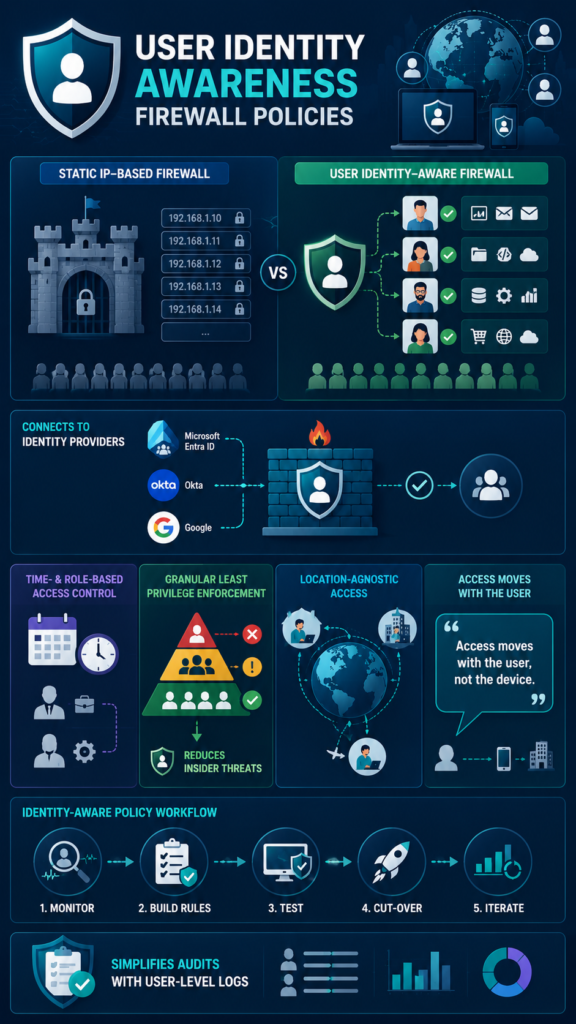
The most obvious one is the “anywhere access” problem. Employees can work securely from any location without you having to create a new firewall rule for every new coffee shop IP. The policy is tied to their identity, not their network coordinates.
“The supporting key and essential tactic for zero-trust is identity and access management (IAM). You can’t do zero-trust without knowing exactly who wants access, what device is trying to connect and which piece of software is trying to act in the environment.” – Security Boulevard
More importantly, it tackles insider threat and account compromise head-on. With IP-based rules, if an attacker phishes an employee’s credentials and logs in from an unusual location, it might look normal if the employee is remote.
But with identity awareness, you can build behavioral policies. For instance, if “Mark from IT” who always works from Seattle suddenly tries to access the source code repository from a new country at 2 AM, the firewall can trigger an alert or even block the session outright. The identity is valid, but the context is all wrong.
It also simplifies compliance. Demonstrating that “only authorized users accessed the PCI data” is easy when your firewall logs show user names, not just anonymous IP addresses. Auditors love it. You can prove that access controls are actually being enforced based on job role, which is a requirement of almost every security framework.
Finally, it kills shadow IT. When access is granted based on who you are, users have less incentive to bypass security to get their job done. If the marketing team needs a new cloud tool, you can create a clean, identity-based rule for it, rather than them using a personal credit card and creating an unmonitored backdoor.
How Does This Change Your Approach to Policy Creation?
Credits: Magnus Holmberg
You have to stop thinking in terms of castles and moats, and start thinking in terms of job functions. The network diagram fades into the background; the organizational chart becomes your policy map.
The first step is to integrate your firewall with your primary identity provider. This is usually straightforward, using standards like SAML or RADIUS. Once that link is live, your firewall can see user groups. That’s your new building block.
Start by mapping applications to user groups. Who needs to use the CRM? Probably Sales and Marketing. Who needs the engineering build servers? The DevOps group. Create a simple matrix.
| Application | Allowed User Groups | Typical Rule Action |
| NetSuite (Financial ERP) | Finance, Executives | Allow |
| Git Repository | Engineering, DevOps | Allow |
| HR Information System | HR, Managers | Allow |
| Internal Wiki | All Employees | Allow |
| Server Management Ports | IT Admin Only | Allow |
Then, you can layer on context. Should access be allowed from any network, or only when the device is deemed compliant? This is where integration with other systems, like a Network Threat Detection platform, adds another layer. We can configure the firewall to query our threat detection system in real-time.
If a user’s device is flagged as potentially compromised, maybe it’s beaconing to a known bad domain, the firewall can dynamically downgrade their access or force a re-authentication, all based on that shared security intelligence.
The policy language becomes declarative: “Marketing users can access the marketing cloud.” The firewall handles the complexity of where they are and what IP they’re using.
What Are the Practical Implementation Steps?
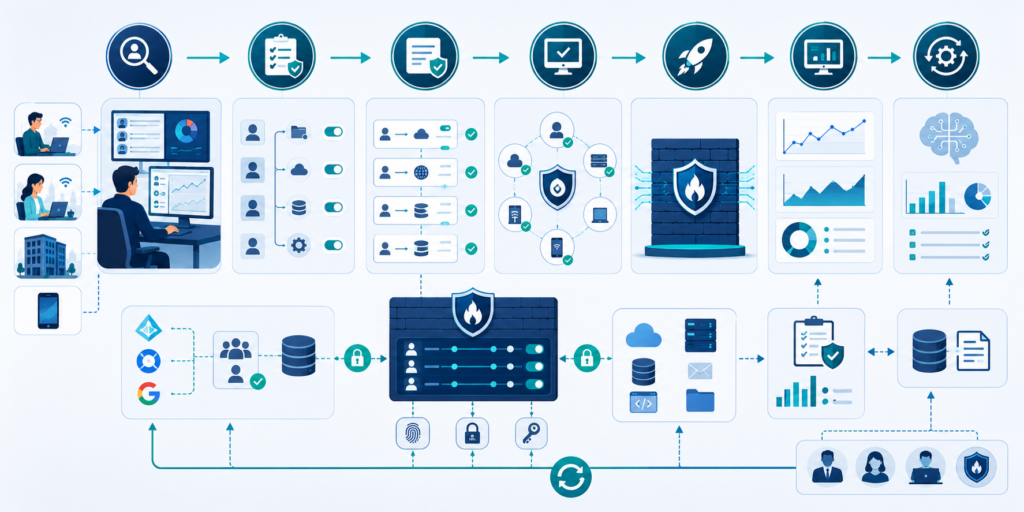
Don’t try to boil the ocean. A phased rollout is essential. Start with a pilot group, like the IT department themselves. They understand the technology and can tolerate hiccups.
- Achieve Visibility First: Configure the firewall to log user identity information for all traffic, but don’t change any blocking policies yet. This “monitor mode” phase shows you what your current traffic looks like when tagged with users. You’ll often find surprising connections that need to be accounted for.
- Build User Group Rules: Create your new identity-based allow policies for critical applications. Start with the most sensitive systems (finance, HR, source code). At this stage, you’ll have duplicate rules: your old IP-based rule and your new user-based rule. That’s okay.
- Test and Validate: Have your pilot group test access from different locations (office, home, mobile). Ensure the new policies work as intended. Check the logs to verify the firewall is correctly identifying users and applying the right rules.
- Cut-Over: Once you’re confident, you can disable the old IP-based rules for the piloted application. The user-based rules take over. You then move to the next application and repeat the process.
- Iterate and Refine: This is a continuous process. As new applications are adopted or org structures change, you update the user-group mappings, not a labyrinth of IP rules.
The biggest hurdle isn’t technical, it’s cultural. You need buy-in from department heads to define who should have access to what. This process often leads to a healthy cleanup of stale permissions, making your organization more secure even before the technical implementation is complete.
FAQ
Does this mean I don’t need a VPN anymore?
Not necessarily, but it changes its role. A VPN is still valuable for encrypting traffic on untrusted networks and for providing access to legacy systems that can’t be easily exposed. However, with identity-aware firewalls, you can securely expose many applications directly to the internet, with the firewall enforcing strict identity-based access.
This improves performance and user experience. The VPN becomes just one more path, not the only secure path.
What if a user isn’t logged in or authenticated?
This is a key policy decision. You can set a default action for “unauthenticated users.” Typically, they are placed in a restricted zone with only internet access, or allowed access only to the authentication portal itself. The goal is to ensure no sensitive resource is reachable without a verified identity.
How do you handle shared accounts or service accounts?
This is a thorny area. The best practice is to avoid shared accounts where possible. For service accounts (used by systems, not people), you can create an identity for them in your directory (like a “service principal”) and apply firewall policies to that identity.
If you must use a shared human account (like a “support” login), the firewall will treat all traffic under that identity as the same “user,” which is a security weakness. Minimize these cases.
Does this work for on-premises and cloud firewalls?
Yes, the concept is platform-agnostic. Major firewall vendors offer identity integration for their physical, virtual, and cloud-hosted firewall offerings (like Azure Firewall, AWS Network Firewall with managed rules, or Google Cloud Firewall with context-aware access).
The integration method (direct with your IdP or via a cloud access security broker) may differ, but the principle of user-aware policy enforcement is consistent across environments.
The Path to People-Centric Security
Adopting user identity awareness for your firewall policies is more than a technical upgrade. It’s a philosophical shift towards security that understands how people actually work.
It replaces the brittle, complex world of IP address management with a flexible, intuitive model based on roles and responsibilities. The result is a network that is both more secure and more usable, a rare combination.
Ready to eliminate blind spots and strengthen your proactive network defense? Join Network Threat Detection today.
References
- https://thecyberwire.com/podcasts/cso-perspectives/20/notes
- https://securityboulevard.com/2025/10/beyond-ips-why-your-next-firewall-ruleset-will-be-written-in-identity/
