
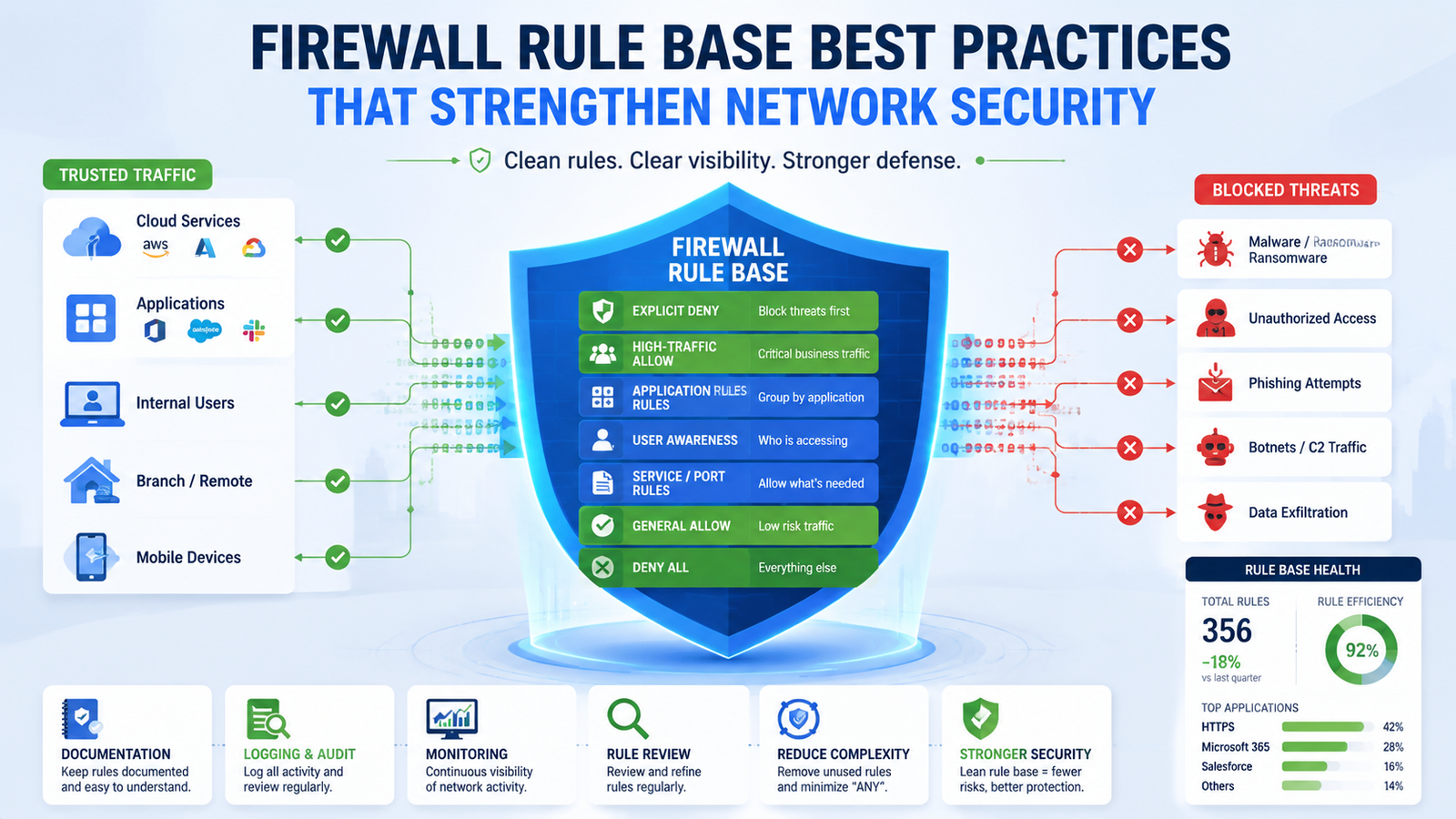
A strong firewall depends on more than simply allowing or blocking traffic. Following firewall rule base best practices helps reduce unnecessary rules, improve visibility, and prevent security gaps caused by outdated configurations.
At Network Threat Detection, we believe a well-structured rule base combined with continuous threat visibility gives security teams greater control over modern networks. Keep reading to learn how NGFW vs traditional firewall comparison
What You’ll Learn
Before comparing NGFW vs traditional firewall, it’s important to understand how each approach affects network visibility, threat detection, and long-term security. Here are the key concepts covered in this article:
- The key differences in an NGFW vs traditional firewall comparison.
- Why deep packet inspection and application awareness improve security.
- How modern firewalls detect threats beyond ports and IP addresses.
What Exactly Is a Traditional Firewall Protecting?
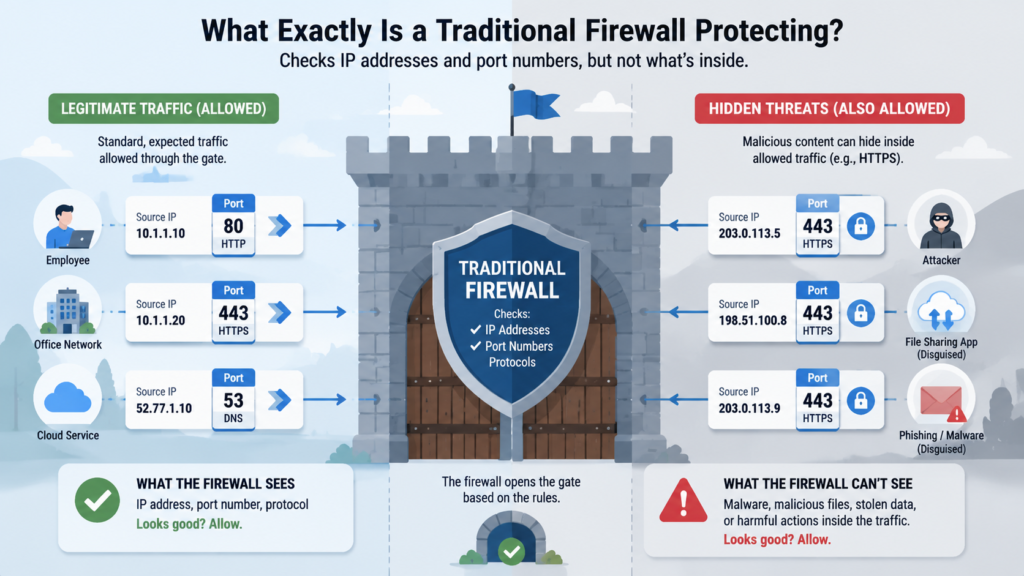
Think of your network like a castle. A traditional firewall is the wall and the main gate. Its job is straightforward.
It looks at every packet trying to enter or leave, checks the source and destination IP addresses (like checking which town a traveler is from), and looks at the port number (like checking if they’re a merchant using the trade gate or a diplomat using the official gate).
It follows a static list of rules. Port 80 for web traffic? Allow. Port 22 from an unknown external IP? Block.
This worked for a simpler time. When most traffic was predictable and threats were crude, this gatekeeping was effective. I remember managing one years ago, the rule set was pages long, a meticulous log of “allow this, deny that.” It felt secure, in a rigid way.
“A survey of firewall administrators found that modern firewall rulebases have grown to an average of 793 rules per firewall, more than five times the 144 rules found in prior studies, with a monthly churn rate of 9.9%, meaning one-tenth of all rules are added, modified, or deleted each month. The study also found that administrators considered it likely their rulebases contained undetected errors that exposed their organization to risk, and that complexity was a major contributing factor to configuration errors. This makes the rigid, static list of rules far more fragile than it appears.” – ISSA
But the digital landscape changed. Applications stopped playing by the old rules. A malicious file can easily slip through port 80, disguised as normal web traffic. An employee might use a personal file-sharing app that also runs on port 80 or 443, bypassing the firewall’s understanding entirely.
The traditional guard sees a diplomat at the official gate and waves them through, never checking their bags.
- Operates at Layers 3 & 4 of the OSI model (Network & Transport).
- Makes decisions based on: Source/Destination IP, Port Number, Protocol.
- Its primary tool is: Static Access Control Lists (ACLs).
How Does an NGFW Actually See More?
The castle analogy breaks down here. An NGFW isn’t just a smarter wall, it’s more like having a team of inspectors inside the castle grounds. It does everything the old firewall does, but then it goes deeper. When traffic comes through the “official gate” (port 443), the NGFW doesn’t just wave it through.
It decrypts the traffic (with the proper keys, of course), opens it up, and looks inside. It identifies the actual application being used, is this Microsoft Teams, Salesforce, or a shadowy file-transfer tool? It can identify the user, is this traffic coming from the CEO’s account or a generic service login?
This is where the shift happens. We’re not just filtering packets anymore, we’re enforcing policy based on identity and action. You can create a rule that says, “The marketing team can use social media applications, but they cannot upload files through them.” The firewall understands that distinction.
This application awareness was a revelation when I first worked with one. It’s one of the defining NGFW features that lets security teams distinguish business-critical applications from risky ones. Suddenly, we could see that “web traffic” was actually 30 different apps, each with its own risk profile. We could allow the business-critical ones and restrict the risky, unknown ones, all without blocking an entire port.
It sees the content, the intent, and the actor behind the connection.
Where Does Network Threat Detection Fit Into This?
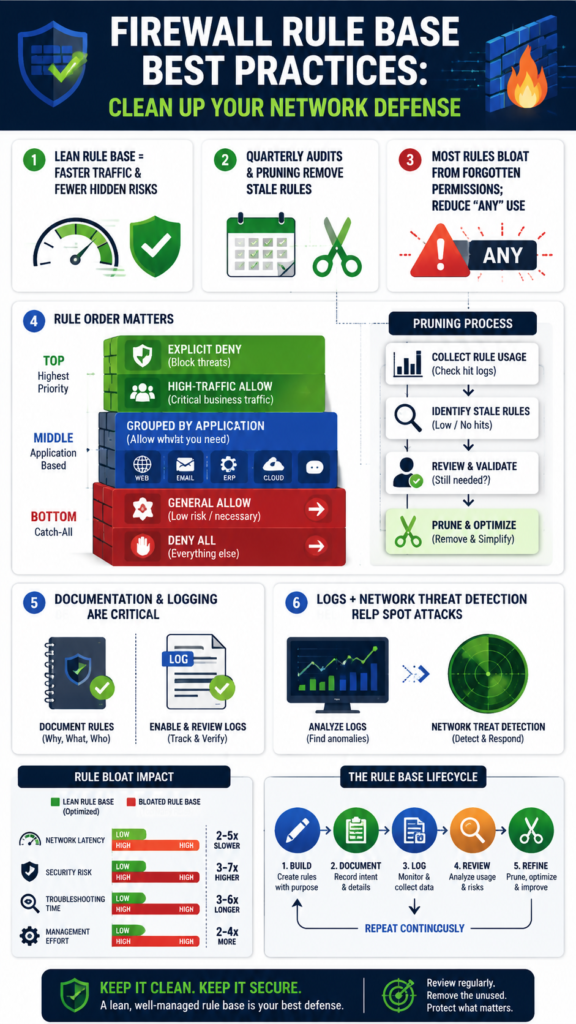
This is the crucial evolution, the part that moves from passive filtering to active defense. Once an NGFW has decrypted and identified the traffic, it has a perfect vantage point to look for threats. This is where our own approach to Network Threat Detection comes into play.
Think of it as the firewall’s built-in intelligence unit. It’s not enough to know what the application is, you need to know if it’s doing something malicious.
The firewall analyzes the content of files being transferred. It looks for signatures of known malware, viruses, or trojans hiding within an allowed application stream.
More importantly, it uses behavioral analysis and intrusion prevention systems (IPS) to spot suspicious patterns, like a device inside your network suddenly trying to communicate with a known command-and-control server overseas. It can detect and block exploits targeting vulnerabilities in software, even if the traffic is coming from a “trusted” application.
For us, integrating this detection layer meant the firewall transformed from a simple policy enforcer into a primary sensor for our entire security posture, alerting us to problems we never saw coming.
When Should You Seriously Consider the Switch?
Credits: CYB3RNETT SECURITY
This isn’t a theoretical debate for most organizations anymore. If your network is static, air-gapped, and only runs a handful of known, legacy applications, a traditional firewall might still suffice. But that’s a rare scenario. You should be planning the switch if any of these are true. Your users are accessing cloud applications like Office 365 or AWS daily.
You have a remote or hybrid workforce connecting via VPN or directly to cloud resources. Your business uses a wide variety of web-based tools for CRM, design, or communication.
The moment your traffic became a blend of corporate and personal, cloud and on-premise, you outgrew the traditional model. I’ve seen small businesses get hit because their “secure” firewall allowed all outbound web traffic. An employee clicked a phishing link, and malware communicated freely over port 443, exfiltrating data right under the firewall’s nose.
It was following its rules perfectly. It just had the wrong rulebook for the modern world. The cost of a breach, in data loss, downtime, and reputation, now far outweighs the investment in a more intelligent gateway.
- You rely on cloud services (SaaS, IaaS).
- You support remote or hybrid employees.
- You need to control specific user and application actions.
- You lack visibility into what’s inside your web traffic.
Can You Break Down the Core Differences Side-by-Side?
It helps to see the contrast in black and white. The table below strips the comparison down to its functional essentials.
| Feature | Traditional Firewall | Next-Generation Firewall (NGFW) |
| Core Function | Packet filtering & stateful inspection | Deep packet inspection & application awareness |
| OSI Layer Focus | Primarily Layers 3 & 4 (Network/Transport) | Layers 3 through 7 (Network to Application) |
| Traffic Control Basis | IP Address, Port, Protocol | IP, Port, Protocol, Application, User, Content |
| Threat Prevention | Basic (via ACLs denying ports) | Integrated IPS, antivirus, malware sandboxing |
| SSL/TLS Inspection | No | Yes (decrypts and inspects encrypted traffic) |
| User Identity Awareness | No (IP-based only) | Yes (integrates with directories like Active Directory) |
| Policy Management | Complex, port-based rules | Simplified, intent-based policies (e.g., “Block social media”) |
The gap isn’t incremental, it’s fundamental. One manages network segments, the other manages risk.
What Are the Real-World Trade-Offs?
Upgrading brings clear advantages, but it’s not without its considerations. NGFWs are more complex to configure properly. Tuning application rules and threat detection profiles takes expertise.
There’s also a performance impact, because deep inspection and SSL decryption are computationally expensive, you need to right-size the appliance or software for your traffic load.
“The GEM algorithm, adapted for firewall packet matching, can filter over 30,000 packets per second on a standard PC even with 10,000 rules, but noted that processing load ‘becomes increasingly concerning as the input line speed increases’.” – CRIS
Cost is higher, both in initial investment and often in subscription fees for threat intelligence updates.
The trade-off, though, is stark. You’re exchanging simplicity for capability, and lower cost for significantly reduced risk. The complexity of managing an NGFW is the complexity of the modern threat landscape itself, you can’t wish it away.
The performance hit is the price of actually looking inside the envelopes you’re passing through your network. In my experience, the operational burden shifts from constantly writing new port-based rules to thoughtfully managing application and user policies, which is a more sustainable and logical model in the long run.
How Do You Start Planning a Migration?
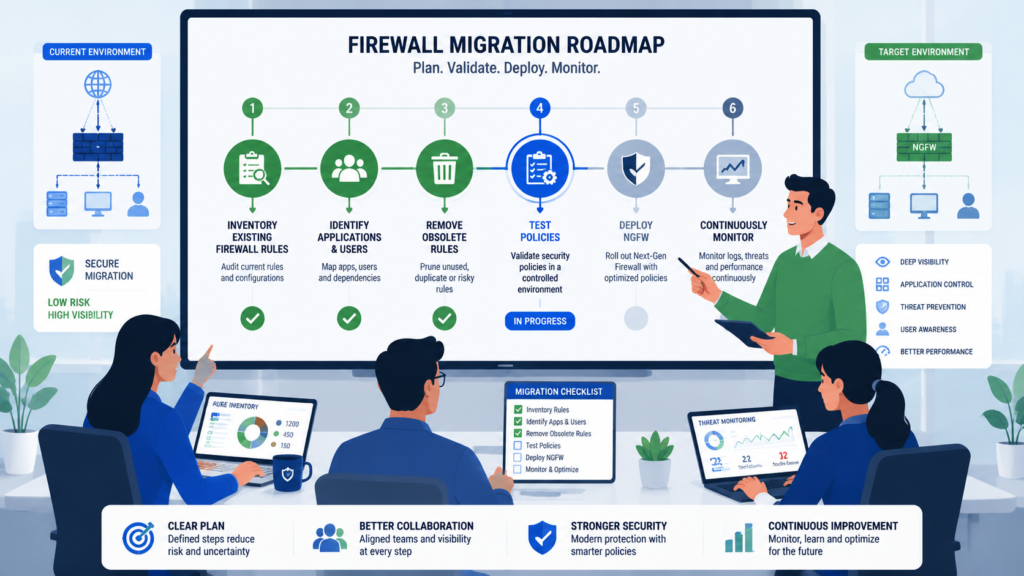
Don’t just rip and replace. Start with an audit. Use your current firewall logs to understand what applications are already on your network, you’ll likely be surprised. Then, define what you need to protect most, customer data, financial records, intellectual property.
Pilot the NGFW in parallel, maybe just for your guest network or a specific department. Let it monitor traffic and build its understanding without enforcing blocking rules initially.
This phased approach lets you tune the system, see its impact, and train your team. Focus on building policies that make business sense, like allowing productivity suites but restricting high-risk apps, or enforcing stricter controls for contractor accounts.
The goal isn’t to block everything, it’s to enable business safely. The migration is as much about evolving your security philosophy as it is about installing new hardware or software.
FAQ
Isn’t an NGFW Overkill for a Small Business?
Not anymore. Small businesses are prime targets because they’re often poorly defended. Modern unified threat management (UTM) appliances bundle NGFW capabilities into affordable, manageable boxes perfect for smaller networks. The threat landscape doesn’t scale down with company size.
Can an NGFW Slow Down Our Internet Connection?
It can, if it’s undersized. The inspection processes require processing power. This is why proper sizing is critical. For most modern, well-sized NGFWs, the impact is negligible for standard business traffic, and the security benefit far outweighs a minimal latency increase.
Do We Still Need Separate Antivirus Software?
Yes, for endpoint protection. Think of it as defense in layers. An NGFW stops threats at the network perimeter and inspects server-bound traffic. Antivirus software protects the individual device (endpoint) from threats that arrive via USB, email, or slip through the network. They work together.
How Often Do NGFW Policies Need Updating?
Continuously. The threat intelligence feeds that power the IPS and malware detection should update automatically, often multiple times a day. Your application and user policies should be reviewed quarterly, or whenever a new major business application is adopted, to ensure they still align with operational needs.
Making the Strategic Choice for Modern Protection
The ngfw vs traditional firewall comparison ultimately comes down to choosing between static filtering and intelligent, context-aware protection. As networks grow more complex, organizations need security that can identify users, applications, and hidden threats, not just ports and protocols.
To strengthen your defenses with real-time threat modeling, automated risk analysis, visual attack path simulations, and continuously updated intelligence, Join Network Threat Detection and see how your team can prioritize risks with greater confidence.
References
- https://issa.org/Library/Journals/2009/February/Chapple-Firewall-Rulebase-Mis-Management-Practices.pdf#2#1
- https://cris.tau.ac.il/en/publications/the-geometric-efficient-matching-algorithm-for-firewalls
