
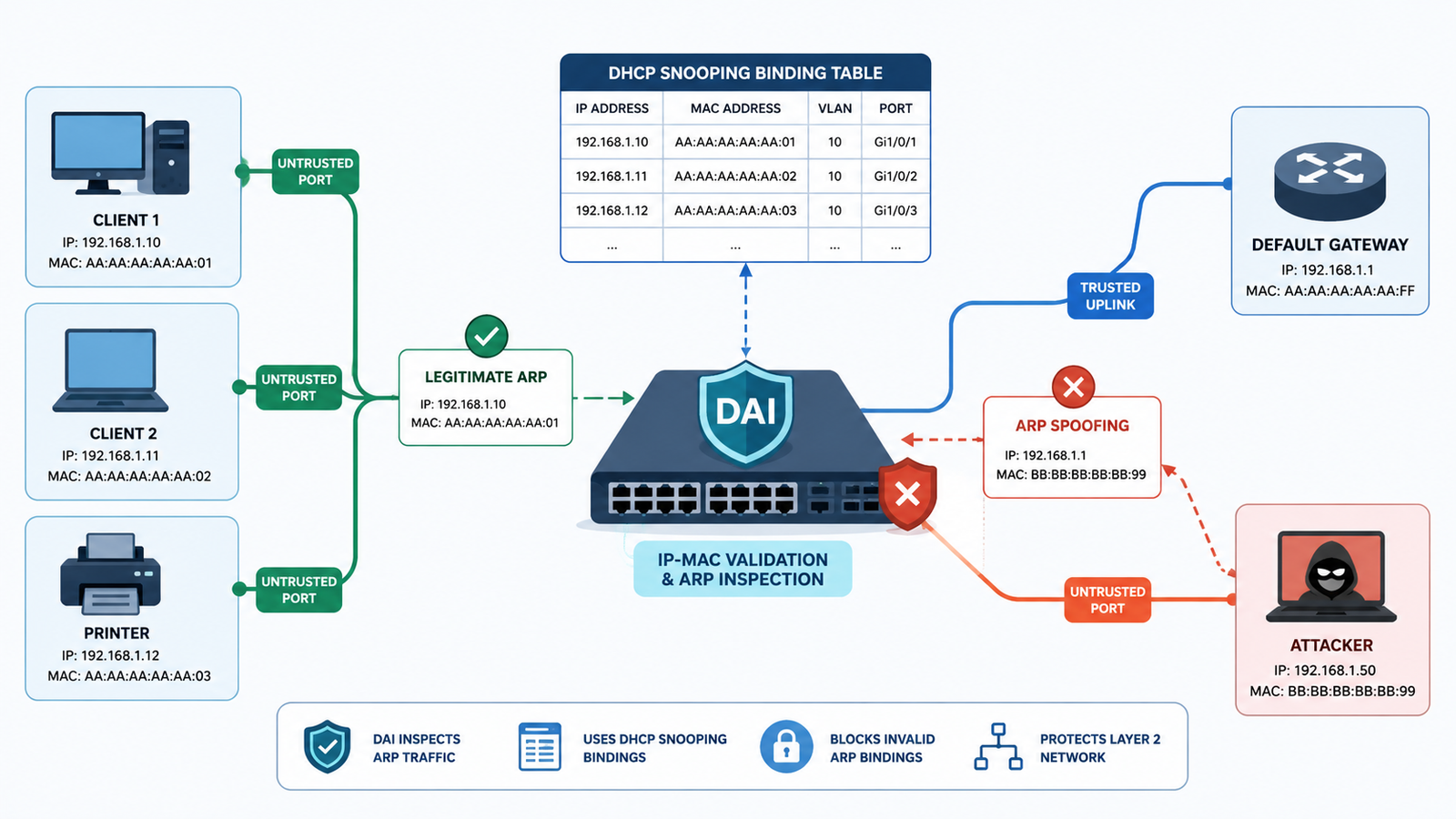
Preventing ARP spoofing dynamic ARP inspection starts by checking ARP traffic against trusted IP-MAC bindings before forged mappings can reach other devices. DAI works best when it is supported by DHCP snooping, which provides the binding data the switch uses for validation.
Static hosts may need approved bindings because they do not normally appear in the DHCP table. We also use VLAN segmentation, access controls, and monitoring to limit exposure and spot unusual activity. Network Threat Detection adds visibility into suspicious network behavior and helps identify related threats. Keep reading to see how to deploy DAI without disrupting legitimate traffic.
Quick Reads: ARP Spoofing Prevention
This section sums up how DAI, trusted bindings, and layered network controls work together to reduce ARP spoofing risk.
- DAI blocks forged ARP packets by comparing their IP-MAC information with trusted bindings.
- DHCP snooping, static bindings, trusted uplinks, and untrusted access ports determine whether DAI protects the network or breaks legitimate traffic.
- A layered design using Network Threat Detection, segmentation, endpoint controls, and centralized monitoring reduces the blast radius when ARP attacks occur.
What Is Dynamic ARP Inspection and How Does It Prevent ARP Spoofing?
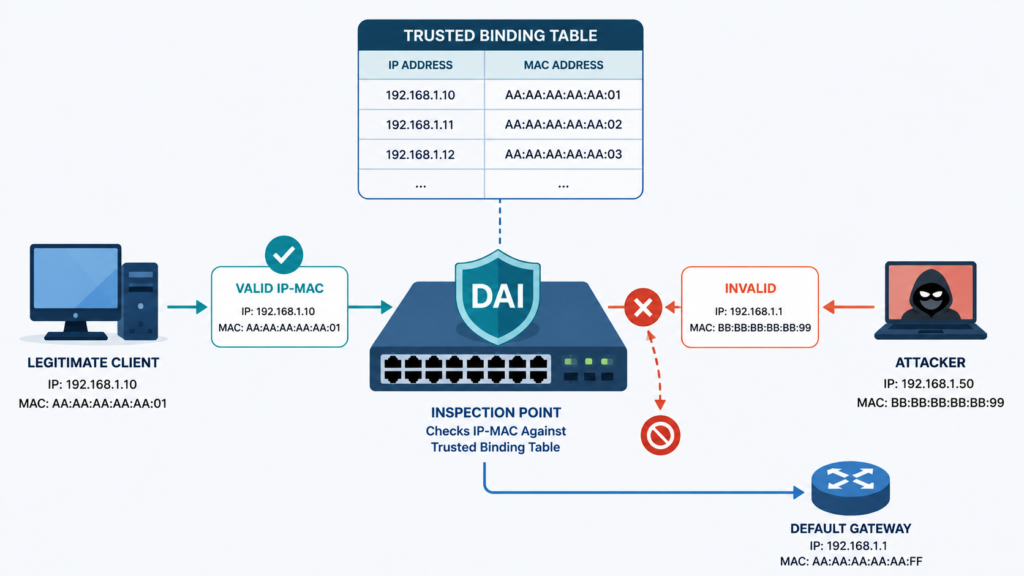
Dynamic ARP Inspection is a Layer 2 security feature that checks ARP requests and replies before they move through a switch. The switch compares the information in the packet with an approved IP-MAC binding. If the information does not match, the switch can drop the packet.
ARP itself does not provide strong identity checks. A device can claim that an IP address belongs to its MAC address, and other devices may accept that information. An attacker can abuse this behavior to poison ARP caches and place a system between two communicating hosts.
DAI changes that process. Instead of accepting every ARP claim, the switch asks whether the sender is allowed to use that IP and MAC combination on that network segment.
In our deployments, that distinction matters. DAI isn’t trying to decide whether an ARP packet “looks suspicious.” It’s checking whether the claimed identity has authorization.
The basic flow is:
- A client sends an ARP packet.
- The switch checks its trusted binding.
- Valid traffic continues.
- Invalid traffic is discarded or logged.
DAI doesn’t replace encryption or endpoint security. It adds another control at the Layer 2 boundary.
Why Does ARP Spoofing Still Work on Modern LANs?
ARP spoofing remains possible because the ARP protocol was designed for local address discovery, not modern identity verification. A host asks which MAC address belongs to an IP address, then stores the response in its ARP cache. There is no built-in mechanism that proves the responder is legitimate.
That weakness matters most when an attacker has access to the same Layer 2 network. Once connected, the attacker can send forged ARP messages and try to associate a trusted IP with their own MAC address.
We have to look beyond the firewall here. A firewall can control traffic between network zones, but it does not automatically validate ARP exchanges between devices inside the same VLAN.
Flat networks make the problem worse because many devices share the same broadcast domain. One compromised endpoint may then have direct visibility of many other systems.
A stronger design reduces that exposure through network security controls examples:
- Smaller VLANs
- Access-port controls
- DAI validation
- Network access authentication
- Endpoint protections
Segmentation also helps limit damage if an attacker gets onto the network. That part is often overlooked.
The practical point is clear: protecting routed traffic isn’t enough if local address resolution remains untrusted.
How Does DAI Validate ARP Packets?
DAI checks information inside an ARP packet against a trusted source of IP-MAC identity. In a typical DHCP-based network, that source is the DHCP snooping binding table. The table can contain the client’s IP address, MAC address, VLAN, switch interface, and lease information.
When an ARP packet arrives, the switch compares the claimed sender information with the available binding. If the information doesn’t match, the switch can reject the packet.
Depending on the switch platform and configuration, DAI may also check the Ethernet source MAC, sender MAC, target information, and other parts of the ARP packet. Some platforms also support ARP rate limiting.
We focus on the identity check first. An endpoint should not be able to claim that it owns the gateway’s IP address when the trusted records show otherwise.
The basic checks can include:
- IP and MAC match
- Correct VLAN
- Expected switch interface
- Valid sender MAC
- Allowed ARP packet rate
An alert may tell us an ARP attack is happening, but DAI can stop the invalid packet at the access switch. Still, inspection only works when its reference data is accurate. Bad bindings can block legitimate traffic too.
How Should You Prepare DHCP Snooping, Trusted Ports, and Static Hosts for DAI?
Credits: PaulJ Networking & Electronics lab
Before enabling DAI, we need to make sure the switch has enough information to recognize legitimate devices. DHCP snooping is usually the starting point because it builds the IP-MAC bindings DAI uses for dynamic clients.
First, enable DHCP snooping on the required VLANs and verify that clients appear in the binding table. The port leading toward the legitimate DHCP server should be trusted, while normal client-facing ports should remain untrusted.
Static hosts need extra attention because they won’t normally appear in the DHCP snooping table. Servers, printers, cameras, and appliances using fixed addresses may need static bindings or another supported DAI exception.
As noted by Cisco
“When DHCP snooping is disabled or in non-DHCP environments, use ARP ACLs to permit or to deny packets.” – Cisco
Before deployment, check:
- DHCP bindings are present and accurate.
- Client ports remain untrusted.
- Trusted infrastructure ports are documented.
- Static IP devices have approved records.
- VLAN and interface information matches reality.
We treat trusted ports as exceptions, not shortcuts. A wrong trust setting can create a security gap, while a missing binding can interrupt legitimate traffic. Taking time to verify these details first makes the DAI rollout much safer.
How Can You Troubleshoot DAI When Legitimate Traffic Gets Dropped?
When DAI blocks legitimate traffic, the problem usually comes down to a missing binding, incorrect trust setting, VLAN mismatch, or an overly restrictive ARP rate limit. A routing failure can be one of the symptoms. For example, a host may have the correct IP address but still fail to reach its gateway because the required ARP traffic was rejected.
We start with the affected device and work through the path instead of disabling security controls immediately.
Research from Huawei indicates
“Check whether the binding tables are correct.” – Huawei
Check:
- The client’s IP and MAC address
- DHCP snooping bindings
- VLAN assignment
- Switch interface
- DAI trust state
- Violation logs and counters
- ARP rate-limit settings
Static devices deserve extra attention because they may not have a DHCP binding at all. If the records look correct, a short packet capture can help show what the device is actually sending.
Don’t assume every violation means an attack. Reboots, lease changes, new virtual machines, and network moves can create unexpected ARP activity. At the same time, repeated mismatches should not be ignored.
How Do ARP Validation and Rate Limits Affect DAI?
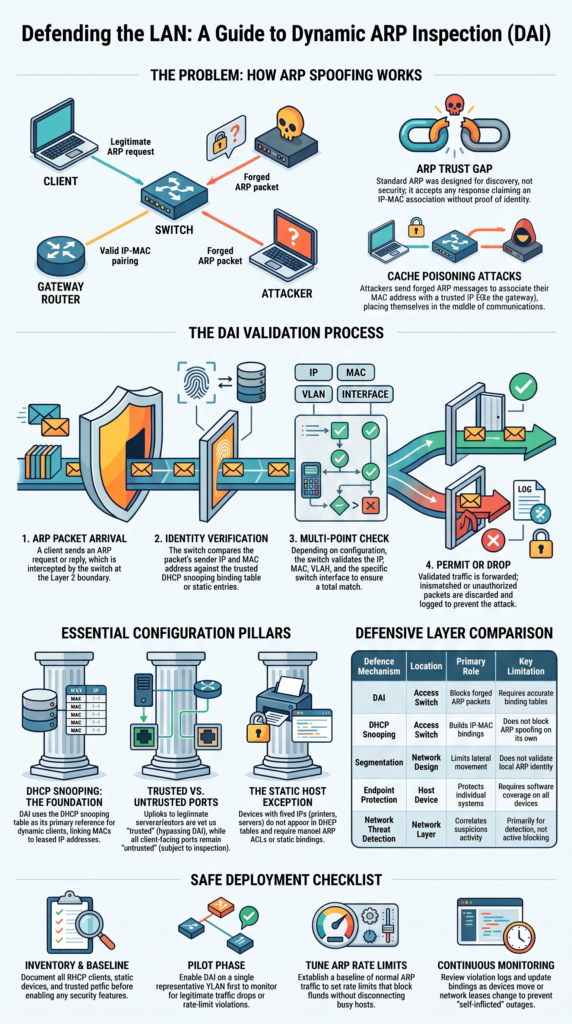
ARP validation and rate limiting solve different problems. Validation checks whether an ARP identity is allowed. Rate limiting controls how much ARP traffic a port can send within a period.
An attacker may send forged ARP packets to poison caches. A compromised device can also generate an unusually high number of ARP packets without using a poisoning technique. A rate limit can help reduce the impact of that traffic.
The correct limit depends on the environment. A quiet office port won’t have the same traffic pattern as a virtualization host or a dense network segment.
We normally establish a baseline before setting aggressive limits. Watch normal traffic first. Then choose a value that allows expected bursts without leaving the port completely unrestricted.
If violations rise, check the reason before changing the limit.
Possible causes include:
- ARP flooding
- Device restart
- DHCP activity
- Virtual machine movement
- A limit set too low
A sudden increase can be useful evidence. Our aim is to stop abnormal traffic without creating a new failure point. Security controls should reduce risk, not become an easy way to knock legitimate devices offline.
Tune slowly, monitor the result, and document the change.
Can DAI Protect Voice, Guest, IoT, and Special VLANs Safely?
DAI can protect more than standard user VLANs, but special-purpose networks deserve testing before inspection is enabled. Voice VLANs may contain phones and connected computers, while guest and IoT VLANs can include devices with very different traffic patterns.
We first identify what each VLAN is supposed to carry and whether its devices receive addresses through DHCP or use static configurations. That helps us avoid blocking legitimate ARP traffic simply because the device doesn’t fit the normal workstation pattern.
Pay attention to:
- Voice phone and data VLAN behavior
- Guest isolation
- IoT and camera devices
- Static monitoring equipment
- Mirroring or RSPAN requirements
- Platform-specific DAI support
RSPAN deserves particular care because mirrored traffic is handled differently from ordinary endpoint traffic. DAI support and behavior can vary by switch platform, so the vendor’s documentation should be checked before applying inspection to a monitoring VLAN.
We also consider the threat model for each segment. Segmentation limits what a compromised device can reach, while DAI helps prevent forged IP-MAC mappings inside the segment.
The goal is not to force every VLAN into one template. Test unusual networks first, document exceptions, and expand only after normal traffic is confirmed.
How Does DAI Work With IP Source Guard and Other Layer 2 Controls?
DAI works best as part of a broader access-layer security design rather than as a standalone feature. DHCP snooping can create the IP-MAC bindings, DAI can validate ARP traffic against them, and IP Source Guard can use the same information to restrict traffic from unauthorized address combinations. These controls fit into broader router and switch security best practices.
Other controls can add another layer. Network access authentication helps determine which devices or users are allowed onto a port, while port security can limit unexpected MAC addresses.
The important part is keeping the dependencies clear. A static device may need an approved binding for DAI and another access-layer feature. If that record is missing, several controls could block the same device.
We keep records for:
- IP addresses
- MAC addresses
- Switch ports
- VLAN assignments
- Approved exceptions
- Configuration changes
This information also helps during investigations. If an IP address suddenly appears with a different MAC address, the team has a known baseline for comparison.
Layer 2 controls should reinforce one another, not create a collection of undocumented exceptions. Clear ownership and accurate records make that balance much easier to maintain during both normal operations and incidents.
How Does DAI Compare With Other ARP Spoofing Defenses?
DAI is useful when an organization controls its access switches and can maintain accurate IP-MAC information. It has a clear advantage: the switch can reject an invalid ARP packet before other local systems accept it.
Other defenses address different parts of the problem. Endpoint controls can protect individual systems. ARP monitoring can identify suspicious changes. Segmentation can limit where an attacker can move. Network Threat Detection can add broader visibility across network activity.
| Defense | Location | Main use | Limitation |
| DAI | Access switch | Blocks invalid ARP | Needs trusted bindings |
| DHCP snooping | Access switch | Builds bindings | Doesn’t block ARP alone |
| Host protection | Endpoint | Protects one host | Needs endpoint coverage |
| ARP monitoring | Monitoring layer | Finds changes | May detect after impact |
| Network Threat Detection | Network | Correlates activity | Primarily detection |
| Segmentation | Network design | Limits reach | Doesn’t validate ARP |
We use Network Threat Detection to add context around suspicious activity. A DAI event can tell us that an invalid mapping was blocked. Network-level monitoring may help show whether that event is connected to other unusual traffic. That combination is stronger than relying on one alert.
How Should You Deploy DAI Without Breaking the Network?
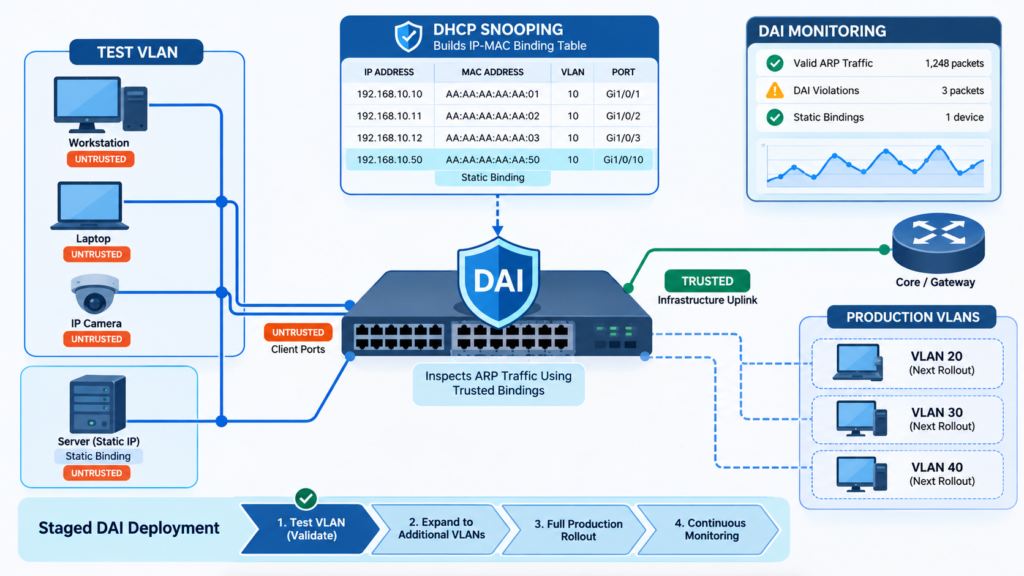
A DAI rollout is safer when we treat it as a network change rather than simply turning on another switch feature. Start by inventorying DHCP clients, static devices, trusted interfaces, VLANs, and known exceptions. Then verify that DHCP snooping is creating the expected bindings.
Test DAI on one representative VLAN before expanding it. During the test, pay close attention to devices that may behave differently from normal workstations, such as phones, printers, cameras, servers, and appliances. Disabling unused switch ports and interfaces can also reduce unnecessary access points before the rollout.
Before moving to the next VLAN, confirm:
- DHCP bindings are accurate.
- Static devices have approved exceptions.
- Client ports remain untrusted.
- Trusted paths are documented.
- ARP limits match normal traffic.
- DAI violations are being monitored.
- Switch configurations are backed up.
- A rollback procedure is ready.
If something fails, change only what is necessary and document the result. Avoid disabling every Layer 2 security control just to restore connectivity.
We also review DAI after major network changes, including VLAN migrations, switch replacements, DHCP changes, and device moves. That keeps the binding data and trust model aligned with the network as it changes.
A staged rollout gives the team room to catch mistakes before they affect the entire access layer.
FAQ
How can I detect ARP spoofing before it causes a network outage?
You can detect ARP spoofing by monitoring changes between IP and MAC addresses. Look for unexpected IP-to-MAC flips, repeated gratuitous ARP messages, or changes involving the default gateway.
Continuous ARP monitoring can establish a normal baseline and highlight unusual activity. Packet evidence capture can also preserve details that help confirm whether malicious ARP packets caused the problem.
Should I flush the ARP cache after detecting poisoning?
ARP cache flushing can help remove a false mapping after you contain an ARP poisoning event. However, it should not be the only response. First, isolate the affected device or switch port when necessary.
Then correct the invalid ARP binding and verify the legitimate IP-MAC mapping. Finally, review logs to determine whether further containment or escalation is required.
When should I use VLAN segmentation to reduce ARP attacks?
Use VLAN segmentation when devices do not need direct Layer 2 communication with one another. Smaller broadcast domains reduce the number of systems exposed to the same ARP traffic.
Microsegmentation and private VLANs can restrict communication even further. Guest network isolation and IoT device security are especially useful because they limit lateral movement if a device becomes compromised.
Can network access control help prevent local ARP attacks?
Yes. Network access control can limit which devices are allowed to connect to protected network segments. 802.1X authentication can verify devices or users before granting network access.
Switch port security can also restrict unauthorized connections. These controls do not replace IP-MAC address validation, but they reduce the number of devices that can launch ARP attacks from the local network.
What should I record during an ARP spoofing incident?
Record the affected IP and MAC addresses, switch ports, VLANs, timestamps, and relevant ARP packets. Check DHCP binding records and switch logs for changes that match the incident.
Preserve packet evidence before clearing useful data. After containment, document the actions taken and update escalation procedures. This record can also support future tabletop exercises and network security reviews.
Keep DAI Accurate as the Network Changes
DAI can reduce ARP spoofing risk, but it only works well when bindings stay accurate and trust boundaries match the network design. Regular reviews matter as devices move, leases change, and VLANs evolve.
If you need better visibility into emerging threats, Network Threat Detection can help you map attack paths and spot gaps before they become bigger problems. Use it as a practical step toward stronger network defenses.
References
- https://www.cisco.com/c/en/us/td/docs/switches/connectedgrid/cgs2520/software/release/12_2_53_ex/configuration/guide/scg2520.pdf#180#72
- https://support.huawei.com/enterprise/en/doc/EDOC1100514641/7ca0a2a/hsec-4-arps_dai_vlan_drop#EN-US_LOGREF_0000002454261398