
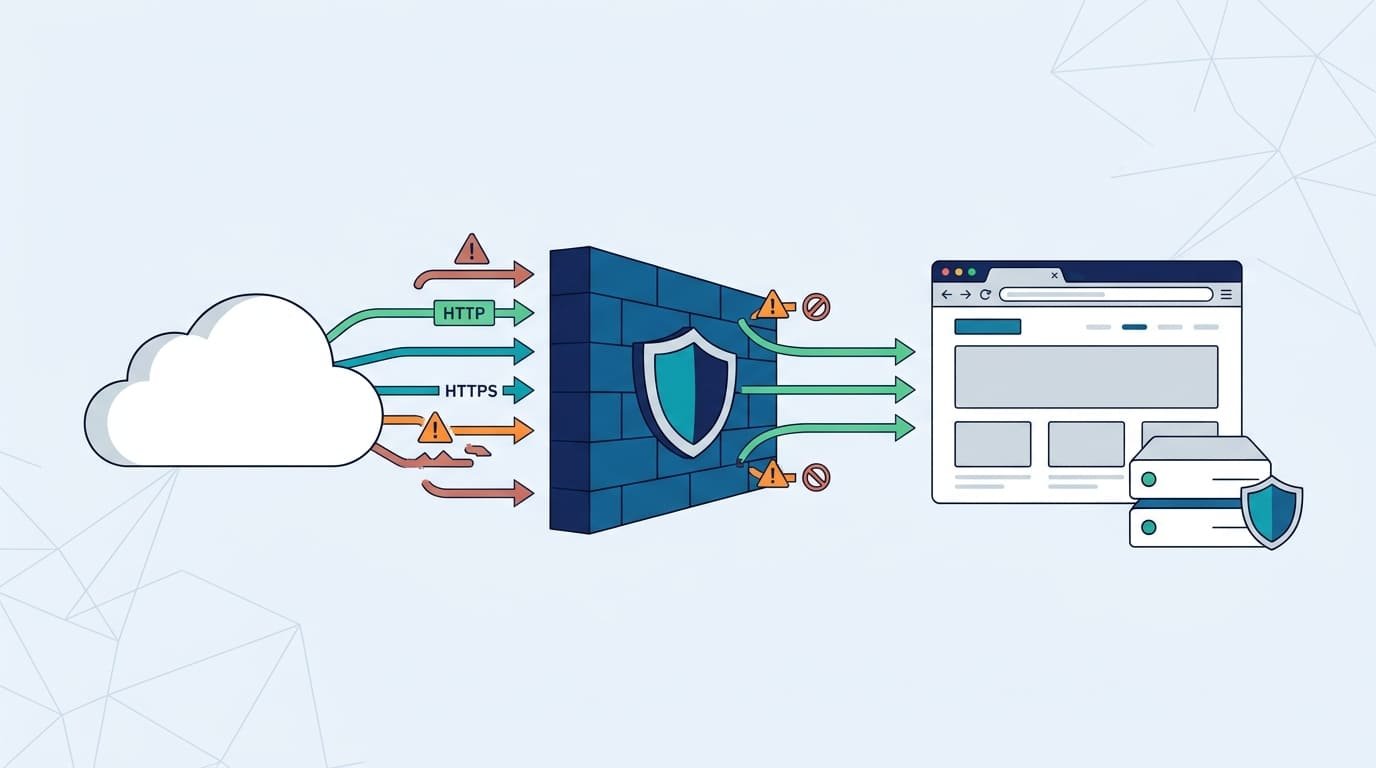
A Web Application Firewall (WAF) filters HTTP and HTTPS traffic before it reaches your web application. It blocks suspicious requests linked to SQL injection, cross-site scripting, and malicious bots. But WAF rules aren’t foolproof. Legitimate requests can get blocked, attackers can target exposed origin servers, and traffic filtering can’t fix flaws in application code.
So, relying on a WAF alone leaves gaps in your security. Network Threat Detection adds another layer by helping security teams spot suspicious activity that a WAF might miss. Keep reading to learn how WAF protection works, where it falls short, and how to strengthen your defenses.
Quick Reads: What to Know About WAF Protection
- WAF protection: Blocks common web attacks.
- Proper configuration: Reduces false positives and disruptions.
- Defense in depth: Combines WAF with other security measures.
How Does a WAF Protect Web Applications at Layer 7?
A web application firewall (WAF) checks each web request before it gets to your app. Good requests pass through. Risky ones get stopped.
Think of a regular network firewall as a guard who checks where a visitor came from. A WAF opens the package and looks inside. It reads the URL, headers, cookies, query strings, and the body of the request. Most web attacks hide in those spots.
Many teams place the WAF in front of the app as a reverse proxy. Users reach the WAF first, and the server stays out of sight. Cloud WAFs can also work with content delivery networks, load balancers, and API gateways. When we build a threat model for a client, we draw this whole path on a map first. It shows us fast where the WAF can see traffic and where it can’t.
Each request goes through five steps:
- Receive: The WAF takes in the HTTP or HTTPS request.
- Inspect: It reads the key parts of the request.
- Evaluate: It checks the request against its signatures, rules, and signs of bad behavior.
- Enforce: It allows, blocks, challenges, or logs the request, based on its settings.
- Monitor: Security teams read the logs and adjust the rules as things change.
Here’s a quick example. Someone pastes a SQL injection string into a login box. The WAF sees the pattern and blocks it, so the app never has to deal with it.
Cisco describes a WAF as a shield against attacks that target web apps. Put simply, it gives you one more checkpoint before the internet reaches your sensitive code.
There’s one catch. A WAF can only protect traffic that goes through it. During our risk reviews, we have found old server addresses that skipped the WAF completely. An attacker who finds a path like that walks right around the protection. So how well a WAF works depends on its setup, what it can see, and whether any other doors are left open.
Which Attacks Can a WAF Help Prevent?
A WAF can block many common web attacks. It does this by catching strange request patterns and stopping anything that breaks your rules.
The OWASP Top 10 is a well-known list of the biggest web security risks. It includes injection, broken access control, and security misconfiguration. WAF rules can help prevent common web attacks, but they cover only some of these risks. Other problems never show up in web traffic, so a WAF can’t fix them alone.
| Attack Type | How WAF Protection Helps | Key Limitation |
| SQL Injection (SQLi) | Detects and blocks requests containing known SQL injection patterns. | Cannot catch every payload or replace parameterized queries. |
| Cross-Site Scripting (XSS) | Identifies suspicious scripts and malicious input in web requests. | Cannot replace context-appropriate output encoding. |
| Cross-Site Request Forgery (CSRF) | May identify suspicious request patterns and enforce applicable policies. | Applications still need CSRF tokens and origin validation where appropriate. |
| Path Traversal | Detects requests that attempt to access unauthorized file paths. | Encoding differences may allow some payloads to evade detection. |
| Application-Layer DDoS | Applies rate limits and traffic controls when supported. | Large or distributed attacks may require additional mitigation. |
| Bot Abuse | Uses signatures and behavioral signals to identify suspicious automation. | Legitimate bots and malicious bots can exhibit similar behavior. |
| Command Injection | Blocks requests matching known command injection patterns. | Secure command handling and input validation remain necessary. |
| XML External Entity (XXE) | May detect suspicious XML payloads in inspected requests. | Secure XML parser configuration is still essential. |
All of this depends on the WAF’s rules, how it’s deployed, and how much traffic it can see. A WAF lowers your risk. It will not stop every bad request.
In our work with security teams, one habit helps more than any other. Don’t assume the default ruleset covers everything. Our risk analysis tools map out each app’s real attack surface, and then the team matches the WAF policies to that map. Apps that handle payments or personal data need this the most.
How Do WAF Security Rules Detect Malicious Requests?
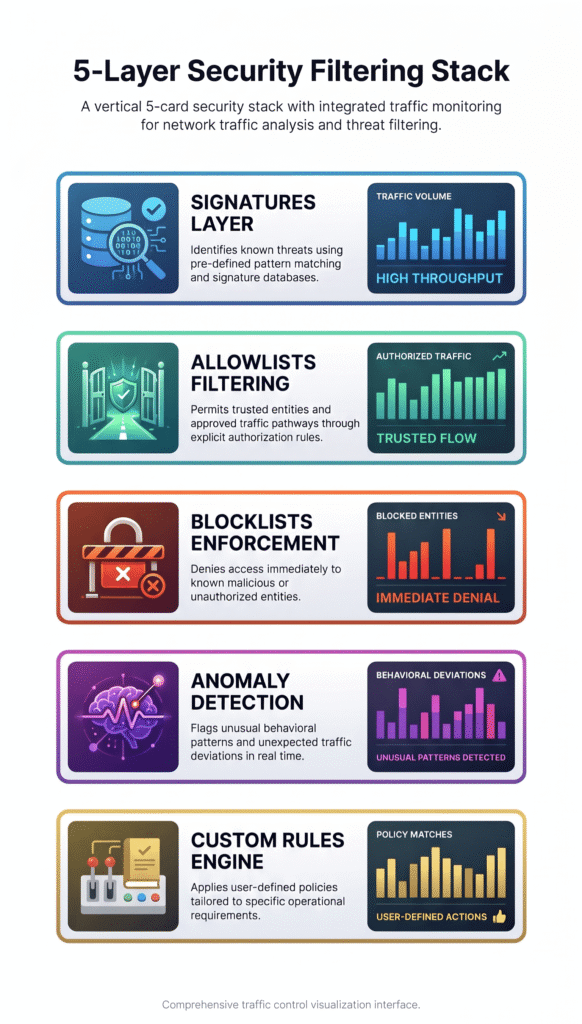
A WAF mixes a few methods to tell bad traffic from normal traffic. These include signature matching, request checks, and behavior tracking.
Signature-based detection hunts for attack patterns that are already known. A positive security model flips that idea. It only lets in requests that meet clear, approved rules. A negative security model lets traffic in unless a rule marks it as suspicious.
We always test these methods against how the app is really used. Rules that are too broad can block real customers, and we have seen that lead to a pile of angry support tickets. Nobody wants to start the day that way.
The most common detection methods are:
- Signature-based detection: Matches known SQL injection strings, script payloads, and other familiar attack signs.
- Allowlists: Let in requests that fit approved formats, paths, or conditions.
- Blocklists: Block requests that match known bad patterns or sources.
- Anomaly-based detection: Flags odd request sizes, speeds, or access patterns.
- Custom security rules: Add extra limits for sensitive pages, admin areas, and API actions.
For example, a login page can reject a strange SQL command and still accept normal usernames and passwords.
Attackers know how WAFs work, though. They can hide their payloads with encoding, obfuscation, or oddly shaped requests. The OWASP Core Rule Set (CRS) is a popular set of detection rules for compatible WAFs. Even so, we never trust a ruleset until it has been tested against how our own app behaves.
Will a WAF Stop SQL Injection and Cross-Site Scripting?
A WAF can block many SQL injection and cross-site scripting attempts, but it can’t be your only protection. The application has to be secure too.
Picture a login form. An attacker types in a bit of SQL code meant to trick the database into doing something it shouldn’t. If the WAF spots the pattern, it rejects the request before the app ever sees it.
Cross-site scripting looks similar on the surface. The WAF watches for script code hiding in whatever a user submits. The hard part is that some sites accept HTML on purpose, like blog editors and comment boxes. Those legitimate requests can look a lot like attacks.
When we build threat models for clients, the same gaps keep showing up. Protection can fail when:
- The payload encoding the WAF doesn’t decode correctly.
- The app reads the input differently than the WAF does.
- A rule is turned off or out of date.
- Someone connects straight to the origin server and skips the WAF.
That last one catches people off guard. In more than one risk review, we’ve seen a team with a well-built WAF setup whose real server address was easy to find. Anyone who found it could walk around the WAF.
The OWASP Top 10 lists injection as a major application security risk. Its advice is to handle input safely inside the app, not to count on traffic filtering alone. See the OWASP Top 10.
Data from OWASP Top 10 demonstrates
“94% of tested applications were found to have some form of injection. Among the 33 CWEs mapped to the Injection category, the number of occurrences in the testing data was the second highest among vulnerability issues. Cross-site scripting now belongs to this category in the new version.” – OWASP Top 10
We treat a WAF as one layer of defense. Parameterized database queries, output encoding that fits the context, input validation, and secure session management are still needed, even when the WAF is blocking suspicious requests.
Why Do WAF False Positives Block Legitimate Users?
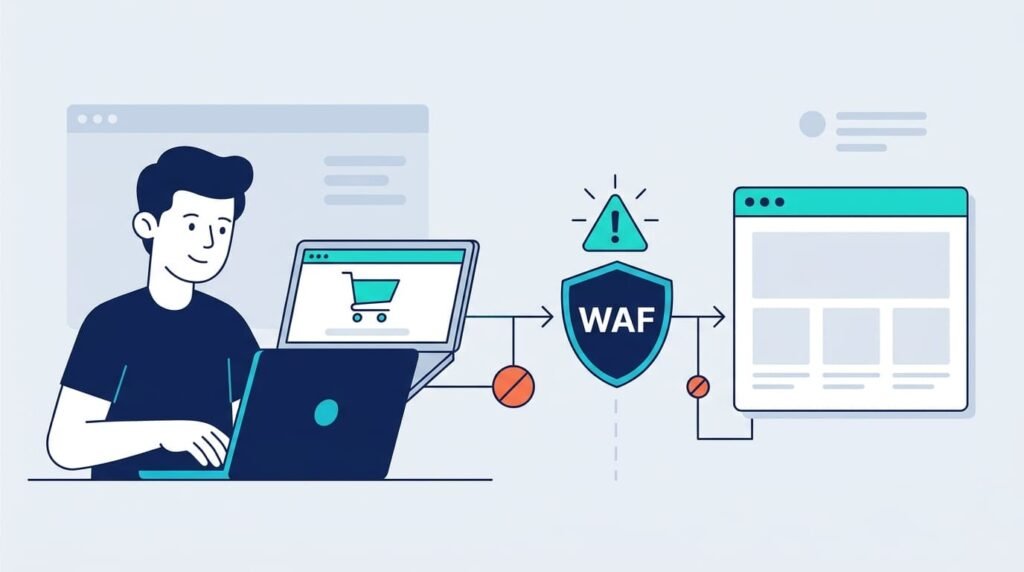
A false positive happens when a WAF mistakes a normal request for an attack. It can stop customers from doing what they came to do and slow down the business.
Say a rule blocks an unexpected piece of HTML. That might stop a real attack in one place and break a valid form submission in another. Strict request checks can also get in the way of payments, logins, and API connections.
Here are the usual causes:
- Generic rules that match ordinary user input.
- Rich-text editors that send real HTML.
- Encoded URLs and odd but valid request formats.
- Middleware or third-party tools that trip broad rules.
- Security policies that don’t match how the app actually works.
Noisy logs are the smaller problem. The bigger one is a customer who can’t finish checking out, or a business process that never reaches its endpoint. We’ve heard from teams who only found out about a blocked payment flow after sales numbers dipped.
When this happens, we suggest going step by step:
- Find the exact rule and request that caused the block.
- Reproduce the problem in a test environment.
- Confirm the request is legitimate.
- Add a narrow exception if you need one.
- Watch for application errors and security events after the change.
OWASP recommends running virtual patches in logging-only mode at first, so you can catch false positives before you start blocking. Its Virtual Patching Cheat Sheet also explains why testing, and a permanent fix in the code, still matter.
Still, getting rid of every false positive isn’t realistic. The goal is to cut down on needless blocking without letting real threats through.
How Can You Tune WAF Rules Without Weakening Security?
Credits: Md Anisur Rahman Chowdhury
Good tuning keeps the WAF’s detection strong while cutting down on interruptions for real users.
It starts with visibility. Our team looks at request logs, the rule IDs that fired, application errors, and what the affected endpoint is actually for. Our risk analysis tools make this easier because they show which parts of an app matter most, so we know where a mistake would hurt.
Next, check the problem before you change anything. A blocked request may be a false positive. It may also point to a real weakness that needs a fix in the application.
We follow this workflow when managing WAF policies:
- Review: Look at security events and find the rule that fired.
- Reproduce: Test the affected request in staging.
- Validate: Make sure the request is part of an approved workflow.
- Scope: Limit any exception to the specific route, parameter, or condition.
- Retest: Check that legitimate requests work and that real attacks are still blocked.
- Monitor: Watch alerts, blocked requests, and app errors after you deploy.
ModSecurity gives a good example. It supports targeted exclusions through directives like SecRuleRemoveById. An administrator can use it once testing shows that one specific rule is wrongly blocking good traffic.
Turning off a whole category of rules is a very different choice. It can strip protection from endpoints that never had the problem in the first place.
How Can Attackers Bypass WAF Protection?
Attackers get around a WAF when it and the app read the same request in different ways. Sometimes they skip the WAF completely. If the origin server is open to the internet, the best rules in the world won’t matter, because the traffic never goes through them.
Our threat models for customers keep turning up the same problems:
- Direct origin access: The origin server is public, so attackers can go straight to it.
- Encoding mismatches: The WAF decodes a request one way, but the app decodes it another way.
- Alternate request paths: Old or side endpoints never get checked by the WAF.
- Overly broad exceptions: A rule that was changed to fix one issue opens a big hole.
- Unpatched vulnerabilities: Attackers use bugs that the current rules don’t catch well.
The WAF is only one stop on the road a request travels, so our deployment checklist covers the whole road.
- Only let your WAF or proxy talk to the origin server.
- Look through DNS records and network rules for anything left open by mistake.
- Make sure the WAF and the app clean up requests in the same way.
- Patch software and the libraries it depends on.
- Test side routes and exceptions each time the setup changes.
On one risk review, we found an old test hostname that still pointed to a live server. Nobody on the team remembered it. It had been sitting outside the WAF for months. Leftovers like that are easy to forget about.
Testers should also try WAF bypass tricks in a safe, approved environment. If the WAF blocks one test payload, that doesn’t mean it blocks every version of it. We try lots of variations for this reason.
How Should You Configure WAF Exceptions Safely?
A WAF exception should fix a real problem that has been confirmed, and nothing else. The best way to do that is to keep each change small and write down why it’s there.
- Avoid disabling the WAF globally. This removes protection across unrelated routes and exposes more of the application to potential attacks.
- Avoid excluding an entire attack category. This may allow additional malicious requests to bypass WAF protection.
- Exclude only one confirmed rule. This limits the change to a specific detection mechanism instead of weakening broader security controls.
- Scope exceptions to a URI or parameter. When the platform supports it, this narrows the exception and limits potential exposure.
- Add conditions for trusted request contexts. This can reduce false positives while keeping broader security rules active.
Picture a rich-text editor that needs an exception for one form field. The whole app shouldn’t lose its cross-site scripting rules because of that. We’ve watched teams switch protection off “just for now” to meet a deadline, and then nobody ever switched it back on.
We suggest writing down the purpose, owner, scope, and review date for every exception. Check each one again after app updates, security incidents, or changes in how requests are handled.
Good notes also make audits much easier. They stop a quick fix from turning into a weak spot that stays forever.
When Should You Treat a WAF Rule as Virtual Patching?
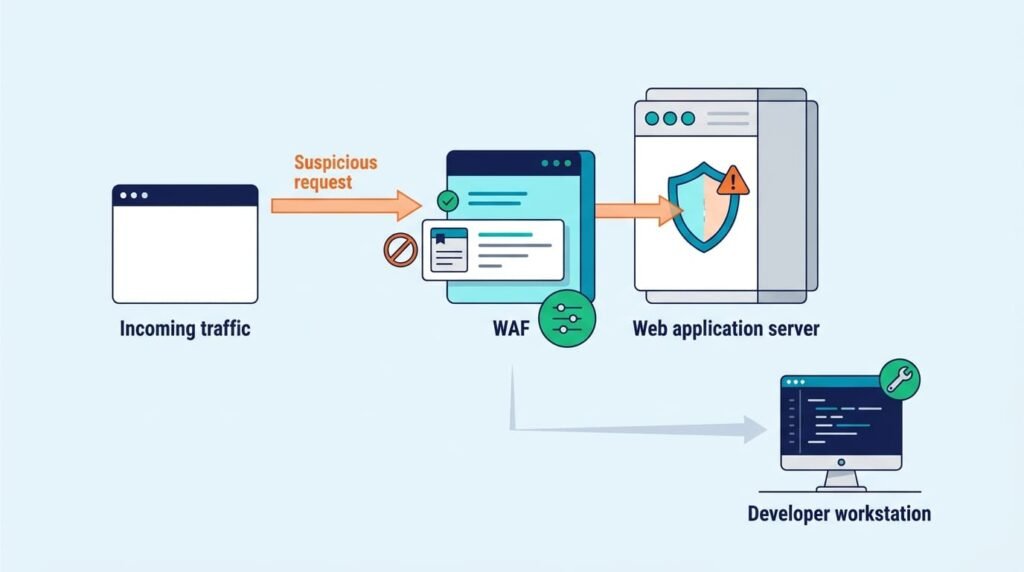
Virtual patching is when a security layer lowers the risk from a known bug while developers build the real fix.
A WAF rule can block known attacks on a weak endpoint without changing any app code. That’s handy when an update can’t go out right away. But the bug is still there. The rule only protects traffic that goes through the WAF and matches what the rule looks for.
A good virtual-patching process has these steps:
- Find the weak component and the endpoint it affects.
- Test the rule against known attack patterns.
- Check other encodings and request paths.
- Watch normal traffic to make sure nothing breaks.
- Give someone ownership and set a deadline for the permanent fix.
- Test again after the code fix goes live.
The OWASP Virtual Patching Cheat Sheet explains that virtual patching lowers risk but doesn’t replace fixing the code.
Temporary rules often stay around much longer than anyone plans. We’ve come across “short-term” rules that were still running years later, and no one could say why. Keeping track of owners and review dates stops a stopgap from quietly becoming part of your real security setup.
How Do You Test Whether a WAF Protects Real User Journeys?
Blocking attacks is only half of what a WAF has to do. The other half is letting real customers get on with their day. We test both together, because a WAF that stops every attack but breaks checkout isn’t doing its job.
Start with the paths your business can’t live without: login, account recovery, checkout, file uploads, search, and API connections. Then run two kinds of tests. One is normal use. The other is authorized attack simulations.
- Authentication: Check that login, logout, and password recovery still work.
- Transactions: Make sure checkout and payments stay up.
- Content handling: Try file uploads, rich-text editors, and forms.
- API behavior: Confirm that normal REST API requests get through and that access limits hold.
- Attack detection: Run relevant SQL injection, XSS, and path traversal tests.
- Monitoring: Check that blocked requests and security events show up in the logs.
Next, look at the numbers. Count false positives, blocked attacks, app errors, and the rules that fire most. We always try changes in staging first. We also agree on rollback rules ahead of time, so nobody argues about when to undo a change while customers are stuck.
A good rollout makes an app safer without getting in anyone’s way. Passing one penetration test is helpful, but it doesn’t prove the app is safe from every attack.
How Does a WAF Fit Into a Layered Security Strategy?
No single tool can cover everything. Understanding WAF vs. NGFW helps security teams distinguish application-layer traffic filtering from broader network traffic controls. A WAF works best next to secure code, identity controls, network limits, and steady monitoring. It can catch many bad requests, but some problems hide in business rules or permission checks. Reading HTTP traffic alone won’t reveal those.
As noted by NIST SP 800-41 Rev. 1
“Web application firewalls are installed in front of the Web server to detect the placement of malicious software on the computer of users who are accessing information on the Web, or to deter attempts to solicit private information from users. These firewalls, which are considered to be different from traditional firewalls, are a relatively new technology, with changing capabilities.” – NIST SP 800-41 Rev. 1
Here is what each layer does for a web application.
- WAF: Inspects and filters HTTP/HTTPS requests to block malicious traffic before it reaches the application.
- Secure coding: Prevents flaws in the application’s design and implementation.
- Input validation: Ensures incoming data follows the expected format and requirements.
- Authentication and authorization: Verifies user identities and controls which resources and actions they can access.
- Patch management: Fixes vulnerabilities in outdated software and dependencies.
- Network access controls: Restricts direct access to application servers to prevent unauthorized connections.
- Bot management: Detects automated traffic and helps prevent abuse.
- Monitoring and incident response: Investigates suspicious activity and guides the response to security incidents.
APIs need extra care. Authorization, tokens, request formats, and sensitive actions all matter. Filtering REST API traffic helps, but a WAF can’t know if every allowed action is right for a certain user. In reviews like ours, a request can look perfectly fine to the WAF and still show one customer another customer’s data. Only a check of the app’s permission rules finds that kind of problem.
When we sit down with a team, we compare the layers and look for gaps between them. Buying more security products is rarely the fix.
How Can Network Threat Detection Strengthen WAF Protection?
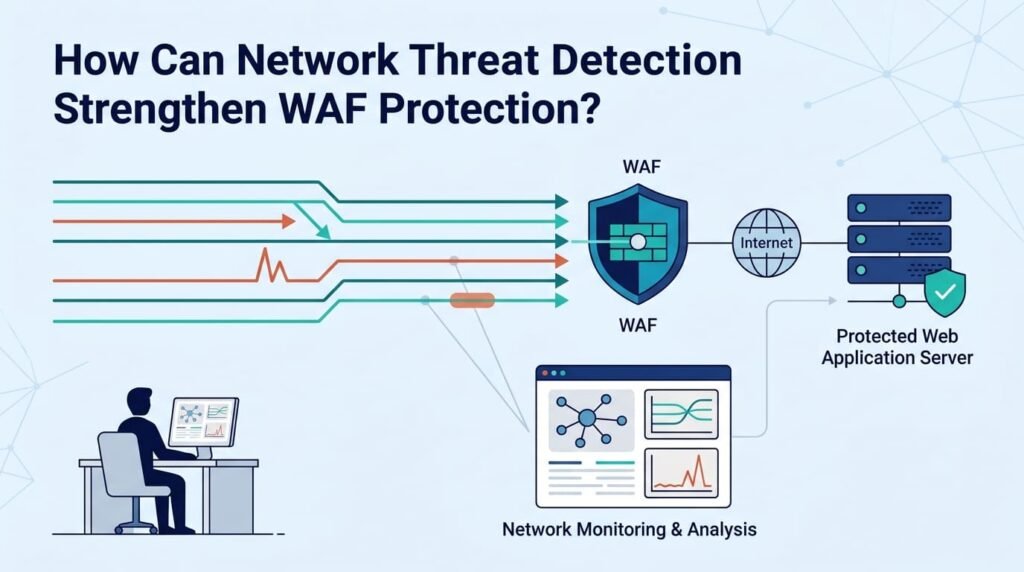
A WAF only sees HTTP and HTTPS requests. Network Threat Detection fills in the rest of the picture. It helps teams look into suspicious activity, study traffic patterns, and spot weak coverage. It can show how systems talk to each other, which services are exposed, and which connections need a closer look. What you can see depends on how your setup is built and monitored.
We build threat models and risk analysis tools for this kind of work. They help us trace how an attacker could reach an app and which new threats might matter next. Our process for turning findings into fixes looks like this:
- Find the exposed web apps, APIs, and origin servers.
- Match common attack paths to your current WAF policies.
- Review blocked requests, odd patterns, and false positives.
- Compare WAF alerts with network and app logs.
- Fix confirmed vulnerabilities first.
- Retest after policy changes, code fixes, and infrastructure updates.
Counting blocked requests doesn’t tell you much by itself. What matters more is whether your controls catch real threats, keep good traffic moving, and give your team what it needs to investigate fast.
Network Threat Detection is a good first step for checking how well you can see your traffic and how strong your layers are. It works alongside your WAF. It doesn’t replace secure coding, app testing, or access controls.
FAQ
How does a WAF protect against SQL injection and cross-site scripting?
A web application firewall (WAF) inspects incoming requests for malicious patterns associated with SQL injection and cross-site scripting (XSS). It can block harmful requests before they reach the application. However, effective protection also requires secure coding, input validation, and updated security rules to address new attack methods and prevent vulnerabilities from being exploited.
Can a WAF protect against zero-day exploits and new web attacks?
A WAF can detect some previously unknown attacks by identifying unusual traffic patterns and suspicious requests. However, it cannot guarantee zero-day exploit protection because new attacks may bypass existing rules. Security teams should update WAF rules, conduct regular security testing, and patch application vulnerabilities to reduce the risk of successful attacks.
How does a WAF protect APIs from malicious requests and abuse?
A WAF can improve API security by filtering REST API traffic, validating requests, and blocking malicious payloads. Rate limiting can also restrict excessive requests associated with brute-force attacks and automated abuse. However, developers must implement authentication, authorization, and business logic checks because a WAF cannot prevent every API security issue through traffic filtering alone.
How can I reduce WAF false positives without weakening security?
Review WAF security logs to identify legitimate requests that trigger unnecessary blocks. Adjust custom security rules to distinguish normal user activity from malicious traffic, then test the changes before deployment. Regular rule tuning helps reduce false positives while maintaining protection against attacks. Monitor the results to ensure that legitimate requests work correctly and malicious requests remain blocked.
What security gaps remain when a WAF is properly configured?
A properly configured WAF cannot fix vulnerable application code, weak authentication, or flawed business logic. Attackers may also bypass WAF rules or access exposed origin servers directly. Organizations should combine WAF protection with secure coding, strong access controls, regular penetration testing, and application security monitoring to identify vulnerabilities that traffic filtering cannot address.
Building More Reliable WAF Protection
When a WAF blocks legitimate requests or misses malicious traffic, your web application can still face security risks. That’s the reality.
Network Threat Detection can help your team gain better visibility into suspicious network activity as part of a layered security approach. Combine it with well-tuned WAF rules and regular security testing to identify gaps without disrupting legitimate users. Explore Network Threat Detection to strengthen your organization’s web application security.
References
- https://top10.owasp.org/2021/zh-TW/A00_2021_Introduction/index.html#category-relationships-from-2017
- https://csrc.nist.rip/CSRC/media/Publications/Shared/documents/itl-bulletin/itlbul2009-10.pdf#1#1#1
