
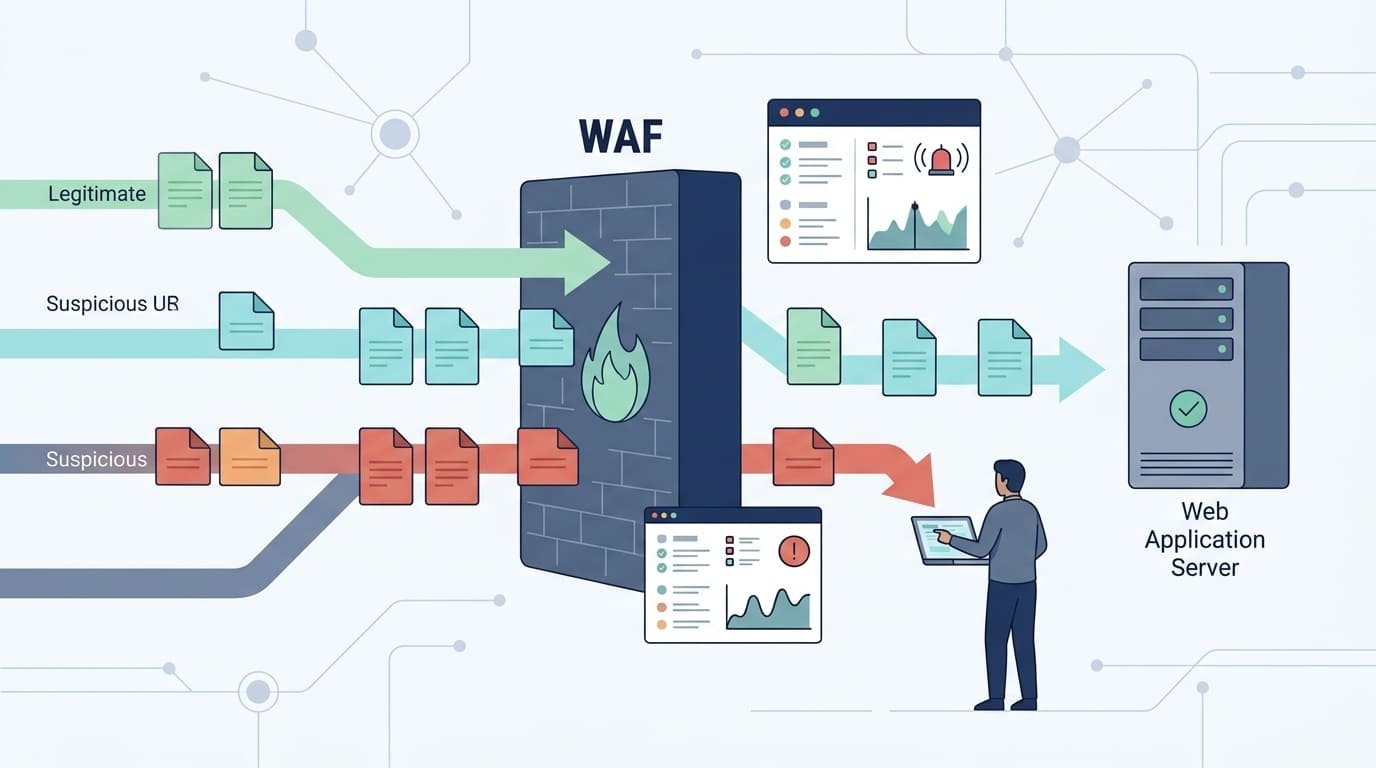
A WAF minimizes false positives by identifying legitimate requests before blocking traffic. But getting the rules right takes more than enabling protection. Security teams need to review logs, test rule matches, and check how changes affect real users. Network Threat Detection also helps identify suspicious traffic patterns that may need closer inspection.
Avoid broad rule exclusions, as they can leave gaps in application security. Instead, test each exception against actual application behavior and monitor the results. Keep both blocked attacks and legitimate traffic in view. Read on to learn how to investigate false positives, adjust WAF rules, and reduce unnecessary blocks.
WAF False Positive Quick Wins
- Test WAF rules in detection mode and analyze detailed logs.
- Investigate false positives and apply narrowly scoped exclusions.
- Review exceptions regularly without increasing false negatives.
What Is a WAF False Positive, and Why Does It Matter?
Sometimes a WAF blocks a request that is perfectly fine. That is a false positive. A rule thinks it spotted an attack, but the request was just normal traffic, and a real person ends up stuck. Effective WAF protection must account for these situations without compromising security.
Why do legitimate requests trigger WAF rules?
WAF rules hunt for patterns that look like attacks. Think SQL injection, cross-site scripting (XSS), command injection, and path traversal. Trouble is, plenty of ordinary data looks a lot like those patterns. Apps that handle structured data or unusual characters get hit the hardest.
A few common examples include login requests containing special characters or encoded values, webhook callbacks that carry JSON data, and XML or JSON API requests with embedded markup. Search boxes where users enter SQL-style phrases can also trigger certain signatures, as can rich-text editors that send actual HTML content.
When one of these gets blocked, a customer can’t log in, an integration quits working, or a payment fails. For that reason, we always weigh two things when we troubleshoot: what the alert says and what it costs the business.
Take an XML API as an example. A partner’s request might contain tags that look like an XSS attack, but that’s just how their system sends data. The rule match by itself doesn’t prove anything. Someone has to check what the payload is meant to do and how the app should behave.
How Should You Establish a Safe WAF Tuning Baseline?
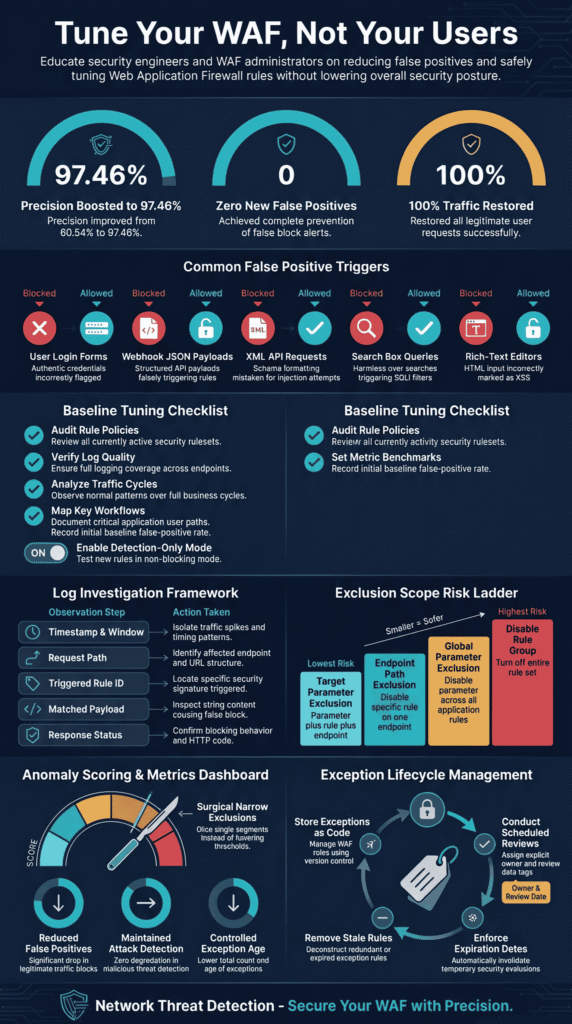
Begin in detection-only or preview mode, where the WAF monitors and logs traffic without blocking requests. This allows the team to understand normal traffic patterns and identify potential attacks before legitimate customers are affected. Before changing any settings, document the active WAF policy, managed rule version, and enforcement settings.
Enable detailed logging to capture matched requests and rule IDs, then monitor typical traffic across normal business cycles. During this period, test and record real application workflows, including logins, file uploads, and API calls. You should also establish baseline numbers for matched requests, confirmed false positives, and blocked legitimate transactions.
In ModSecurity, the SecRuleEngine DetectionOnly setting allows you to monitor requests without applying the usual rule-based blocking. Other WAF products may call this preview, count, or log-only mode, so check your product documentation for the correct setting.
Microsoft’s Azure WAF best practices provide useful guidance for this process. If possible, monitor traffic for several days or even weeks. A short observation period may miss less frequent events, such as monthly reports or scheduled webhook requests, which could cause problems when blocking rules are eventually enabled.
Keep in mind that detection mode does not make attacks harmless. The WAF only monitors traffic during this stage, so other security controls and the application’s built-in protections must remain active to handle potential threats.
Which WAF Logs Help Identify False Positives?
The most helpful logs connect the rule that fired to the request and to what the app did next. With those, a reviewer can tell a real attack from normal traffic that only looks suspicious.
What should you inspect in each event?
When an alert looks unusual, start by checking its timestamp and request ID to identify the event. Then, review the request path and HTTP method, along with the triggered rule ID and detection message. Pay attention to the specific parameter, header, or cookie that matched the rule. If available, examine the request body and payload details to understand what triggered the alert. Finally, check the response status and how the application handled the request.
How do you investigate a suspicious match?
When investigating a suspicious match, look for patterns in the WAF logs and determine what might be causing them. If one rule matches repeatedly, inspect its signature and the data that triggered it. If most alerts come from a single endpoint, test that route independently to identify the issue.
Failed authentication requests may require you to validate legitimate login flows, while alerts involving JSON or XML requests may indicate problems with parsing or payload inspection. If alerts suddenly increase after a rule update, compare the new behavior with your baseline logs to see what changed.
Start with one event rather than making assumptions about the entire WAF policy. Compare its rule ID, request path, and timestamp with the application logs to understand what happened. Our threat models and risk analysis tools can also help distinguish genuine threats from false positives.
The OWASP Core Rule Set (CRS) project explains how its rules detect patterns associated with common web attacks. Understanding these detection patterns makes unusual matches easier to investigate and helps teams tune CRS more effectively.
Finally, avoid logging passwords or other sensitive information unless absolutely necessary. Restrict access to WAF logs and establish appropriate retention periods to protect the data they contain.
How Can You Confirm That a WAF Match Is a False Positive?
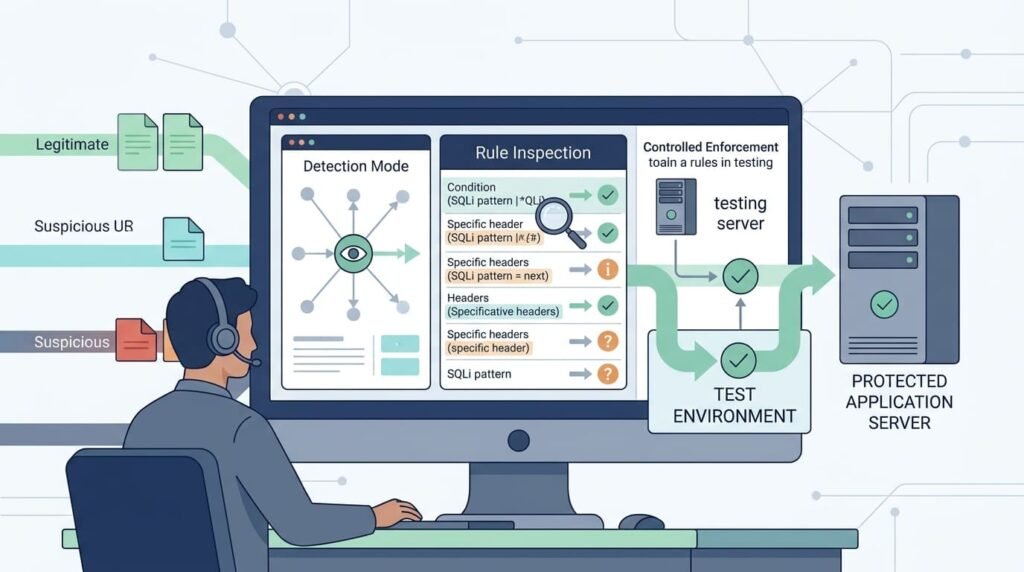
Before you call a WAF match a false positive, make sure the request is safe and the rule got it wrong. If you skip this step, a real attack can slip through.
Which questions should teams ask?
Teams should ask whether the request came from an expected source, whether the field is allowed to contain HTML, JSON, XML, or special characters, and whether the application processed it without errors. They should also check whether a seemingly normal payload hides a real attack and whether a recent application update changed the way requests look.
A good first step is to ask the application owner to repeat the same steps in a staging environment. Then, compare the request against the documented input rules and the application’s expected behavior.
For example, a webhook may send encoded text inside a JSON field, which can be completely normal. However, a known IP address or successful login does not automatically mean the payload is safe.
When building threat models, teams often find that trusted sources can still send harmful data, either by mistake or because an account has been compromised. That’s why it’s important to review the entire request before approving an exception. Otherwise, a real attack could easily be mistaken for a false alarm.
Should You Fix Application Input or Add a WAF Exception?
Fixing the input is usually the better choice. An exception is appropriate only when you’ve confirmed that the request is legitimate but still gets blocked. Even then, keep the exception narrowly scoped.
Use these guidelines to decide the right response:
- Incorrect input encoding: Correct the encoding or serialization.
- Broken JSON or XML parsing: Fix the content-handling logic.
- One legitimate field triggers one signature: Consider a field-specific exclusion.
- A managed rule misclassifies valid traffic: Apply a narrow rule override.
- Multiple unrelated rules trigger: Investigate the application and payload first.
Think about an XML API. Some of its markup can look like an XSS attack. The team should first check the schema and how the application is designed to work before considering an exclusion for that field.
Our risk analysis tools follow a simple rule: keep protections strong and fix the problem where it starts. Only use exceptions when the evidence supports them.
Never disable an entire managed rule group just to quiet one noisy field. Doing so can create security gaps in other parts of the system that have nothing to do with the original problem.
How Do You Scope WAF Exclusions Without Weakening Security?
Keep every exclusion as narrow as possible. Apply it to one request parameter, one rule, and one endpoint so other attack rules remain active.
Which exclusion scope is safest?
The safest exclusion scope is the narrowest one that resolves the issue without weakening protection for other endpoints. Excluding one parameter from one specific rule on a single endpoint carries the lowest practical risk because the exception affects only a limited part of the request.
Applying the same exclusion to one parameter across multiple endpoints creates broader exposure because several routes are affected. Disabling one rule globally increases security risks by removing that rule’s protection across the entire application. Disabling an entire managed rule group carries the greatest risk because it can remove multiple security protections at once.
In ModSecurity, the SecRuleUpdateTargetById command removes one target from a rule’s inspection. Here’s an example:
SecRuleUpdateTargetById 959071 !ARGS:’q’
This is only a sample and may not fit your setup. Before using it, check that the rule ID, syntax, and rule-set version match your environment.
We keep WAF exclusions in a separate file under version control, with each entry documenting the reason the exclusion is necessary and the affected endpoint or application route. It should also identify the WAF rule involved, the person responsible for the exclusion, and the date when it needs to be reviewed again.
Old exceptions can accumulate when nobody reviews them. Adding an owner and review date makes them easier to track and remove when they are no longer needed.
Don’t let a path or parameter exclusion become a free pass for an entire application. IP reputation checks and client allowlists can provide additional protection, but they should support request-level inspection, not replace it.
How Should You Tune OWASP CRS Anomaly Scores and Paranoia Levels?
Credits: OWASP London
Base your CRS tuning on real numbers: how often good traffic gets blocked and how often bad traffic gets through. If you lower sensitivity everywhere, the alerts get quieter, but you also catch less.
CRS looks for attack patterns. With anomaly scoring, it adds up the matches in a request. If the total goes over a set limit, the request is blocked.
Why can legitimate payloads exceed the threshold?
Legitimate requests can trigger WAF thresholds when complex payloads, rich-text content, or unusual encoding patterns match multiple security rules. Large or complex payloads may trigger several rules at once, while rich-text fields can activate multiple related protections.
Higher paranoia levels can detect more unusual patterns, but they may also increase false positives. In addition, URL encoding, Base64 decoding, and unusual character combinations can change how the WAF interprets a request, causing legitimate traffic to be flagged.
As noted by OWASP Foundation
“The OWASP Foundation notes that WAF rulesets are ‘applied generically, without taking into account how the protected application is built or what types of input it expects,’ and that the manual tuning phase required to reduce false positives is ‘time-consuming, and error-prone,’ potentially undermining detection capabilities .” – OWASP Foundation
What should you test?
Test your WAF rules in staging to make sure legitimate requests pass without allowing malicious traffic through. Start by identifying which rules contribute to the score, then repeat the legitimate request in the staging environment.
Compare the results of changing the threshold with those of adding a targeted exclusion to determine which option carries less risk. Next, test known attack payloads alongside normal traffic to check how the WAF responds to both. Make sure legitimate requests pass successfully while malicious requests remain blocked.
The OWASP CRS documentation explains how the rules work and how to set them up.
Picture a search box that accepts parentheses and SQL-style words. A few rules might match the query parameter, and the combined score can pass the blocking limit even though the request is fine. When this happens to us, we look at each match one at a time before we touch the threshold. Many times, one exclusion for that single parameter fixes it better than turning down the whole policy.
How Do You Tune WAF Rules Safely?
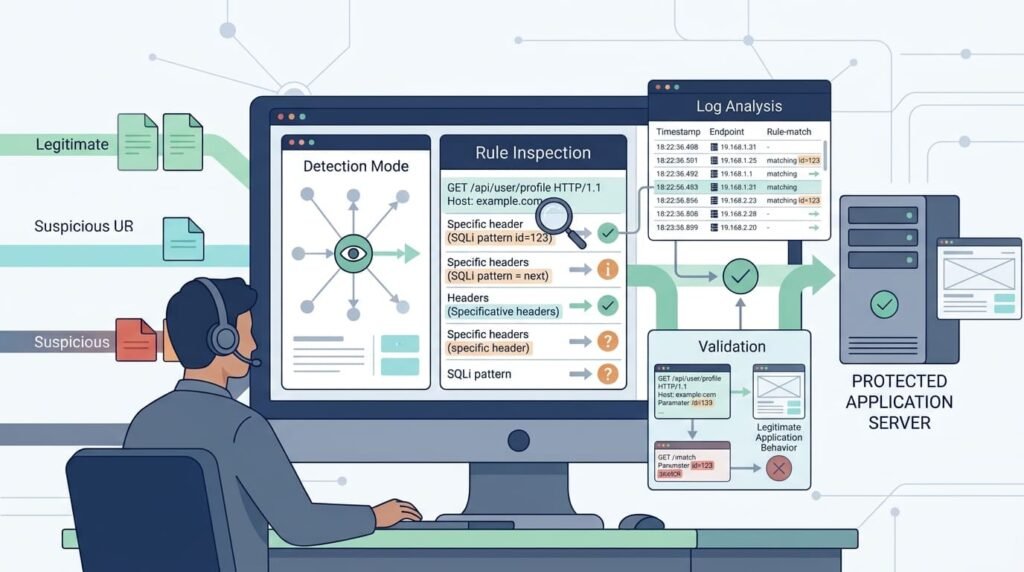
Tuning a WAF safely is mostly about patience. Turn on logging, change one thing at a time, and test before you block anything. The right approach can also depend on your WAF deployment, whether it uses an inline, reverse proxy, or cloud setup. Each WAF works a little differently, but this basic approach holds up everywhere.
Recommended WAF tuning approaches:
- Managed rules: Keep the rule group enabled and adjust only the rules that cause legitimate traffic problems.
- Custom rules: Apply rules only to the paths, HTTP methods, and request fields that need them.
- Rule exclusions: Keep each exception narrow and tie it to one endpoint or request field.
- Count mode: Monitor which requests a rule catch before enabling blocking.
- Block mode: Switch to blocking once testing confirms that the rule works as expected.
- Rule ordering: Check that an early allowed rule does not bypass security rules further down.
What if a managed rule is defective?
Sometimes a rule update starts flagging good traffic across several apps at once. Before changing anything, we track down the exact rule and the requests it’s catching. Turning off a whole rule group in a panic can leave a much bigger hole than the one you’re fixing.
If your WAF allows it, set only that one rule to log instead of block. The rest of the group keeps working while you dig in. Once you’ve fixed the cause and tested it, turn blocking back on.
Other things help too. Compare rule versions, read the latest change notes, and watch your alerts for sudden jumps. A spike right after an update is usually the first sign something went wrong.
Rule priorities and exclusion syntax are different on every platform, so read your vendor’s docs before you push a change.
How Can You Test WAF Changes Before Production?
Every change should be tried on real-looking user traffic and known attacks in a test setup first. We use threat models and risk analysis tools to pick the attacks that matter most for each app. That way our tests match real risks and not just a random list.
Here’s the checklist we follow:
- Replay normal login, API, upload, and webhook requests.
- Try odd cases like encoded text, special characters, and big payloads.
- Test against common web attacks, such as SQL injection and XSS, to confirm that the WAF still detects malicious requests.
- Compare what matched and what was blocked before and after the change.
- Check that other protections still fire.
- Write down what we expect to see and what would make us undo the change.
Research from Computers & Security shows
“A peer-reviewed study in Computers & Security evaluating OWASP CRS in ModSecurity found that after identifying coverage gaps and implementing custom rules, detection precision improved from 60.54% to 97.46% ‘with no increase in false positives within our controlled test environment’ .” – Computers & Security
Tools like GoTestWAF can show how well a WAF spots attacks. The score depends on the tests and settings you pick, so we treat it as a clue, not a final grade.
We always look for two kinds of mistakes: good requests getting blocked, and bad requests getting through. A change that lets all the good traffic in but also lets old attacks slip past isn’t a win. We’ve seen teams cheer about fewer alerts, then find out attacks had stopped setting anything off.
Finally, have real people try the important stuff. Logging in, checking out, and uploading files should all still work.
What Metrics Show Whether WAF Tuning Is Working?
Tuning works when real users get through and real attacks still get stopped. Look at security results and app uptime together. The total number of alerts alone won’t tell you much.
| Metric | What It Measures | Why It Matters |
| Confirmed False-Positive Rate | The percentage of legitimate requests incorrectly flagged by the WAF. | Shows whether tuning reduces unnecessary alerts. |
| Legitimate Request Block Rate | The proportion of valid requests blocked by WAF rules. | Helps identify disruptions to application availability. |
| Confirmed Attack Detection Rate | The proportion of known malicious requests correctly detected. | Measures whether security coverage remains effective. |
| False-Negative Rate | The proportion of malicious requests that bypass WAF detection. | Identifies potential security gaps caused by overly permissive rules. |
| Exception Count and Age | The number of active exclusions and how long they have remained in place. | Helps identify outdated exceptions and excessive policy changes. |
| Rule-Trigger Spikes | Sudden increases in rule matches over a given period. | Helps detect problems following application or rule updates. |
| Application Error Rate | The frequency of application errors during or after WAF enforcement. | Reveals potential disruptions caused by WAF configuration changes. |
We use the same time windows and traffic groups every time we review, so the before-and-after numbers are fair. Our checks happen around each big configuration change, not just when alert totals look odd.
Say blocked requests drop. That sounds great, but only if customers can finish their purchases and our attack tests still trigger the right rules. If we can’t confirm both, we don’t call it a success.
How Should Teams Manage WAF Exceptions Over Time?
WAF tuning never really ends. Every app release, new attack signature, or managed rule update can change how a WAF treats normal traffic. A rule that worked fine last month might start blocking real users this month.
In our experience, the exceptions that cause trouble are often the ones nobody documents. Someone adds a quick fix at 2 a.m. to resolve an outage, but two years later, nobody remembers why it exists. To prevent this, store WAF rules, exclusions, and overrides as code, and have a second person review every security-related change. Document the reason for each exception, who owns it, and which endpoint it affects.
Set a review date and a clear expiration point for each exception. Teams should also monitor managed rule updates and new application releases, then remove outdated exceptions once they are no longer needed. Finally, maintain a rollback plan and an audit trail so every change can be tracked and reversed when necessary.
Most teams should review exceptions every quarter. If the app changes in a way that affects the exception, review it sooner.
At our company, we build threat models and risk analysis tools for network security, so we see how a forgotten exception can turn into an open door. That’s why we push for clear owners and tight change control. An emergency fix should never quietly become a permanent gap. DevSecOps teams can also add rule reviews to release approvals and vulnerability management.
Every exception should answer three questions. Why did we need it? What risk does it add? How will we know if it’s still worth keeping?
How Can You Prevent False Positives During Future WAF Deployments?
The best fix is to treat WAF checks as part of the software development and release process. Whenever a new feature is introduced, test the WAF against it before deployment to make sure legitimate requests are not blocked. Start by testing proposed WAF policy changes against staging traffic and including login, API, and integration tests in your release checks.
Compare new rule matches with normal traffic patterns to identify unusual changes. If your WAF supports detection mode or a preview feature, use it to observe how the rules behave before enabling blocking. Then, enable blocking gradually and only when the test results support it. After deployment, monitor application errors and sudden increases in rule triggers to catch problems early.
Managed rule sets and applications change over time, so review your WAF policy whenever either one is updated. Automated regression tests can help teams identify problems before they affect production traffic.
Combine these tests with version-controlled exceptions and continuous monitoring to make WAF tuning more predictable and easier to audit. This approach also helps security teams detect problematic changes before they affect a large portion of legitimate users.
How Can You Balance WAF Security With Application Availability?
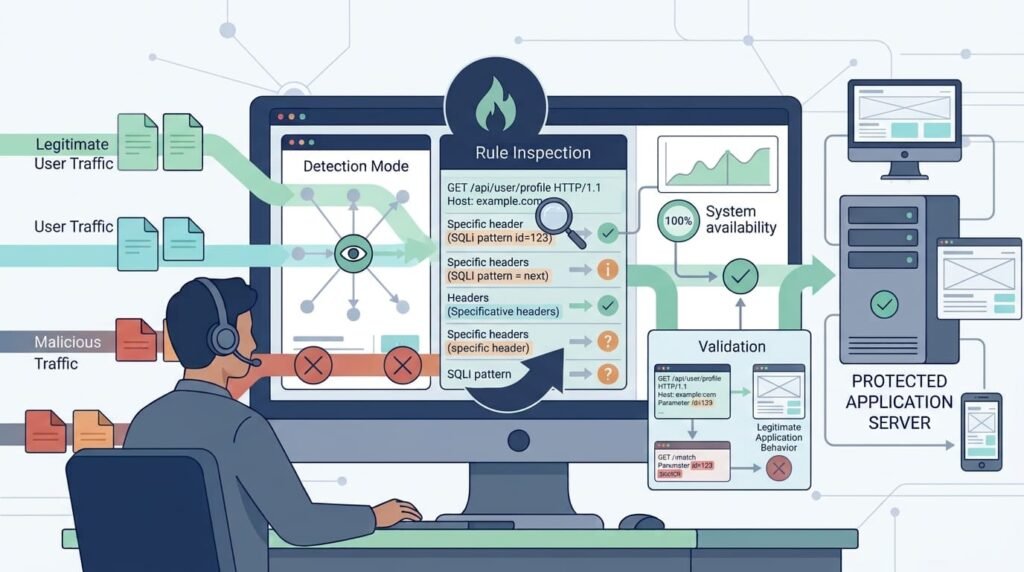
A strong WAF policy has three parts: solid default protections, tuning based on evidence, and exceptions that are as narrow as possible. The goal is to stop blocking good requests without making it easier for attackers to get in.
When you think a block is a false positive, work through these steps:
- Unclear request: Collect logs and confirm what the app is supposed to do.
- App defect: Fix the parsing, encoding, or validation problem in the app.
- Verified rule mismatch: Add a narrow exception and document it.
- Threshold issue: Measure what you might miss before changing it.
- Rule defect: Use a temporary fix aimed at that one rule.
- Validated fix: Retest, monitor, and write down the result.
Don’t judge success by how few requests get blocked. A good tuning change keeps attack detection working while letting real users do their jobs.
We also look at how each change affects the whole policy. Our rule of thumb is that an exception built for one endpoint shouldn’t weaken protection on other endpoints, request methods, or parameters. If a fix for one problem opens up three more, it isn’t a good fix.
FAQ
How can WAF rule tuning reduce false positives?
WAF rule tuning reduces false positives by adjusting rule sensitivity to match normal application behavior. Security teams can establish traffic baselines, adjust detection thresholds, and review WAF logs to identify legitimate requests that trigger unnecessary alerts. Regular rule validation helps improve detection accuracy while ensuring that malicious requests are still identified and blocked appropriately.
When should security teams use rule exclusions instead of disabling managed rules?
Security teams should use rule exclusions when specific request elements repeatedly trigger false positives. For example, parameter exclusions, header exclusions, cookie exclusions, and URI path exclusions can prevent unnecessary blocking without disabling entire security rules. This approach preserves managed rule protection while allowing legitimate requests to reach the application.
When should security teams switch from detection mode to prevention mode?
Security teams should switch to prevention mode after confirming that WAF rules correctly identify malicious requests without blocking legitimate traffic. Detection mode allows teams to monitor rule matches without interrupting requests. During testing, teams should review attack signatures, investigate WAF alerts, and validate rule behavior in a staging environment before applying blocking actions in production.
How can API security teams reduce false positives during JSON payload inspection?
API security teams can reduce false positives by configuring JSON payload inspection rules to match the expected structure of each API endpoint. Custom rules and endpoint-specific exclusions can prevent legitimate requests from being blocked. Teams should also test request body inspection, payload encoding, and parameter validation to ensure that valid API calls pass security checks.
How can security teams measure the effectiveness of WAF optimization?
Security teams can measure WAF optimization by tracking false positive rates, true positives, and false negatives. They should also review blocked requests, WAF alerts, and audit logs to identify unnecessary restrictions or missed attacks. Regular request sampling and continuous monitoring help confirm that rule exclusions reduce false positives without weakening malicious request detection or application protection.
Make WAF Tuning a Repeatable Security Practice
When your WAF blocks legitimate traffic, users lose access to your application even when no real threat exists. That’s a problem worth fixing. A careful review of false positives helps you restore access without weakening your security coverage.
With Network Threat Detection, you can take a more structured approach to WAF tuning through measurable results and continuous validation. Start by identifying high-impact false positives and confirming their causes with your application team. Ready to improve your WAF configuration? Contact our team to strengthen Network Threat Detection and refine your WAF security strategy.
References
- “OWASP WAF Advanced Ruleset Management.” OWASP Foundation, Accessed November 3, 2026.
- MK, Anuvarshini; Bala, Kommuri Sai Suhitha; Sonti, Sri Sai Tanvi; KP, Jevitha. “An Empirical Study on the Evaluation and Enhancement of OWASP CRS (Core Rule Set) in ModSecurity.” Computers & Security, January 2026. Accessed November 3, 2026.