
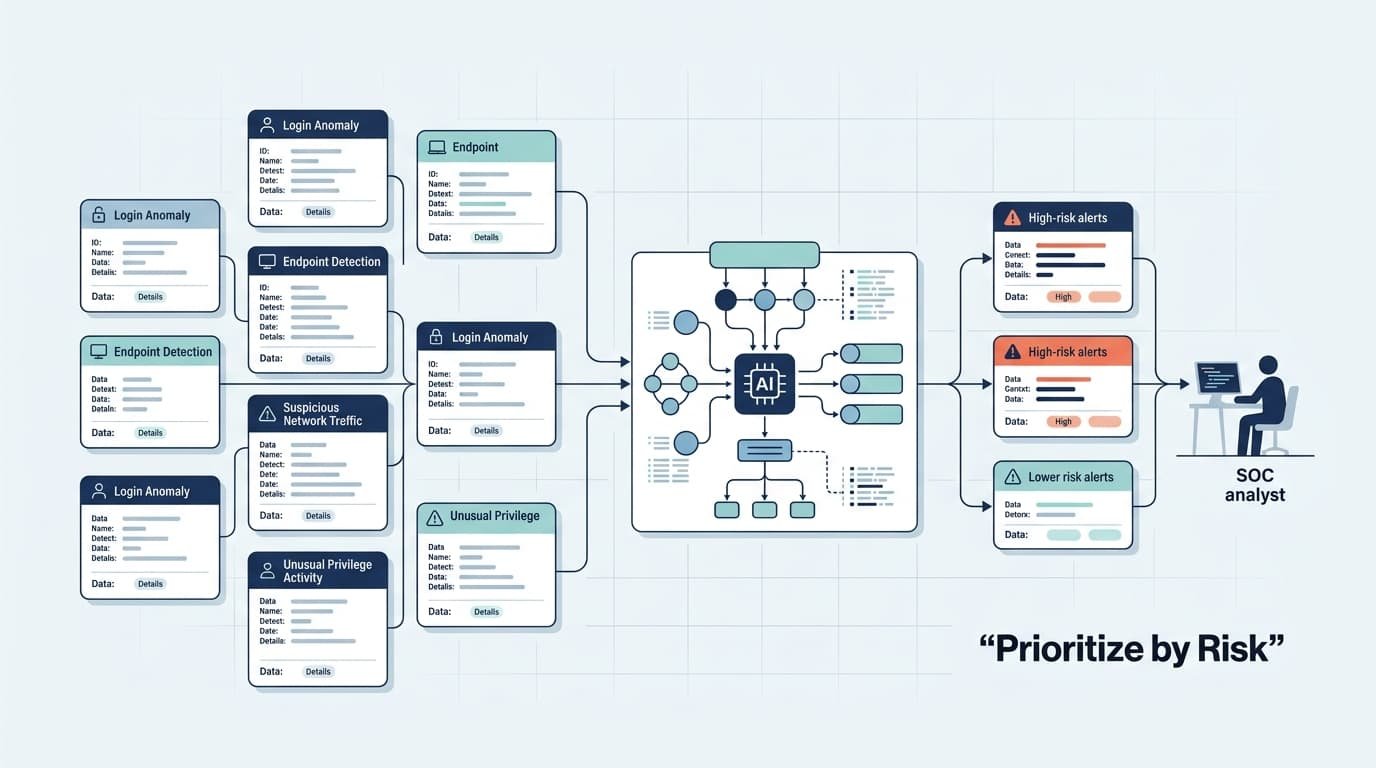
Automating alert triage prioritization standardizes and routes security alerts before an analyst sees them. The latest NIST guidelines advise ranking incidents by their impact, scope, and urgency. We skip opaque scoring and begin with evidence and context. See how Network Threat Detection builds a practical workflow.
Risk-Based Alert Triage: Quick Wins
- Prioritize alerts by risk, combining impact, confidence, likelihood, scope, exposure, and urgency instead of relying on source severity alone.
- Automate repetitive triage tasks such as normalization, correlation, enrichment, scoring, and routing to reduce alert fatigue and speed investigations.
- Keep consequential actions under human oversight, using AI to assist with evidence summaries, clustering, recommendations, and investigation workflows.
What Does Automated Alert Triage Prioritization Actually Automate?
Automated triage should prepare evidence and rank alerts. Its goal isn’t to replace an analyst’s judgment.
Any effective workflow starts by validating a detection before setting its priority. This stops a vendor’s generic “critical” label from automatically creating a new incident ticket.
Good automation pulls together context an analyst would have to find themselves. It checks asset ownership, user privileges, threat intel, vulnerability data, and related activity from across your security tools.
What we’ve seen is that the most useful automation tackles the repetitive prep work first. It builds a preliminary case file. The analyst then gets something they can actually use, not just another raw alert that forces them to start from scratch.
Our work with threat models consistently shows that this approach, automating the investigation, not the decision, sharpens focus on real emerging threats.
- Normalize alert data.
- Validate detection quality.
- Deduplicate and correlate events.
- Enrich assets, identities, and indicators.
- Calculate confidence and risk.
- Route cases to the right queue.
A useful output contains a priority level, confidence estimate, evidence summary, affected entities, related alerts, recommended investigation steps, and documented decision reason. This creates an auditable SOC analyst workflow rather than a simple alert filter.
According to UnderDefense SOC Research
“Cognitive fatigue refers to the neurological degradation of decision-making quality after sustained exposure to repetitive, low-value signals. Analysts literally lose the ability to distinguish real threats from noise after processing hundreds of near-identical alerts.” – UnderDefense SOC Research
Alerts Be Prioritized by Risk Instead of Source Severity
Source severity rarely shows the full risk. It may miss asset value, user privilege, attack scope, or how far an attack has spread. NIST recommends weighing scope, impact, urgency, and available resources when setting response priority.
We’ve seen why local context matters. A “high” alert on a test machine may need less attention than a suspicious login tied to a privileged administrator.
Our risk tools help add that context. Effective threat prioritization should tell analysts what needs attention now, not repeat a detection engine’s rating.
| Signal | What it tells analysts |
| Severity | Potential consequence |
| Confidence | Strength of supporting evidence |
| Impact | Potential business damage |
| Scope | Number of affected entities |
| Exposure | Accessibility and attack surface |
| Time sensitivity | How quickly action may matter |
MITRE ATT&CK gives teams a clear way to map attacker behavior to tactics and techniques. We use its machine-readable STIX data to enrich our threat models and support automated security workflows.
According to NIST Special Publication 800-61
“Because of inevitable resource limitations, NIST recommends prioritizing incidents based on their functional impact, information impact, and recoverability.” – NIST Special Publication 800-61
Alert Triage Workflow Process Each Event?
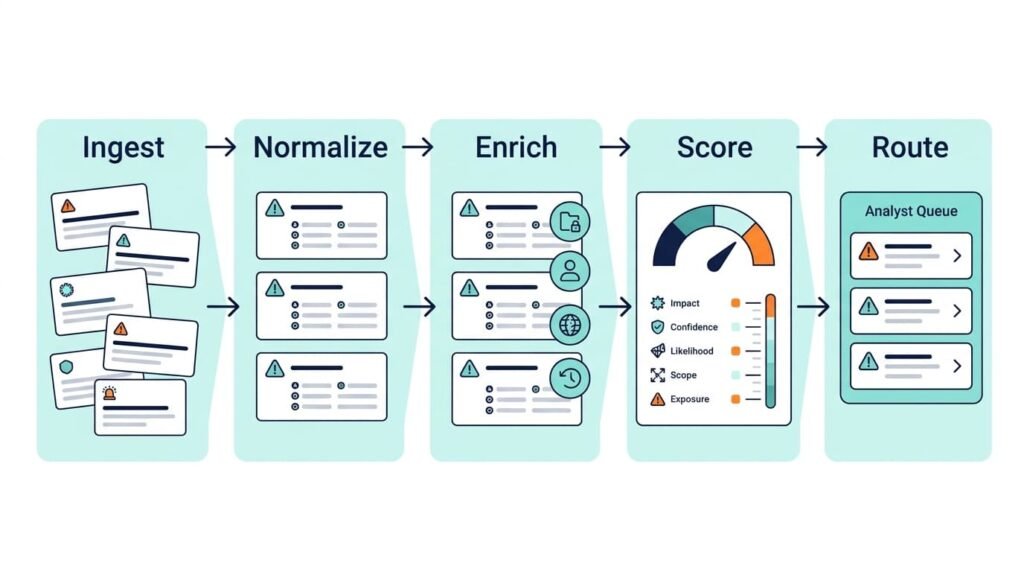
A good workflow turns raw evidence into a clear decision. We use automation to reduce doubt before an analyst reviews a case.
- Ingest and normalize.
- Validate events.
- Deduplicate and correlate.
- Enrich asset and identity data.
- Add threat intelligence.
- Score confidence and impact.
- Rank the incident.
- Route and document the decision.
These 8 core stages need checks at each point. Missing data, parser errors, late logs, or repeated events can change the score. Our threat models help find these gaps early.
We’ve also seen how repeated alerts can create duplicate cases. Tracking the evidence helps separate new activity from events we’ve already seen.
Which Data Sources Should Enrich an Alert?
Context enrichment should link security data with business and identity details before a case is ranked.
Useful sources include:
- SIEM, endpoint, and network data
- Asset and configuration records
- Identity and privilege data
- Vulnerability data
- Threat intelligence
- Past analyst decisions
MITRE ATT&CK adds behavior context, while our asset and identity data adds local detail. We use these sources to give analysts fewer questions to answer by hand.
How Soes Alert Correlation Reduce Duplicate Investigations?
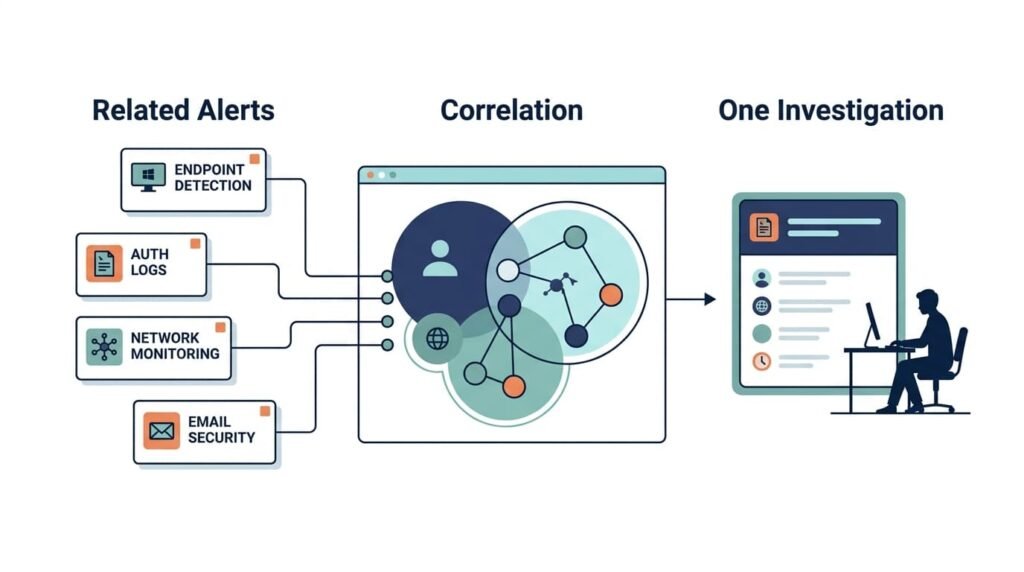
Correlation groups related events into one incident instead of separate tickets.
Say 300 failed login attempts occur against one account. Grouping by source IP, target identity, and time window collapses 300 logs into 1 incident ticket.
The same applies to endpoint, identity, cloud, and network data. A suspicious login followed by unusual process activity may matter more when both events are reviewed together.
Correlation keys can include:
- User and host
- Process lineage
- Source and destination
- Indicator
- Time window
- ATT&CK technique
- Shared incident ID
Timing still matters. Short windows catch bursts, but slow attacks can span days. Our risk tools can use several windows and score decay, so older evidence isn’t lost.
What Context Should an Automated Enrichment Packet Contain?
A useful triage packet should answer who, what, where, how serious it is, and what comes next before an analyst opens the case.
The packet should show the affected asset, owner, business service, user, privilege level, exposure, and recent activity. Security alert enrichment then adds the technical evidence, helping analysts understand risk exposure across affected systems.
What Asset and Identity Context Matters Most?
Business context can change the risk. A suspicious action on one system may matter far more on another.
Useful fields include:
- Asset owner and business service
- Business criticality and data type
- Internet exposure
- User role and privilege
- MFA status
- Recent password or role changes
- Approved maintenance or changes
We’ve seen why this matters. A suspicious command on a lab endpoint may stay P3, while the same action on an admin workstation may need P1 or P2 review.
Which Behavioral and Threat-Intelligence Signals Matter?
Threat context should use several signals, not one reputation score.
Useful evidence includes:
- Process trees
- Authentication history
- Related network activity
- IOC reputation and confidence
- Indicator age
- Known campaigns
- Similar past alerts
We treat threat intelligence as supporting evidence. A new domain may look suspicious, but it isn’t proof of an attack. Confidence should rise when other data supports it.
Separate Severity, Confidence, and Risk
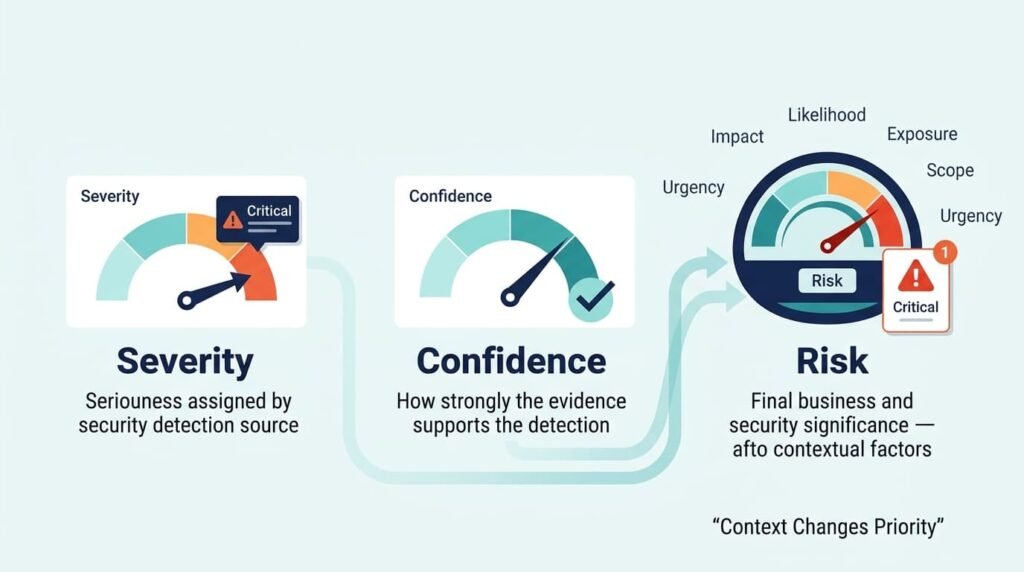
Severity, confidence, and risk answer different questions. We keep them separate in our alert models so one high score doesn’t distort the others.
Severity shows possible harm. Confidence shows how strong the evidence is. Risk looks at both likelihood and impact in the local environment.
| Dimension | Question | Example |
| Severity | How bad could it be? | Ransomware |
| Confidence | How strong is the evidence? | Confirmed malware |
| Risk | How likely and harmful here? | Malware on an admin endpoint |
We can score each from 0 to 100 and combine them using clear policy. This makes security risk scoring easier to review. It also stops a vendor’s high severity rating from becoming a high-confidence result.
Explainable Alert Prioritization Score Include
Credits: SpecterOps
A clear weighted model can combine impact, confidence, likelihood, scope, exposure, and time pressure. We use a model like this:
Priority = w1(Impact) + w2(Confidence) + w3(Likelihood) + w4(Scope) + w5(Exposure) + w6(Time) – Adjustment
Each factor can use a 0–100 scale, with weights based on past analyst decisions. Our threat models treat those weights as local policy, not a fixed rule. This makes custom risk scoring more adaptable to the organization’s assets, threats, and response priorities.
| Factor | Higher score when… |
| Impact | Critical data is involved |
| Confidence | Multiple sources agree |
| Likelihood | An attack is progressing |
| Scope | More users or hosts are affected |
| Exposure | The system faces the internet |
| Time sensitivity | Active compromise is spreading |
We also keep each input with the score. That way, analysts can see why a case ranked high, especially when automated triage recommends escalation.
When should automated triage route an alert to P1, P2, P3, or P4?
A four-level model keeps routing easy to follow. We can adjust the thresholds to match our risk tolerance and response capacity.
| Priority | Situation | Automated handling |
| P1 | Likely severe compromise | Immediate escalation |
| P2 | Credible high-risk activity | Senior review |
| P3 | Suspicious but unclear | Analyst queue |
| P4 | Low-risk or duplicate event | Batch review |
A P1 case requires automated verification of high impact, confirmed confidence, and high exposure before triggering on-call escalation.
How should alerts be routed beyond urgency?
Routing should also consider analyst skills, business ownership, availability, workload, and case age.
We’ve found that matching cases to the right person can improve SOC efficiency. An endpoint expert may handle process activity, while an identity expert reviews a privileged login.
Queue age matters too. A medium-priority case that sits untouched may need escalation as its SLA deadline gets closer.
How can AI assist triage without making unsafe decisions?
AI is most useful for summarization, clustering, evidence extraction, and investigation recommendations rather than unrestricted response authority.
A practical AI alert triage design keeps the model close to evidence. It can summarize process trees, group related alerts, identify missing context, draft timelines, and recommend a priority.
That approach matches the operational reality we see: analysts want less tool switching, not less evidence. A confident paragraph is not a substitute for raw event references.
| AI use | Recommended role |
| Evidence summary | Automate |
| Alert clustering | Assist |
| Priority recommendation | Assist |
| Investigation queries | Assist |
| Account disabling | Approval required |
| Endpoint isolation | Approval or tightly controlled policy |
Keep Consequential Security Decisions Under Human Approval
When a security action can disrupt an account, endpoint, network, message, or permission, you need a human to confirm it before anything changes. Context can be incomplete, and a wrong action can create a bigger problem than the original alert. Keep that boundary clear.
Network Threat Detection can help teams automate the work that comes before approval, including evidence gathering and risk analysis. Its threat modeling and vulnerability insights help analysts understand what matters before taking action.
FAQs
How can automated alert triage reduce alert fatigue for SOC analysts?
Automated alert triage can handle repetitive screening before alerts reach analysts. It can group related events, suppress duplicates, filter obvious false positives, and rank alerts based on risk. This process reduces alert fatigue and gives analysts a cleaner queue.
A practical setup combines alert classification, alert scoring, threat context enrichment, and clear escalation rules for alerts that require human review.
What information should an alert prioritization workflow use to rank security alerts?
An effective alert prioritization workflow should consider more than alert severity alone. Useful signals include asset importance, user privileges, event history, threat context, affected systems, and related activity.
Contextual alert prioritization helps determine which alerts require attention first. Security risk scoring can then support consistent alert ranking by combining multiple risk factors instead of relying on a single indicator.
How does threat context enrichment improve security alert triage?
Threat context enrichment gives analysts additional information about what an alert may indicate. Relevant context can include related events, asset details, user activity, known indicators, and historical behavior.
Automated threat enrichment can support faster alert validation and investigation. It can also help analysts distinguish isolated events from broader activity that may require incident triage or escalation.
When should automated alert prioritization send an alert to a human analyst?
Automated alert prioritization should involve a human analyst when automation has low confidence, business impact is high, or activity indicates a serious security risk. Critical alert detection can trigger alert escalation, while uncertain cases can remain in the queue for analyst review.
This approach supports SOC efficiency while ensuring that high-impact or ambiguous security events receive appropriate human oversight.
How can teams measure whether security alert automation is improving SOC performance?
Teams can measure changes in alert volume, false positive rates, response times, analyst workload, and investigation outcomes. Reducing alert fatigue is valuable, but lower alert volume alone does not prove that the workflow has improved.
Teams should also measure whether analysts reach actionable security alerts faster and whether important incidents receive appropriate attention. These metrics provide a clearer view of SOC productivity and workflow effectiveness.
References
- https://underdefense.com/blog/ai-soc-investigation-speed/
- https://mitratech.com/resource-hub/blog/nist-sp-800-61/
