
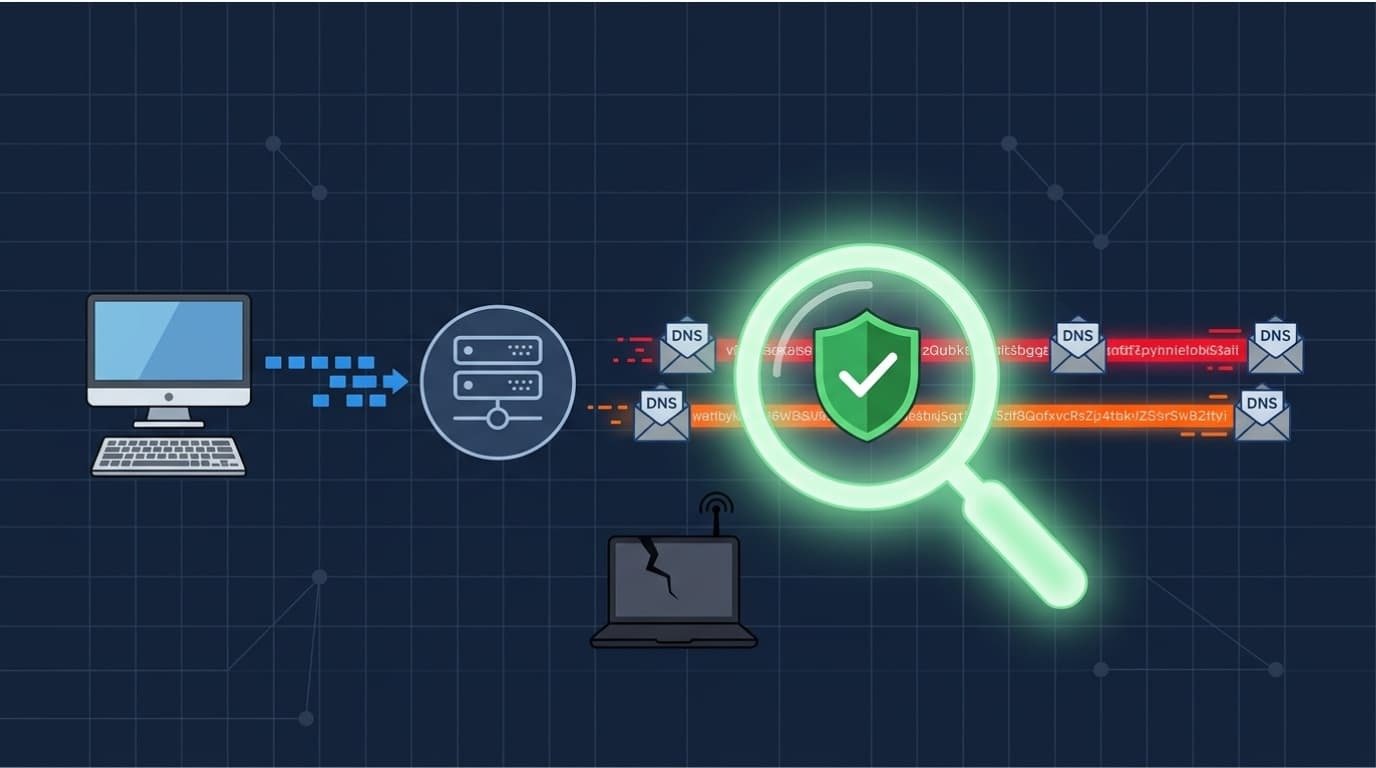
DNS tunneling detection helps security teams identify hidden communication and possible data theft through DNS traffic. Attackers may hide encoded information in long subdomains, frequent queries, or unusual record types.
Research in Computers & Security also examines how traffic analysis can reveal these activities. Network Threat Detection supports this work with threat modeling and risk analysis tools that help teams review attack paths and spot security gaps.
Read on to learn how to check suspicious DNS traffic, investigate affected devices, and improve detection across your network.
DNS Tunneling Detection for Stronger Network Security
These key points explain how DNS tunneling works, how to spot it, and which tools can help detect it.
- Understand the threat: DNS tunneling hides data in encoded DNS queries or replies. Attackers can use it to send data secretly or steal information.
- Watch for unusual traffic: Large numbers of queries, long subdomains, unusual record types, and strange data patterns may signal an attack.
- Use different detection methods: Traffic checks, machine learning, and SIEM tools can help find unusual DNS activity.
- Improve network visibility: Zeek, Suricata, and Elastic help monitor DNS traffic. However, DoH and DoT can make some DNS activity harder to see.
What Is DNS Tunneling and How Does It Enable Data Exfiltration?
DNS tunneling hides information inside DNS queries or responses to create a secret communication channel. Attackers can use this method to send stolen data from an infected device to an external server.
Normally, DNS lookups translate domain names into IP addresses. A user enters a website address, a DNS resolver finds its IP address, and the browser connects to the site. DNS tunneling changes this process by hiding encoded data inside a domain name or DNS response.
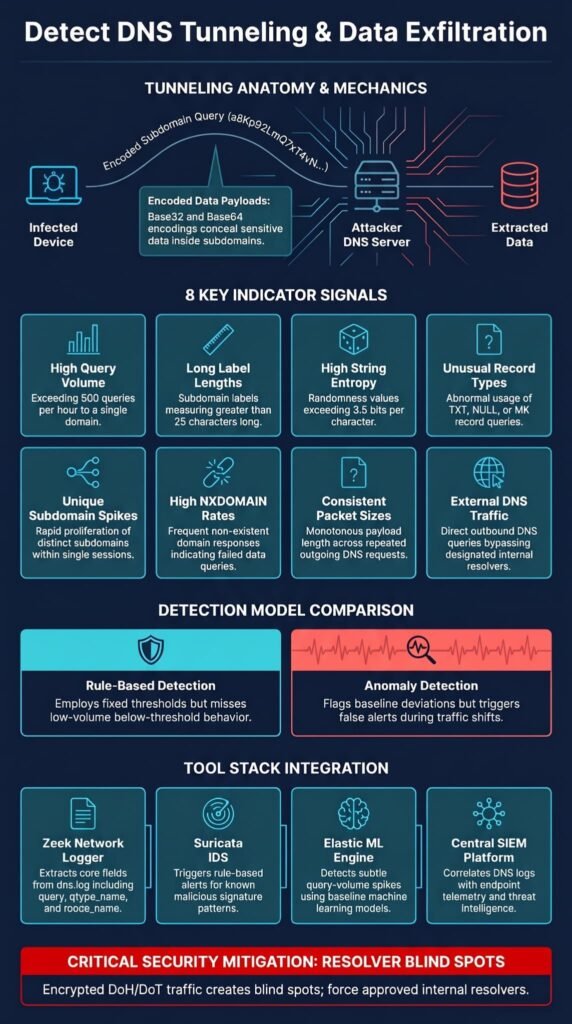
For example, attackers may use Base32 or Base64 to encode data in a subdomain. A DNS request could contain a long string before a domain controlled by the attacker. Their DNS server then receives the request and extracts the hidden data.
This technique supports command-and-control (C2) activity and data theft. An infected device may receive instructions through DNS responses or send sensitive information through repeated outgoing requests.
What DNS Traffic Patterns Indicate a Possible Tunneling Attack?
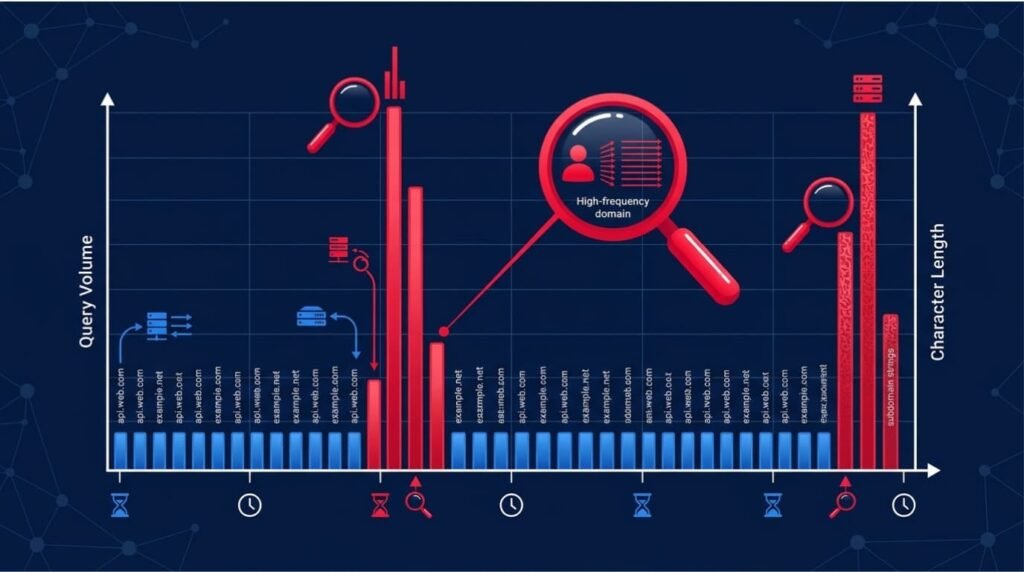
Unusual DNS query patterns can point to possible tunneling, especially when several warning signs appear at once. Security teams should check the source device, queried domain, record type, and number of requests to understand what is happening.
These indicators can help separate suspicious DNS activity from normal lookups.
| Detection indicator | Suspicious behavior |
| High query volume | One device repeatedly queries the same parent domain |
| Long subdomains | DNS labels contain unusually long encoded strings |
| High entropy | Subdomains contain random-looking characters |
| Unusual record types | Unexpected TXT, NULL, or MX query activity |
| Unique subdomains | Many different names appear under one root domain |
| High NXDOMAIN rate | Repeated requests target names that do not resolve |
| Consistent packet sizes | Repeated query and response sizes suggest automated activity |
| External DNS traffic | Devices send DNS requests directly to external servers |
For example, a device that sends hundreds of requests to an unfamiliar domain should be checked. The risk is higher when those requests also contain long, random-looking subdomains or unusual TXT records.
One indicator alone does not prove an attack. Content delivery networks, software updates, and cloud apps can also generate heavy DNS traffic. Check several indicators together before raising an alert. Combining these checks with broader DNS security measures, such as DNS filtering and DNSSEC validation, can strengthen protection against other DNS-based threats.
How Can Security Teams Measure DNS Query Volume and Subdomain Entropy?
Security teams can track query frequency, label length, and character patterns to spot DNS activity that may point to tunneling. These measures help show when requests carry unusual data instead of simply looking up a website.
As noted by Computer Networks
“The extracted statistical features are then combined with the token embeddings produced by the Hierarchical Bidirectional Transformer module, expert activation is guided by statistical characteristics. This design allows different experts to specialize in distinct traffic regimes, for example, high-entropy long queries versus short benign queries, thereby improving separability where semantic cues are weak.” – Computer Networks
The thresholds below can be used as starting points for an investigation. They are not fixed rules. Each network should set its own baseline based on normal DNS activity.
| Metric | Suggested suspicious threshold |
| Subdomain label length | More than 25 characters |
| Query volume | More than 500 queries per hour to one domain |
| Subdomain entropy | More than 3.5 bits per character |
| Query rate | More than 100 queries in five minutes to one parent domain |
Shannon entropy measures how random or unpredictable a string of characters looks. A normal hostname often contains familiar words. Encoded data may look more random, which can make high entropy a useful warning sign.
For example, compare mail.department.example.com with a8Kp92LmQ7xT4vN…example.com. The second name looks less familiar and may need a closer look. However, its appearance alone does not confirm an attack.
Track queries per minute, unique hostnames, and repeated requests to the same parent domain. A sudden increase from one device may be more significant than high DNS activity across the entire network.
How Do Statistical Analysis and Anomaly Detection Identify DNS Tunneling?
Statistical analysis and anomaly detection help security teams find DNS activity that does not match normal network behavior. Rather than checking only for known malicious domains, these methods look at how each device sends DNS requests.
The first step is to build a baseline of normal DNS traffic. Analysts can track each device’s average query rate, common record types, number of unique domains, and usual subdomain lengths. They can then compare new activity with these past patterns.
For example, a workstation may usually make only a few DNS requests to business apps. If it suddenly sends hundreds of queries per minute to one unfamiliar domain, the change may trigger an alert.
Rule-based detection and anomaly detection work in different ways:
| Detection method | How it works | Main limitation |
| Rule-based detection | Flags activity that exceeds fixed thresholds | May miss unusual behavior below the threshold |
| Anomaly detection | Finds changes from a host or network baseline | Can generate false alerts when normal activity changes |
A 2023 study available through the National Library of Medicine’s PubMed Central reviews DNS tunneling detection methods and traffic patterns. It highlights why teams should look beyond domain reputation and examine how DNS requests behave.
However, baselines need regular updates. New apps, cloud services, and network changes can affect normal traffic. We use threat models and risk analysis tools to help teams assess these changes and identify possible security gaps.
How Does Machine Learning Improve DNS Tunneling Detection?
Machine learning helps security teams review large amounts of DNS traffic and spot patterns that manual checks or fixed rules may miss. These models study query frequency, domain details, and communication patterns to flag possible tunneling.
Research from IEEE Xplore shows
“Traditional detection methods tend to focus on single-feature heuristics or signature-based detection, which have difficulty generalizing to new attack patterns. This paper presents a multi-aspect behavioral approach to DNS tunneling detection that combines statistical, temporal, structural, and semantic analysis with machine learning. The system analyzes PCAP traces and derives features including entropy, query volume trend, timing variation, payload structure, and subdomain semantic shift.” – IEEE Xplore
A model learns from normal DNS traffic or labeled examples. It then checks new requests for warning signs, such as long subdomains, high entropy, repeated queries, and unusual record types. Some tools use these findings to raise alerts or block suspicious traffic.
Infoblox is one example of a company using machine learning to detect DNS tunneling. In its published results, it reported 99.9% precision, 99.5% recall, and a 99.7% F1 score. These figures reflect its own tests and do not guarantee the same results for every network.
However, machine learning still depends on good training data and accurate models. We recommend treating automated alerts as signs that need further review, not proof of an attack. Analysts should check the source device, queried domain, and related traffic before confirming an incident.
How Can Elastic ML Rules Flag Suspicious DNS Queries?
Elastic ML rules can flag unusually high DNS query volumes to one parent domain, which may indicate command-and-control (C2) activity or data theft.
Its DNS tunneling detection rule analyzes DNS events to identify repeated queries that may be difficult to spot in individual log entries.
Analysts can investigate these alerts with a few simple steps:
- Collect DNS events from monitored devices and resolvers.
- Check for devices that repeatedly query the same parent domain.
- Review the queried names, source IP addresses, and request frequency.
- Compare the activity with the device’s normal DNS behavior.
- Check related endpoints and network events for other warning signs.
A high query count does not always mean an attack is happening. Some legitimate apps need to send frequent DNS requests.
We recommend checking the domain, source device, query patterns, and related activity before taking action. Our threat models and risk analysis tools can help teams assess possible attack paths and decide which risks need attention.
What DNS Logs and Network Fields Should Analysts Monitor?
Analysts need DNS query details, source information, response data, and timestamps to investigate possible tunneling. Basic logs show which domain a device requested, but extra details help explain unusual activity. Regular monitoring of DNS query logs also helps teams identify unusual request patterns and investigate suspicious activity before it develops into a larger incident.
A good DNS monitoring setup should collect:
- Source IP address: Identifies the device sending the request.
- Destination IP address: Shows where the query goes.
- Queried domain and FQDN: Shows the full hostname requested.
- DNS record type: Identifies A, AAAA, TXT, MX, and other types.
- Response code: Helps spot repeated NXDOMAIN results or unusual replies.
- Timestamp and query frequency: Shows when and how often requests occur.
- Query and response sizes: Helps identify large or repeated exchanges.
- Client hostname and resolver: Links activity to a device and DNS service.
Zeek provides detailed DNS data through its protocol logs. Its dns.log includes fields such as query, qtype_name, rcode_name, id.orig_h, and answers. Analysts can use these details to count requests and compare activity across devices.
FIRST’s DNS Abuse Special Interest Group provides stakeholder guidance on DNS tunneling, infiltration, and exfiltration detection
How Can Zeek and Suricata Help Detect DNS Exfiltration?
Credits: Corelight
Zeek collects detailed DNS data, while Suricata checks network traffic for suspicious activity using detection rules. Using both tools gives security teams a clearer view of DNS behavior across a network.
| Tool | Main role | Detection value |
| Zeek | DNS metadata and protocol logging | Helps analyze traffic patterns over time |
| Suricata | Network intrusion detection | Flags suspicious traffic that matches configured rules |
Zeek records DNS queries and responses for further review. Its logs help analysts spot long subdomains, repeated requests, high NXDOMAIN rates, and unusual record types.
Suricata works differently. It inspects network traffic and raises alerts when activity matches its detection rules. This can help teams find unexpected DNS communication and other signs of a possible attack.
Use both tools together for broader visibility. Zeek provides detailed DNS logs, while Suricata inspects traffic for activity that matches configured rules. Send their events to a central monitoring platform so analysts can correlate findings across systems.
Can DoH and DoT Hide DNS Tunneling From Internal Resolver Logs?
Yes. DNS over HTTPS (DoH) and DNS over TLS (DoT) can make DNS activity harder to monitor when devices send encrypted requests outside the organization’s approved resolvers.
DoH sends DNS requests over HTTPS, while DoT protects them with TLS encryption. Both help protect DNS queries from interception. However, when users or applications connect to external resolvers, those requests may not appear in the organization’s normal DNS logs.
This creates a blind spot if an infected device uses an external encrypted resolver. Security teams may miss the requested domains, making DNS tunneling harder to detect.
Organizations can reduce this risk by:
- Directing device DNS traffic through approved resolvers.
- Monitoring connections to external DNS services.
- Checking device settings for unauthorized DoH or DoT use.
- Blocking unapproved DNS paths through network policies.
- Comparing endpoint and network logs when DNS records are incomplete.
Encrypted DNS is not a threat by itself. It protects user privacy and data in transit. The concern is unmanaged traffic that bypasses organizational security controls. Include external DNS connections in regular network reviews.
How Should Analysts Investigate a Suspected DNS Exfiltration Alert?
Analysts should identify the source device and examine its DNS activity to determine whether an alert requires further investigation.
Follow these steps when checking a possible attack:
- Find the source: Record the device name and IP address sending the DNS requests.
- Check the domain: Review the main domain, subdomains, and threat reports.
- Review query patterns: Check request volume, query length, record types, and unusual names.
- Check DNS replies: Look for repeated errors or unexpected responses.
- Compare activity: Review DNS logs with device alerts and other network events.
- Stop confirmed threats: Follow your response plan to block harmful traffic and check the affected device.
For example, a device that keeps sending long TXT queries to an unknown domain needs a closer look. The risk is higher if its logs also show an unknown program or unusual network traffic.
AWS GuardDuty can provide extra alerts in supported AWS environments. Check these alerts alongside DNS logs. Don’t treat one alert as proof of data theft.
Avoid blocking a domain or device based on one alert alone. Review all available evidence first. Our threat models and risk analysis tools can also help teams find weak points and plan their response.
How Can SIEM Correlation Improve DNS Tunneling Detection?
SIEM correlation brings DNS, endpoint, network, and threat intelligence data together. This gives analysts more context than DNS logs alone and helps them understand whether unusual requests are part of a larger attack.
A DNS query may look suspicious without showing whether data is leaving the network. By checking other security records, we can see what the device was doing at the same time.
| Data source | What analysts can correlate |
| DNS logs | Query volume, entropy, record types, and response codes |
| Endpoint telemetry | Suspicious processes and device activity |
| Network logs | External connections and traffic patterns |
| Threat intelligence | Known malicious domains and infrastructure |
| Change records | Recent DNS or network setting changes |
These values need to be tested against normal network traffic. Content delivery networks, cloud apps, and backup tools can also generate many DNS queries. We recommend combining several warning signs before raising an alert.
How Can Security Teams Reduce False Positives in DNS Tunneling Alerts?
Baseline tuning and multi-signal detection help teams tell normal DNS activity from possible tunneling. A high number of queries alone does not mean a device is sending stolen data.
Content delivery networks (CDNs), SaaS platforms, and backup tools can all create frequent DNS requests. Security teams need to understand this activity before setting alert rules. The same care applies when choosing secure DNS providers, since their filtering features, logging policies, and threat protection can affect network visibility.
Use these checks to improve detection:
- Identify trusted CDNs, SaaS platforms, and business apps.
- Set normal query patterns for each device and network segment.
- Account for backup tools, automated processes, and scheduled tasks.
- Check query volume alongside entropy, label length, and record types.
- Review repeated alerts before adding domains or devices to allow lists.
For example, a server may send hundreds of DNS requests during a scheduled backup. This may be normal for that server, even if the activity exceeds a general alert limit.
Update baselines whenever applications or network settings change. Review unusual activity against the latest baseline to reduce false positives without overlooking suspicious behavior.
What Should Organizations Monitor to Detect DNS Tunneling at Scale?
Organizations need clear DNS visibility, automated alerts, and regular checks to spot suspicious communication. As the number of devices and DNS requests grows, reviewing logs by hand becomes harder.
DNS-OARC has published a presentation on detection, analysis, and measurement of DNS tunneling techniques, covering payload analysis, traffic analysis, entropy, and NXDOMAIN patterns.
A scalable monitoring process should include:
- Send endpoint DNS requests through approved internal resolvers.
- Store DNS metadata in a central SIEM platform.
- Use behavior-based detection across devices and domains.
- Watch for devices sending DNS requests directly to external servers.
- Review DoH and DoT policies and device settings.
- Use threat intelligence to check suspicious domains.
- Update detection rules as network activity changes.
Automation helps identify unusual DNS patterns across large networks. Analysts can prioritize alerts that combine several warning signs, such as high query rates, long subdomains, and unexpected external connections.
How Does DNS Tunneling Detection Fit Into a Broader Security Strategy?

DNS tunneling detection works best alongside endpoint monitoring, network inspection, threat intelligence, and incident response. These controls help confirm whether suspicious DNS activity is linked to a compromised device or data theft.
DNS monitoring reveals unusual outbound requests, while endpoint and network tools provide evidence about device compromise and possible data transfers.
A layered security plan should include:
- Endpoint detection: Check suspicious processes and activity on affected devices.
- Network controls: Block unauthorized outbound DNS traffic and direct connections to external resolvers.
- Threat intelligence: Check suspicious domains and related systems against known threat data.
- SIEM correlation: Connect DNS alerts with endpoint, network, and security events.
- Incident response: Investigate confirmed threats and contain affected devices.
- Encrypted DNS monitoring: Review DoH and DoT settings to reduce gaps in network visibility.
Network Threat Detection supports this process with threat modeling and risk analysis tools. These capabilities help security teams review attack paths and identify network weaknesses that DNS monitoring alone may not reveal.
FAQ
How Can Security Teams Distinguish Malicious Outbound DNS From Normal Traffic?
Compare outbound DNS traffic with normal DNS lookups from the same devices and network segments. Check queries per minute, request timing, domain length, and record types.
A sudden increase in DNS requests from one infected client may indicate data exfiltration. Anomaly detection can flag these changes, but analysts must examine the source, destination, and query content before confirming an incident.
How Can Analysts Identify DNS Traffic Used for Command-and-Control Communication?
Attackers can use DNS for C2 communication to send instructions to an infected client or receive stolen data. Look for repeated requests to unusual domains, consistent query intervals, and encoded subdomains.
Check whether multiple devices contact the same suspicious domain. These patterns can indicate command-and-control activity and help analysts investigate communication between compromised devices and attacker-controlled servers.
What Role Do Domain Generation Algorithms Play in DNS Tunneling?
Domain Generation Algorithms (DGAs) create numerous domain names that malware can use to locate command-and-control servers. Monitor unusual domain patterns, repeated failed lookups, and requests to recently registered domains.
DGA activity does not confirm DNS tunneling, but it can indicate malware communication. Compare these findings with endpoint alerts and network logs to determine whether the infected device is compromised.
How Should Security Teams Investigate DNS Anomalies Across a Target Network?
Identify the suspected infected client, record its IP address, and list the destination domains involved. Compare its DNS activity with normal behavior across the target network. Review query frequency, timestamps, and related endpoint events.
Check whether other devices show similar patterns. This process helps analysts determine whether the suspicious activity affects one device or indicates a wider network compromise.
Can Cloud-Based Monitoring Add an Extra Layer of DNS Threat Detection?
Cloud-based monitoring can provide an extra layer of visibility into DNS activity across supported cloud environments. Review alerts for unusual outbound DNS requests, suspicious domains, and possible data exfiltration.
Confirm which workloads, devices, and network resources the monitoring service covers before relying on its alerts. Combine cloud findings with endpoint data and network logs to investigate suspicious activity.
Turn DNS Tunneling Detection Into Actionable Security Alerts
Effective DNS tunneling detection requires more than checking domain reputation. Security teams should combine query analysis, traffic monitoring, and behavioral detection to identify hidden communication and investigate possible data theft.
Network Threat Detection helps security teams investigate network risks through real-time threat modeling, automated risk analysis, and attack path simulations. These tools can help identify weak points and improve security planning. Explore Network Threat Detection to strengthen your network security strategy.
References
- Kuang, Shilei, Weiping Wang, Yongfei Ye, and Lingzhi Peng. “HHBT: DNS Tunneling Detection via Hybrid Hierarchical Bidirectional Transformer.” Computer Networks, February 1, 2026. Accessed November 3, 2026.
- “IEEE Xplore Document 11583483.” IEEE Xplore. Accessed November 3, 2026.