
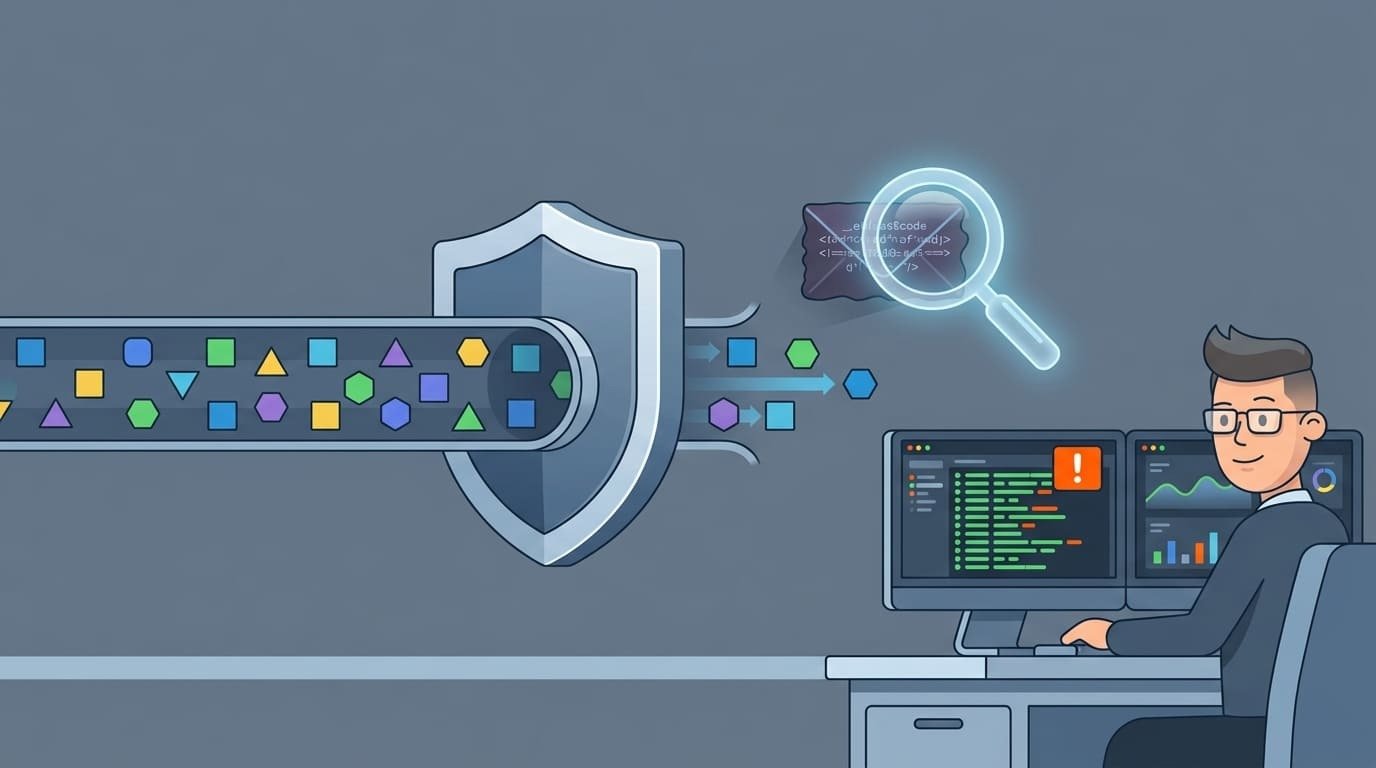
WAF bypass detection helps identify malicious requests that slip past web application firewall rules. Attackers use URL encoding, altered payloads, and HTTP parsing differences to hide harmful traffic from security filters. And once these requests reach an application, existing defenses may not be enough.
In 2026, Network Threat Detection focuses on request normalization, protocol inspection, and application-layer monitoring to catch these gaps. Security teams need to recognize unusual request patterns and understand how attackers exploit filtering weaknesses. Read on to learn how WAF bypass attempts work and how to detect them before they expose your applications.
Quick Reads: Key Insights for Detecting WAF Evasion
- WAF bypasses exploit HTTP interpretation gaps through encoding, HPP, and content-type manipulation.
- Compare raw requests, normalized inputs, and backend logs to detect bypasses and exposed origin servers.
- Test WAF robustness with OWASP WAF-A-MoLE, monitor suspicious traffic, and fix application vulnerabilities.
Why Are WAF Bypasses Primarily Parsing Problems?
Most WAF bypasses come down to one thing. The WAF reads a request one way, and the app reads it another way. The WAF thinks the request is fine and lets it in. The app understands it differently and acts on it.
A WAF checks traffic against rules and known patterns. The app server may clean up or decode that same traffic before using it. Take URL encoding. A character written as a percent code can look harmless to a rule that matches plain text. Once the server decodes it, it becomes a normal part of the path.
A clear real-world example is CVE-2026-35273 in Oracle PeopleSoft. Security filters configured to block literal paths like /PSEMHUB/ failed when attackers used the percent-encoded path /%50SEMHUB/. The backend application normalized %50 back to P and processed the request anyway.
Even so, the idea is a good one. When our team reviews a setup, we line up what the WAF logged next to what the backend got. We’ve learned not to trust a “blocked” label by itself. The strangest cases we see are requests marked blocked that still show up as activity on the backend.
In a recent analysis by ACSAC
“A 2025 ACSAC paper on WAF evasion confirmed 1,207 bypasses across five major WAFs (AWS, Azure, Cloud Armor, Cloudflare, and ModSecurity) by exploiting parsing discrepancies in headers and body segments, and found that over 90% of tested websites accepted interchangeable content-types, demonstrating how broadly applicable these gaps are in practice .” – ACSAC
Our first checks usually include differences between the raw URL path and the cleaned-up path, reverse proxies and app servers that decode requests in different ways, parameters that take on a new meaning after passing between systems, and backend activity for requests that were logged as blocked.
Which WAF Evasion Techniques Should Security Teams Recognize?
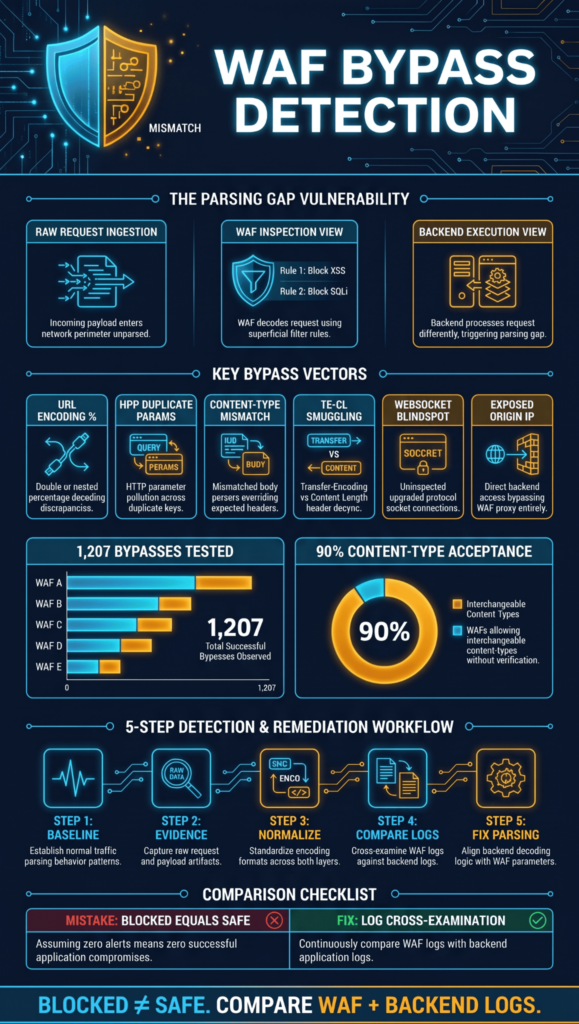
WAF evasion means changing how a request looks so a rule misses it, while the harmful part still works. Defenders often group these tricks into three types: payload-level, request-level, and protocol-level. Each type causes its own kind of trouble.
How does encoding and obfuscation affect detection?
Encoding changes how an input looks, but not what it does. An attacker might use URL encoding, HTML entities, Unicode, hex, or base64, so that the WAF reads one version of the input while the application ends up with another. Signs to watch for include double URL encoding and odd percent-encoded characters, mixed upper and lower case, extra spaces, and inline comments, as well as Unicode characters that look like normal letters, encoded SQL injection and XSS payloads, and payloads with shuffled syntax or random keywords.
A rule that catches a common SQL keyword can miss a different spelling of the same thing, which is why we test rules against the cleaned-up input and not only the raw text. If a team only matches raw strings, gaps will show up.
How does HTTP Parameter Pollution evade inspection?
This trick uses repeated parameter names. Say a request sends two values for one parameter. The WAF may only look at the first. The backend might use the last one, or stick them together. So the bad value sits in the spot nobody checked.
Research from ACNS shows
“Research on HTTP Parameter Pollution (HPP) published at ACNS 2012 describes how attackers exploit web applications by manipulating query parameters of requested URLs, and proposes an Application Request Cache that rejects requests whose URL schemas do not match known benign patterns .” – ACNS
In our testing, we keep an eye out for duplicate parameter names, query parameters in a strange order, different handling of first and last values, values split across parts of the request, and proxy and backend parsing that doesn’t match. How many parameters there are doesn’t matter much. What matters is whether every layer reads them the same way.
What other request manipulation methods matter?
Attackers can also manipulate content types and protocol details. These tricks target how a security device reads the body, the headers, and where a message starts and stops. Some common ones include JSON and XML bodies that parse differently across systems, tampered multipart boundaries, chunked transfer encoding and content-length mismatches, request splitting and CRLF injection, unusual HTTP methods and malformed requests, and request smuggling through TE-CL or CL-TE mismatches.
These matter to us because a reverse proxy, a WAF, and a backend server all have to work together. Proper WAF integration with web server infrastructure helps maintain consistent request inspection across these layers. Even a small mismatch between two of them can open a hole.
How Can Security Teams Detect Encoding and Normalization Gaps?
To find these gaps, compare the original request with its decoded and cleaned-up versions, and look at how the app behaved only after that. We recommend saving three copies of any suspicious input: the raw request, the version the WAF cleaned up, and the values the backend actually used. With all three side by side, mismatches are much easier to spot.
Industry WAF deployment guidance emphasizes multi-stage URL decoding and smart path normalization, so that altered or obfuscated payloads are identified before inspection logic is applied. The big idea is simple: inspect input the way the app will actually use it.
The first signs we check for are repeated percent-encoding sequences and unexpected Unicode characters. We also look for HTML entities and hex encoding, as well as gaps between the original and cleaned-up URL path. Base64 strings in places they don’t belong are another red flag, along with odd changes in SQL or JavaScript syntax.
Which normalization checks deserve priority?
This table matches each kind of input with what we like to monitor.
| Input Category | Common Manipulation Technique | Detection Focus |
| URL Paths | Percent encoding and double URL encoding | Compare raw and decoded URL paths |
| Unicode | Alternative character representations | Identify unexpected or inconsistent Unicode characters |
| HTML | HTML entity encoding | Check whether entities are decoded consistently |
| SQL and JavaScript | Inline comments, altered syntax, and character substitutions | Detect changes that may hide injection payloads |
| HTTP Parameters | Duplicate or reordered parameter values | Compare how the WAF and backend process repeated parameters |
| JSON and XML | Nested structures and inconsistent parsing | Verify that request bodies are interpreted consistently |
| HTTP Headers | Unusual formatting and conflicting values | Identify discrepancies in header interpretation |
Cleanup should happen in a set order, and it needs a limit. A system that keeps decoding the same input over and over can cause new problems. We keep the original request as evidence and make a separate cleaned-up copy for inspection. That keeps the investigation solid and the evidence intact. Our threat models and risk analysis tools are built to help teams spot this kind of gap before attackers do.
Note: lines like “when our team reviews a setup” and “in our testing” should reflect what your team really does, so change them if they don’t fit.
How Does HTTP Parameter Pollution Reveal WAF Weaknesses?
Picture a request that sends the parameter account twice, with two different values. The WAF might read the first one, while the app reads the last one. The WAF says “looks fine,” but the app is working with something else entirely. That gap is HTTP Parameter Pollution.
On one assessment, our team found a site whose filter rules were solid. The problem was that the proxy and the framework didn’t agree on which duplicate to use. Nobody had written it down, so nobody knew.
There are several things worth checking. Start by looking for repeated parameter names in query strings and request bodies, then test whether the first value, the last value, or all of them get used. See how your reverse proxy handles repeats, and find out if the backend framework merges values or overwrites them. Finally, match any strange requests to app errors and odd responses.
This matters most on pages that use repeated parameters, like filters or account pickers. If the WAF and the app pick different values, the security check never covers what the app actually does. So it’s a consistency problem as much as a bad-signature problem.
We tell teams to write down how each important endpoint handles parameters, and then to make sure the WAF follows those same rules.
Why Can Content-Type and Protocol Manipulation Defeat WAF Inspection?
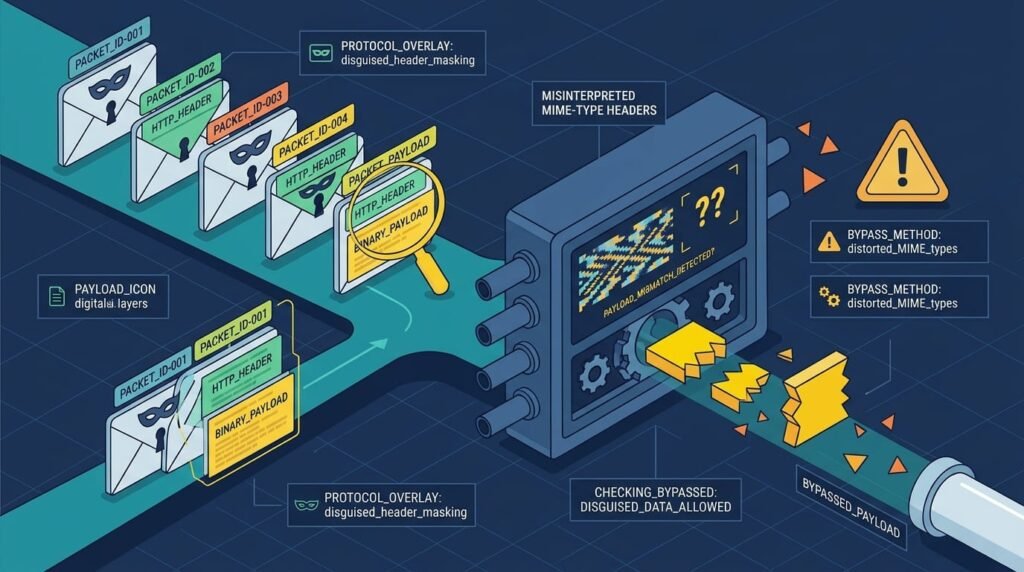
Sometimes a WAF and a backend server read the same request in two different ways. That can happen because a request carries a lot more than a URL. The body, the headers, the encoding, and the message boundaries all change how an app behaves.
What content-type inconsistencies should teams monitor?
JSON, XML, and multipart requests need the closest look, because different parsers read them differently. A body might contain odd nested data, or the content-type header might say one thing while the body says another. The WAF might check one version while the backend uses the other.
In the risk reviews we do, there are a few signs we point teams toward. Sudden changes in JSON structure are one, and strange XML namespace or entity handling is another. We also watch for multipart boundaries that don’t match, and for wrong or conflicting content-type headers.
Finally, character encodings that nobody expected deserve a second look, since they often hint that two components are interpreting the same body in different ways.
How can protocol manipulation affect visibility?
Protocol problems come from how HTTP messages travel between servers. RFC 9112 is the standard for HTTP/1.1, and it explains how messages should be split up and read, which makes it a good place to start learning.
Teams should watch for chunked transfer encoding that looks off, and for Content-Length and Transfer-Encoding headers that conflict. Signs of TE-CL and CL-TE desync deserve attention too, as do unusual headers and methods, badly formed request framing, and HTTP TRACE left turned on.
Request smuggling is the one we worry about most. It happens when a reverse proxy and a backend disagree on where one request ends and the next begins. One bad request can then change how the traffic behind it gets read.
For our clients, the goal is simple. The proxy, the WAF, and the app server should all agree on where requests start and stop, and if something is unclear, they should reject it.
Can WebSocket Traffic Create a WAF Inspection Blind Spot?
It can. A WebSocket starts as a normal HTTP request, and many WAFs only look at that first step. After the handshake, the connection stays open and data moves both ways. Chat apps, dashboards, and live tools all work like this.
The OWASP WebSocket Security Cheat Sheet notes that regular HTTP access logs often show only the first upgrade request. They miss the messages that come after. OWASP also says to confirm your WAF keeps inspecting past the handshake.
We hit this ourselves while looking at a dashboard app. The logs looked clean, but they only showed the handshake. We couldn’t see anything that happened next, and that turned out to be the biggest hole in the setup.
Here is what we suggest checking. Start by finding out whether WebSocket messages get inspected at all, and check the Origin header when the connection opens. Watch for strange message shapes and signs of injection, and validate every message on the server. Log logins, permission checks, and odd connection events, and set limits on message size and on how often messages can be sent.
Say bad input shows up an hour after a normal-looking connection started. If you only watched the handshake, you’d never see it. We like to pair protocol-aware monitoring with checks inside the app. An approved handshake doesn’t mean every message after it is safe.
How Does Direct-Origin Access Undermine WAF Protection?
A WAF only protects you when traffic actually goes through it. If an attacker can reach your app server directly, the WAF never sees the request. A reverse proxy or CDN checks traffic first, but an exposed origin IP address gives people a side door.
It usually happens when a company counts on the outer filter and never locks down the origin. We’ve seen teams spend months tuning WAF rules while the origin server sat open to the whole internet.
Which origin exposure indicators matter?
Our team looks for origin IP addresses that anyone can reach, since a server that answers the open internet can be hit directly and skip the WAF entirely. We also look for requests coming from outside the approved proxy networks, and for odd combinations of Host header and SNI, which often point to traffic that was never meant to reach the app.
On the DNS side, we review the records that show how the setup fits together and hunt for old ones that still point to forgotten servers. Certificate transparency records are another source, because they can reveal extra subdomains nobody remembered to lock down. Finally, we check for temporary firewall exceptions that nobody removed.
Attackers can find origins by listing subdomains, digging up old DNS records, and studying certificates. We use the same tricks in authorized attack surface assessments, so we know how well they work.
How should teams strengthen origin protection?
A few steps go a long way. Start by only allowing origin traffic from approved proxy networks, and enforce the Host and SNI values you expect so that anything unusual gets rejected. Watch for anyone hitting the origin directly, and review firewall rules and temporary exceptions so nothing lingers past its purpose. It also helps to audit your DNS records and exposed services, and to keep track of who owns your TLS certificates and origin servers.
For example, a company running nginx behind a reverse proxy can allow connections only from its trusted upstream servers, not from anywhere.
A WAF should never be the only thing guarding a server. Network access rules give you a backup layer when the proxy gets skipped.
Why Do Signature-Based WAF Rules Fail Against Obfuscated Payloads?
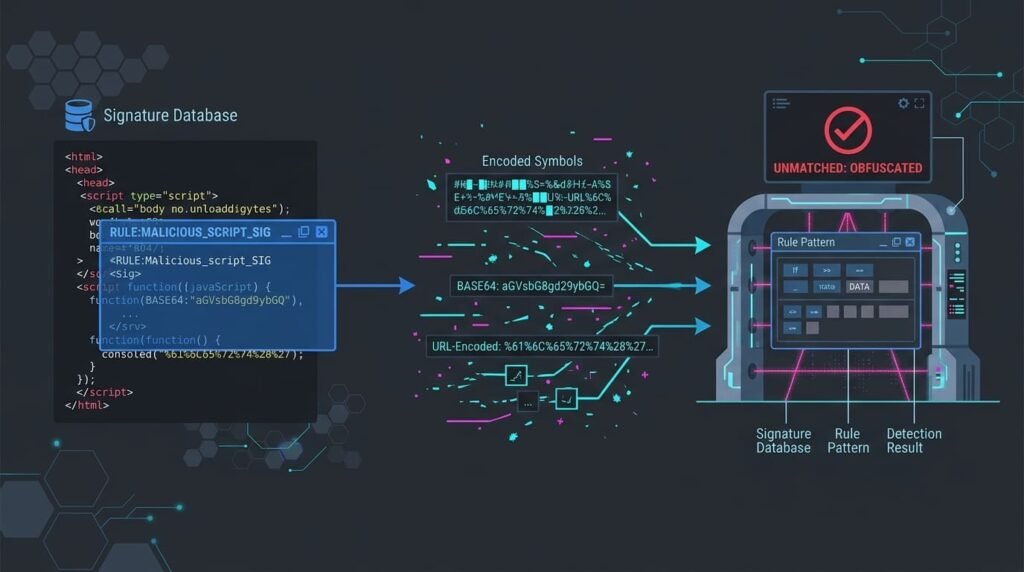
Signature-based WAF rules miss attacks when the request looks different but does the same thing.
A WAF checks traffic against a list of known bad patterns. That list can include exact text, regular expressions, and known attack signatures. It catches the common stuff well, like SQL injection, cross-site scripting (XSS), and command injection. But if an attacker rewrites the request so it no longer fits the pattern, the rule stays quiet. The app still understands the request, so the attack still works.
Attackers have a few easy ways to do this. They can mix up capital and lowercase letters, use odd characters in place of spaces, tuck comments inside a command, or encode certain characters. To the WAF, the request looks new. To the app, it is the same old attack.
When we go through WAF logs with customers, we see this a lot. The plain version of an attack gets blocked. A slightly reworded version slips by. Only the wording changed.
This list shows where each detection method falls short:
- Literal matching: Misses other ways to write the same thing.
- Static signatures: Can’t predict every change.
- Regex filtering: Only works for the syntax the rule writer expected.
- Behavioral detection: Needs good knowledge of the app.
- Normalized inspection: Only works if the parsing is right.
- Anomaly-based detection: Can flag normal traffic by mistake.
What does OWASP recommend?
The OWASP Cross Site Scripting Prevention Cheat Sheet says the real fix is to close the hole that allows XSS, and a WAF can’t do that alone. Its advice boils down to a few principles: don’t depend only on WAF signatures, check input based on where it will be used, encode output the right way for where it ends up, fix the XSS and injection bugs in the code, and test the app by itself, without the WAF in front of it.
Signature rules are still worth having. They are a fast first layer that stops known threats. The danger comes when a team thinks that layer is all they need.
Our approach mixes cleaned-up request checks, behavior checks, and strong app security. We also build threat models and risk analysis tools. They help teams see which apps and pages attackers are most likely to go after, so they know where to look harder when a request doesn’t match any known pattern.
How Can Security Teams Build an Effective WAF Bypass Detection Workflow?
Credits: NahamSec
A good detection workflow connects each WAF decision to what the request really looked like and what the backend did with it.
Just because a request was blocked doesn’t mean the attack failed. Teams need to check whether the traffic still reached something it shouldn’t have. We have found that the best clues show up when you put the WAF log right next to the app log. Sometimes the WAF says “blocked” while the app log shows the request ran anyway.
Here are the steps we suggest. They tie together network monitoring, WAF data, and app logs.
What steps should an investigation include?
A solid WAF investigation goes beyond reading alerts. It compares what the WAF saw with what the app actually did. These steps help you spot evasion attempts and close the gaps they exploit:
- Set a baseline.
Write down what normal traffic looks like. Track status codes, headers, body sizes, how often requests come in, and how fast responses are. When monitoring response times, also account for VPN encryption overhead, which can affect network performance. Once you know normal, strange changes are easier to spot. - Save the evidence.
Keep the raw HTTP request, the key headers, the time, where it came from, and what the WAF decided. Protect any private data while you collect it. - Clean up the input.
Compare the original request to a decoded, standardized copy. Look at the URL path, the query parameters, the headers, and the body. - Look for oddities.
Watch for repeated parameters, unusual encoding, strange Unicode characters, broken request bodies, and requests whose structure doesn’t make sense. - Check the app logs.
See if a request the WAF blocked still caused errors, app activity, or strange responses on the backend. - Confirm what happened.
Find out whether the suspicious request reached a protected part of the app. Always compare the WAF’s decision with what the app actually did. - Fix the problems.
Repair any mismatch in how requests are parsed, lock down exposed servers, update your rules, and patch bugs in the app.
Which indicators should trigger investigation?
These signs deserve a closer look: a WAF block followed by unexpected backend activity, a suspicious request that gets a successful response, encoding or cleanup oddities that keep showing up, sudden changes in response size or speed, attempts to reach the origin server directly, signs of HTTP desynchronization, and strange app errors right after a suspicious request.
It also helps to bring all of these events into one monitoring view. Network Threat Detection works well as a first layer here. It spots suspicious network activity and links odd traffic to what is happening in the app. When we line that up with WAF logs and backend data, we get a much clearer picture than any one alert could give us.
Which Tools Help Validate WAF Detection Capabilities?
Testing tools show whether a WAF still catches the same bad input when it is written in a different way.
The safest place to test is a controlled environment. Engineers can find gaps there without putting live apps at risk. A few trusted tools and resources can help. OWASP WAF-A-MoLE tests how well a WAF handles small changes to input, while Burp Suite lets you inspect HTTP requests closely. Application logs show what the backend really did, and WAF telemetry shows rule decisions and detection events. Broadcom’s WAF guidance rounds things out by explaining URL decoding and path parsing issues.
How should teams use these tools responsibly?
OWASP WAF-A-MoLE is a good place to start. It makes small, guided changes to input and checks whether the WAF still catches it. Teams can use it to see if their rules hold up when suspicious input looks a little different.
When we do this kind of testing, we stick to some simple rules. We only test systems we have permission to test, and we record how normal requests behave first. We write down every gap we find, and we compare how the WAF reads a request with how the backend reads it. We track both false positives and false negatives, and we test again after every config change.
For penetration tests and red team work, the point is to see how much your defenses cover. Collecting a huge pile of bypass payloads doesn’t help anyone. We also check the full path a request takes, from the first stop to the app, instead of relying on ready-made SQL tamper scripts or payload lists.
What Operational Mistakes Make WAF Bypasses More Likely?
When a WAF gets bypassed, the WAF itself is often not the problem. The trouble usually sits around it. The device can work fine while an old firewall rule, a certificate nobody owns, or a gap in the logs leaves a way around it.
People who work in security keep pointing to the same two weak spots: origin servers that anyone can reach, and rules that nobody has touched in ages. Our team has run into both. During one review, a company had put a reverse proxy in front of its app. But the origin server still answered anyone on the internet, so an attacker could just walk past the WAF.
Here are the common mistakes and how to fix them:
- Exposed origin servers: Restrict trusted network access.
- Temporary bypass rules: Review and remove obsolete exceptions.
- Static signatures: Update detection policies.
- Missing backend logs: Centralize application telemetry.
- Inconsistent normalization: Standardize request parsing.
- Unowned TLS certificates: Establish certificate ownership.
- WAF-only remediation: Patch application vulnerabilities.
- Incomplete protocol inspection: Validate protocol coverage.
Why does operational ownership matter?
Security tools don’t look after themselves. Someone has to be in charge. A company should decide who checks the settings, who handles certificates, who approves exceptions, and who looks into incidents.
Picture a firewall exception added while an app is being fixed. The fix is finished, but the exception stays. A year later, no one remembers why it’s there. We’ve seen this happen more than once, and it’s easy to see why.
We suggest adding WAF settings to your regular security reviews, change process, and attack surface checks. Regular WAF policy updates also help ensure that outdated rules and signatures do not leave gaps in detection. When someone looks at these things on a schedule, small slips are much less likely to turn into real ways in.
How Should Organizations Measure WAF Bypass Detection Effectiveness?
A WAF is doing its job when the team notices suspicious requests and knows what those requests did to the app. A long list of blocked requests doesn’t tell you that. Plenty of attacks can hide behind a big number of blocks.
Which metrics should teams track?
Teams should set goals for each of these areas: the detection rate for suspicious requests, the false-positive rate, and how well WAF logs correlate with backend logs. They should also track direct-origin access attempts, detection coverage across HTTP and WebSocket traffic, and how consistently requests are normalized. On the response side, the goals should cover the time it takes to investigate suspicious requests and the time it takes to remediate confirmed vulnerabilities.
No one detection rate fits every WAF. The right target depends on how the app is built, what traffic it gets, how the tests are run, and which threats matter most. If someone promises a number that works for everyone, be careful.
What should a detection validation exercise include?
A solid test covers six areas. Encoding normalization checks that every layer interprets a request the same way. Duplicate parameters show whether repeated parameters are handled reliably. Content-type parsing confirms the body gets inspected consistently.
WebSocket coverage tells you whether you can see traffic beyond the handshake. Origin restrictions make sure nobody can reach the origin directly, and backend validation catches unexpected execution.
A team can set its own targets using approved test cases and past security data. One easy way is to count how many known test cases trigger a WAF alert, and how many of those also show up in the backend logs. When we do this, the gap between the two counts usually teaches us the most.
One last thing: a blocked request doesn’t prove the app is safe. We always check what happened further down the line before we call a test a pass.
How Can Teams Strengthen WAF Protection Beyond Signature Detection?

alt text: Detecting WAF bypass techniques evasion methods with layered threat intelligence, ML parsing, and anomaly detection for an analyst.
Good protection comes from several security layers working together. These include traffic inspection, consistent request parsing, network visibility, and secure application design. Relying on signatures alone is not enough because attackers can change how a request looks to avoid detection.
We see the WAF as one part of a broader security strategy. A good starting point is to normalize requests before inspection and make sure every infrastructure layer follows consistent parsing rules. Teams should also enforce strict input validation and use context-aware output encoding to prevent untrusted data from being interpreted as executable code.
Origin protection matters too. Restricting direct access to origin servers helps prevent attackers from bypassing the reverse proxy and WAF. Teams should also disable unnecessary HTTP methods and protocols, maintain centralized WAF and application logging, and inspect WebSocket messages where supported. Regular reviews of temporary security exceptions and timely application patching are equally important.
These layers work best when they share information. Network Threat Detection can help teams identify unusual traffic patterns and suspicious connections. We combine that visibility with WAF data, application logs, and controlled security tests to get a clearer picture of potential threats. Our threat modeling and risk analysis tools also help teams identify weak points and decide which risks need attention first.
Every finding should lead to a practical fix. For example, if two systems interpret the same request differently, the solution should address the parsing problem rather than add another WAF rule. We have seen teams spend months adding new rules when fixing one underlying parsing issue could have addressed the problem.
The goal is straightforward: every system should interpret a request consistently, from the reverse proxy at the front to the application server at the back. When these layers work together, security teams can reduce inspection gaps instead of repeatedly trying to catch the same issue with new rules.
FAQ
How can I test whether my WAF detects payload obfuscation?
Test your WAF with authorized security test cases that include URL encoding, double URL encoding, Unicode normalization, and character encoding tricks. Check whether the WAF blocks or flags each request. Then compare the results with application logs to confirm whether any suspicious payload reaches the backend. Document missed detections and retest after updating security rules.
What should I check when request smuggling is suspected?
Review reverse proxy and application logs for HTTP parsing discrepancies, request desynchronization, malformed HTTP requests, and conflicting content-length or transfer-encoding headers. Compare how each component interprets incoming requests. Look for unusual responses, unexpected request sequences, and differences between proxy and backend logs. Conduct further testing in an authorized environment before changing production configurations.
How can I tell whether attackers are bypassing the WAF?
Compare WAF logs with origin server access logs and network traffic records. Requests that reach your application without corresponding WAF entries may indicate a direct-to-origin bypass, an exposed origin server, or a logging gap. Review DNS records, firewall rules, and permitted source IP addresses. Restrict direct origin access to approved traffic routes and investigate unauthorized connections.
Which WAF log patterns may indicate an evasion attempt?
Look for repeated requests with modified payloads, unusual encoding, HTTP parameter pollution, inconsistent headers, and frequent changes in IP addresses or user agents. These patterns may indicate WAF detection evasion. Use behavioral analysis to identify suspicious activity across multiple requests. Compare WAF logs with application errors and authentication records to determine whether the traffic represents an actual attack.
How often should I review WAF rules and test for bypass vulnerabilities?
Review WAF rules whenever you change application code, API endpoints, proxy configurations, or network infrastructure. Schedule regular security testing to identify new bypass techniques, false negatives, and parser mismatches. Retest previously identified vulnerabilities after applying fixes. Keep records of test results, rule changes, and unresolved issues so your security team can track weaknesses and verify improvements over time.
What Should Security Teams Remember About WAF Bypass Detection?
When a WAF reports that a request was blocked, that doesn’t always mean the application is protected. Attackers can exploit differences in how security filters and backend applications interpret requests. That’s a real security gap.
Network Threat Detection can help your security team investigate suspicious traffic and identify gaps in application-layer visibility. Don’t rely on static WAF rules alone. Explore Network Threat Detection to strengthen your organization’s security visibility and support a more complete defense strategy.
References
- IEEE Xplore: Metadata could not be independently verified. Article title, author, and publication date are omitted to avoid fabricated citation details. IEEE Xplore document 11391774. IEEE Xplore. Accessed November 7, 2026.
- Athanasopoulos, Elias, Vasileios P. Kemerlis, Michalis Polychronakis, and Evangelos P. Markatos. “ARC: Protecting against HTTP Parameter Pollution Attacks Using Application Request Caches.” ACM Digital Library, 2012. Accessed November 7, 2026.