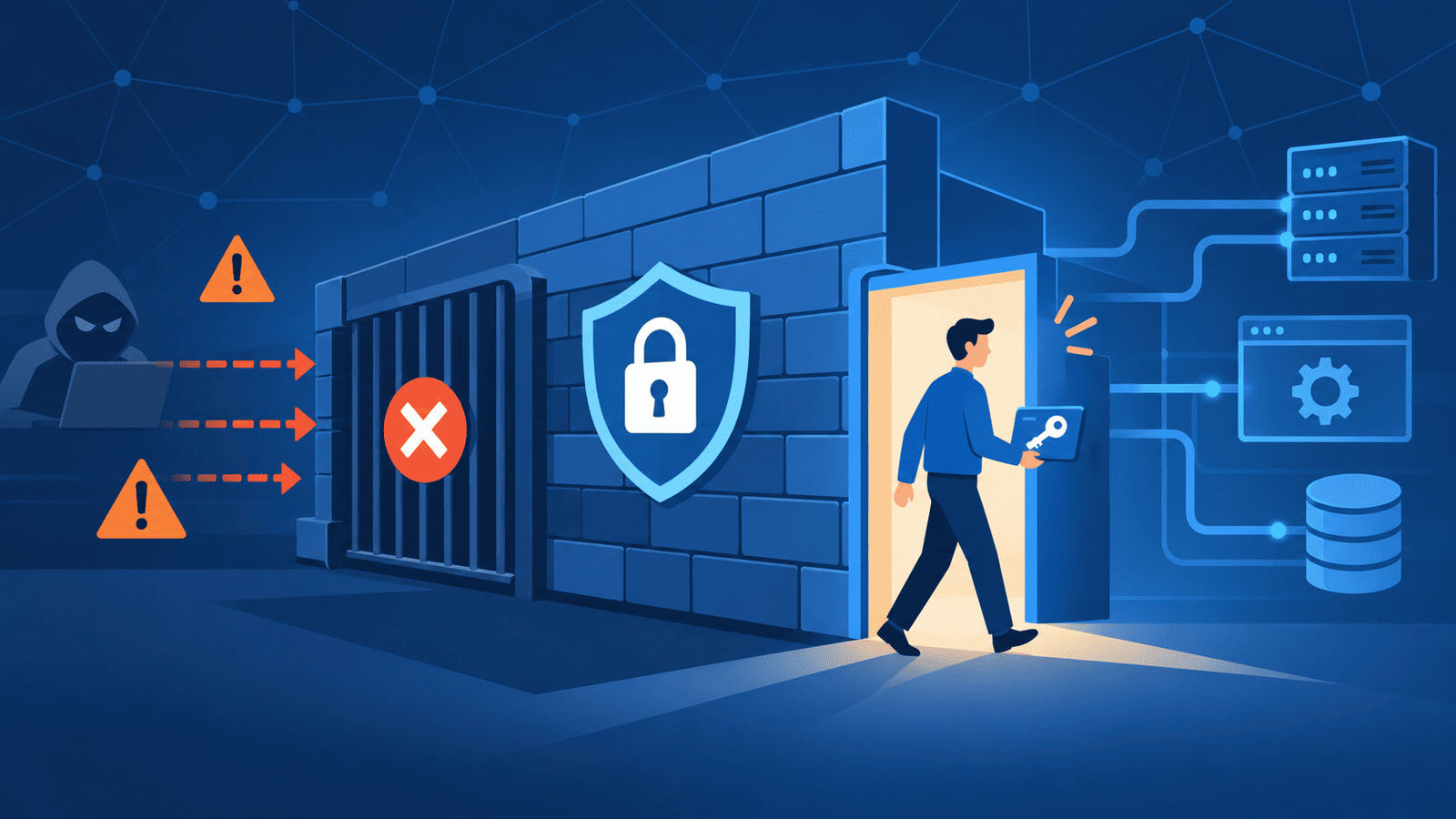
A Web Application Firewall (WAF) cannot stop every business logic flaw. It checks HTTP traffic, but it doesn’t understand how an application should handle user permissions, payments, or transactions. So, even valid requests can expose weaknesses in checkout processes, account access, and API workflows.
OWASP places responsibility for business logic security at the application level. Businesses need more than traffic filtering to address these risks. Network Threat Detection adds another layer by helping security teams spot suspicious activity and monitor network behavior. Keep reading to learn how to address these gaps in your security strategy.
Quick Guide: What WAFs Can and Cannot Protect Against
- Core distinction: Request filtering is not business authorization.
- Security implication: Applications need server-side validation and behavioral monitoring.
- Recommended approach: Combine WAF protection with Network Threat Detection and secure application design.
Why Can’t WAFs Detect Business Logic Flaws?
A WAF checks how a request looks. It doesn’t know your business rules, so abuse that looks normal can slip right through.
How does a WAF evaluate incoming requests?
A web application firewall watches the HTTP traffic going into and out of an app and looks for patterns that match known attacks. Most of the time it checks HTTP methods, headers, parameters, and request bodies. It also looks for patterns tied to SQL injection and XSS, odd strings, strange encoding, and broken requests, and it applies the security rules and attack signatures that someone has set up.
All of that is useful. But spotting bad input is not the same as knowing what a user is allowed to do.
Why does business logic require deeper context?
Business logic is the set of rules that makes an app work. It decides who can see what, how much money can move, who gets a discount, and which steps come first.
Take a coupon. A WAF can see that the “apply coupon” request is well formed. It can’t tell whether this customer already used that coupon, or whether the discount breaks company policy. When we build threat models for clients, this is the gap we find most often. The firewall report looks clean while the business rules are being broken.
The OWASP Business Logic Security Cheat Sheet says apps should enforce business rules on the server instead of trusting values the client sends.
Read the OWASP Business Logic Security Cheat Sheet for implementation guidance.
This matters because a request can be written correctly and still be an unauthorized transaction. A logged-in customer might try to open another account’s records, a real endpoint might let someone refund the same order again and again, and a normal workflow might have steps that users can skip.
So our advice is to treat a WAF as a filter for traffic. Effective WAF protection can reduce exposure to common web attacks, but it can’t replace an app that understands its own rules.
How Do Valid HTTP Requests Become Business Logic Attacks?
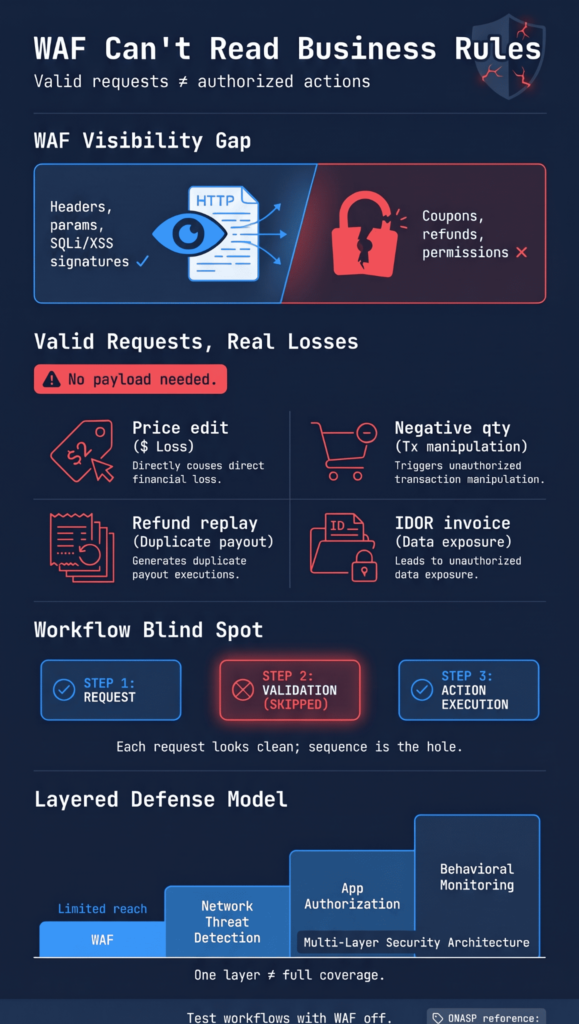
Attackers don’t always need a nasty payload. They can change parameters, permissions, and the order of steps in features that already exist.
Which legitimate-looking actions can attackers manipulate?
These examples show how a flaw in app logic can hurt the business directly. Changing product prices leads to financial losses, and applying unauthorized discounts causes revenue leakage. Purchasing negative quantities allows transaction manipulation, while replaying refund requests results in duplicate financial losses. Accessing another user’s invoice exposes data, and skipping verification steps opens the door to unauthorized transactions.
These attacks can work even when every request passes basic security checks.
Why might a WAF allow these requests?
A few things keep normal WAF rules from catching this kind of activity. The request syntax looks normal, and the parameters hold valid data types. Attackers use real endpoints that the app already offers, and the requests don’t match any known attack signature.
Picture an online store where a shopper edits one checkout value to get 100% off. There is no SQL injection, no XSS, and no broken HTTP in that request. If the backend simply trusts the discount it was sent, the order goes through.
In our risk reviews, this is where the limits of a WAF start to cost real money. The traffic isn’t always the problem. The real problem is an app that can’t tell an approved purchase from a misuse of a feature it was built to offer.
Why Does a WAF Lack Application-Specific Business Context?
A generic WAF rule can’t know every app’s permissions, payment policies, and limits.
What business rules remain invisible to a WAF?
A WAF usually can’t answer questions like these: Does this customer qualify for the promotion? Is this account allowed to see this invoice? Can an order be cancelled after it has been paid? Has this user gone over their account’s transaction limit? Does this API call break the user’s permissions? Answering them takes an understanding of how the app works.
Here is a common case. A logged-in customer sends a request with someone else’s invoice ID. They are signed in, and the ID is a valid number. Still, the app has to check who owns the invoice before it hands it over.
This is called an Insecure Direct Object Reference (IDOR), closely aligned with Broken Object Level Authorization (BOLA) in APIs, and falls under Broken Access Control. We see it again and again when our tools map out how data moves through an app.
As noted by OWASP
“Object level authorization checks should be considered in every function that accesses a data source using an ID from the user.” – OWASP
What happens without application-level validation?
Attackers can change normal parameters and take advantage of missing authorization checks.
We think the fix belongs inside the app. The backend should check on its own who the user is, who owns the resource, what the account is entitled to, and whether the transaction conditions are met. Keep in mind that logging in only proves who someone is. It doesn’t prove they may do everything they ask for.
How Do Stateful Workflows Create Security Blind Spots?
Many logic flaws take more than one request. Looking at each request alone isn’t enough.
How can attackers manipulate multi-step processes?
Research from IEEE Transactions on Dependable and Secure Computing shows
“Modern enterprise web applications have transitioned into highly stateful architectures. In these scenarios, an adversary does not trigger a vulnerability through a single, self-contained malicious request. Instead, they execute a sequence of ‘state-setting’ requests that incrementally manipulate the backend database or file system, establishing the necessary preconditions for a final request to execute a malicious payload.” – IEEE Transactions on Dependable and Secure Computing
Imagine an app that makes users verify their identity before a transaction is approved. An attacker could abuse weak workflow checks like this: they start a real workflow in the app and finish the first verification step. Then they change the next request, or skip a step in the middle, and submit the transaction without meeting the required conditions. All of this depends on the server not enforcing the right order.
Each request, taken alone, can look fine. The hole exists because the app never made sure the steps happened in the right order. When we walk through workflows with development teams, this is often the point where someone says, “Wait, it lets you do that?”
Why do conventional WAF rules struggle?
A few technical limits cause trouble. Single requests can look completely legitimate, and the app’s state depends on what happened earlier. A sequence of requests can break business rules without breaking HTTP syntax, and generic filtering can’t promise that a workflow stays intact.
The OWASP Business Logic Security Cheat Sheet suggests treating multi-step processes as clear state machines and checking every step change on the server. In practice, that means keeping state on the server, validating each step, and rejecting any action that is repeated or out of order. It also helps stop session replay, checkouts finished without payment, coupons used twice, and tampering with transactions.
Can WAFs Prevent API Abuse and Unauthorized Object Access?
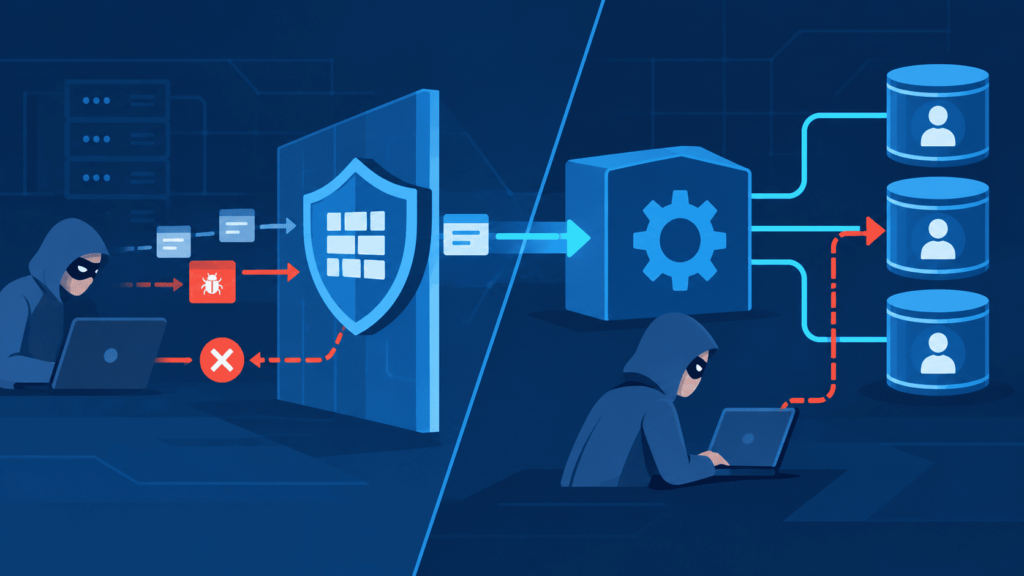
A WAF can block a lot of shady API traffic. But it can’t tell who should be allowed to see or change a certain record. The app itself has to decide that, every time.
Which API vulnerabilities require application-level controls?
Making sure a request looks like normal web traffic only gets you so far, because some problems can only be fixed inside the application itself. Broken Object Level Authorization (BOLA) requires object-level authorization, so that users can only access the specific records they are entitled to.
Excessive API requests call for business-aware rate limiting, which restricts usage based on how the application is actually meant to be used rather than on raw traffic volume alone. Unauthorized transactions can only be prevented through server-side permission checks that verify whether a user is allowed to perform a given action, and parameter manipulation is countered by server-side validation that never trusts the values sent by the client.
Finally, workflow bypass is addressed through sequence enforcement, which ensures that users complete each step of a process in the intended order. OWASP’s API Security Top 10 names Broken Object Level Authorization (API1:2023) and Unrestricted Access to Sensitive Business Flows (API6:2023) as top API risks. Refer to the OWASP API Security Top 10 documentation and OWASP Cheat Sheet Series for implementation details.
Why isn’t authentication sufficient?
Logging in shows who you are. It doesn’t show what you’re allowed to do. Say a customer changes the invoice number in a request and gets back another person’s invoice. The session is real. The request is shaped correctly. Nothing looks off.
The WAF can’t know who owns that invoice. Only the app knows. In our reviews of client systems, we see this gap a lot. Login works great, but the API never asks, “Does this user actually own this thing?”
That’s why each sensitive action needs its own ownership check, even when the request comes from a real user. It matters even more when a company has lots of API endpoints, mobile apps, and internal tools all using the same customer data.
Why Are Generic Rate Limits Insufficient Against Business Abuse?
Generic limits count requests. They don’t understand that some actions are riskier than others.
How does business-aware rate limiting differ?
Imagine an application with two actions: reading information, which handles about 4,000 requests per minute, and creating widgets, which handles only about five requests per minute.
A basic WAF rule might treat both actions the same way, but that approach overlooks the real difference between them. If someone creates thousands of widgets, the application slows down, server costs climb, and bots can take advantage of the weakness. This is why the limit should fit what each action actually does.
What should businesses monitor?
When we build threat models for clients, we usually watch for a handful of warning signs: how often each account makes transactions, how fast things are created or changed, repeated payment and refund attempts, strange buying patterns, and odd API activity.
Our practical insight is that rate limits should follow business actions, not just IP addresses or raw request counts. IP limits still help, but attackers can spread their traffic across many addresses, use real accounts, or move so slowly that they never hit the limit.
We have seen abuse that looked completely normal from any single source. Good rate limiting therefore looks at who the account is, what the action is, how much money is involved, and what that account usually does.
How Can WAF Over-Reliance Create False Security?
When a company thinks its WAF covers everything, holes appear. The backend still has to enforce permissions and business rules by itself.
What happens when businesses rely exclusively on WAF protection?
Here is how it usually goes wrong. Developers skip backend permission checks because they assume the WAF already covers them, so business rules never get enforced and bugs slip into production. Security teams then miss abuse that looks like normal use, and when the WAF misses something, bad requests can reach the weak parts of the application with nothing behind it to stop them.
Wrong blocks are a problem too. Real customers can get stopped because their request looks like an attack, and that hurts the business.
What should organizations change?
We suggest thinking of the WAF as one layer, not the final wall. Proper WAF integration with web server infrastructure should support application-level security rather than replace backend controls.
Teams should keep permission checks inside the app, check sensitive transactions on the server, and test workflows with the WAF turned off. They should also review WAF rules and the ways around them on a regular schedule, and keep testing application security through the whole secure SDLC.
People on Security StackExchange share this worry. Some teams use the WAF as an excuse for sloppy backend design. A WAF can lower the risk from common web attacks, but it cannot fix missing permission checks or badly written application logic.
What Business Logic Attacks Should Organizations Prioritize?
Start with the attacks that could cost money, expose private data, or break key workflows.
Which attacks create the greatest business risks?
This table is a good place to begin:
| Attack category | Potential consequence | Priority |
| Payment manipulation | Financial losses | Critical |
| Unauthorized refunds | Revenue leakage | Critical |
| BOLA and IDOR | Customer data exposure | Critical |
| Coupon abuse | Promotional fraud | High |
| Inventory hoarding | Operational disruption | High |
| Workflow manipulation | Unauthorized operations | High |
| Trial abuse | Resource and revenue losses | Medium |
These rankings won’t fit every business. A bank might worry more about payment tricks than stock hoarding. An online store might get hit harder by bots buying up everything.
Which areas require immediate attention?
When we do risk analysis, we look first at where money or value moves. That usually means payment and refund processing, customer account permissions, inventory and purchasing workflows, promotions and discount rules, and any API endpoints that handle sensitive actions.
OWASP’s business logic guidance lists price tampering, workflow abuse, timing and concurrency problems, and unauthorized actions as areas that need controls built for your specific application.
How Should Businesses Protect Against Logic Flaws Beyond WAFs?
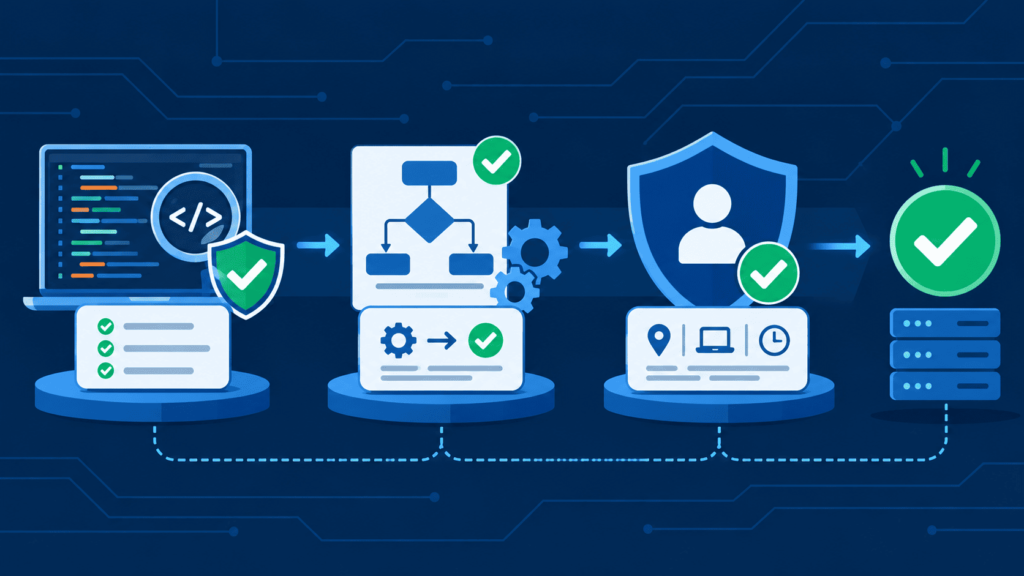
Good protection comes from a few things working together: safe code, tight permission checks, close monitoring, and regular testing. One tool alone won’t cut it.
Which application-level controls should organizations implement?
When we look at how breaches actually happen, the same six controls keep showing up:
- Server-side authorization: Check permissions every time someone takes a sensitive action or touches an object.
- Input validation: Set limits based on how the business really works.
- Workflow enforcement: Don’t let users skip, repeat, or fake steps.
- Transaction controls: Cap payments, refunds, and new resources.
- Abuse monitoring: Watch for strange account and transaction behavior.
- Security testing: Run penetration tests aimed at business logic, including tests for WAF bypass techniques that could allow malicious traffic to evade existing filtering rules.
Input validation (ensuring data types and formats match expected patterns) and business logic validation (verifying domain rules against current server state) are distinct security functions. Say a store has 20 items left. An order for 500 is a real number, so it passes a basic check, but the order still shouldn’t go through.
Where does Network Threat Detection fit?
Network Threat Detection helps you spot odd connections and unusual traffic. It’s an early warning system, and it helps teams chase down activity that plain request filtering can’t explain.
But it can’t do the whole job. Permissions, transaction checks, and business rules need to stay inside the application. Network monitoring backs those up. It doesn’t replace them.
How Does Network Threat Detection Complement WAF Protection?
A WAF watches web requests. Network Threat Detection looks wider. It asks who is talking to what, and whether that traffic seems normal.
How do these security layers differ?
Each layer guards a different part of the attack surface:
- Network Threat Detection: Suspicious network activity and communication patterns.
- WAF: HTTP traffic inspection and filtering.
- Application security: Business rules and authorization.
- Behavioral monitoring: Unusual user and transaction activity.
- Penetration testing: Identification of exploitable weaknesses.
We build threat models and risk analysis tools for network security, so this is usually where we begin. Network signals give teams a first look at what’s going on across their connected systems. That makes new threats easier to catch early.
Why combine these capabilities?
One layer gives you one view, while several layers give you a fuller picture. Together, they help teams see more of the attack surface, notice suspicious communication, and investigate odd activity faster. They also make it easier to link network events to account and application activity, and they let teams depend less on any single control.
Here is something we run into a lot. A batch of API requests can each look harmless, but when you zoom out, you might see one source sending them at a strange pace, or reaching systems it never touches.
Still, seeing traffic does not tell you whether a transaction broke a business rule. Only the application knows that. The best setup mixes Network Threat Detection, WAF filtering, application security, and behavior analysis, and no single one of them should be expected to fix everything.
How Can Organizations Test Whether Their WAF Leaves Business Logic Exposed?
Credits: Loi Liang Yang
Business logic testing asks a simple question: does the app still follow its own rules when someone bends a normal-looking request?
Which tests should security teams perform?
A solid test plan covers several areas. For authorization testing, try to open another user’s data. For parameter manipulation, change prices, quantities, and transaction amounts to see whether the server accepts values it should reject.
Workflow testing means skipping or repeating important steps, while replay testing means sending the same payment or refund request twice. Rate-limit testing checks the limits set for each type of action, and session testing shows whether expired or invalid sessions can still perform sensitive actions.
Only run these tests in authorized testing environments.
What should organizations evaluate?
Teams should check both the outer defenses and the app itself. Good questions to ask:
- Does the WAF catch suspicious HTTP patterns?
- Does the application reject unauthorized transactions?
- Does the server enforce each workflow step?
- Can the application stop money actions from being repeated?
- Can security teams dig into unusual activity later?
We also suggest pairing penetration testing with code review, application security testing, and automated tests in the secure SDLC. OWASP’s business logic recommendations are a good place to start. One lesson from them sticks with us: test the business rules, not just whether each endpoint gives the right response.
Testing principle: A successful WAF deployment does not prove business logic security.
What Is the Right Security Strategy Beyond WAF Protection?
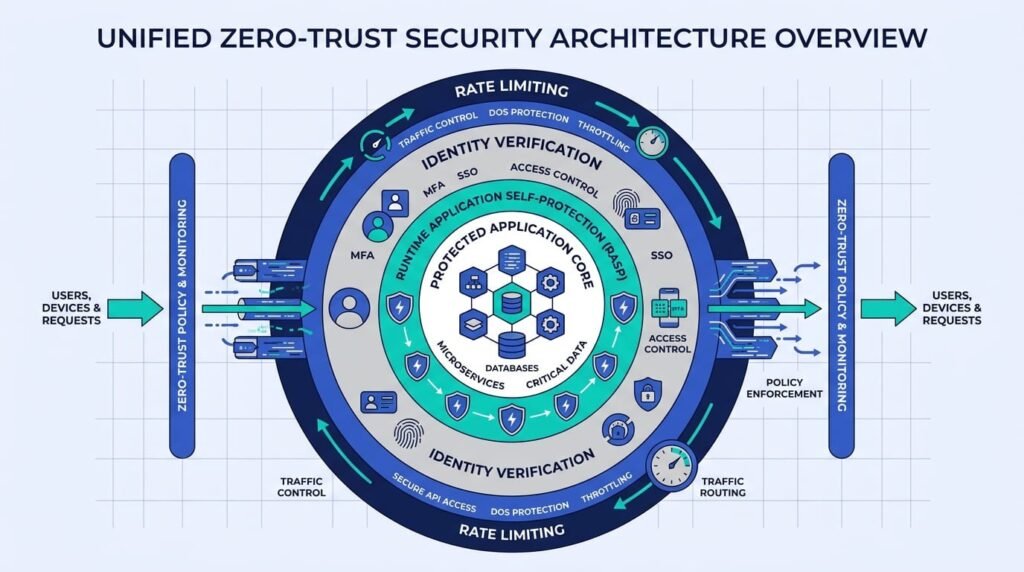
Think of a WAF as one piece of a layered plan. It can’t be the whole plan.
Which security responsibilities belong at each layer?
Give each layer its own job, so that if one control fails, the whole application does not go down with it. The network layer detects suspicious communication, and the WAF filters malicious HTTP traffic. The application enforces authorization and business rules, while monitoring identifies abnormal user behavior. Testing then validates the security assumptions the other layers rely on.
Splitting up the work this way stops teams from leaning too hard on the perimeter. We see that mistake more than we would like.
How can organizations strengthen this architecture?
We follow five principles:
- Enforce application rules: Keep business checks and authorization on the server.
- Monitor network activity: Use Network Threat Detection to look into suspicious communication.
- Control automated abuse: Set rate limits that match the account and the action.
- Protect transaction integrity: Use atomic operations and smart replay protection.
- Test continuously: Mix code review, penetration testing, and business logic checks.
The OWASP Business Logic Security Cheat Sheet has practical tips for protecting workflows, transactions, and business rules that are unique to your app.
In the end, strong security needs prevention and monitoring working together. A WAF can block bad traffic. Solid application security makes sure a normal-looking request still can’t break the rules. Our threat models and risk analysis tools help teams find those gaps before attackers do.
FAQ
How Can Businesses Reduce WAF False Positives Without Weakening Security?
Businesses can reduce WAF false positives by reviewing blocked requests, user reports, timestamps, affected endpoints, and triggered rules. Security teams should determine whether a request violates a security policy or only resembles a known attack.
They can then adjust specific rules instead of disabling protection across the application. Regular testing also helps identify WAF false negatives without blocking legitimate traffic.
How Should Security Teams Prioritize Business Logic Vulnerabilities?
Security teams should prioritize business logic vulnerabilities based on their potential impact, ease of exploitation, and the number of affected users or transactions. Payment processing, refund requests, account permissions, and access to sensitive data deserve particular attention.
Threat modeling helps identify realistic abuse scenarios and assess their business impact. Teams should also review these priorities whenever application features or business rules change.
How Can Organizations Identify Legitimate Traffic Abuse?
Organizations can identify legitimate traffic abuse by monitoring patterns across user accounts, sessions, devices, and transactions. Repeated refund requests, unusual coupon usage, rapid account changes, and unexpected purchasing patterns may indicate abuse.
Security teams should combine anomaly detection, behavioral analysis, and transaction monitoring to identify suspicious activity. They should investigate these signals before restricting accounts or blocking requests.
What Application Events Should Security Teams Monitor for Business Logic Abuse?
Security teams should log sensitive application events, including user actions, resource identifiers, authorization results, transaction states, workflow changes, and timestamps. These records help investigators understand how an action occurred and whether it violated business rules.
Organizations should protect logs against unauthorized changes and restrict access to sensitive information. Detailed event records also support incident investigations and help improve abuse detection.
What Should Developers Do After Discovering a Business Logic Flaw?
Developers should first assess whether the business logic flaw allows unauthorized access, fraudulent transactions, or financial losses. They should apply temporary safeguards when necessary and correct the underlying application logic.
After implementing the fix, developers should add regression tests to prevent the same vulnerability from returning. Security teams should also review potentially affected accounts and transactions before confirming that the issue has been resolved.
Why Is WAF Protection Only Part of Business Security?
A WAF can block malicious HTTP requests, but it can’t always recognize when legitimate actions violate business rules. That’s the problem. Attackers can still exploit weak authorization or manipulate application workflows without triggering traditional WAF rules.
Businesses need application-level security alongside network visibility. Network Threat Detection helps strengthen security monitoring by identifying suspicious network activity that perimeter filtering may miss. It works best as part of a broader security approach, not as a replacement for secure application design. Explore Network Threat Detection to strengthen your organization’s security visibility.
References
- OWASP Top 10 API Security Risks – 2023. OWASP, 2023. Accessed November 7, 2026.
- “Document 11599453.” IEEE Xplore. Accessed November 7, 2026.