

Identifying unmanaged shadow IT devices a critical part of modern security operations. From forgotten IoT hardware to unauthorized employee devices, these assets often escape traditional inventories while creating unnecessary risk.
At Network Threat Detection, we believe continuous network visibility helps uncover these blind spots before they become attack paths. The sooner organizations discover unknown devices, the sooner they can assess, prioritize, and secure them. Keep reading.
HowtoFindUnmanagedShadowITDevices Before They Find You
Hidden devices rarely announce themselves, yet they constantly expand your attack surface. Unauthorized IoT equipment, personal endpoints, forgotten printers, and legacy systems can all operate outside security oversight.
Finding them isn’t about banning innovation, it’s about gaining visibility so every connected device is accounted for, monitored, and managed before attackers discover it first.
- Hidden Devices, Hidden Risks: Shadow IT creates attack paths that traditional asset inventories often miss.
- Visibility Comes from Multiple Sources: Network discovery, traffic analysis, and asset correlation work best together.
- Manage Instead of Eliminate: The objective is continuous visibility and risk-based governance, not blocking every unauthorized device.
What Makes a Device “Shadow IT,” and Why Should We Care?
You know the official inventory. The laptops, the servers, the corporate phones. Shadow IT is everything else. It’s any device, system, or application that connects to your network or handles company data without the explicit knowledge or approval of the IT and security teams. It’s not inherently malicious, it’s just invisible.
“Hardware, software, or services built, introduced, and/or used for the job without explicit approval or even knowledge of the organisation” – Stage
We care because invisibility equals risk. Every unmanaged device is a policy bypass. It hasn’t been hardened, it doesn’t get security patches, it’s not monitored by your endpoint protection, It’s a wide-open door.
An attacker who finds one of these devices has found a way into your network that your security controls are completely blind to. They’re not evading your defenses, they’ve simply walked around them.
From personal experience, the most common culprits aren’t nefarious. They’re convenient. That consumer-grade Wi-Fi router an employee brought in to get a better signal in their corner office.
The personal tablet someone uses to check email on the corporate Wi-Fi. The USB-connected gadget a marketing team uses for a trade show. Each one seems harmless, until it becomes the pivot point for a breach.
How Do These Devices Sneak Onto the Network Unnoticed?
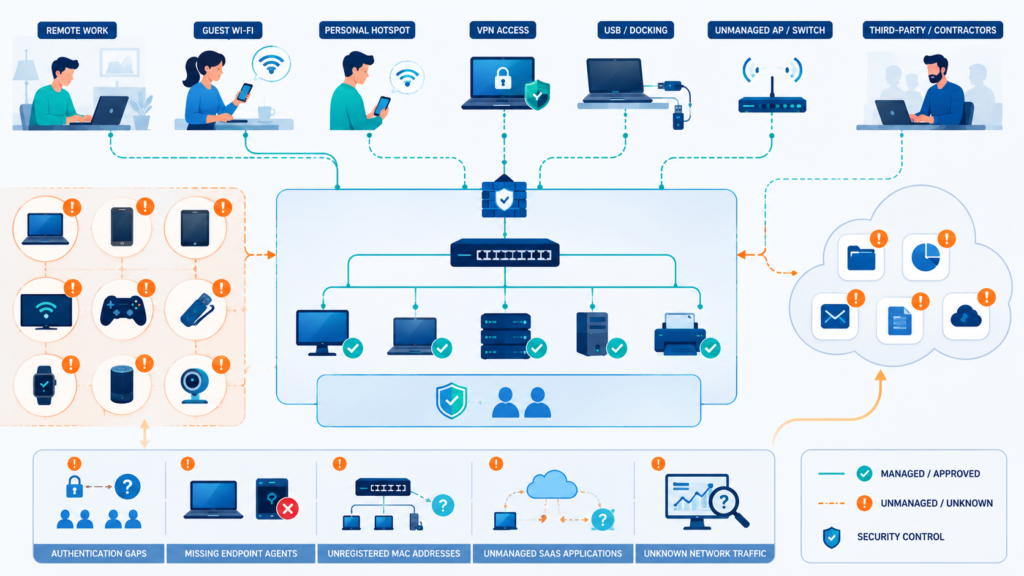
They don’t sneak, they walk right in. The modern network perimeter is porous by design. We enabled guest Wi-Fi for visitors, we provided Ethernet jacks in meeting rooms, we embraced BYOD (Bring Your Own Device) policies for flexibility. Each of these conveniences is also an on-ramp for shadow IT.
The pathways are straightforward:
- Direct Physical Connection: An employee plugs a personal streaming stick into a conference room TV’s HDMI port. The stick needs Wi-Fi, so it connects to the guest network. Now you have an unknown Android-based device on your network.
- Rogue Wireless Access Points: That consumer router someone installed creates its own unauthorized network segment, a “network within a network” you can’t control.
- Tethering and Hotspots: A laptop connected to the corporate network might also be tethered to a personal phone, creating a hidden bridge between the internet and your secure environment.
- “Innocent” IoT: Facility systems like HVAC controllers, video cameras, or even the new fancy coffee maker often come with network connectivity by default and are installed by vendors without IT’s involvement.
The problem isn’t a lack of rules, it’s that the technology for connection has become democratized. The barrier to entry is a power outlet and a Wi-Fi password.
What Are the Most Common Types of Shadow IT Devices?
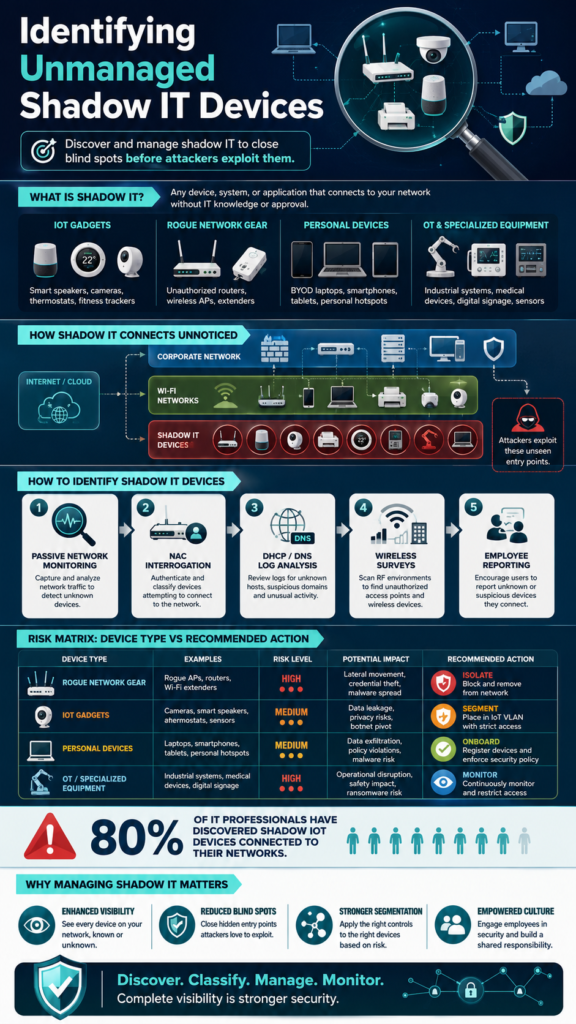
Knowing what to look for is half the battle. The shadow IT landscape is diverse, but patterns emerge. They typically fall into a few high-risk categories.
First, consumer IoT gadgets. Smart speakers, fitness trackers, personal media devices. They’re designed for ease of use, not security, and often have weak default passwords and un-patchable firmware.
“Research by Infoblox found that 80% of IT professionals have discovered shadow IoT devices connected to their networks, highlighting the scale of the problem.” – Globalsecuritymag
Second, unauthorized hardware. This includes:
- Rogue wireless access points and routers.
- Unapproved computers or servers (like a developer’s test rig).
- External storage devices and unauthorized USB peripherals.
Third, cloud software and services. While not a “device” in the traditional sense, an employee using an unvetted cloud storage app or project management tool on a corporate laptop creates the same data exfiltration risk. The device is managed, but its activity isn’t.
Finally, network-connected operational technology (OT). This is a big one in manufacturing, healthcare, and retail. Medical imaging machines, production line sensors, digital signage players. They’re critical to operations but often managed by facilities or vendors, not IT, leaving them unpatched and unmonitored.
Why Are Traditional Inventory Methods Useless Here?
Credits: Managed Technology Channel by ITS
If your asset management system is fed by an agent installed on company-approved computers, it will never see the shadow. Agents can’t be installed on a smart thermostat or a personal phone. Traditional discovery often relies on active scanning (ping sweeps, port scans), but this has major limitations.
Active scans can miss devices configured to ignore ping requests. They can disrupt sensitive operational equipment, like medical devices or industrial controls. Most importantly, they provide a one-time snapshot, not continuous visibility. A device can connect, do damage, and disconnect between weekly scans, leaving no trace in your inventory.
We’ve found that passive listening is the only reliable way to catch these transient and agentless devices. This is where Network Threat Detection shifts from being a security tool to a critical discovery engine. By analyzing the traffic flowing across your network, it can identify devices you never knew were talking.
Can Network Threat Detection Actually Find What We Can’t See?
This is the pivotal insight. You can’t interrogate the shadow device itself, but you can listen to its conversations. Every device on a network, to function, must communicate. It sends DHCP requests for an IP address. It generates DNS lookups. It talks to other devices or calls out to the internet. These communications are its fingerprints.
Our approach with Network Threat Detection is to passively collect and analyze this network traffic. It doesn’t send probes, it just observes. From this flow data, it can identify devices and build a behavioral profile. It answers questions like:
- What is this device? (A Roku player, a Raspberry Pi, an IP camera)
- What is it doing? (Streaming video, sending data to an unknown cloud IP)
- Is it behaving normally? (A thermostat suddenly initiating SSH connections is a red flag)
For example, we once identified a device labeled only by its MAC address. Traffic analysis showed it was making frequent, encrypted calls to an IP address in a foreign country. Further investigation revealed it was an unauthorized wireless camera someone had installed for “office security.”
It was a live video feed leaving the company, unknown to security, from a device with documented vulnerabilities. We found it because it couldn’t stay silent.
What Are the Step-by-Step Methods for Discovery?
A robust discovery program uses a layered approach. No single method is perfect, but together they create a net fine enough to catch most shadow IT.
1. Passive Network Monitoring: This is your foundation. Deploy sensors to mirror traffic from key network segments (wireless, guest networks, user subnets). Use tools to analyze this traffic for device fingerprints, anomalous behavior, and connections to unknown services.
2. Network Access Control (NAC) Interrogation: When a device connects, a good NAC can perform a posture check. Even if it can’t block an unknown device on a guest network, it can log its presence, MAC address, and connecting port for investigation.
3. Analyzing DHCP and DNS Logs: These are goldmines. Every device that wants an IP address leaves a record in DHCP logs. Every time it tries to resolve a website, it creates a DNS query. Correlating these logs can reveal unknown hostnames and device types.
4. Wireless Network Surveys: Use tools to scan your physical environment for all broadcasting Wi-Fi signals. This can identify rogue access points that aren’t even connected to your wired network yet but are sitting in your office.
5. The Human Element: Encourage reporting. Have a simple, non-punitive channel for employees to ask, “Is it okay if I connect this?” Sometimes the best detection tool is a culture of shared responsibility.
How Should We Handle Devices Once We Find Them?
Finding them is step one. What you do next determines whether you create a secure environment or a culture of fear. A heavy-handed “confiscate and delete” approach will only drive the behavior further underground.
A better framework is to assess and act based on risk. We use a simple matrix to decide:
| Device Type & Behavior | Associated Risk | Recommended Action |
| Critical Risk: Rogue AP, unauthorized server, device with active malware. | High – Immediate breach vector. | Isolate & Remove. Immediately block network access, physically secure device if possible, investigate for compromise. |
| High Risk: Consumer IoT (cameras, speakers), unpatched OT equipment. | Medium-High – Likely vulnerable, poor security hygiene. | Segment & Secure. Move to a dedicated, locked-down network segment (IoT VLAN). Enforce strict firewall rules. Begin process to replace with approved device. |
| Medium Risk: Personal laptop/tablet for web browsing, approved device type but unmanaged. | Medium – Potential data loss, compliance issue. | Onboard or Restrict. If needed for business, bring under management (install agent, apply policies). If not, restrict to internet-only guest network. |
| Low Risk: E-reader, personal phone on guest Wi-Fi. | Low – Minimal attack surface, limited access. | Monitor & Allow. Note its presence, ensure it stays on appropriate guest network, monitor for suspicious behavior changes. |
The conversation with the device owner is key. Explain the risk to the company, don’t just cite policy. Offer a secure, approved alternative. The goal is to turn a shadow into a managed asset, or to safely contain its use.
How Does Managing This Problem Improve Overall Security?
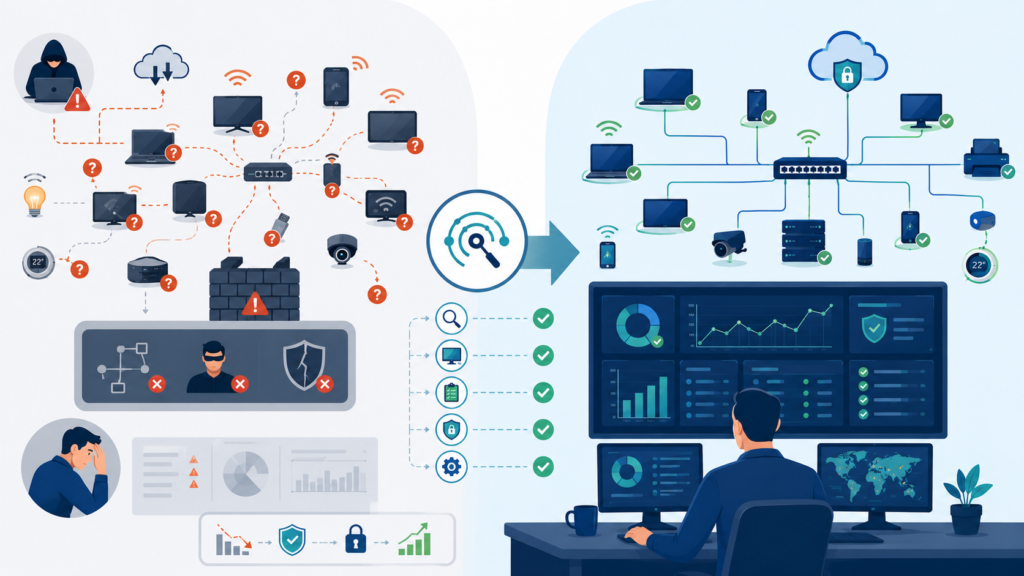
Getting a handle on shadow IT does more than just plug holes, it transforms your security maturity. It moves you from a state of ignorant vulnerability to informed defense.
First, you eliminate your blind spots. Your attack surface becomes defined and visible. You can’t be surprised by a breach from a device you didn’t know existed. This alone is a massive reduction in risk.
Second, it strengthens your network segmentation strategy. By identifying all device types, you can design network zones that make sense, a locked-down VLAN for IoT, a strict segment for OT, a controlled zone for BYOD. This contains breaches and limits lateral movement.
Finally, it builds a culture of security awareness. When employees understand why that smart plug is a risk, they become partners in security, not adversaries. They start to ask before they connect. This cultural shift is more valuable than any single piece of technology.
Common Questions on Shadow IT Discovery
Won’t this invasion of privacy upset employees?
It’s about monitoring network traffic and device behavior for security threats, not reading personal emails. Have a clear, communicated policy: “Connecting to the corporate network constitutes consent for security monitoring to protect company data.” Be transparent about what you’re looking for (malicious activity, unauthorized devices) and what you’re not (personal web content).
Is it even possible to find every single device?
Probably not, and that’s okay. The goal isn’t perfection, it’s material reduction of risk. Aim to find the persistent, high-risk devices. A personal phone that connects once is a lower priority than an unauthorized server running 24/7. Focus on continuous improvement, not a one-time purge.
How does Network Threat Detection help if the device isn’t malicious?
Its value is in discovery and profiling, not just threat blocking. It identifies the device by its traffic patterns, even if that traffic is benign. It answers the fundamental question: “What is this thing?” Once you know it’s an Amazon Echo, you can assess its risk and decide to allow, segment, or block it.
What’s the first thing I should do tomorrow?
Start with your wireless networks. They are the easiest on-ramp for shadow IT. Review your DHCP logs for unrecognized hostnames. Do a wireless survey to look for rogue access points. This quick, low-effort investigation will almost certainly reveal a few shadows you can immediately address.
From Shadow to Light: The Path to Managed Visibility
Shadow IT won’t disappear, but your blind spots can. The key is continuously discovering, assessing, and safely managing unknown devices before they become security risks. Start by reviewing guest Wi-Fi logs or investigating unclassified assets already detected in your environment.
If you’re ready to strengthen visibility with real-time threat modeling, automated risk analysis, and continuous asset discovery, explore what Network Threat Detection offers: Join Network Threat Detection
References
- https://stage.connect.geant.org/2022/10/31/shadow-it-in-research-and-education-what-to-look-out-for
- https://www.globalsecuritymag.com/Shadow-IoT-Devices-a-Major-Concern,20200204,95301.html
