
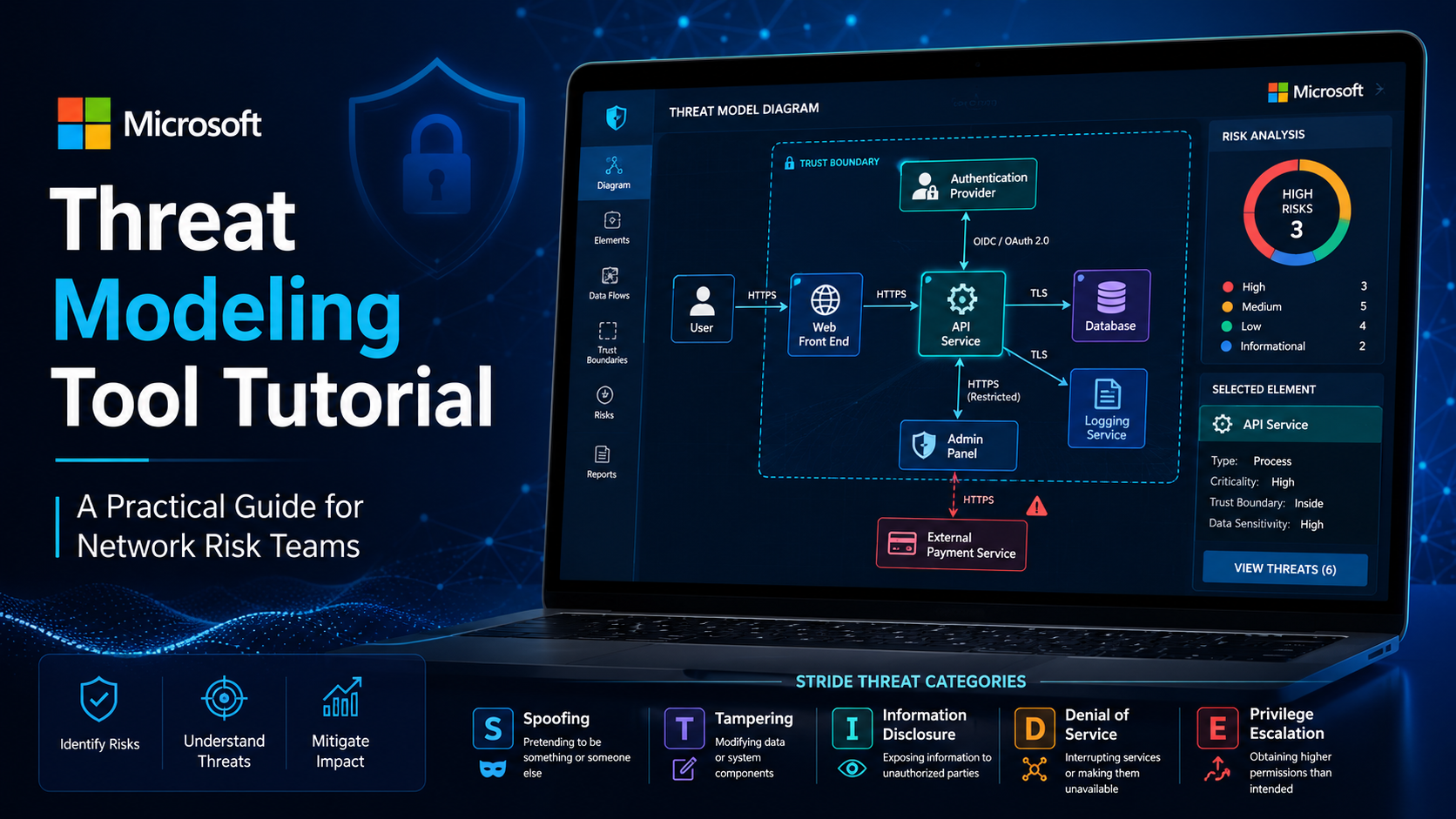
Microsoft Threat Modeling Tool helps security and network teams identify design weaknesses before attackers exploit them. By mapping data flows, trust boundaries, assets, and threats, teams can reduce risk early and improve detection planning.
This guide explains how the tool works, how to use it effectively, and how to connect threat modeling to real-world security operations. Keep reading to learn a practical workflow that goes beyond drawing diagrams.
Microsoft Threat Modeling Tool Reality Check
- Microsoft Threat Modeling Tool is most valuable when it reveals risky assumptions, weak trust boundaries, and missing controls before deployment.
- A threat model should connect architecture to realistic attack paths, not just document system components and data flows
- The output should drive security decisions, monitoring improvements, or mitigation work. If nothing changes after the exercise, the threat model has limited value.
Understanding Microsoft Threat Modeling Tool
Microsoft Threat Modeling Tool is a visual modeling tool designed to help teams identify potential security threats during the design phase. It lets users map system components, data flows, external dependencies, and trust boundaries, then review possible threats based on the structure of the model.
For teams new to threat modeling, this matters because security reviews often happen too late. A system may already be deployed before anyone asks how data moves, where authentication happens, which services trust each other, or where sensitive assets are exposed. By then, fixing the design can be slow and expensive.
A threat model creates a structured view of the system from a security perspective. It helps teams ask better questions:
- What are we protecting?
- Who can access it?
- Where does data cross a trust boundary?
- Which components are exposed to users, APIs, or third parties?
- What could go wrong?
- What controls already exist?
- What still needs to be fixed?
“The Threat Modeling Tool is a core element of the Microsoft Security Development Lifecycle.”
In our work with network-focused teams, the best threat models are not the prettiest diagrams. They are the ones that help teams decide where visibility is missing, which alerts matter, and which design risks should be fixed before detection becomes the only fallback.
Threat Modeling Matters for Network Threat Detection
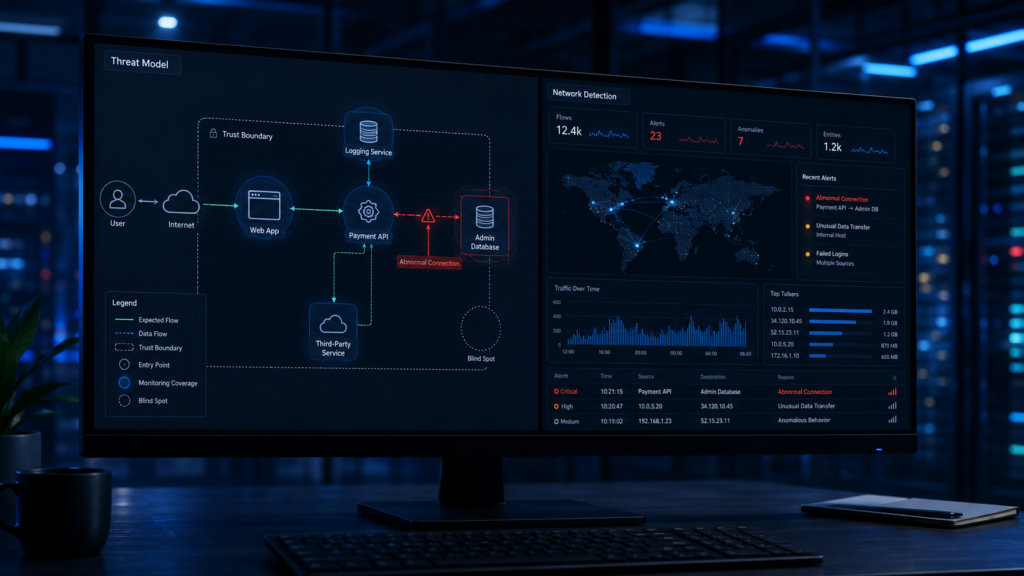
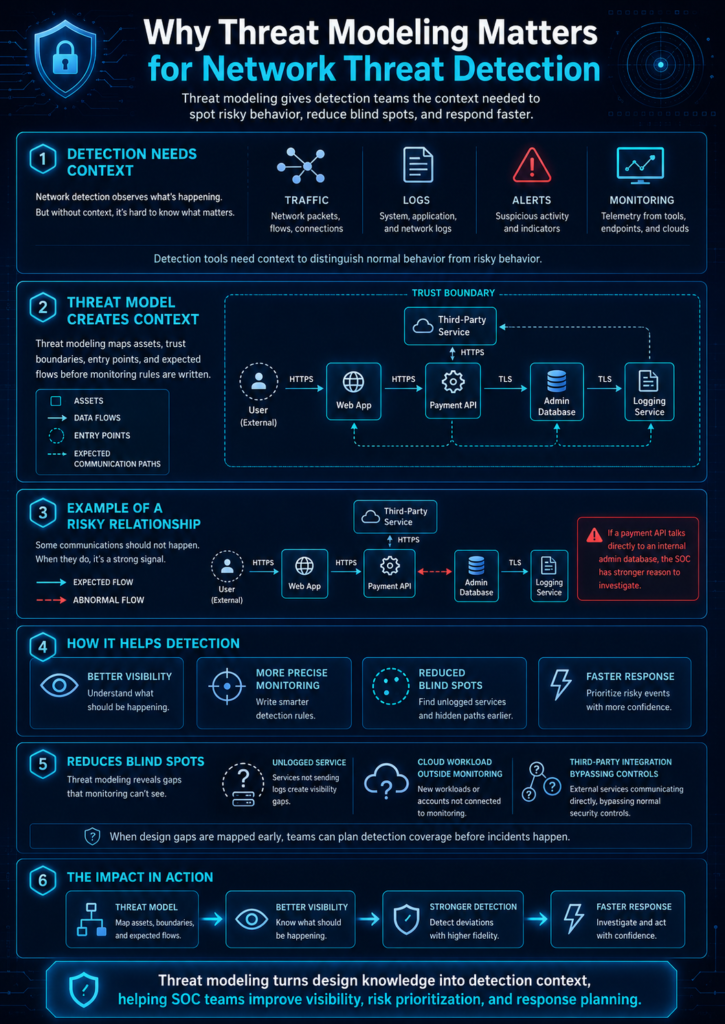
Network threat detection depends on context. A detection platform can observe traffic, sessions, logs, and suspicious activity, but it still needs to understand what normal and risky behavior look like for the system. Threat modeling helps create that context before monitoring rules are written.
For example, if a payment API should never communicate directly with an internal admin database, that relationship should be visible in the threat model. If it later appears in network telemetry, the SOC has a stronger reason to investigate. Without that design context, the same traffic may look like just another connection.
This is where threat modeling supports network threat detection fundamentals. It gives teams a clearer picture of assets, data flows, entry points, and expected communication paths. That makes monitoring more precise.
Threat modeling also helps reduce blind spots. Security teams often discover too late that a service was never logged, a cloud workload was outside the usual monitoring path, or a third-party integration bypassed normal controls. When those issues are mapped during design, the team can plan detection coverage earlier.
For Network Threat Detection, this is where threat modeling becomes more than a design activity. It becomes a way to improve visibility, risk prioritization, and response planning before the SOC has to react under pressure.
How Microsoft Threat Modeling Tool Works
Source: Use STRIDE To Do A Quick Threat Modeling On A Simple Web Application
This video is useful for beginners because it shows how STRIDE can be applied to a simple application model. It supports the same workflow used in this tutorial: define the system, map the flows, review threat categories, and turn the findings into mitigations.
Microsoft Threat Modeling Tool works by turning a system design into a structured security model. The user creates a diagram with components, data stores, data flows, external actors, and trust boundaries. The tool then helps identify possible threats based on how those elements interact.
The basic workflow is simple:
- Create a new threat model.
- Add system components.
- Add data stores and external actors.
- Draw data flows between elements.
- Mark trust boundaries.
- Review generated threats.
- Add mitigations.
- Export or share the model.
The important part is not just adding shapes. The important part is understanding what each shape means. A process may represent an application service, API, background worker, authentication service, or cloud function. A data store may represent a database, file repository, secrets vault, queue, or object storage bucket. A data flow may represent an API call, file transfer, database query, authentication exchange, or message queue event.
Trust boundaries are especially important. They show where the security assumptions change. For example, traffic moving from a user browser to a public API crosses one type of boundary. Traffic moving from an application server to a database crosses another. Traffic moving from a cloud workload to an external vendor may cross a different risk boundary altogether.
If the team marks these boundaries carefully, the threat model becomes more useful for both engineering and detection. It shows where controls are needed and where monitoring should be stronger.
Step-by-Step Microsoft Threat Modeling Tool Tutorial
This Microsoft Threat Modeling Tool tutorial uses a simple example: a web application with users, a front-end service, an API, a database, and an admin panel. The same process can be adapted for cloud workloads, internal applications, APIs, network services, or customer-facing platforms.
Step 1: Define the system scope
Start by deciding what the model will cover. Do not try to model the entire company at once. Pick one system, service, application, network segment, or workflow.
A good scope might be:
- Customer login workflow
- File upload service
- Admin dashboard
- Payment API
- Internal reporting system
- Cloud-hosted web application
- Remote access workflow
The scope should be narrow enough to model clearly, but important enough to reveal real risk. If the system handles sensitive data, privileged access, external users, or business-critical workflows, it is a good candidate.
Step 2: Identify assets and users
Next, list what the system protects and who interacts with it. Assets may include credentials, customer data, payment records, intellectual property, configuration files, API tokens, logs, or administrative functions.
Users may include:
- External customers
- Internal employees
- Administrators
- Third-party vendors
- Service accounts
- APIs
- Background jobs
- Support teams
This step prevents the model from becoming too abstract. Security risk always depends on what is valuable and who can reach it.
Step 3: Build the data flow diagram
Open the Microsoft Threat Modeling Tool and create the first version of the data flow diagram. Add the main components first. Then connect them with data flows.
A simple application model may include:
- External user
- Web front end
- API service
- Authentication provider
- Application database
- Logging service
- Admin panel
- External payment service
Keep the first diagram readable. It does not need every internal function. If the diagram becomes too crowded, split it into smaller models.
This is also where mapping attack paths methodology becomes useful. A good model should make it easier to see how an attacker could move from one point to another, not just how the system works under normal conditions.
Step 4: Add trust boundaries
Trust boundaries show where control changes. This might be between the internet and the application, between user space and backend services, between application code and a database, or between your environment and a third-party service.
Common trust boundaries include:
- Public internet to web application
- User device to API service
- Application service to database
- Internal network to cloud workload
- Production environment to vendor integration
- Standard user access to admin access
- Corporate identity provider to application
Trust boundaries are where many threats appear. If sensitive data crosses a boundary without encryption, authentication, validation, logging, or access control, the team should review it carefully.
Step 5: Review generated threats
After the diagram is complete enough, review the threats generated by the tool. These threats may relate to spoofing, tampering, repudiation, information disclosure, denial of service, or elevation of privilege.
Do not treat every generated threat as equal. Some may be theoretical. Some may already be handled. Others may expose real design gaps.
A useful review asks:
- Is this threat possible in the current design?
- What asset would be affected?
- What control already exists?
- Is the control preventive, detective, or corrective?
- Would the SOC be able to detect this if it happened?
- Who owns the fix?
This is where threat modeling becomes practical. The goal is not to accept or dismiss threats quickly. The goal is to decide what must change.
Step 6: Add mitigations and detection notes
For each valid threat, document the mitigation. A mitigation should be specific enough that an engineer or security team can act on it.
Weak mitigation:
- Improve authentication.
Better mitigation:
- Require MFA for admin accounts, enforce session timeout, log failed admin login attempts, and alert on repeated failures from unfamiliar locations.
Detection notes are also useful. If a threat cannot be fully prevented, the SOC needs to know what signal to monitor. For example, if an attacker could abuse an API token, the detection plan may include monitoring unusual API volume, impossible travel, access from new geographies, or token use outside expected service accounts.
This makes the threat model useful beyond design review. It becomes input for network detection, SIEM rules, alert triage, and incident response.
Step 7: Export and review with stakeholders
A threat model should not stay inside one person’s laptop. Review it with engineering, security, operations, and risk stakeholders. Each group sees different things.
Developers may catch missing technical details. SOC analysts may identify detection gaps. Network teams may notice routing or segmentation issues. Risk leaders may point out business impact. This shared review improves the quality of the model.
The final output should include:
- System diagram
- Key assets
- Trust boundaries
- Identified threats
- Mitigations
- Open risks
- Owners
- Follow-up actions
- Detection notes
A threat model that ends with owners and actions is much more useful than one that ends with a diagram.
STRIDE and Microsoft Threat Modeling Tool
Microsoft Threat Modeling Tool is closely associated with STRIDE, a threat categorization model that helps teams think through common security risks. STRIDE stands for spoofing, tampering, repudiation, information disclosure, denial of service, and elevation of privilege.
| STRIDE Category | What It Means | Example Question |
| Spoofing | Pretending to be another user or system | Can someone impersonate a valid user or service? |
| Tampering | Changing data or system behavior | Can someone modify requests, files, logs, or records? |
| Repudiation | Denying an action happened | Can users perform actions without reliable logging? |
| Information Disclosure | Exposing sensitive data | Can unauthorized users view data they should not see? |
| Denial of Service | Disrupting availability | Can this component be overloaded or made unavailable? |
| Elevation of Privilege | Gaining higher access | Can a normal user become an admin or access privileged functions? |
STRIDE is useful because it gives structure to the review. Instead of asking vague questions like “Is this secure?” teams can ask specific questions against each system element and data flow.
“Threat modeling works to identify, communicate, and understand threats and mitigations within the context of protecting something of value.”
— OWASP
For teams using Microsoft Threat Modeling Tool, STRIDE is a strong starting point. It helps standardize the review and makes threat discussions easier for non-security experts.
Product Considerations
Microsoft Threat Modeling Tool is useful, but it should be treated as part of a process, not the whole process. A tool can generate prompts, organize diagrams, and document threats. It cannot fully understand business risk, operational context, or the quality of a mitigation.
Product description
Microsoft Threat Modeling Tool helps teams create threat models using diagrams, data flows, trust boundaries, and structured threat categories. It is commonly used during application design, architecture review, and secure development planning.
Pros
- Helps non-security teams structure threat modeling
- Supports visual data flow diagrams
- Encourages early design-stage security review
- Helps document threats and mitigations
- Works well with STRIDE-style analysis
Cons
- Requires accurate diagrams to be useful
- Can produce threats that still need human review
- May feel too application-focused for some network teams
- Does not replace risk analysis or architecture review
- Output quality depends on how carefully the model is built
Dealbreaker
If the team treats the tool as an automatic security answer instead of a structured review aid, the results may become shallow. The tool can help find threats, but people still need to validate risk, prioritize mitigations, and connect findings to monitoring.
Best for
Security architects, application teams, DevSecOps teams, SOC leaders, and network risk teams that need a repeatable way to identify design threats before deployment.
Common Mistakes When Using Microsoft Threat Modeling Tool
The most common mistake is drawing the system as teams wish it worked, not as it actually works. If the diagram leaves out admin access, third-party APIs, service accounts, background jobs, logs, or data exports, the threat model will miss important risks.
Another mistake is ignoring trust boundaries. Many teams draw components and data flows, but they do not clearly mark where security assumptions change. This makes it harder to identify where authentication, encryption, authorization, validation, and monitoring should apply.
Common mistakes include:
- Modeling too much at once
- Leaving out third-party services
- Forgetting admin workflows
- Treating generated threats as automatically valid
- Ignoring detection and logging needs
- Writing vague mitigations
- Not assigning owners
- Not updating the model after architecture changes
- Failing to involve SOC or network teams
- Treating the model as a compliance checkbox
We often see teams produce a threat model that looks complete but does not change anything. That is the real failure. A useful model should influence backlog items, controls, monitoring rules, security tests, or risk decisions.
Connecting Threat Modeling to Network Risk Analysis
Threat modeling becomes much stronger when it connects to network risk analysis. A model can show where important assets are located, how data moves, and where controls should exist. Risk analysis helps decide which threats matter most.
For example, a threat against a public-facing authentication service usually deserves more attention than a threat against a low-value internal demo system. The same STRIDE category may appear in both places, but the business risk is different.
This is why teams should connect threat models to network security risk analysis techniques when planning mitigation. The model shows what could go wrong. Risk analysis helps decide what needs action first.
A practical risk review should consider:
- Asset criticality
- Exposure level
- Exploit likelihood
- Existing controls
- Detection coverage
- Business impact
- Compliance impact
- Remediation effort
- Residual risk
Network Threat Detection can help teams make this process more useful by connecting design threats to visibility gaps, attack path analysis, and prioritized response planning. The goal is not just to list threats. The goal is to understand which threats deserve immediate control, monitoring, or escalation.
Best Practices for a Practical Threat Modeling Workflow

A good Microsoft Threat Modeling Tool tutorial should end with workflow discipline. The tool is only useful when teams make threat modeling repeatable.
Start small. Pick one system, one workflow, or one sensitive data path. Model it clearly. Review the threats. Assign owners. Then improve the workflow before scaling to more systems.
Useful best practices include:
- Model important systems first.
- Keep diagrams readable.
- Mark trust boundaries carefully.
- Validate the model with engineers and SOC analysts.
- Focus on threats that affect real assets.
- Write mitigations as clear actions.
- Add detection notes for threats that cannot be fully prevented.
- Track unresolved risks.
- Update the model after major architecture changes.
- Use the output to improve monitoring and response.
The best teams treat threat models as living security documents. They do not need to update them every day, but they should revisit them when systems change, new integrations are added, authentication changes, sensitive data moves, or major risks are discovered.
This is also where Network Threat Detection fits naturally. Threat modeling shows where attacks might happen. Network visibility, risk analysis, and detection workflows help teams see whether those attacks are happening.
FAQs
What is Microsoft Threat Modeling Tool used for?
Microsoft Threat Modeling Tool is used to identify potential security threats in a system design. Teams use it to map components, data flows, trust boundaries, threats, and mitigations before the system is deployed or changed.
Is Microsoft Threat Modeling Tool good for beginners?
Yes, Microsoft Threat Modeling Tool can help beginners because it provides a structured way to think about threats. However, the results are better when users understand basic concepts like data flow diagrams, trust boundaries, assets, and STRIDE.
What should be prepared before using Microsoft Threat Modeling Tool?
Before using the tool, teams should prepare a clear system scope, list of assets, users, components, data stores, external integrations, and expected data flows. This makes the model more accurate and reduces missing details.
How does threat modeling support network threat detection?
Threat modeling supports network threat detection by showing expected communication paths, sensitive assets, trust boundaries, and possible attack routes. That context helps teams decide what to monitor and which alerts deserve priority.
How often should a threat model be updated?
A threat model should be updated when architecture changes, new integrations are added, authentication changes, sensitive data moves, or new risks are discovered. High-risk systems should be reviewed more often than low-risk systems.
Wrapping Up Microsoft Threat Modeling Tool Tutorial
Microsoft Threat Modeling Tool helps teams find design risks before attackers find them in production. It gives structure to security conversations, especially when teams need to map data flows, trust boundaries, threats, and mitigations in a clear way.
If your team wants to connect threat modeling with better attack path visibility, risk analysis, and network defense planning, explore the Network Threat Detection Features through the Features page.
References
- https://learn.microsoft.com/en-us/azure/security/develop/threat-modeling-tool
- https://owasp.org/www-community/Threat_Modeling
