
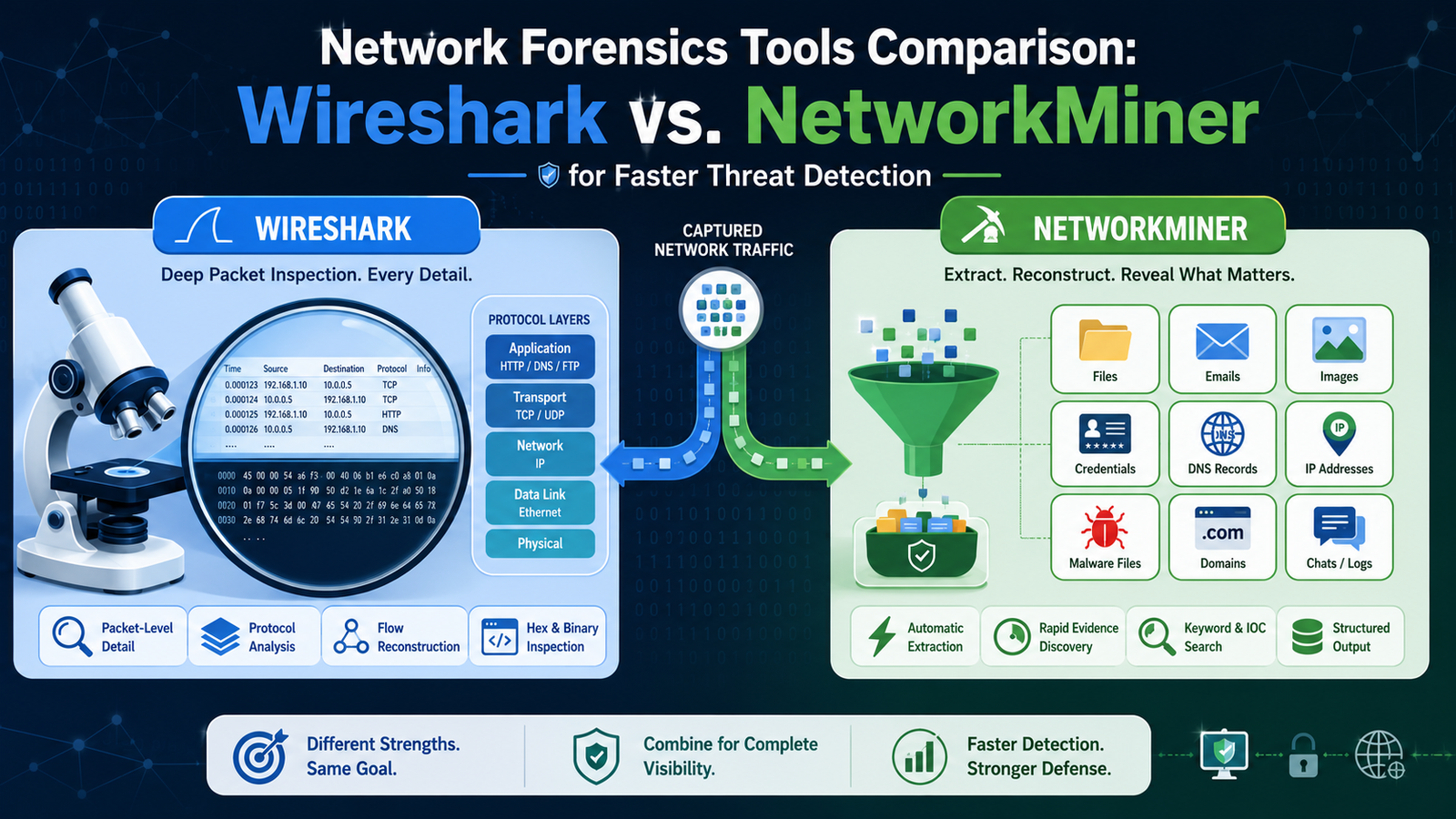
Choosing between Wireshark and NetworkMiner can significantly impact the speed and accuracy of a security investigation. In this network forensics tools comparison wireshark networkminer, you’ll discover how each tool approaches traffic analysis, evidence collection, and incident response.
Whether you’re investigating suspicious activity or strengthening your Network Threat Detection strategy, understanding their unique strengths helps you work more efficiently and uncover critical evidence faster.
See Which Network Forensics Tool Matches Your Investigation Needs
Every investigation has a different starting point. Sometimes you need to quickly identify what happened, while other cases require a detailed analysis of every packet.
- Wireshark uncovers every detail. Its packet-level analysis is ideal for understanding exactly how attacks, anomalies, and network events unfold.
- NetworkMiner delivers answers quickly. It automatically reconstructs files, sessions, credentials, and hosts, making evidence easier to review.
- Each tool serves a different purpose. Wireshark is best for in-depth protocol analysis, while NetworkMiner excels at rapid forensic triage.
What Are You Really Trying to See?

It happens like this. You get an alert, maybe from a perimeter device, maybe just a hunch that something’s off on the network. You span a port, you capture the traffic. Now you have a file. That file is everything and nothing all at once.
It’s a thousand simultaneous conversations recorded in a language you need to decode. The first decision, the one that wastes the most time if you get it wrong, is which tool to open.
Do you want the raw, unedited transcript of every single word spoken? Or do you want a smart summary that highlights the suspicious meetings and the documents that changed hands? That’s the core of it. That’s the difference we’re talking about.
Is Your Focus on the Granular Details of How an Attack Moved?
If you need to follow the exact sequence of a TCP handshake that was hijacked, or decode a custom protocol a piece of malware is using for command and control, you’re in Wireshark territory. There’s no substitute. I remember once tracing an exfiltration attempt where the data was hidden in DNS query requests.
It was slow, it was tedious, building display filters to isolate the suspicious traffic from the noise of normal queries. But in Wireshark, we could follow the trail byte by byte, watching the encoded payloads in the packet bytes pane. It showed me how reconstructing events network in a way nothing else could.
“A study in Bentham Science’s forensic tools review rated Wireshark with perfect scores (5/5) for both accuracy and reliability criteria in network traffic analysis, confirming its status as ‘highly recommended in the area of analysis of network traffic’.” – Benthamscience
Wireshark’s strength is in its depth:
- Live capture and deep inspection of hundreds of protocols.
- Powerful display and capture filters to isolate needle-in-haystack traffic.
- The ability to follow TCP or SSL streams to reconstruct a single conversation.
- Detailed packet-by-packet view for timing and sequence analysis.
That granular control is its gift and its burden. You have the power to see everything, which means you also have the responsibility to know what you’re looking for. It’s like being given the unedited security camera footage from an entire building. You can find anything, but you need to know where to look.
Or Do You Need a Fast Overview of What Transpired?
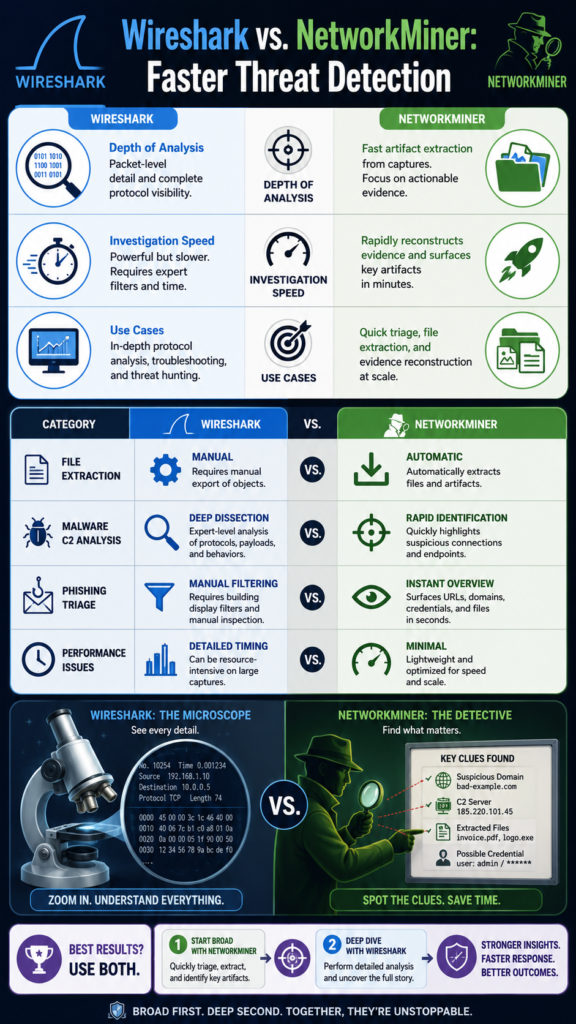
Now, consider a different scenario. A user reports a phishing email got through, they clicked, who knows what happened. You have a packet capture from their segment. You need answers, fast. What files were downloaded? Were credentials sent? What domains did the machine talk to? This is where NetworkMiner shines.
You load the PCAP and it just, goes to work. It doesn’t ask you for filters. It parses the capture offline and gives you a dashboard. You see the hosts, the files, the images, the sessions, all extracted and laid out. It’s doing the initial triage for you.
“NetworkMiner demonstrated ‘robustness in terms of behaviour analysis with efficacy as compared to other state-of-the-art schemes’ when analyzing PCAP files for host identification.” – Inderscience
We used it to quickly identify a dropped executable from a malicious ad, pulling the file straight from the traffic for analysis. NetworkMiner answered the what in minutes. It’s less about the protocol mechanics and more about the artifacts.
Think of it as the detective who walks into a room and immediately points out the overturned vase, the muddy footprint, the open safe. It shows you the evidence, already separated from the background noise.
Putting the Tools Side-by-Side
Credits: Reganel CTF
Let’s make this practical. You’re network investigating a potential data leak. The table below isn’t about declaring a winner, it’s about matching tool to task.
| Investigation Need | Wireshark Approach | NetworkMiner Approach |
| Identifying Exfiltrated Files | Manually follow TCP streams, export objects from HTTP or SMB traffic. Requires knowledge of the protocol used. | Automatically extracts files from multiple protocols (HTTP, SMB, FTP) and lists them in a dedicated “Files” tab with hashes. |
| Analyzing Malware C2 Traffic | Deep dissection of packets to understand custom ports, encryption methods, and beaconing intervals. Essential for writing new detection rules. | Quickly lists all sessions and hostnames, allowing rapid identification of suspicious external IPs and domains contacted. |
| Triage After a Phishing Click | Filter for HTTP traffic to/from the victim IP, manually reconstruct web sessions to see submitted forms. | Instantly displays parsed credentials from web forms, along with any downloaded files and visited URLs in a clear overview. |
| Understanding a Network Performance Issue | Analyze TCP window sizes, retransmissions, and packet timing with expert info and IO graphs. Unmatched for root cause. | Provides little help here. Its focus is on content, not connection quality or timing. |
The pattern is clear. Wireshark is your primary investigator, your lab technician. NetworkMiner is your first responder, your evidence collection officer. One is for asking “how did this happen?” The other is for asking “what happened, and what did they take?”
When Does Your Workflow Demand a Different Perspective?
Sometimes, the tools we know best can blind us to a more efficient path. We learned this the hard way. For years, my default was Wireshark. It was the Swiss Army knife, so we used it for everything, even quick checks. Then we spent a week on a incident response team where every minute counted.
Watching a seasoned responder pull up NetworkMiner, get a host list, file list, and credential list from a 500MB PCAP in the time it took my Wireshark to finish loading, that was a revelation. It changed my workflow.
Now, my process starts with a question: Am we diagnosing or discovering? Diagnosis is Wireshark work. Discovery is where NetworkMiner, or a platform built for that purpose, saves you. Speaking of purpose-built platforms, for teams that do this constantly, the manual tool-switching gets old.
This is where considering a dedicated network threat detection platform makes sense. We built ours precisely because we got tired of the context switching.
It automates that initial NetworkMiner-style reassembly and artifact extraction, hosts, files, sessions, but keeps it all live on the network, indexed and searchable, so you can pivot from a suspicious file hash to the raw packet stream in a click. It tries to give you the what immediately, but never at the cost of losing the how.
You don’t have to choose; you start with the overview and drill down when you need to, all in one place. It’s the workflow, evolved.
Can You Rely on One Tool for Every Forensic Task?
Technically, you could rely on a single tool, but it is rarely the most effective approach. Using only one solution is like a carpenter trying to build everything with just a hammer or just a saw. The job may get done, but it takes more effort and often produces weaker results.
The better approach is to understand the strengths of each tool and use them where they provide the most value:
- Wireshark for detailed packet analysis and protocol troubleshooting.
- NetworkMiner for quickly extracting evidence and identifying key forensic artifacts.
Ideally, investigators should use solutions that combine both perspectives, making it easier to switch between high-level evidence and detailed packet analysis during the same investigation.
FAQ
Is Wireshark considered a network forensics tool?
Absolutely, yes. While often used for troubleshooting, its ability to capture, dissect, and filter traffic at the deepest level makes it a foundational forensic tool. It provides the verified, packet-level evidence that can be critical in an investigation or legal proceeding.
Can NetworkMiner perform live packet capture?
Its primary strength is in offline PCAP analysis. While some versions have a basic live capture feature, it’s not its designed forte. It’s best used on captured traffic files where its reassembly engines can work thoroughly.
Which tool is better for a beginner in network forensics?
NetworkMiner often provides a more accessible starting point because it presents concrete artifacts (files, messages, hosts) immediately. Wireshark has a steeper learning curve as it requires more protocol knowledge to ask the right questions of the raw data.
Do I need both tools in my toolkit?
For serious forensic work, having access to both capabilities is highly recommended. They address different phases and questions in an investigation. Many professionals start with NetworkMiner for rapid triage and then use Wireshark for deep-dive analysis on specific, suspicious streams identified.
Bringing the Full Network Story Together
Finding the narrative in the noise is what network forensics is ultimately about. Every packet, session, and artifact contributes to the larger story of an incident. Wireshark helps you understand the precise details of each conversation, while NetworkMiner quickly highlights the people, files, and events that matter most.
If you’re ready to strengthen your investigations and reduce response times, Join Network Threat Detection to explore the platform, request a tailored demo, and see how continuous network intelligence can help your team uncover the complete story behind every attack.
References
- https://www.benthamscience.com/article/145197
- https://inderscience.com/info/inarticle.php?artid=118542
