
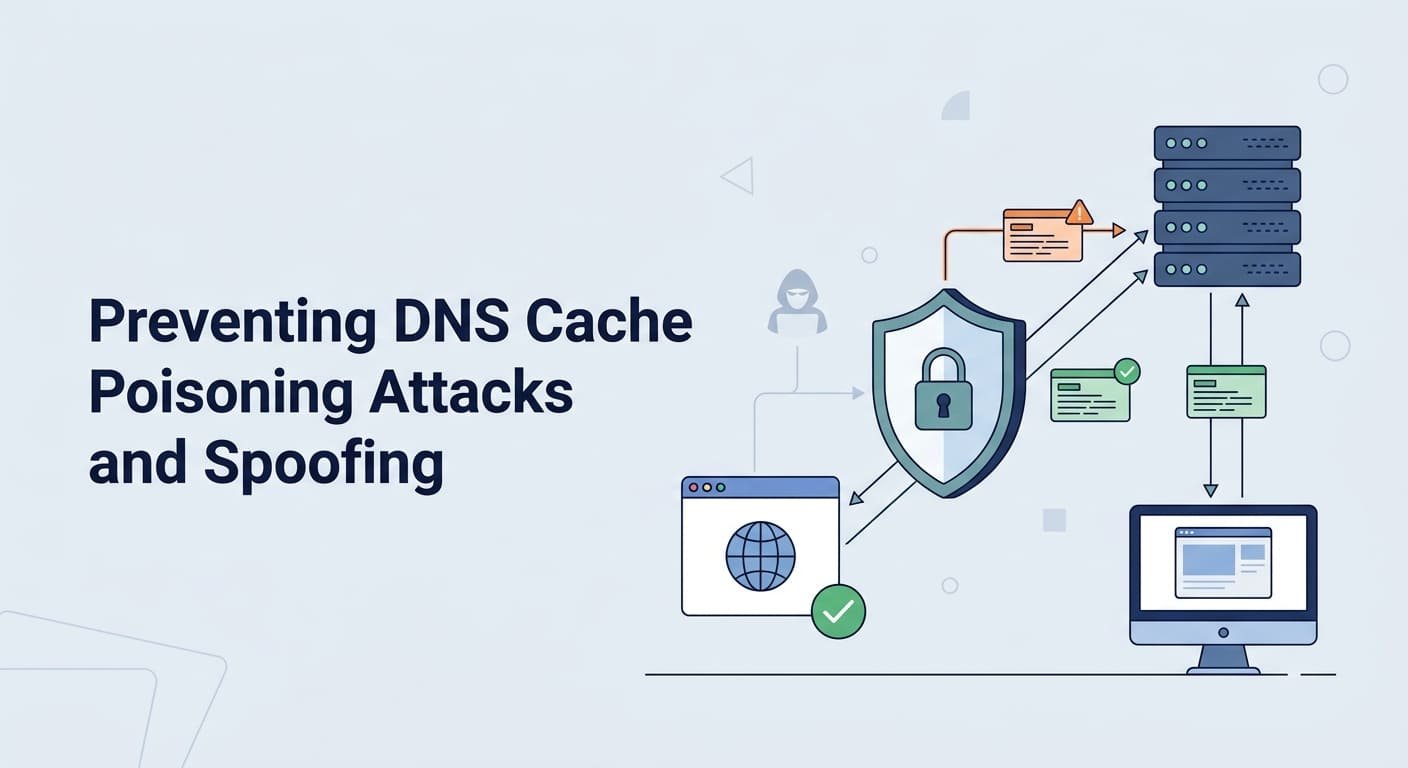
Prevent DNS cache poisoning with DNSSEC validation, trusted recursive resolvers, and randomized DNS queries. But these measures won’t catch every attack. Poor configurations can still leave DNS systems open to false records that redirect users to malicious websites.
Research presented at USENIX Security has highlighted gaps in DNS protection, including low adoption of DNS Cookies. So, review resolver settings and watch for unusual DNS traffic. Check unexpected responses before they lead to further damage.
Network Threat Detection helps security teams identify suspicious DNS activity and investigate potential attacks. Don’t overlook gaps in your DNS setup. Keep reading to learn how to detect threats and strengthen your defenses.
Quick Guide to Preventing DNS Cache Poisoning Attacks
- Validate DNS responses: Use DNSSEC and trust chain checks to verify DNS records.
- Harden DNS infrastructure: Patch resolvers, restrict queries, randomize IDs and ports, and secure DNS caches.
- Detect and respond to threats: Monitor DNS traffic, investigate suspicious activity, and follow an incident response plan.
What Is DNS Cache Poisoning, and Why Does It Matter?
DNS cache poisoning is when an attacker gets a DNS resolver to save fake records. The records point people to the wrong IP address. The resolver keeps handing out that bad answer until the record expires or an admin clears it out.
DNS is short for Domain Name System. Think of it as the internet’s phone book. It changes a website name into an IP address that computers can read. A recursive resolver does the lookup and then saves the answer for a while, so the next visit loads faster.
That saved answer is what attackers go after. They try to slip in a fake reply before the real one arrives. If the resolver falls for it, users can end up on a server the attacker runs. When we walk teams through threat models, this is usually the first attack we bring up. It’s easy to explain, and people tend to brush it off.
How does a DNS spoofing attack work?
Spoofing means feeding a resolver or a DNS client made-up data. Once the resolver saves that data, it becomes cache poisoning.
Here are the four stages we see most often:
- The attacker picks a recursive resolver to target.
- The attacker sends a fake DNS reply that looks like the answer to a question the resolver just asked.
- The resolver accepts the fake reply because its checks didn’t catch it.
- Other users who ask that resolver get the attacker’s IP address from the cache.
Say a person types in their bank’s real address. They land on a copycat page, and the address bar still looks right. That’s what makes this attack hard to spot. Attackers use it to steal passwords, spread malware, or send people to fake sites.
How do DNS spoofing and cache poisoning differ?
A lot of people use these two terms as if they were the same. They aren’t. In our risk assessments, mixing them up has led some teams to defend against the wrong thing.
- DNS spoofing: Sends a forged DNS response to provide incorrect destination information.
- DNS cache poisoning: Causes a DNS resolver to store fake DNS data, allowing the incorrect answer to be repeated for multiple users.
- DNS hijacking: Changes DNS settings or official DNS records to redirect users to unintended destinations for an extended period.
- On-path DNS tampering: Alters DNS queries or responses while they travel between systems.
Once you know which one you’re facing, picking a defense gets easier. DNSSEC checks that a record is authentic. Encrypted DNS protects the connection when supported. Monitoring helps you notice strange activity. No single tool covers every attack type.
How Does DNSSEC Prevent DNS Cache Poisoning?
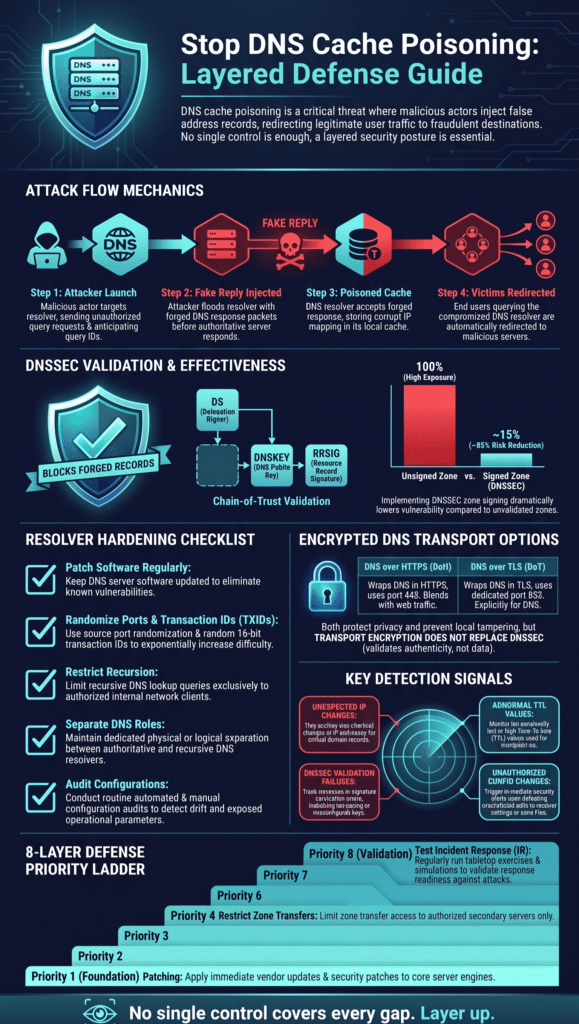
DNSSEC lets a resolver check digital signatures and reject bad data from signed zones. This makes forged answers a lot harder to sneak through. It’s a strong defense, but it can’t fix every DNS problem.
The full name is Domain Name System Security Extensions. It adds signatures to DNS data. A validating resolver checks those signatures and follows a chain of trust to decide if the data can be believed.
As highlighted by RFC Editor
“In the DNSSEC protocol, Resource Record Sets (RRsets) are signed cryptographically. This means that a response to a query contains signatures that allow the integrity and authenticity of the RRset to be verified. DNSSEC signatures are validated by following a chain of signatures to a ‘trust anchor.'” – RFC Editor
The Internet Engineering Task Force (IETF) explains that DNSSEC uses special records and cryptography to prove DNS data is real. The catch is that both signing and validation have to be set up right. We’ve seen teams turn DNSSEC on and call it finished, when only half of the setup was actually in place.
You can read the IETF’s official overview in RFC 4033: DNS Security Introduction and Requirements.
How Does DNSSEC Validation Work?
DNSSEC works on two sides: the authoritative DNS server publishes signed records, and the recursive resolver verifies them.
The main DNSSEC records and their functions include:
- DNSKEY: Stores public keys used to verify DNSSEC signatures. It helps resolvers validate signed DNS data.
- DS (Delegation Signer): Links a child domain’s DNSKEY to its parent zone. It establishes the chain of trust between DNS zones.
- RRSIG (Resource Record Signature): Contains a digital signature for a set of DNS records. It helps resolvers verify data authenticity and integrity.
- NSEC: Provides authenticated information that a DNS name or record does not exist. It helps prevent attackers from forging certain negative DNS responses.
- NSEC3: Provides authenticated denial of existence using hashed DNS names. It offers an alternative way to prove that DNS names or records do not exist.
If validation fails for data that should be signed, the resolver can reject the response instead of passing it on to the user.
What are the limitations of DNSSEC?
DNSSEC is strong, but it needs good setup, and it only helps when a domain is actually signed.
- Unsigned zones: If a zone isn’t signed, DNSSEC has nothing to check.
- Configuration errors: A wrong DS record, an expired signature, or a broken chain can keep real websites from loading.
- Software vulnerabilities: DNSSEC can’t cover for a resolver with an unpatched security hole.
- Transport privacy: DNSSEC proves data is real, but it doesn’t hide the questions people ask.
- Operational complexity: Mistakes in signing or validation can cause outages. In our experience, expired signatures cause more of these than anything else.
One research paper in our source materials, Implementing DNSSEC to Protect Against DNS Spoofing and Cache Poisoning (2024), says DNSSEC can cut spoofing risk by up to 85%. We wouldn’t treat that number as a rule for every network. Look at how the study was done and what it tested before you rely on it.
Our advice is to treat DNSSEC as a core way to protect data integrity, and then build around it. Effective DNS security measures combine safe resolver settings, regular software updates, DNS filtering, and traffic monitoring to help teams detect and prevent threats.
How Should You Harden DNS Resolvers Against Spoofing?
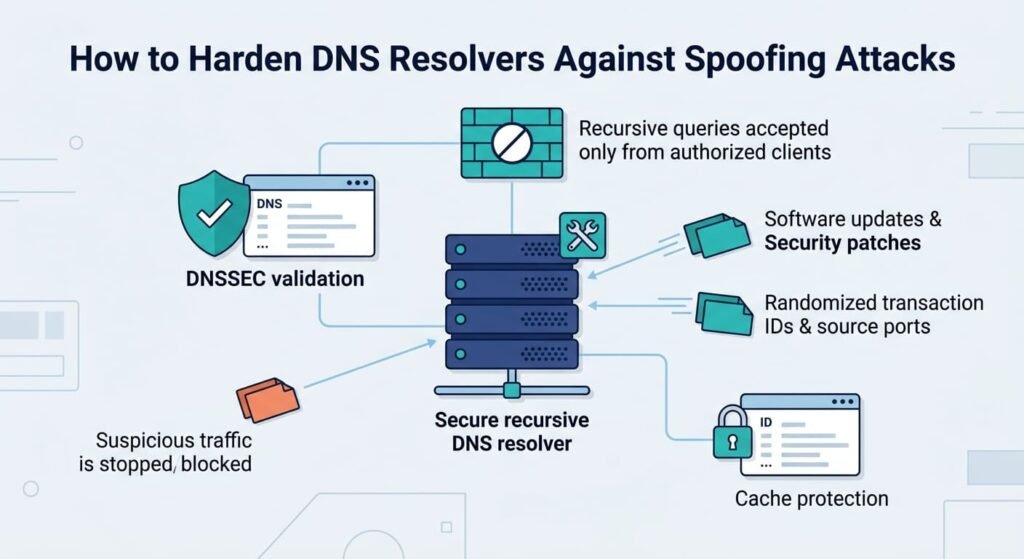
A DNS resolver is a lot like a phone book that remembers what it looks up. If someone sneaks a fake entry into it, lots of people can end up at the wrong website. Following recursive DNS server security best practices means keeping software updated, limiting who can use the resolver, and making queries harder to predict.
Here is how it works. A recursive resolver gets a request, asks other DNS servers for the answer, and keeps a copy in its cache. Since that cache affects every lookup after it, a poisoned cache can cause a lot of damage. Both BIND and Unbound let admins tighten their settings, but the best setup depends on your software version and your network. It also matters whether the resolver does its own lookups or just passes them along to another server.
Which DNS security settings should administrators prioritize?
When teams ask us where to start, we hand them this list.
- Patch DNS software: Install security updates and read the vendor’s advisories often.
- Randomize source ports: Use random UDP source ports so a fake reply is harder to match to a real question.
- Randomize transaction IDs: Random query IDs make them much harder to guess.
- Restrict recursion: Only answer recursive queries from networks and users you trust.
- Control upstream forwarding: If you pass queries along, send them only to approved servers.
- Separate DNS roles: Run authoritative servers and recursive resolvers on different machines when you can. Then one break-in does less harm.
- Audit configurations: Check access lists, listening interfaces, and forwarding rules on a regular schedule.
These steps help each other out. Random ports and IDs make blind guessing harder, and patching closes holes that attackers already know about. In the threat models we build, a missed patch shows up again and again. It is also usually the cheapest problem to fix.
Why are source ports and transaction IDs important?
Most old-school spoofing attacks come down to a lucky guess. The attacker fires off a fake reply and hopes it matches a question the resolver is waiting on. To accept an answer, the resolver checks the transaction ID, the addresses, and the ports.
When both the ID and the port are random, the attacker has a lot more numbers to guess from. This helps most when the attacker can’t see the real question leave the resolver.
But random numbers don’t prove who sent the answer. A study shown at ACM CCS 2020 looked at side-channel tricks that can weaken the idea that source ports are hard to guess. The researchers found that 34.36% of the network setups they tested were open to one of these tricks. That number only describes the study. It does not tell us how exposed the whole internet is today.
Research from USENIX Security shows
“Our techniques remain effective in the presence of stateful firewalls, under high query loads, and when targeting DNS forwarders, avoiding the need for direct UDP port inference entirely. Our attack can predict the exact UDP source port and TXID (up to very few candidates) without side channels, does not require numerous packets, and is in full effect at the time of writing.” – USENIX Security
So we suggest stacking defenses. Use DNSSEC validation, keep resolvers updated, turn on DNS Cookies where they work, and add network-level DNS protection. When we run risk analysis for clients, no single control covers every gap. That is the reason layers matter.
How can administrators prevent open DNS resolver abuse?
An open recursive resolver answers anyone who asks, even people who should never use it. Attackers love these servers. They can use them for free, and they can use them to power DNS amplification attacks.
To close this door, write clear access rules and allow recursion only for trusted networks. Check which interfaces accept DNS traffic, too. We also look hard at firewall rules, since a public DNS server should only offer the features it truly needs.
Keep one thing in mind, though. Blocking outside users cuts down your exposure, but it does not prove that an answer is real. You still need query validation and other integrity checks.
Should You Use DNS-over-HTTPS or DNS-over-TLS?
DNS-over-HTTPS (DoH) and DNS-over-TLS (DoT) both scramble the traffic between a client and a DNS resolver. Someone watching the network then has a hard time reading or changing it. Neither one replaces DNSSEC.
That’s because they do two different jobs. DNSSEC helps show that DNS data is real. Encrypted DNS protects the road the data travels on.
How do DoH and DoT compare?
| Feature | DNS-over-HTTPS (DoH) | DNS-over-TLS (DoT) |
| Transport | HTTPS | TLS |
| Query confidentiality | Encrypts supported client-to-resolver traffic | Encrypts supported client-to-resolver traffic |
| Replaces DNSSEC | No | No |
| Enterprise concern | May bypass managed DNS policies | Requires compatible clients and infrastructure |
| Security priority | Protect transport and control resolver selection | Protect transport and control resolver selection |
Both can help stop spoofing if the connection is set up and checked the right way. Still, neither one promises that every record in an answer is genuine.
How should enterprises deploy encrypted DNS?
First, decide which resolvers your company approves. Next, set up your devices to use them and write a policy for outside DNS services. It also helps to watch for devices using resolvers nobody picked. Check whether browser or app settings can slip past your managed DNS, too.
A common setup is simple. Employee laptops use encrypted DNS to reach an approved internal resolver, and DNSSEC checks still happen at the right spot. The company gets safer traffic and keeps its central monitoring.
There is a catch. When apps skip the company resolver, investigations get harder. Security teams tell us this is the tradeoff they argue about most. Think about user privacy, network visibility, and company rules before rolling out DoH or DoT everywhere.
How Can HTTPS and HSTS Reduce the Impact of DNS Poisoning?
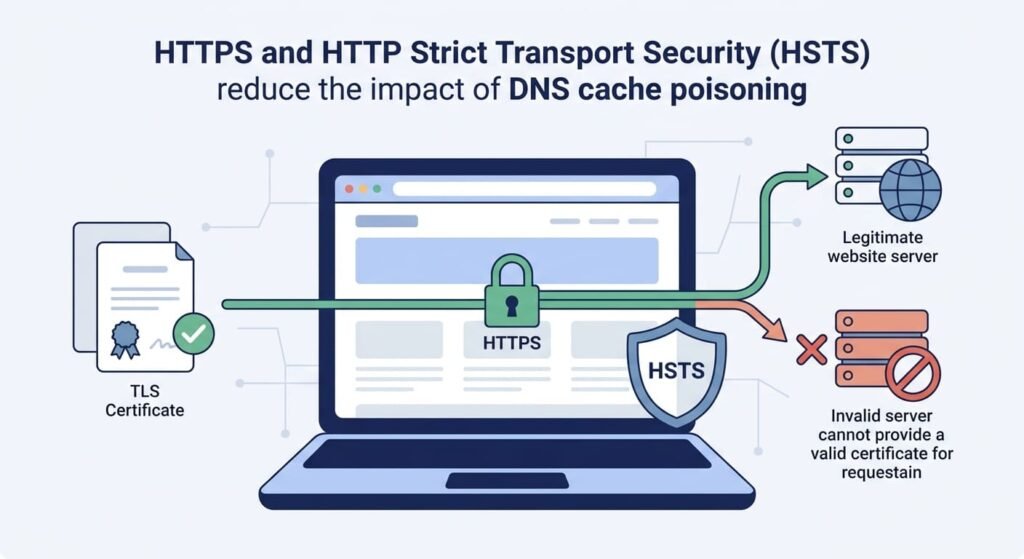
HTTPS checks and HTTP Strict Transport Security (HSTS) give you a safety net. They can’t fix a poisoned DNS record. They can, however, block some kinds of fake websites.
HTTPS uses TLS to prove who a website is and to protect the connection. Picture a poisoned answer that sends a browser to the attacker’s server. The attacker usually can’t build a valid HTTPS connection for the real domain. They don’t have the right certificate, and they’d need some other weakness to get around that.
HSTS tells supported browsers to always use HTTPS for a domain. That makes downgrade attacks less likely, where an attacker tries to push people onto plain HTTP with no encryption.
Which website protections should you enable?
- Use valid TLS certificates, and renew them before they expire.
- Turn on HSTS where it fits your site.
- Redirect HTTP traffic to HTTPS.
- Protect domain registrar and DNS hosting accounts with multifactor authentication.
- Watch for unauthorized DNS record changes and certificate alerts.
The Cybersecurity and Infrastructure Security Agency (CISA) has guidance for groups that manage domains and internet-facing systems. You can find its official resources on the CISA website.
Treat these steps as one more layer of DNS protection. We never see them as a stand-in for DNSSEC, resolver hardening, or secure admin access. They work best when you use them together.
How Can Network Threat Detection Identify DNS Poisoning Attempts?
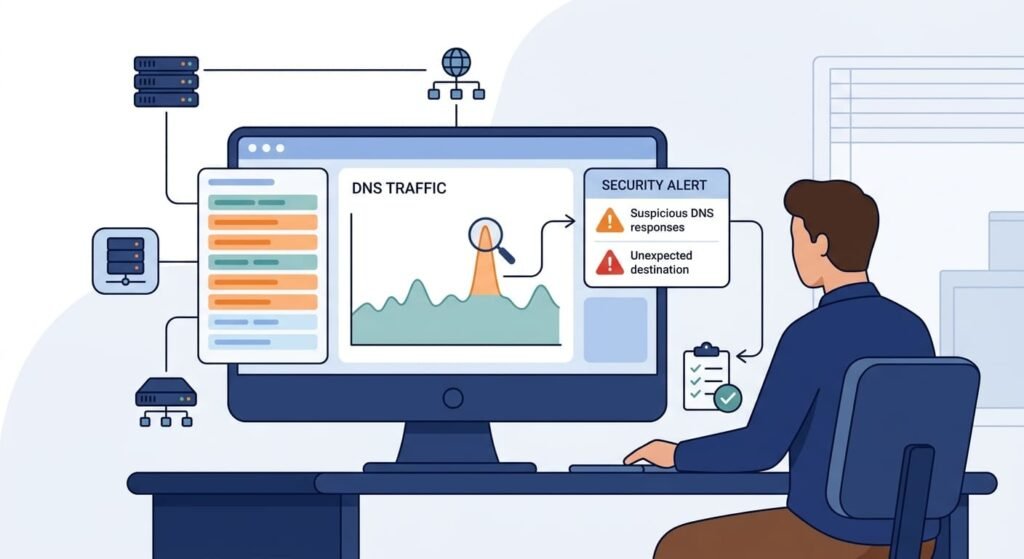
Network Threat Detection helps security teams catch strange DNS activity. It watches what gets asked, what comes back, and how the network behaves. Combining DNSSEC checks, a hardened resolver, and DNS filtering helps teams identify suspicious lookups and block connections to malicious domains that may distribute malware.
One tool alone can miss DNS problems. Picture a domain that has always pointed to the same address. Then overnight it points somewhere new. Worth a look, especially if the TTL seems off too. When we review setups like this, the clue is rarely one loud alarm. It’s usually a few small things that only make sense side by side, and honestly, that surprises people every time.
Which DNS events deserve investigation?
These are the signs our team watches for. Any one of them could mean someone is tampering with your DNS.
- Unexpected IP changes: A trusted domain starts pointing to a new address, and nobody approved it.
- Abnormal TTL values: Responses carry time to live numbers that don’t match your usual pattern.
- Repeated validation failures: DNSSEC errors keep showing up across related domains or resolvers.
- Unusual response patterns: Answers include records nobody expected, or they come from sources you never approved.
- Unauthorized configuration changes: Resolver settings, forwarding rules, or authoritative records change outside a planned maintenance window.
One sign alone doesn’t prove an attack. A content delivery network can look strange. So can a move to a new host, or a routine update. We’ve chased plenty of alerts that ended with a boring answer in the change log. Boring is good.
The smart move is to check DNS traffic against endpoint data, firewall logs, and resolver records. We build threat models and risk analysis tools, and they help teams sort out which DNS events matter most on their own network. Network Threat Detection then connects suspicious DNS activity to other clues, so you see the bigger picture instead of a pile of separate alerts.
How Should You Respond to a Suspected DNS Cache Poisoning Attack?
Credits: Ahmad Halabi
Responding takes four steps: validate, contain, investigate, and recover. But slow down first. Make sure the odd result is real before you change settings or clear any caches. Clear too early and you may erase the proof you need later, and that mistake is hard to undo.
Here is the order we suggest for getting back to trusted DNS.
- Validate the response: Compare the suspicious records to trusted DNS data. Check DNSSEC signatures where they apply.
- Contain the exposure: If the attack looks active right now, cut off the affected resolvers or clients.
- Inspect the cache: Read through cached records, query logs, TTL values, and recent resolver changes.
- Correct the weakness: Patch weak software, undo changes nobody approved, and tighten who has access.
- Flush affected caches: Remove the bad records only after you’ve saved the evidence and settled on a fix.
- Verify recovery: Confirm that real domains resolve correctly, DNSSEC checks work, and the problem stays gone.
Keep your timestamps, DNS queries, responses, and network logs, and follow your incident response policy while you do it. These records answer the hard questions later. How did the attacker get in? Which other systems were touched? Without them, teams end up guessing, and we’ve seen how stressful that gets.
How Can You Build a Layered DNS Cache Poisoning Defense?
Good DNS security works in layers. Authentication, a hardened resolver, encrypted transport, and monitoring all play a part. No single control fits every network, so we tell teams to lock down the basics first and add detection tools after. Basics first. Always.
- Patch DNS software: Fix known security vulnerabilities by keeping DNS software up to date.
- Restrict recursive access: Prevent unauthorized users from using your DNS resolver.
- Enable DNSSEC validation: Verify the authenticity of supported DNS records.
- Randomize transaction IDs and source ports: Make it harder for attackers to guess the details needed to inject fake DNS responses.
- Configure DoH or DoT appropriately: Protect DNS traffic in transit where encrypted DNS is supported.
- Enforce HTTPS and HSTS: Reduce certain risks associated with fake websites and downgrade attacks.
- Monitor DNS traffic and cache behavior: Help detect suspicious activity and investigate potential attacks.
- Test incident response procedures: Improve the speed and effectiveness of attack investigation and recovery.
How should organizations measure DNS security progress?
Watch a few numbers over time. How much of your DNS uses DNSSEC validation? How current are your resolver patches? How many recursive services sit open to the internet? How many suspicious DNS events show up, and how long does it take to respond? A regular review can reveal gaps that a single audit would skip, and in our experience those gaps tend to hide in the places nobody checks.
Test any DNSSEC change before you roll it out everywhere. Bad signing, broken trust chains, and forwarding mistakes can stop real sites from loading. Roll out in small stages. Write down how to undo each step, too.
Network Threat Detection works well next to all of this because it helps teams look into DNS oddities and link related events. But it should support DNSSEC validation, safe settings, and quick updates. Not replace them.
FAQ
What are the most effective methods for preventing DNS cache poisoning attacks?
Preventing DNS cache poisoning attacks requires DNSSEC validation, secure resolver settings, and randomized DNS queries. Administrators should also apply DNS software updates, restrict unauthorized access, and randomize DNS source ports. These DNS security best practices make it harder for attackers to inject forged responses and help resolvers return authentic DNS records to users.
How does DNSSEC validation help prevent DNS spoofing?
DNSSEC validation checks digital signatures to confirm that DNS records match the information signed by the responsible zone. Resolvers verify DNSKEY records, DS records, and RRSIG signatures to establish the DNSSEC chain of trust. This process supports DNS response authentication and helps resolvers reject forged or altered records, although DNSSEC does not encrypt DNS queries or responses.
How can administrators detect forged DNS responses?
Administrators can use DNS security monitoring, DNS traffic analysis, and DNS log monitoring to identify suspicious response patterns. They should investigate unexpected IP addresses, unauthorized DNS record changes, and inconsistent responses from different resolvers. These checks support forged DNS response detection and help identify DNS poisoning attacks, malicious domain redirection, and possible DNS response tampering.
What should administrators do after discovering DNS cache poisoning?
Administrators should first identify affected resolvers and determine which DNS records have been altered. They should inspect cached entries, verify the correct records against trusted authoritative sources, and flush affected caches when necessary. They should also review DNS logs, patch vulnerable software, and correct the security weaknesses that allowed the attack to occur.
How can DNS resolver security reduce future poisoning attacks?
Administrators can strengthen DNS resolver security by restricting recursive queries to authorized clients, updating DNS software, and applying secure server configurations. They should also enable DNSSEC validation, use randomized query identifiers and source ports, and configure rate limits. Regular security audits and DNS anomaly detection help identify weaknesses before attackers exploit them to manipulate cached records.
Preventing DNS Cache Poisoning Attacks: Key Steps to Protect Your Network
DNS cache poisoning can redirect users to malicious websites and expose your network to serious security risks. Prevention starts with strong DNS security. Your defenses need to work together.
Network Threat Detection can help your organization identify suspicious DNS activity and strengthen its security monitoring. Combine it with DNSSEC validation, secure resolver configurations, and regular testing to reduce the risk of cache poisoning. Explore how Network Threat Detection can support your organization’s security operations. Taking these steps helps your team detect threats earlier and maintain more reliable DNS infrastructure.
References
- https://www.rfc-editor.org/rfc/rfc9718.pdf#1#2#1
- https://www.usenix.org/system/files/conference/usenixsecurity26/sec26_prepub_ben-simhon.pdf#6#1