
SPAN ports copy traffic, but not all of it gets through. When traffic spikes, drops start. You see it most during incidents, when the capture does not match what users felt on the network. Still, SPAN stays popular because it is already built in and quick to turn on. A few commands, and it is running.
It works fine for light checks across switches or Layer 3 devices. Cisco Nexus and simple switch GUIs make it easy to set up. The issue is what you do not see. Missing packets and uneven copies can hide real problems and confuse analysis.
Where SPAN Ports Start to Break Down
- SPAN drops packets when traffic is high. What you capture is not the full story.
- Oversubscription happens when mirrored traffic is heavier than the port can handle, so some data never leaves the switch.
- When accuracy matters, teams often move to taps or mix SPAN with other monitoring tools.
What are SPAN Ports and Why Do They Matter?
SPAN ports copy traffic from one interface to another so we can inspect it. They use the same hardware that handles normal traffic, so not every packet makes it through.
We use SPAN, or port mirroring, during real incidents. It is often the fastest way to pull traffic off a link and send it to a capture tool. A few commands on a switch, and we have something to look at. That speed is why teams keep coming back to it.
Most enterprise switches support it out of the box. Cisco Nexus, Cisco 4500 Series, and other LAN switches all include SPAN. In many networks we have worked on, mirrored traffic is the main source of visibility, especially when comparing tap vs span approaches in real deployments.
But SPAN runs inside the switch fabric. It shares resources with forwarding. On quiet links, that is fine. On busy ones, we start to see gaps, especially with full-duplex traffic moving across several segments.
Common use cases include:
- Troubleshooting TCP traffic and network slowdowns
- Feeding packet capture tools during incident response
- Supporting network observability across distributed systems
These jobs are routine. The limits behind them are easy to miss.
Quick Insights: Key SPAN Limitations at A Glance
SPAN ports drop packets under load because mirroring is not treated as core work.
We have seen the same issues across different setups:
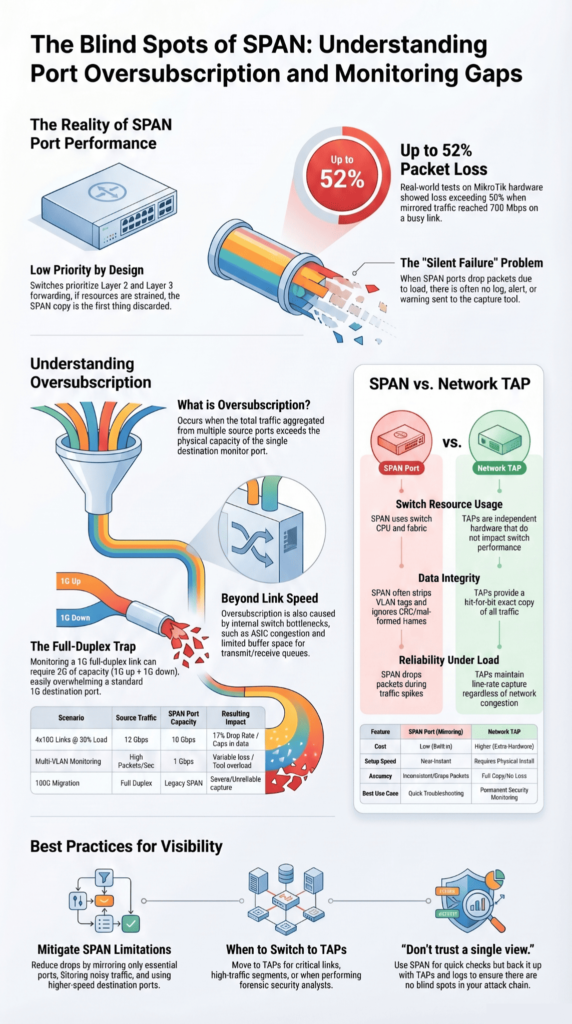
- Packet loss can pass 50% under heavy load, observed on MikroTik CRS326
- Some frames never show up, including CRC errors and very small packets
- VLAN tags may be removed, which changes how traffic looks in tools
- Monitor ports can hit capacity without clear signs
- Running multiple sessions reduces what each session can handle
This affects how much we can trust the data. Missing traffic leads to weak analysis, which matters in security work.
Why Do SPAN Ports Drop Packets Under Load?
Mirrored traffic is handled after normal forwarding. When the switch is busy, SPAN is the first thing to give way.
We have run captures where production traffic looked steady, but the mirror feed had holes. At first glance, it looks like a tool issue. It is not. It comes from how the switch processes packets.
Traffic is forwarded at Layer 2 and Layer 3 first. Only then does the switch copy it for SPAN. If buffers are tight or the system is under load, some packets never get copied.
As noted by Cisco
“Receives copies of sent and received traffic for all monitored source ports. If a destination port is oversubscribed, it can become congested. This congestion can affect traffic forwarding on one or more of the source ports. The switch treats SPAN data with a lower priority than regular port-to-port data. In other words, if any resource under load must choose between passing normal traffic and SPAN data, the SPAN loses, and the mirrored frames are arbitrarily discarded.” – Cisco
Buffers fill quickly. Once full, packets are dropped in order. The capture tool does not get a warning. In one test with MikroTik hardware, we measured about 52% loss at 700 Mbps of mirrored traffic, even though the main link still had room.
Key reasons include:
- Limited buffer space for transmit and receive queues
- Added load on the switch CPU during mirroring
- No backpressure to slow incoming traffic
- Competition with QoS rules and normal forwarding
So while SPAN looks stable from the outside, the copy it produces can miss a lot.
What is Oversubscription in SPAN Ports?
Oversubscription is what happens when the mirror port can’t keep up with what it’s being sent.
We usually see it when several links are copied into one port. It works for a while. Then traffic picks up, and the port hits its limit. After that, packets start dropping. There’s no alert, no log, just missing data.
As highlighted by Packet Pushers
“The most common problem I come across is when the total amount of traffic aggregated from the source ports exceeds the physical limitations of the destination port. This will result in some dropped packets on the destination port. The switch always favors real traffic first. So the mirrored copy gets trimmed when there’s pressure.” – Packet Pushers
One setup we dealt with on a Cisco Catalyst 3850 made it obvious. Four 10G links, each not even half used, still pushed more than 10G once mirrored. The math didn’t hold, and the excess traffic never made it out.
It’s not only about link speed. Other parts of the switch get involved:
- Internal paths inside the switch
- Traffic moving between ASICs
- Port channel monitoring
SPAN doesn’t manage the load. It copies everything and hopes the port can handle it.
How Does Oversubscription Impact Monitoring Accuracy?
Once packets drop, what we see is no longer the full story.
We’ve had cases where captures looked clean, but something felt off. Later checks showed activity that never appeared in the mirrored data. It wasn’t the tool. The packets just didn’t arrive.
Packet rate plays a part here. A 1G port can fall behind even if the bandwidth seems low. Too many packets per second, and it starts missing them. Tools like Suricata depend on steady input. Break that, and results drift.
What we usually notice:
- Gaps in detection data
- Metrics that don’t match real traffic
- Missed signs during longer attacks
- Broken or partial flow records
At that point, analysis turns into guesswork.
Real-world Oversubscription Scenarios
Oversubscription doesn’t need a large setup. It shows up quickly.
| Scenario | Source Traffic | SPAN Capacity | Drop Rate | Impact |
| 4×10G @30% | 12 Gbps | 10 Gbps | 17% | Monitoring gaps |
| Multi-VLAN | High PPS | 1 Gbps | Variable | Tool overload |
| 100G migration | Full duplex | Legacy SPAN | Severe | Unreliable capture |
We’ve seen a single 1G port struggle with just a couple of busy links. Full duplex traffic doubles what needs to be copied, which is easy to miss during planning.
During SSL/TLS decryption and GTP correlation work, traffic didn’t stay steady. It came in bursts. Short spikes filled the port, and drops followed right after.
This is where the design starts to crack. On paper, it looks fine. In practice, it falls behind.
What Other Technical Limits Affect SPAN Ports?

SPAN doesn’t show everything, and sometimes it changes what it copies.
In a few of our lab runs, traffic only showed up in one direction. That made it harder to trace a full session. Timing can drift, too. Packets land slightly out of order, which gets messy when we try to piece events back together.
There’s also a hard cap on how many sessions you can run. On some switches, we hit that limit quickly and had to choose which links to watch.
Other things we’ve run into:
- CRC errors and bad frames often don’t show up at all
- VLAN tags can disappear or look different
- ACL filtering is limited and easy to misapply
- Short spikes, like microbursts, slip past
None of this stands out at first. It shows up later, when the data doesn’t quite line up.
Are SPAN Ports Reliable for Security Monitoring?
For security work, SPAN leaves holes.
We’ve seen captures that looked fine until we checked against other data. Some traffic never made it into the mirror. That gap matters when you’re trying to track movement inside a network.
Tools depend on a steady stream of packets. When that stream breaks, detections don’t always fail loudly. They just miss things.
What we keep seeing:
- Parts of an attack chain are missing
- Incomplete records during lateral movement
- Gaps tied to filtering or session limits
- Different results across similar devices
Because of that, we don’t rely on SPAN alone. We still use it, but we back it up with other sources when we assess risk.
How Do Network TAPs Solve Oversubscription Issues?

TAPs sit on the link and copy traffic as it passes.
We bring them in when we need a cleaner feed. They don’t use switch resources, so they aren’t affected by CPU load or internal limits. Both directions of traffic are copied at the same time, which highlights key tap deployment advantages for stable visibility under load.
The difference is easy to spot. What goes across the wire shows up in the capture.
What we get with TAPs:
- Full packet copies at line rate
- No extra load on the switch
- Visibility into errors and malformed frames
- Support for faster links
They also pair well with packet brokers and inline tools. For us, they reduce the guesswork when accuracy matters.
SPAN Vs TAP: Which Should You Choose?
Credits: SANS ICS Security
SPAN is useful when we just need a quick look. TAPs matter when we need the full story over time, especially when choosing between taps and SPAN for long-term monitoring accuracy.
| Feature | SPAN | TAP |
| Cost | Low | Higher |
| Packet loss | Can drop | No loss in normal use |
| Scalability | Limited | High |
| Accuracy | Inconsistent | Full copy |
We still use SPAN in live troubleshooting. It is already there on the switch, and we can turn it on fast. That helps during incidents when time matters more than setup.
But once traffic grows, things change. We have seen captures drift from what is actually happening on the wire, especially past 10G links. The mirror just cannot keep up.
In real networks, it usually looks like this:
- SPAN for quick checks
- TAPs for steady monitoring
- Other logs to fill gaps
It is not about replacing one with another. It is about not trusting a single view.
How Can You Mitigate SPAN Oversubscription?
You can slow the problem down, but you do not fully remove it.
We’ve adjusted SPAN setups in production environments to reduce drops. It helps during spikes, but only up to a point.
What we usually do:
- Mirror only the ports we really need
- Filter out noisy traffic
- Split monitoring across more ports
- Use higher-speed destination ports
- Apply session limits where available
On Cisco Nexus gear, rate limits helped during traffic bursts. We saw fewer drops, but not zero.
The pattern stays the same. SPAN shares resources with the switch, so when traffic rises, it gives way.
That is usually the moment teams start adding TAPs. Not as a full switch, but as a way to steady the view when SPAN starts falling behind.
FAQ
Why do SPAN ports drop packets during over-subscription?
SPAN ports copy network traffic from many source ports to one destination port. When the total traffic exceeds the destination port capacity, the switch cannot forward everything.
This causes packet loss and packet dropping. Over-subscription happens when combined traffic is too high, which is common in busy network segments using port mirroring or Switched Port Analyzer setups.
How does a Network Tap reduce packet loss compared to SPAN ports?
A Network Tap copies full-duplex traffic directly from the link without relying on the network switch. It does not depend on the switch CPU or switch fabric, so it avoids packet filtering and packet dropping.
This allows monitoring tools, packet capture systems, and security monitoring processes to receive complete network traffic data for accurate network analysis and better network observability.
What causes destination port overload in SPAN Port Mirroring setups?
Destination port overload happens when multiple source ports send large volumes of network traffic to one monitoring port. If the combined traffic exceeds the port capacity, packet loss occurs.
Factors like VLAN tags, port channel traffic, and high switch CPU load can increase the risk. This is a common limitation in SPAN Port Mirroring on modern network switch environments.
Can SPAN ports affect network performance or switch CPU load?
SPAN ports rely on the network switch to copy and forward traffic, which increases switch CPU load and uses switch fabric resources. In high traffic conditions, this can slow down traffic forwarding and lead to packet loss.
As a result, network performance may drop, and tasks like network troubleshooting, intrusion detection, and security monitoring may become less accurate.
When should network administrators avoid using SPAN ports?
Network administrators should avoid using SPAN ports on critical links or high-traffic network segments. Over-subscription in these cases can lead to traffic loss and create a single point of failure.
For important use cases like detecting cybersecurity threats, data breach risks, or Advanced Persistent Threats, more reliable options such as Test Access Points or passive fiber TAPs provide better packet capture and network analysis.
Rethinking SPAN for Modern Network Visibility
SPAN was never meant to carry today’s load, and you know it. It works for quick checks, but when traffic spikes and blind spots grow, it falls behind. It’s like watching a storm through a keyhole. You see flashes, not the full danger.
So ask yourself: are you really seeing your network, or just hoping? Waiting costs you, missed threats, and silent failures. You don’t need perfect tools, just better ones. Start with Network Threat Detection and take control now.
References
- https://www.cisco.com/c/en/us/td/docs/switches/datacenter/nexus3000/sw/system_mgmt/503_U5_1/b_3k_System_Mgmt_Config_503_u5_1/b_3k_System_Mgmt_Config_503_u5_1_chapter_010000.html
- https://packetpushers.net/blog/benefits-limitations-of-span-ports/
