

Cyberattacks rarely begin with a dramatic breach. More often, they start with a forgotten device, an unpatched application, or a vulnerability hiding in plain sight. That’s why a strong network threat detection strategy begins long before an alert appears on your dashboard.
By Identifying Network Assets Vulnerabilities Threats organizations gain a complete view of what needs protection and where attackers are most likely to strike. This foundational process helps security teams prioritize risks, strengthen defenses, and improve network threat detection before small weaknesses become major security incidents.
Security Snapshot: What Matters Most
Before we explore how to identify network assets, vulnerabilities, and threats, it’s important to understand why visibility matters
- You must maintain a dynamic, accurate inventory of all network assets; an unknown device is an unmanaged risk.
- Vulnerabilities are the specific weaknesses in your assets, while threats are the external actors and methods that exploit them.
- Continuous monitoring for new assets, vulnerabilities, and threat intelligence is not a project, it’s an operational necessity.
What Is the First Step in Identifying Network Assets?
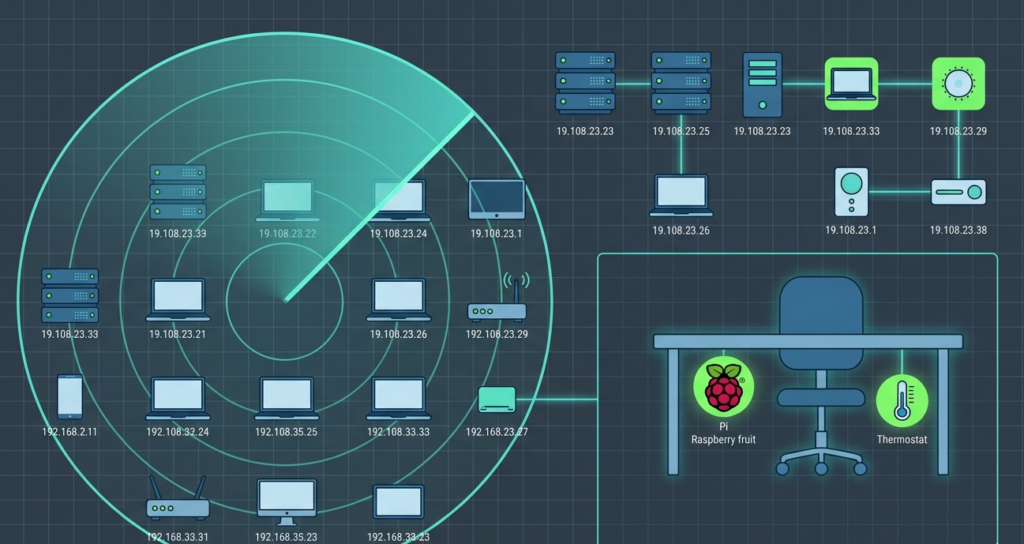
You have to map the territory. This isn’t about a one-time spreadsheet. It’s about discovering every single thing with an IP address that’s talking on your network. That includes the obvious, your file servers, employee laptops, Wi-Fi access points.
And the forgotten, the old test server in the closet, the IoT thermostat in the lobby, the personal tablet an employee connected to the guest network.
Start with automated discovery tools. They’ll scan your IP ranges and give you a raw list. But the real work is categorization. You need to know what each asset is, who owns it, and what it does.
Is it a Windows 10 laptop owned by the marketing department, used for email and design software? Is it a Linux web server owned by the devops team, hosting the customer portal? This context is everything. We once found a developer’s Raspberry Pi plugged into a network jack under a desk.
It was a test project, but it was an unmonitored, unpatched computer on the corporate network. It wasn’t malicious, but it was a huge, unknown risk. Discovery is the non-negotiable first step.
Why Is a Dynamic Asset Inventory Non-Negotiable?
Because networks are alive. They breathe. New devices join every day. Cloud instances spin up and down. Employees bring new phones. A static list is obsolete the moment you finish it. A dynamic inventory is a living system that updates automatically, or at least through frequent, scheduled scans.
This is the only way to maintain what security folks call “situational awareness.” You have to know what’s supposed to be there so you can immediately spot what isn’t.
The consequences of a stale inventory are direct. You can’t patch a server you don’t know exists. You can’t apply a security policy to a device you haven’t cataloged. When a new critical vulnerability drops (like Log4Shell), you need to know immediately if you have any affected assets.
If your inventory is a six-month-old Excel file, you’re dead in the water. You’ll spend days scrambling just to figure out what you have, while attackers are already scanning for the flaw.
How Do You Move from Assets to Identifying Vulnerabilities?
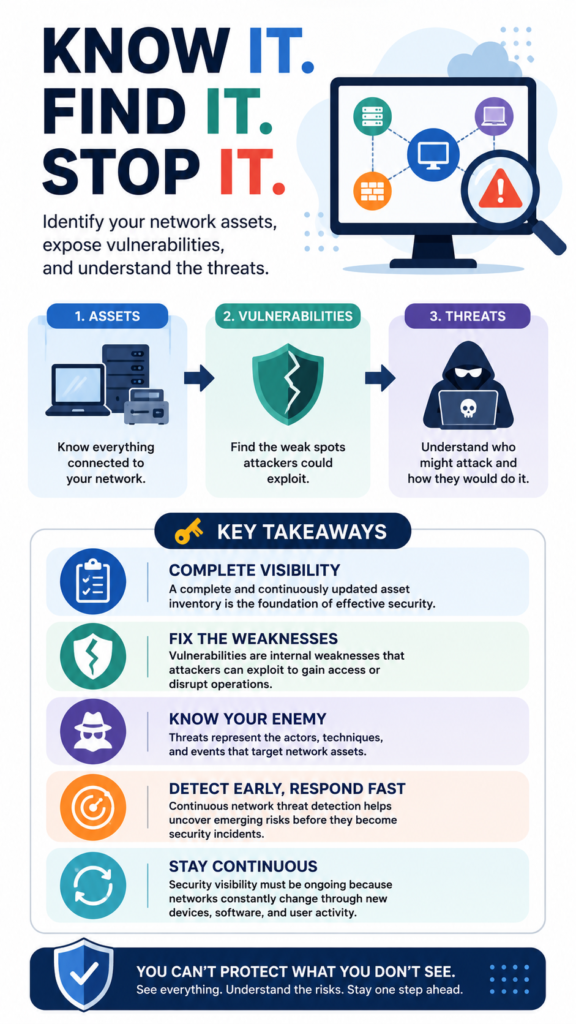
Once you know what you have, you look for the cracks in each item. A vulnerability is a specific, technical weakness, a missing security patch, a default administrative password, an unnecessary open network port, a piece of software with a known flaw. You find them through systematic vulnerability scanning.
But scanning is just data collection. The critical next step is prioritization. A scanner might report 5,000 vulnerabilities. You can’t fix them all at once. You need to triage. Focus on the combination of severity and exploitability. A critical remote code execution flaw on an internet-facing web server is a five-alarm fire.
A low-severity information disclosure bug on an internal, isolated test machine can probably wait. Security teams can master these evaluations by utilizing proven network security risk analysis techniques to measure exposure. Context from your asset inventory is key here.
A low-severity information disclosure bug on an internal, isolated test machine can probably wait. Context from your asset inventory is key here. The same vulnerability on two different assets can represent two completely different levels of risk. You’re not just running a tool, you’re connecting its findings to your business reality to decide what to fix first.
What’s the Practical Difference Between a Vulnerability and a Threat?
People use these words interchangeably, but they mean very different things. A vulnerability is a weakness in your system. It’s internal. It’s the unlocked door. A threat is an external force or actor that could exploit that weakness. It’s the thief trying doorknobs. The thunderstorm is a threat to a house with a leaky roof (the vulnerability).
In cybersecurity, threats are often categorized:
- Cybercriminals: Motivated by financial gain (ransomware, data theft).
- Hacktivists: Motivated by ideology, aiming to disrupt or embarrass.
- Nation-States: Motivated by espionage or sabotage, often highly sophisticated.
- Insider Threats: Malicious or careless employees/contractors.
- Environmental Threats: Power outages, fires, floods.
Understanding the threat landscape helps you prioritize which vulnerabilities matter most. If you’re a small retailer, a nation-state APT is a lower-probability threat than a commodity ransomware gang.
Security teams often map these probabilities by weighing qualitative vs quantitative risk analysis to figure out real-world exposure. So, you’d prioritize patching the vulnerabilities that ransomware groups are actively exploiting in the wild.
So, you’d prioritize patching the vulnerabilities that ransomware groups are actively exploiting in the wild. You match your internal weakness list against external threat intelligence about who’s attacking and how.
How Do You Proactively Identify Active Threats to Your Network?
You look for the footsteps, not just the unlocked doors. This is where passive monitoring shifts to active hunting. You’re searching for indicators of compromise (IoCs), strange network traffic patterns, suspicious login attempts, connections to known malicious IP addresses, unexpected outbound data transfers.
“Asset discovery is a fundamental but inherently flawed capability in cybersecurity, as current methodologies frequently confuse preliminary discovery observations with definitive asset inventories, thereby obscuring uncertainty, restricting auditability, and eroding trust in security-critical decision-making.” – MDPI
This is the domain of a robust Network Threat Detection system. We don’t just wait for an alert from an antivirus; we analyze the full stream of network metadata. We look for deviations from established baselines.
Does this server normally send 50MB of data daily to the backup system, but today it’s sending 2GB to an IP in a country we don’t operate in? That’s a signal. It’s about correlating weak signals that individually might be nothing, but together paint a picture of an attack in progress.
Can You Tie This All Together in a Real-World Scenario?
Let’s walk through a ransomware attack from this perspective.
- Asset: An internet-facing file server used by the accounting team. Your inventory tags it as critical, owned by IT, and running Windows Server 2019.
- Vulnerability: A vulnerability scan last week found it was missing the patch for a critical SMB protocol vulnerability (like EternalBlue). It was flagged as “Critical – Patch Immediately.”
- Threat: A ransomware group is conducting automated scans of the entire internet for servers with this exact unpatched vulnerability. They have a tool that automatically exploits it.
- Threat Identification: Your Network Threat Detection system sees an initial, massive wave of scan traffic from a foreign IP block hitting port 445 on that server. Hours later, it detects the server itself starting to make unusual outbound connections to a command-and-control server, followed by a spike in internal SMB traffic as the ransomware begins to encrypt shares.
The sequence is clear: Known Asset -> Known Vulnerability -> Active Threat -> Detected Behavior. At any point, breaking the chain stops the attack: patching the vulnerability after the scan, or blocking the initial malicious IP, or isolating the server when the strange outbound connection is detected.
The table below shows how these elements interact during an incident:
| Stage of Attack | Asset Involved | Vulnerability Exploited | Threat Actor Action | Detection Opportunity |
| Reconnaissance | Web Server | Presence of outdated service banner | Scanning for specific software versions | Unusual scan traffic from new IP ranges |
| Initial Access | File Server | Unpatched SMB vulnerability (CVE-2017-0144) | Exploiting flaw to execute code | Alert on exploitation attempt against known vulnerability |
| Lateral Movement | User Workstation | Weak local admin password reused across devices | Using credentials to move to new systems | Detection of “pass-the-hash” or anomalous login between machines |
| Exfiltration/Impact | Database Server | Excessive, permissive outbound firewall rules | Encrypting files or sending data out | Spike in outbound data volume to unknown external IP |
What Are the Most Common Mistakes in This Identification Process?
The biggest mistake is treating this as a periodic audit instead of a continuous process. You do a big asset discovery project, run a vulnerability scan quarterly, and check the news for threats when you remember. That leaves massive gaps. Assets change daily. New vulnerabilities are published hourly. Threat actor tactics shift weekly.
“This thesis develops a comprehensive vulnerability management framework for IT service organizations to protect sensitive data and harden their security posture. The research emphasizes the importance of early vulnerability detection using static and dynamic testing, maintaining a detailed asset inventory, and conducting regular risk assessments.” – Aalto University
Other critical errors include:
- Ignoring “non-critical” assets: That network-connected HVAC controller might not hold data, but it can be a pivot point into your core network.
- Prioritizing by CVSS score alone: A vulnerability with a 10.0 score on an isolated lab machine is less urgent than a 6.5 score on your internet-facing email server.
- Lacking context: Having a list of threats without understanding which ones are actually targeting your industry or technology stack.
- Siloing information: The team running vulnerability scans doesn’t talk to the team monitoring threats, so no one connects the dots.
The process only works if it’s woven into the daily fabric of IT and security operations. It’s a cycle, not a checklist.
How Does Continuous Monitoring Change the Game?
Credits: Cyber-Recon
It flips the model from reactive to proactive. Instead of waiting for a scan or an audit, you have a constant pulse on your network.
New device joins? It’s cataloged within minutes. A critical vulnerability is announced? Your system can immediately check your inventory to see if you’re affected. A new malware strain is reported? Your threat detection can update its signatures to look for its network calls.
This is where the three pillars, assets, vulnerabilities, threats, merge into a single defensive operation. Continuous monitoring means your asset inventory is always current, your vulnerability assessment is near real-time, and your threat detection is watching for the latest attack patterns. It creates a state of readiness.
You’re not discovering you were vulnerable after you’re breached; you’re identifying and remediating the weakness before it can be exploited. It’s the difference between a yearly physical and a live heart monitor. One gives you a historical snapshot, the other alerts you the moment something goes wrong.
What Simple Tools or Practices Can You Start With Today?
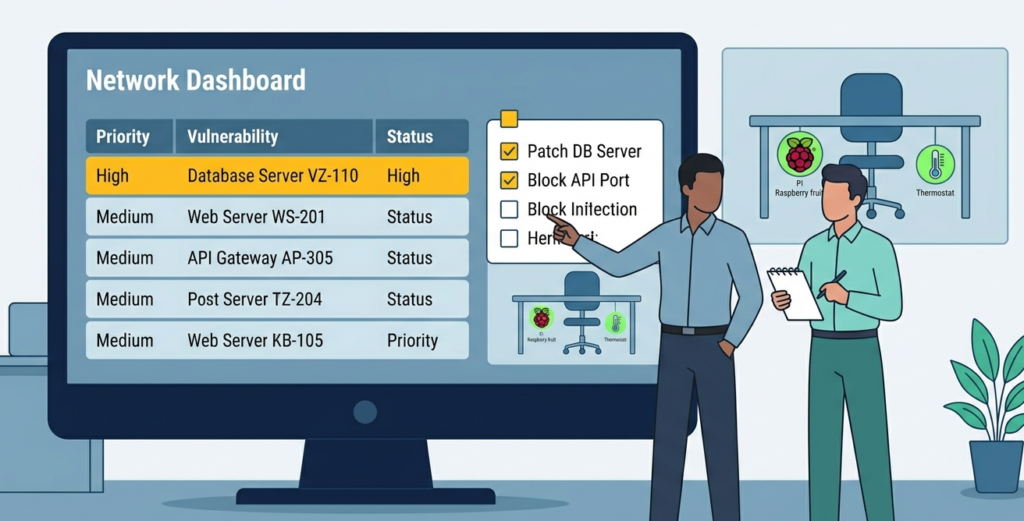
You don’t need a million-dollar platform to begin. Start with disciplined fundamentals.
- For Assets: Run a free, network discovery tool like nmap on your key subnets. Document everything it finds in a shared spreadsheet. Assign an owner to each entry. Do this monthly.
- For Vulnerabilities: Enable the built-in vulnerability scanner in your existing antivirus/endpoint protection. Deploying dedicated network security risk assessment software or running the free version of a network scanner like OpenVAS against your critical servers can uncover hidden gaps. Triage the top 10 critical findings.
- For Threats: Subscribe to free threat intelligence feeds (like US-CERT alerts, or industry ISAC reports if you qualify). Set up a simple SIEM rule to alert on login attempts from foreign countries if you have no business there.
The most important practice is communication. Hold a 30-minute weekly meeting between sysadmins and security. Share the asset changes, the top vulnerabilities, and any new threat intel relevant to your business.
This cross-team conversation is more powerful than any tool. It builds the shared situational awareness that is the ultimate goal of the entire identification process.
FAQ
We’re a small business with no dedicated security staff. Can we do this?
Yes, absolutely. Start small and focus on the basics. Designate one tech-savvy person to “own” security. Their first task is to create that simple asset list. Their second is to ensure automatic updates are turned on for everything, operating systems, applications, routers.
This alone fixes most vulnerabilities. Then, use managed services. A managed firewall, a managed detection and response (MDR) service, or even a virtual CISO can provide the continuous monitoring and expertise you lack in-house. You’re buying the process as a service.
How do you handle employee-owned devices (BYOD) in your asset inventory?
You segment them. They should not be on the same network as your corporate servers. Create a separate, strongly firewalled Wi-Fi network for personal devices. Enforce a policy that company data cannot be accessed from or stored on personal devices without approved security software (like mobile device management or secure containers).
In your inventory, you can list the BYOD network as a single “asset” with the note “unmanaged personal devices.” You protect your core assets by isolating the things you can’t fully control.
Is vulnerability scanning dangerous? Can it crash our systems?
It can be, if done carelessly. Some aggressive scans can overwhelm older or fragile systems. Always start with “safe” or “non-intrusive” scan policies, especially during business hours. Schedule more comprehensive scans for maintenance windows.
Communicate with system owners beforehand. And most importantly, test on a non-production system first. The goal is to identify weaknesses, not cause a denial-of-service incident. Professional scanning tools have settings to prevent this.
How do you prioritize when everything seems critical?
Use a risk-based formula. Combine the severity of the vulnerability (like its CVSS score), the criticality of the asset (from your inventory), and evidence of active exploitation in the wild (from threat intel). A simple 1-3 score for each factor, multiplied together, gives you a risk score from 1 to 27.
Fix the things with the highest scores first. This removes emotion and guesswork. It tells you that a severity “3” flaw on a critical “3” asset being exploited “3” (score 27) is orders of magnitude more urgent than a severity “3” on a test “1” asset with no exploits “1” (score 3).
The Foundation of Informed Defense
Identifying network assets and their vulnerabilities is the mandatory prerequisite for informed defense, shifting your posture from blind fear to measured understanding. Instead of guessing if you are safe, a comprehensive inventory lets you address specific, real-world flaws before attackers exploit them.
NetworkThreatDetection.com streamlines this visibility. The platform delivers real-time threat modeling, CVE mapping, and visual attack path simulations to expose blind spots and prioritize critical risks effortlessly. Ready to confidently strengthen your network defenses? Join NetworkThreatDetection Today.
References
- https://www.mdpi.com/2624-800X/6/2/67
- https://aaltodoc.aalto.fi/items/88d7df85-8fd4-4918-bbcc-f863eaafb10f
