
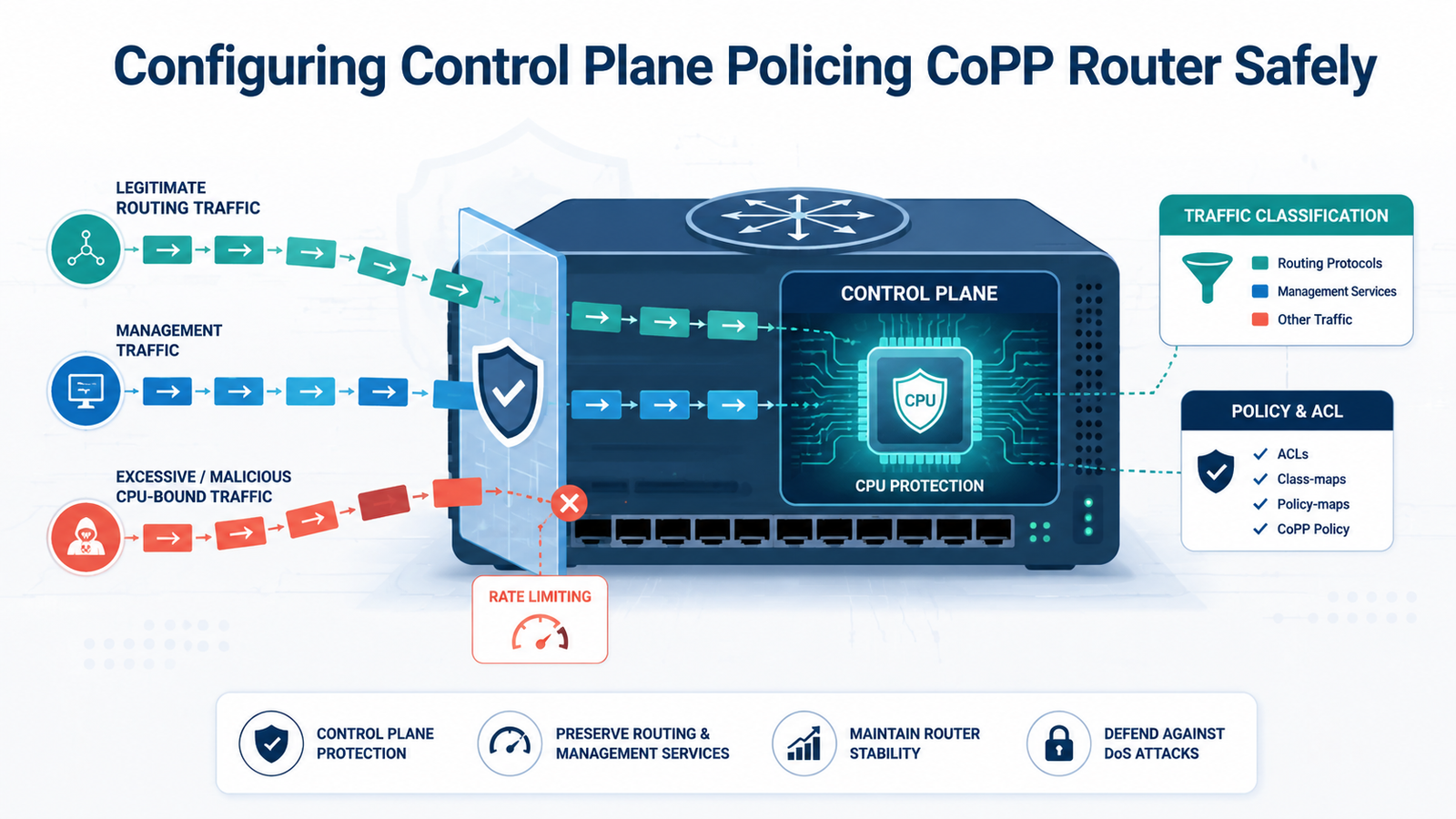
Configuring control plane policing CoPP routers helps protect the route processor from excessive CPU-bound traffic while keeping routing and management services available. We recommend starting with a permissive policy so you can see which traffic matches before applying strict limits.
Network Threat Detection can provide added visibility into unusual traffic patterns, while CoPP focuses on protecting the router CPU. From there, use real traffic data to set practical rates and avoid disrupting OSPF, BGP, SSH, or SNMP. Keep reading to see how to configure and verify CoPP safely.
CoPP Quick Reads: Router Protection Basics
These points sum up the main CoPP decisions: protect CPU-bound traffic, classify real traffic carefully, and baseline before applying strict limits.
- CoPP protects CPU-bound traffic, not ordinary packets simply passing through the router.
- ACLs, class maps, policy maps, and policing should match real routing and management traffic.
- Baseline first, because aggressive limits can disrupt OSPF, BGP, SSH, ARP, or other control-plane services.
What Does CoPP Actually Protect on a Cisco Router?
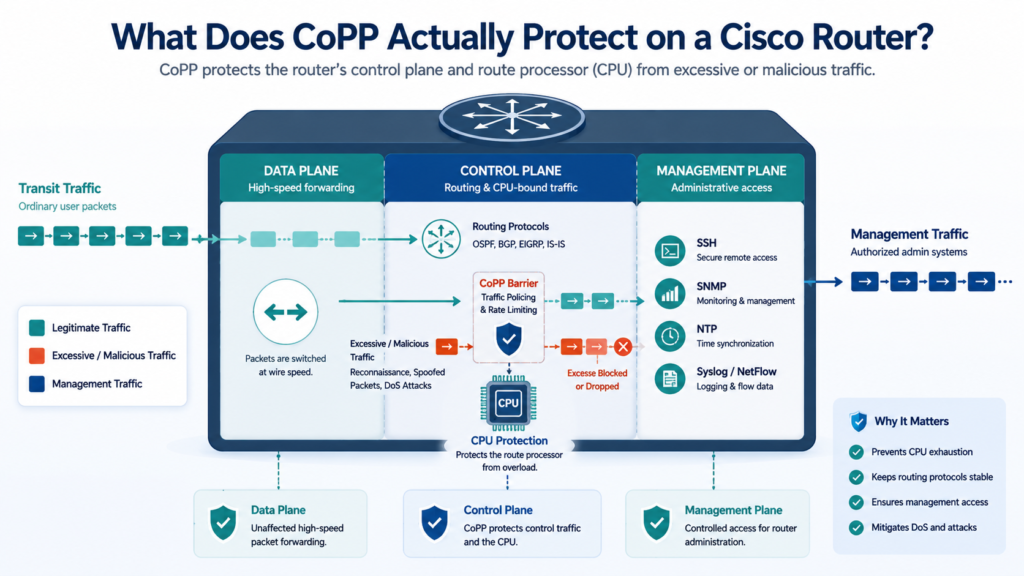
CoPP protects traffic that needs the router’s control plane, helping the route processor keep routing and management services running when CPU-bound traffic rises sharply.
The data plane handles packets moving through the router. The control plane deals with routing decisions and other traffic that needs CPU processing. The management plane handles administrative services such as SSH and SNMP.
That split matters. A packet passing through the router does not normally need the same CPU resources as a packet addressed to the router itself.
On a Cisco router, the route processor handles many control-plane processes. A large amount of unsolicited traffic can therefore create CPU pressure. Reconnaissance scans, spoofed packets, malformed traffic, and denial-of-service traffic can all add to that load.
Cisco describes CoPP as a policy applied to the control plane. Supported Cisco IOS XE platforms can classify traffic and apply policing after the router determines that the control plane is the destination.
CoPP isn’t a replacement for interface ACLs or service controls. We still need those controls around the router. Network Threat Detection can also help us spot unusual traffic patterns while CoPP focuses on CPU protection.
When Should You Configure CoPP on a Router?
CoPP is most useful when excessive CPU-bound traffic could affect routing, management access, or router availability.
An Internet-facing router can receive unsolicited ICMP, TCP, routing, and malformed traffic. Some of that traffic may reach services that require CPU processing. During a flood, legitimate routing traffic then has to compete for the same limited processing capacity.
So the design should begin with exposure. List the protocols the router actually uses before choosing rates. OSPF, BGP, SSH, SNMP, ICMP, ARP, and other services may need different treatment.
A router carrying several BGP sessions will have different needs from a small management router. Traffic levels also change with topology size, software version, hardware capacity, and network events.
We should avoid copying a rate from another device without checking the traffic first. That shortcut can look fine during a quiet period and fail during convergence.
As highlighted by Cisco DevNet
“Control Plane Policing (CoPP) allows a policy map to be applied to the control plane.” – Cisco DevNet
How Does a CoPP Policy Work With MQC?
A traditional CoPP policy uses Modular QoS CLI, or MQC, to classify traffic and apply policing to selected control-plane traffic.
The basic path looks like this:
traffic → ACL → class-map → policy-map → policing → control plane
MQC separates classification from enforcement. That makes the configuration easier to read and troubleshoot.
| Configuration layer | Purpose |
| ACL | Identifies traffic |
| Class map | Groups matching traffic |
| Policy map | Sets enforcement |
| police | Sets the traffic rate |
| control-plane | Applies the policy |
A policer can use a CIR, or committed information rate. Burst settings can also affect how short traffic spikes are handled, depending on platform support.
conform-action transmit allows traffic within the configured allowance to continue. exceed-action drop removes traffic above that allowance.
For example:
police cir 64000 conform-action transmit exceed-action drop
That number is not a universal recommendation. It is an example.
A 64-kbps limit may be fine for one class and far too low for another. We need real traffic data before choosing the number.
How Should You Classify Routing and Management Traffic?
Credits: IMA Tech
Classification should match what the router actually does. If it runs OSPF, BGP, SSH, SNMP, or other services, those traffic types should have a clear place in the CoPP policy. We start by reviewing the router’s role instead of copying a policy from another device.
From our experience, a simple traffic inventory makes this step much easier. Identify:
- Routing neighbors and protocols.
- Trusted management networks.
- Monitoring systems.
- Infrastructure services that need CPU access.
BGP traffic on TCP port 179 may need its own class, while OSPF can be classified separately. We usually keep SSH and SNMP apart from routing traffic because their traffic patterns and operational needs are different.
Avoid broad rules such as permit ip any any when more precise matching is possible. They can group unrelated traffic together and make the policy harder to tune.
One important point is that CoPP classification is not an authorization. An ACL can identify SSH traffic, but it does not decide who should connect. Our threat models and risk analysis tools help us identify exposed services and decide which traffic needs stronger protection as threats change.
How Do You Build a Safe CoPP Policy Step by Step?
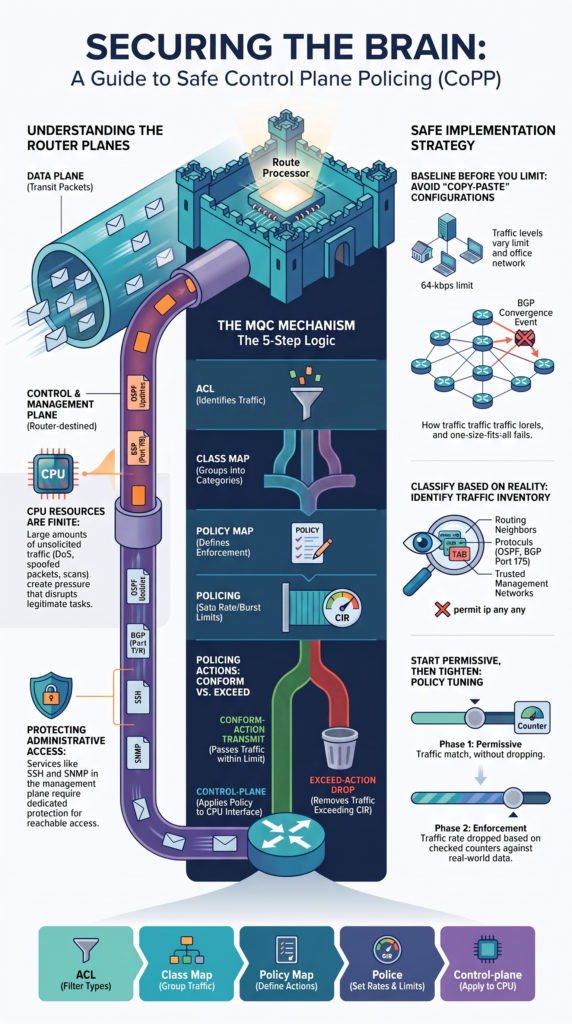
Build the CoPP policy in small stages. We first identify the traffic, then test the policy with permissive actions. Only after checking the counters should we start dropping excess traffic.
The basic flow is:
ACL → class-map → policy-map → police → control-plane
Start by defining the traffic that matters:
ip access-list extended ACL-COPP-OSPF
permit ospf any any
ip access-list extended ACL-COPP-BGP
permit tcp any any eq 179
ip access-list extended ACL-COPP-SSH
permit tcp <trusted-subnet> any eq 22
Next, connect each ACL to a class:
class-map match-any CLASS-COPP-OSPF
match access-group name ACL-COPP-OSPF
class-map match-any CLASS-COPP-BGP
match access-group name ACL-COPP-BGP
class-map match-any CLASS-COPP-SSH
match access-group name ACL-COPP-SSH
Then apply the policers:
policy-map COPP-POLICY
class CLASS-COPP-OSPF
police cir 256000 conform-action transmit exceed-action transmit
class CLASS-COPP-BGP
police cir 256000 conform-action transmit exceed-action transmit
class CLASS-COPP-SSH
police cir 64000 conform-action transmit exceed-action drop
These rates are examples, not fixed values. In our testing, traffic baselines and threat models help us choose limits that protect the router without disrupting legitimate services. Risk analysis also helps us prioritize exposed control-plane services as threats change.
Why Can an Aggressive CoPP Policy Break OSPF or BGP?
A CoPP rate can be too strict, even when normal traffic looks low. Routing protocols do not always send traffic at a steady pace. A quiet router can suddenly see a burst when links fail, neighbors reset, or routes change.
During convergence, OSPF may exchange extra link-state updates while the network settles. BGP can also generate a burst when several sessions reset or many routes change at once. If the policer is too low, legitimate packets may be dropped.
We have found that testing only during calm periods can give a false sense of safety. Our baseline should include both normal traffic and short spikes.
Before tightening a routing class, check:
- Average control-plane traffic.
- Short traffic bursts.
- OSPF or BGP neighbor stability.
- Policy conform and exceed counters.
- CPU use during network changes.
Our threat models and risk analysis tools can help separate expected routing events from traffic that may signal an attack. The goal is not to let unlimited traffic reach the CPU. Instead, we leave enough capacity for routing protocols to recover while still limiting sustained unwanted traffic.
What Should You Do If CoPP Locks Out SSH?
If CoPP cuts off SSH, stop changing rates blindly. Use console or out-of-band access first, then find out where the traffic is being dropped. A quick review often shows whether the problem is classification, policing, or the default class.
Start with:
show policy-map control-plane
show ip access-lists
Look for a few common causes:
- The management subnet is missing from the ACL.
- The class map does not match the SSH traffic.
- The SSH policer is set too low.
- class-default is dropping unmatched packets.
If SSH lands in class-default, fix the classification before changing the rate. When it matches the right class but still drops packets, check the policer counters and configured limit.
We also test from the actual management network. A lab connection may not follow the same path. Source addresses, VRFs, routes, and destination addresses can change the result.
From our experience, console or out-of-band access should be ready before any CoPP change. This also fits into broader practices for securing router administrative access credentials, where limiting trusted management paths is an important part of protecting administrative access.
How Should You Baseline CoPP Before Enabling Drops?
Baseline first, drop later. A permissive CoPP policy gives us a safer way to see what is reaching the control plane before we block anything. It also helps reveal traffic patterns that may not be obvious during normal monitoring.
During this stage, we usually track:
- Control-plane packet counters.
- Conform and exceed counters.
- CPU utilization.
- OSPF and BGP neighbor status.
- SSH and SNMP access.
- ICMP behavior.
- Traffic during planned convergence events.
Network Threat Detection adds another useful view by helping us spot unusual traffic around the router. We can then compare those findings with CoPP counters to see how suspicious traffic is interacting with the policy.
For the first test, conform-action transmit and exceed-action transmit let traffic continue while we watch the results. This gives the team time to catch a bad match or unexpected burst before users feel the impact.
Our threat models and risk analysis tools can also help identify which control-plane services face the greatest risk. Once the baseline is clear, we can tighten selected classes and use drop actions with more confidence.
What Platform-Specific CoPP Behavior Can Change Your Design?
CoPP behavior varies by hardware platform, IOS XE release, CPU architecture, and available policing features. Cisco IOS XE routers may use MQC-based policies, while other platforms can rely on system-defined CPU queues.
Before applying a policy, verify:
- Exact hardware model and software release.
- Available CoPP commands and policing features.
- How CPU queues handle different protocols.
- Whether multiple host protocols share a hardware policer.
This matters because several logical classes do not always represent separate hardware resources. For example, a large ARP or ICMP burst may consume capacity shared with other control-plane traffic, potentially affecting management access.
Cisco documentation also gives a 4,000-pps threshold for a specific host-protocol class on a documented platform. Treat that as platform-specific guidance, not a universal CoPP rate.
Always verify hardware behavior before tuning rates. Otherwise, we may adjust the configuration without addressing the actual enforcement point.
How Do You Troubleshoot a CoPP Policy That Does Not Work?
Move through the policy in order. Don’t change the rate before confirming that the right packets are being classified.
Use this sequence:
ACL match?
↓
Class-map match?
↓
Policy-map counter?
↓
Policer exceeded?
↓
CPU-bound traffic?
↓
Hardware policer involved?
Start with the ACL:
show ip access-lists <ACL>
Then inspect the class map:
show class-map
Finally, inspect the control-plane policy:
show policy-map control-plane
If the ACL doesn’t match, the issue is classification. If the ACL matches but the policy doesn’t, check the class map.
If the policy matches and the policer shows excess traffic, then investigate the rate and burst behavior.
Only after those checks should we investigate platform-specific queues.
This approach works for OSPF, BGP, SSH, ICMP, SNMP, and other control-plane traffic. It keeps troubleshooting based on evidence rather than guesswork.
Data from IBM Support demonstrates
“Non-zero drops indicate that CoPP policing is limiting control-plane traffic.” – IBM Support
What Are the Most Common CoPP Design Mistakes?
Most CoPP failures come from assumptions, not difficult commands. A policy can look clean in the configuration and still cause trouble when real traffic changes.
| Mistake | Better approach |
| Copying a template | Check the platform first |
| Dropping traffic too quickly | Baseline before blocking |
| Ignoring traffic bursts | Test during convergence |
| Using broad default drops | Review unmatched traffic |
| Treating CoPP as a firewall | Keep interface ACLs in place |
| Ignoring hardware queues | Check platform behavior |
| Forgetting IPv6 | Include required IPv6 traffic |
| Testing only idle traffic | Test during busy periods |
One mistake we see is using the same CIR on every router. A rate that works well on one device may drop valid traffic on another. Routing protocols also need enough room during changes. Protecting SSH means little if OSPF or BGP starts losing important control packets.
After an IOS XE upgrade, review the policy again. Commands, limits, or platform behavior may differ.
We can identify which services are exposed, what traffic they need, and where tighter controls could create risk. For a wider view of layered defenses, network security controls examples can also help put CoPP into the larger router security picture. The traffic model matters more than the template.
How Can CoPP Complement a Broader Router Security Strategy?
CoPP works best as one part of a layered router security plan. It limits traffic that reaches the control plane, but it should not be expected to handle every security problem on its own.
A practical setup can include:
- Network Threat Detection: spots unusual traffic and network behavior.
- Interface ACLs: block unwanted traffic before it reaches router services.
- CoPP: limits CPU-bound traffic that still gets through.
- Management controls: restrict access to SSH and other admin services.
- Routing security: protects routing sessions and trusted neighbors.
- Monitoring: tracks CPU use, policy matches, and drops.
Interface ACLs can remove unwanted traffic early, while CoPP protects the CPU from traffic that still reaches the router. Management controls then help keep administrative access limited to approved sources.
Network Threat Detection gives us wider visibility into suspicious patterns. Our threat models and risk analysis tools also help identify exposed services and areas where an attack could create CPU pressure.
These controls fit into broader router and switch security best practices, where different security layers work together instead of relying on one control.
The goal is simple: reduce attack impact without blocking the traffic the router needs to recover and operate normally.
What Should a Production CoPP Deployment Checklist Include?
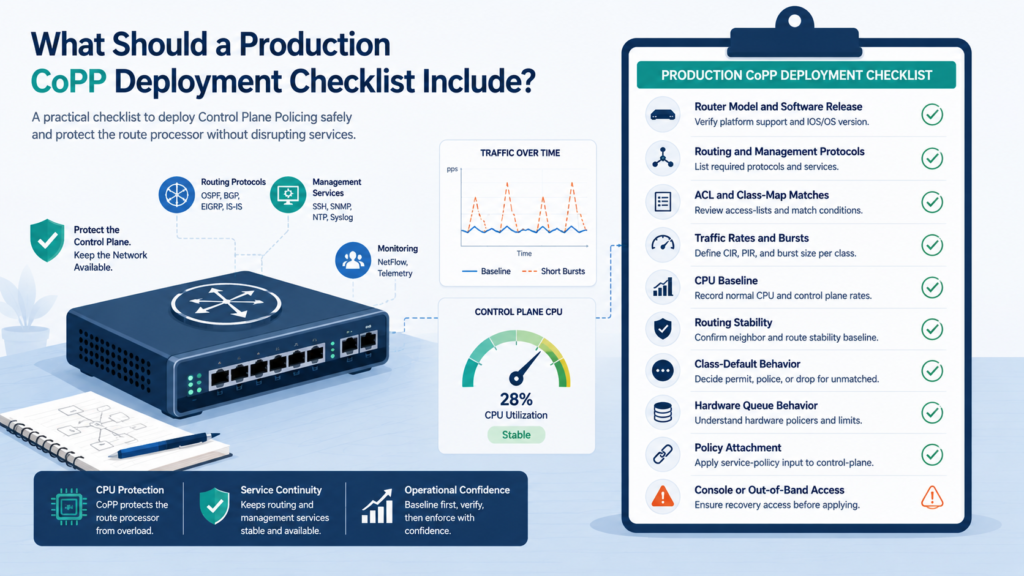
Before moving CoPP into production, check the platform, traffic needs, baseline, and recovery path. We want to know what the policy will protect and what could be affected if a match is wrong.
Use this review:
- Router model and IOS XE release.
- Routing and management protocols.
- Trusted source addresses.
- IPv4 and IPv6 requirements.
- ACL and class-map matches.
- Expected traffic rates and bursts.
- CPU and routing baselines.
- SSH, SNMP, and ICMP access.
- class-default behavior.
- Hardware queue behavior.
- Control-plane policy attachment.
- Console or out-of-band access.
We also recommend testing the policy during normal traffic and a planned network event. After deployment, compare the results with the original baseline. Policy counters should behave as expected, while routing and management services remain stable.
From our experience, the recovery path matters just as much as the configuration. Keep a tested rollback method ready before making the change.
Finally, document why each rate was selected. Our threat models and risk analysis tools can help record the services at risk and the reasoning behind each control. Future engineers should understand the decision, not just copy the commands.
A good CoPP change should be predictable, measurable, and easy to reverse.
FAQ
How does burst size affect control plane policing during short traffic spikes?
Burst size controls how much traffic can pass during a short spike before policing takes effect. If the burst size is too small, legitimate traffic may be dropped during normal bursts. If it is too large, unwanted traffic may reach the route processor. We recommend setting burst size based on the CIR, expected traffic rate, and normal control-plane behavior.
Should control plane policing use DSCP or IP precedence for traffic prioritization?
DSCP and IP precedence can help classify and prioritize control traffic, but they should not replace clear traffic classification. Routing protocols and management traffic have different requirements.
We recommend using trusted QoS markings only when they accurately represent the traffic source. Incorrect markings can give unwanted traffic higher priority and reduce the effectiveness of control plane protection.
What is the difference between CoPP policing and traffic shaping?
CoPP policing limits traffic that reaches the control plane when it exceeds a configured rate. Traffic shaping works differently because it buffers excess traffic and sends it later.
For control plane protection, policing is generally more suitable because the goal is to limit traffic reaching the route processor. Shaping can delay traffic, but it does not provide the same direct rate-limiting behavior.
How can you protect the control plane CPU from reconnaissance attacks?
Start by filtering unnecessary traffic before it reaches the route processor. Traffic classification can separate expected routing and management traffic from reconnaissance attacks, spoofed packets, and other malicious traffic.
Rate-limiting can then control traffic that reaches the control plane. Monitoring CPU utilization and packet drops also helps identify whether the controls are maintaining stability during suspicious activity.
What should a CoPP policy do when traffic does not match any class?
Unmatched traffic normally falls into class-default, so its treatment needs careful planning. A broad drop action can block legitimate control traffic that was missed during classification.
We recommend reviewing unmatched traffic first, then deciding whether to permit, police, or drop it. This approach reduces accidental packet drops and makes the CoPP policy easier to maintain.
Protect the Control Plane Without Creating New Risk
CoPP is most effective when it protects the router CPU without disrupting services you depend on. Start with a baseline, apply controls carefully, then verify counters and routing stability under normal and abnormal traffic. Every platform needs a configuration that matches its workload.
For added visibility, Network Threat Detection can help teams spot unusual behavior and prioritize network risks. Use it as a practical next step, while keeping testing and rollback ready.
References
- https://developer.cisco.com/docs/nx-api-rest-sdk/
- https://www.ibm.com/docs/en/networker/19.10?topic=reference-cisco-nexus-9000-series-nx-os-troubleshooting-guide-release-104x