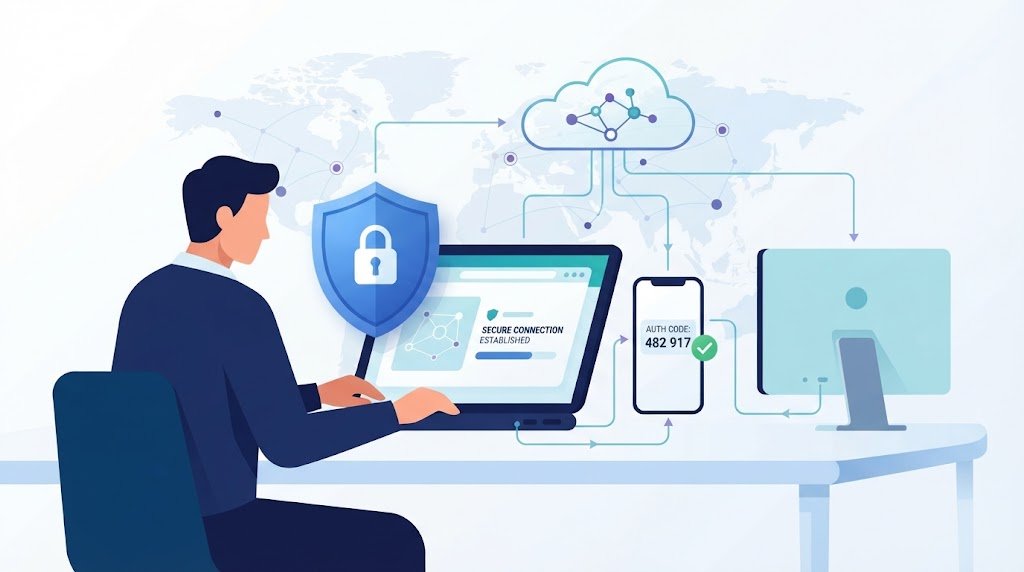
Securing VPN endpoints MFA strong authentication helps protect remote access from stolen credentials, phishing, and compromised devices. However, adding MFA alone won’t stop every attack. A trusted account can still connect through an infected laptop or access systems it doesn’t need.
We need to verify users, check device health, limit permissions, and monitor activity throughout each session. At Network Threat Detection, we recognize that effective VPN security depends on both preventing unauthorized access and spotting suspicious behavior after login. Keep reading to see how strong authentication, device trust, and continuous monitoring work together to reduce VPN security risks.
Quick Wins for Securing VPN Endpoints
Securing VPN endpoints with MFA requires strong user authentication, trusted devices, restricted access, and continuous monitoring to reduce the risk of unauthorized access.
- Use phishing-resistant MFA: Prioritize FIDO2 security keys, passkeys, and WebAuthn to reduce the risk of credential theft and phishing attacks.
- Verify devices and restrict access: Check endpoint health, use device certificates where appropriate, and apply least-privilege access and network segmentation.
- Monitor activity after login: Correlate VPN, identity, endpoint, and firewall logs to detect suspicious behavior and support faster incident response.
How Should VPNs Combine MFA and Device Trust?
VPN MFA reduces dependence on passwords by requiring another proof of identity before access is allowed. But MFA methods don’t all provide the same protection.
| Factor | Examples | Main limitation |
| Knowledge | Password, PIN | Can be stolen |
| Possession | Security key, certificate | Needs lifecycle management |
| Inherence | Fingerprint, face | Often unlocks another credential |
| Context | Device health, location | Not a true factor |
Phishing-resistant methods such as FIDO2, WebAuthn, passkeys, and certificate-based authentication offer stronger protection because cryptographic proof is tied to the legitimate authentication service.
NIST SP 800-63B-4 recognizes WebAuthn as phishing-resistant. Manually entered OTPs don’t provide the same protection because attackers can relay them during live phishing attacks.
TOTP can still be useful where stronger methods aren’t supported. SMS and voice should be treated as weaker fallback options.
Device trust adds another layer. A valid user account doesn’t prove that the laptop is safe. Our remote access VPN client security best practices should include endpoint posture checks for:
- Current operating-system patches
- Endpoint protection
- Host firewall status
- Full-disk encryption
- Device management
- Valid device certificates
- Supported operating systems
We should also consider EDR alerts. A device that triggers a serious malware detection may need to lose VPN access even if its user authenticated a few minutes earlier.
How Do Device Certificates and Strong MFA Work Together?
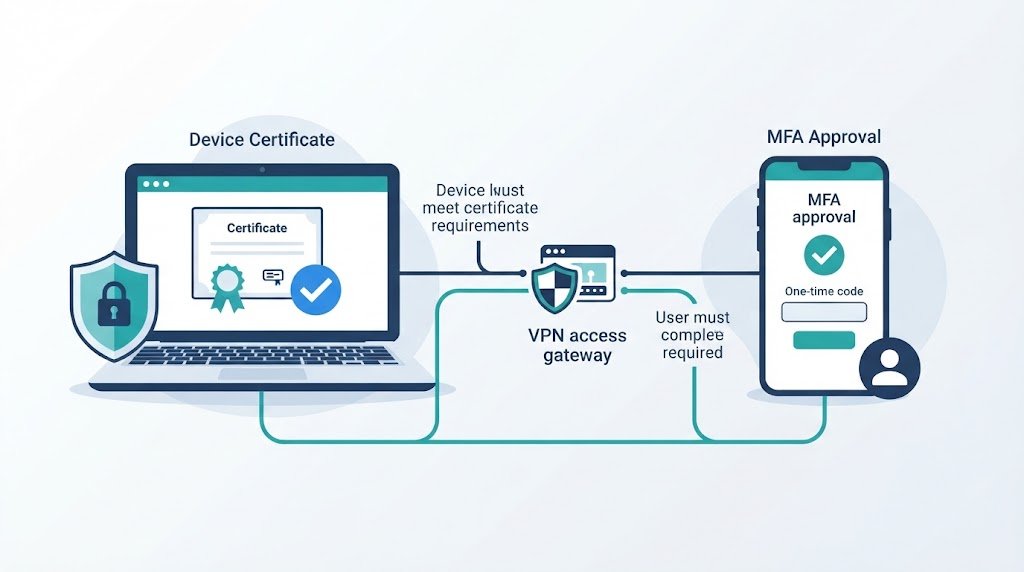
Device certificates give the VPN another way to verify the machine. The gateway can check whether the endpoint holds a valid certificate issued by the organization.
As noted by Microsoft Learn
“Computer certificates are the recommended method of authentication as they provide strong authentication and are very difficult to impersonate or compromise.” – Microsoft Learn
A stronger design combines:
- User authentication
- Phishing-resistant MFA
- Device certificate
- Endpoint posture check
A private key can be protected by a TPM or another hardware-backed system. That makes it harder to copy and reuse.
Certificates still need careful management. We need rules for issuance, renewal, revocation, and retirement. If a laptop is stolen or compromised, its certificate should stop working quickly.
The same principle applies to smart cards and enterprise PKI. NIST recognizes client-authenticated TLS as a phishing-resistant cryptographic method when properly implemented.
Biometrics can help users unlock device-bound credentials, but the biometric itself shouldn’t replace strong cryptographic authentication.
Authentication proves identity. Authorization decides what that identity can access.
Why Should VPN Authorization Use Least Privilege?
A successful VPN login shouldn’t expose the entire internal network. Access should match the user’s role and actual business needs.
As highlighted by CISA
“Permit access based upon the principles of least privilege. Users should only have access to resources that are needed on a just-in-time basis. Users and devices need to be identified and verified in a strict manner for each access request [CPG 2.E].” – CISA
| User type | Suitable access |
| Employees | Approved applications |
| Developers | Required development systems |
| Finance or HR | Designated business systems |
| Contractors | Limited, time-based access |
| Administrators | Separate privileged path |
A developer doesn’t automatically need access to identity systems. Administrators deserve stricter controls because their accounts can affect large parts of the environment.
Role-based access control, privileged access management, and least privilege reduce the damage caused by a compromised account.
Network segmentation adds another barrier. Separate user systems from domain controllers, production servers, management interfaces, and security infrastructure.
Microsegmentation can go further by controlling access between individual workloads. A VPN can still provide useful network-level access, but application-level controls can reduce trust after authentication.
Our preferred sequence is straightforward: authenticate the user, verify the device, authorize the resource, then monitor the session.
What VPN Hardening and MFA Recovery Controls Are Needed?
Credits: Highrise Technologies
Strong MFA can’t compensate for a vulnerable VPN gateway. Internet-facing gateways need timely patches, secure configuration, protected administration, and current cryptographic settings.
A practical hardening plan should include:
- Patch gateways and VPN clients
- Remove unsupported software
- Disable weak protocols
- Protect management interfaces
- Review certificates
- Review split tunneling VPN risks and configuration options
- Review routing rules
- Remove unused accounts
IPsec, SSL VPN, IKEv2, OpenVPN, and WireGuard have different implementation details. Understanding VPN technologies and security concerns helps teams assess protocol-specific risks and choose secure configurations.
RADIUS integration can also create unexpected problems. Credential order, MFA challenge handling, reconnect behavior, and client compatibility should be tested before rollout.
Recovery deserves equal attention. MFA fatigue can pressure users into approving unexpected push requests, while weak help-desk procedures can let attackers bypass a strong factor.
A better recovery process should:
- Use phishing-resistant MFA where possible
- Limit repeated prompts
- Alert on unusual approvals
- Verify identity before factor resets
- Protect recovery codes
- Notify users after factor changes
- Record privileged recovery events
TOTP remains useful, but it can be relayed during phishing. WebAuthn provides stronger protection because its cryptographic exchange is tied to the legitimate site. We should threat-model the entire process, not only the login screen.
What Should VPN Teams Monitor After Authentication?
A successful VPN login doesn’t mean the session is safe. A stolen account or compromised device may behave normally at first, then begin scanning systems or accessing unusual resources.
Useful monitoring signals include:
- VPN login success and failure
- MFA approvals and denials
- Factor resets
- Device posture decisions
- Source IP and device identity
- Certificate events
- Session duration
- Administrator changes
- Concurrent sessions
- Unusual internal traffic
Login anomaly detection can identify unfamiliar devices, unusual locations, odd connection times, or changes in normal behavior.
| Signal | Example | Response |
| MFA denials | Repeated denials | Investigate account |
| New device | First-time endpoint | Require verification |
| Impossible travel | Distant logins | Review or revoke |
| Certificate event | Unexpected issue | Check enrollment |
| Internal scanning | Many hosts contacted | Isolate device |
| Concurrent sessions | Unusual locations | End session |
Our monitoring becomes more useful when VPN logs connect with identity events, EDR alerts, DNS activity, firewall data, and application access.
That supports a better incident-response process. Analysts can determine which account logged in, which device connected, which certificate it used, what resources it reached, and when the session ended.
One failed login may mean nothing. Repeated MFA denials followed by a successful approval can tell a different story.
How Should Organizations Roll Out Stronger VPN Authentication?
A staged rollout can reduce disruption while protecting the accounts and systems with the highest risk.
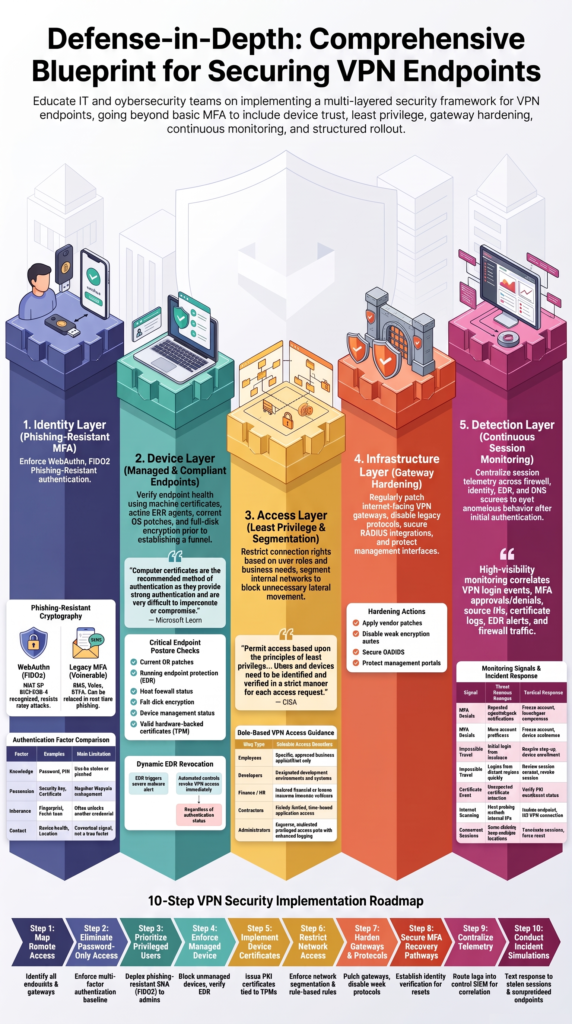
- Map remote access. Find every VPN and remote connection.
- Remove password-only access. Make MFA the baseline.
- Protect privileged users. Use phishing-resistant MFA first.
- Require managed devices. Check patching and endpoint protection.
- Add device certificates. Use them where appropriate.
- Limit network access. Match access to job needs.
- Harden gateways. Patch and review configurations.
- Secure recovery. Test factor-reset procedures.
- Centralize logs. Connect identity and endpoint data.
- Test incidents. Practice account and device compromise.
Administrators, infrastructure engineers, and identity-management users should usually be among the first groups protected.
Pilot groups can expose problems before production deployment. Test the VPN client, gateway, RADIUS service, identity provider, MFA method, and certificate service as one system.
Reconnect behavior also deserves attention. Always-on VPN connections may need to reconnect without a person sitting at the keyboard. Interactive MFA isn’t always suitable for those cases.
We should separate human access from unattended machine connections. Machine identities need their own controlled authentication and authorization model.
Conditional access can add more context later. Device health, user role, location, application sensitivity, and unusual activity can influence access decisions.
How Can Network Threat Detection Strengthen VPN Endpoint Security?
Network Threat Detection adds visibility into what happens after authentication. It doesn’t replace MFA or device trust. Instead, it helps identify suspicious behavior that those controls didn’t stop.
A practical model has five layers:
- Identity: Strong MFA
- Device: Managed and compliant endpoint
- Access: Least privilege and segmentation
- Infrastructure: Patched VPN systems
- Detection: Continuous session monitoring
The detection layer matters because no control catches every attack.
A stolen credential may pass authentication. A compromised laptop may pass an earlier device check. A valid session may later be used to scan internal systems.
For example, an authenticated workstation that suddenly contacts hundreds of internal hosts should receive attention. That behavior may not match the user’s normal activity.
Network access control, EDR, DNS monitoring, firewall telemetry, and identity events can provide separate clues. When we correlate them, the security team gets a clearer view of what is happening.
A response may include:
- End the VPN session
- Disable the account
- Isolate the endpoint
- Revoke its certificate
- Require stronger authentication
We shouldn’t use detection as a reason to weaken prevention. MFA still matters. Device trust still matters. Segmentation still matters.
Network Threat Detection gives the team another opportunity to act when one control fails.
What Should a Strong VPN Authentication Baseline Include?
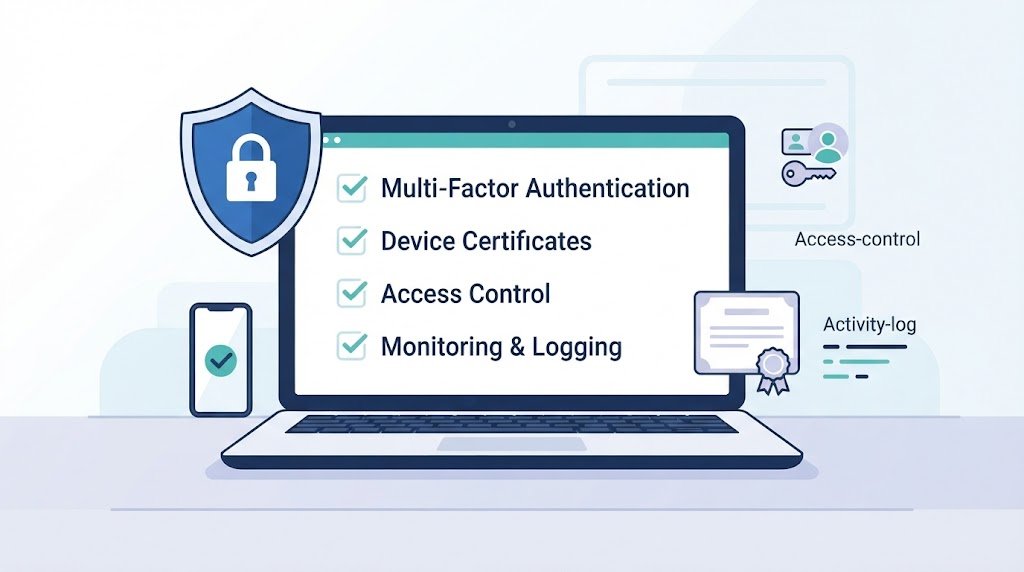
A strong baseline combines MFA with trusted devices, narrow authorization, hardened infrastructure, and continuous monitoring.
| Control | Baseline |
| MFA | Required before tunnel access |
| Strong factors | FIDO2, passkeys, or certificates |
| Devices | Managed and compliant |
| Authorization | Role-based and least privilege |
| Network | Segmented |
| Infrastructure | Patched and hardened |
| Monitoring | Centralized telemetry |
| Recovery | Controlled and audited |
The exact technology will vary. Some environments may use SAML authentication, while others rely on RADIUS, client certificates, smart cards, or older VPN protocols. The security logic should remain consistent.
Authentication checks identity. Device trust checks the endpoint. Authorization limits access. Segmentation limits movement. Monitoring identifies behavior that doesn’t fit.
Our threat models should also cover certificate theft, stolen sessions, compromised endpoints, contractor access, BYOD, third-party connections, MFA recovery, and factor replacement.
Testing belongs inside the design. A strong policy can still fail because of certificate renewal, client behavior, MFA challenge ordering, or unattended reconnects.
Security teams should regularly review VPN logs, access rules, device inventories, certificates, gateway exposure, and recovery procedures.
The goal isn’t to create a VPN that can never be attacked. That’s unrealistic.
Instead, we want several controls that support each other. If one fails, another should reduce the attacker’s options.
FAQ
How can I tell if my VPN endpoint security is strong enough?
Check whether your VPN verifies each user and device before granting access. Strong VPN authentication, updated endpoint protection, and limited access permissions help reduce security risks.
Review login records for unfamiliar devices, unusual connection times, and repeated failed attempts. Remove permissions that users no longer need, and test your security controls regularly to identify weaknesses before attackers exploit them.
What should I do if I receive unexpected VPN MFA prompts?
Never approve an MFA request that you did not initiate. Repeated prompts may mean someone has stolen your password and is trying to access your account. Report the activity to your security team immediately.
Follow your organization’s process to secure your account, revoke suspicious sessions, and change compromised credentials from a trusted device. Phishing-resistant MFA can help prevent similar attacks.
Should I use device certificates with VPN multi-factor authentication?
Yes. Device certificates help verify that a connecting computer has an approved digital identity. VPN multi-factor authentication verifies the user, while client certificate authentication helps verify the device. Using both controls can reduce the risk of unauthorized connections.
Your IT team should manage certificate issuance, renewal, and revocation. If a device is lost, stolen, or compromised, revoke its certificate promptly.
How can contractors access company systems without exposing the entire network?
Give contractors access only to the applications and systems they need for their assigned work. Use role-based access control, time-limited accounts, and strong VPN authentication. Require approved devices when the work involves sensitive information.
Review contractor permissions regularly, update them when responsibilities change, and remove access when a contract ends. These steps reduce the risk of unauthorized access to company resources.
What should I check after a suspicious VPN login?
Review VPN authentication logs, MFA events, endpoint security alerts, and records of the resources accessed during the session. Look for unfamiliar devices, unusual login locations, and connections to multiple internal systems.
If you suspect an attack, terminate the affected session, restrict the account, and isolate the device if necessary. Document your findings and investigate the cause to prevent similar incidents.
Strengthen VPN Endpoint Security With MFA
Securing VPN endpoints requires more than enabling MFA. Strong authentication, device posture checks, least-privilege access, and gateway hardening work together to reduce risk. Regular testing also helps teams uncover weaknesses involving stolen sessions, compromised devices, or outdated certificates.
A continuous review process keeps these controls effective as users and threats change. To identify weak access paths and improve visibility into suspicious network activity, explore Network Threat Detection and build a more informed, risk-based approach to remote access security.
References
- https://learn.microsoft.com/en-us/previous-versions/windows/it-pro/windows-server-2003/cc757436(v=ws.10)
- https://www.cisa.gov/sites/default/files/2024-06/joint-guide-modern-approaches-to-secure-network-access-security-508c.pdf