
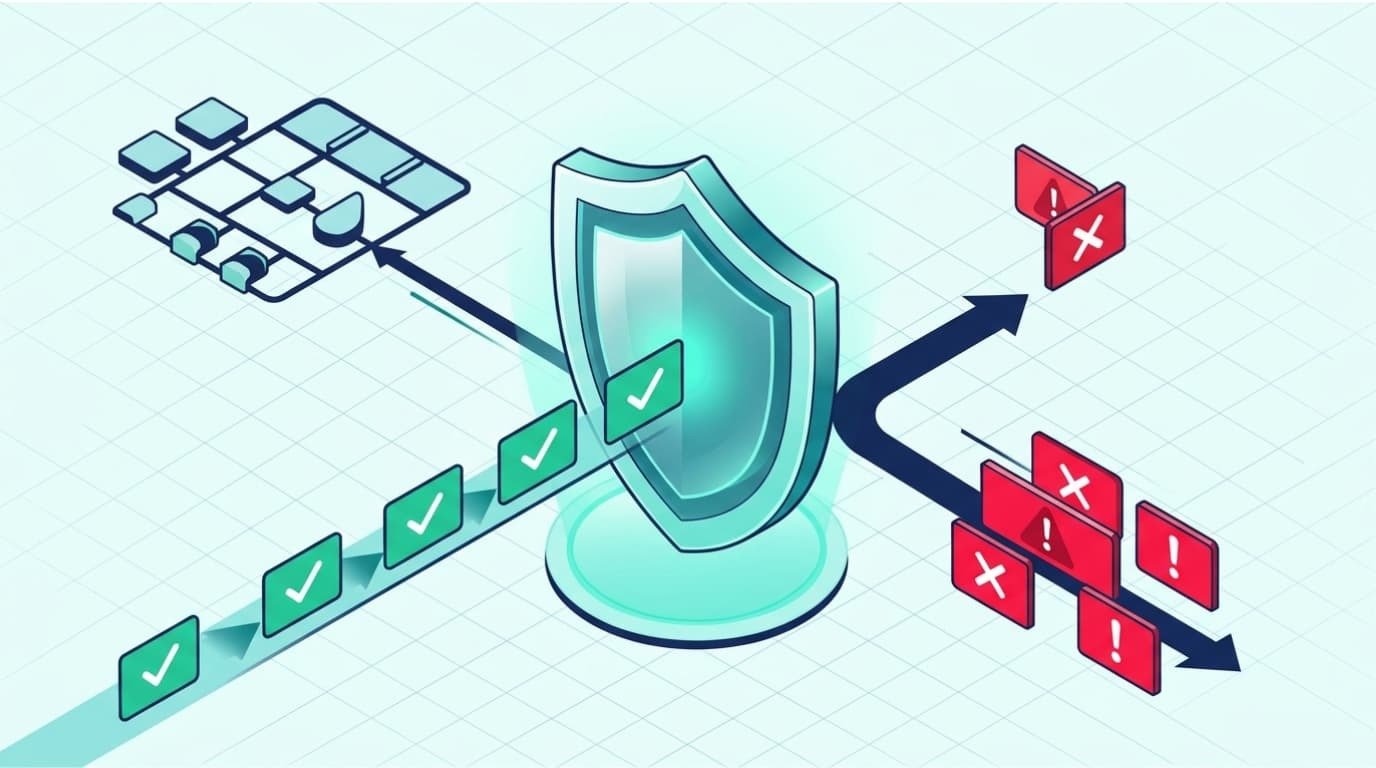
DNS firewall solutions check DNS requests to block harmful domains, detect suspicious activity, and control access to websites. They help protect users from malware, phishing pages, and command-and-control servers.
Network Threat Detection uses threat intelligence, DNS filtering, caching, rate limits, and query logs to help secure network traffic and monitor possible attacks. But DNS firewalls have limits and cannot stop every threat on their own.
We recommend checking their features and how they fit your existing security tools before deployment. Read on to learn how DNS firewalls work, what they offer, and how to use them.
DNS Firewall Solutions for Better Network Protection
These key points explain how DNS firewalls block online threats and help protect a network.
- Block known threats: Filter DNS requests to block known harmful domains.
- Detect suspicious activity: Use threat intelligence and traffic analysis to identify malicious domains and possible DNS tunneling.
- Support network performance: Use caching, rate limits, and query logs to manage traffic and monitor activity.
- Add another layer of security: Work alongside traditional firewalls, endpoint protection, and other security tools.
What Are DNS Firewall Solutions and How Do They Work?
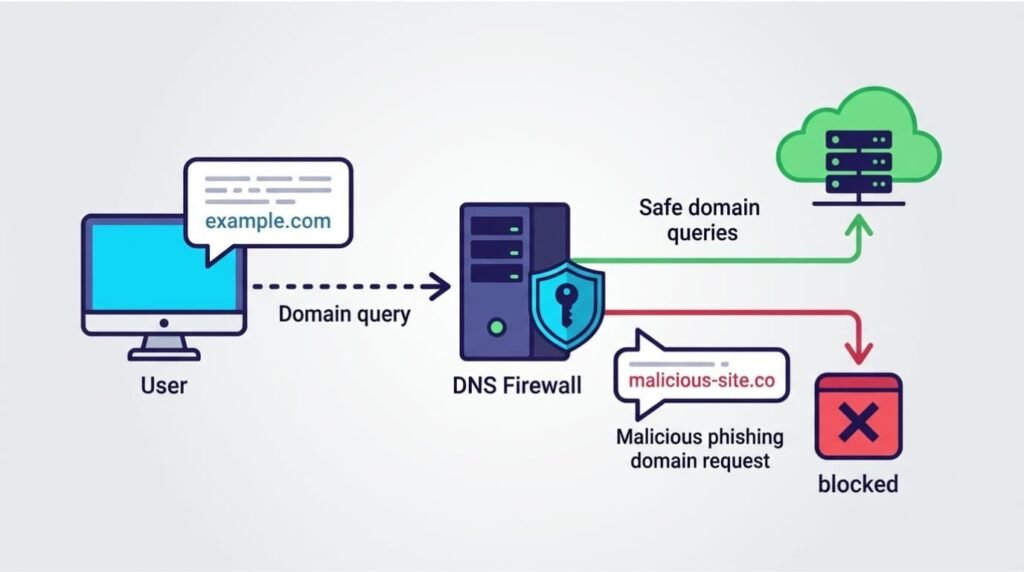
DNS firewall solutions check DNS queries and apply security rules before allowing, blocking, or redirecting requests.
The Domain Name System (DNS) converts website names into IP addresses. When someone visits a website, their device sends a DNS query to find the correct address.
As noted by NIST Special Publication 800-81r3
“Instead of resolving these domain names to IP addresses or other types of data, protective DNS generally returns some other form of DNS response to indicate that the domain name does not exist, such as NXDOMAIN. Protective DNS implementations can also log queries for domain names that trigger policy to indicate potential malware infection or other malicious activity.” – NIST Special Publication 800-81r3
A DNS firewall checks the request before the connection goes through. It compares the domain with threat intelligence feeds, reputation databases, and security rules set by the organization. Then it decides what to do.
The process usually follows five steps:
- A user tries to visit a domain.
- The DNS firewall checks the query.
- It compares the domain with threat data and security rules.
- It allows, blocks, or redirects the request.
- It logs DNS activity for later review.
For example, an employee might click a phishing link in an email. If the domain is already listed as harmful, the DNS firewall can block the request before the website loads.
The Internet Engineering Task Force (IETF) describes how DNS works in RFC 1035. DNS firewalls add security checks to this process. Their ability to block threats depends on up-to-date threat data and properly set rules.
DNS filtering only checks domain requests. Organizations may need additional threat analysis to identify attack paths and security risks that domain blocking cannot detect.
What Features Should You Expect From DNS Firewall Solutions?
Effective DNS firewall solutions use several features to block threats, protect DNS traffic, and monitor network activity.
Each feature has a different job. Some block access to known harmful websites, while others help keep DNS services running and give security teams a clearer view of network activity.
| Feature | Function | Security or Operational Value |
| Threat intelligence | Finds domains linked to harmful activity | Helps block known threats |
| DNS filtering | Applies domain and category rules | Controls network access |
| DNS caching | Stores previous DNS responses | Speeds up lookups |
| Rate limiting | Limits the number of DNS queries | Reduces the impact of query floods |
| DDoS mitigation | Handles harmful DNS traffic | Protects DNS services |
| High availability | Keeps DNS services available during certain outages | Supports DNS continuity |
| Query logging | Records DNS activity | Helps with security checks |
| Machine learning | Spots unusual DNS patterns | Helps find new threats |
Threat intelligence supplies information about harmful domains, while DNS filtering applies rules to block access to them.
Caching, rate limiting, and query logging support DNS performance, service stability, and security monitoring.
Evaluate these features together to understand how well a DNS firewall supports threat prevention, service availability, and network monitoring.
How Does Threat Intelligence Help DNS Firewalls Block Malicious Domains?
Threat intelligence feeds help DNS firewalls find domains linked to malware, phishing, and command-and-control activity.
These feeds gather data from security research, attack reports, domain reputation services, and other threat sources. A DNS firewall checks this data when a device requests a domain. If the domain is known to be harmful, the firewall can block the request.
What Threats Can DNS Firewalls Identify?
Depending on the provider and its data sources, DNS firewalls can help detect:
- Phishing domains that steal passwords or payment details.
- Malware websites that offer harmful downloads.
- Botnet command-and-control domains that contact infected devices.
- Suspicious new domains that may be used in short-term attacks.
- Ransomware-related domains linked to malicious activity.
CIRA DNS Firewall reports that more than 100,000 new malicious domains are added daily. This shows why threat data needs regular updates. An old blocklist may miss domains created after its last update.
Threat intelligence can also help stop infected devices from contacting known command-and-control servers. If a device requests a domain already marked as harmful, the DNS firewall can block the connection.
But threat feeds can’t catch every new attack. We recommend using them alongside activity monitoring and endpoint protection. Our threat models and risk analysis tools also help teams assess attack paths and spot risks that blocklists may miss.
Can DNS Firewalls Detect DNS Tunneling and Data Exfiltration?
Credits: Cloudmark
Advanced DNS firewalls check unusual query patterns to spot possible DNS tunneling and hidden data transfers.
Research from IEEE Symposium on Security and Privacy (IEEE S&P) shows
“DNS tunneling domains have unique characteristics in their authoritative nameservers, domain usage, and domain name patterns. In our two-months real-world deployment, TunTight has successfully detected 349 confirmed tunnels at the very first query with negligible false positives and negatives.” – IEEE Symposium on Security and Privacy (IEEE S&P)
DNS tunneling happens when attackers use DNS requests and replies to move data or keep a hidden line of communication open. They place encoded data inside DNS queries sent to domains they control instead of using DNS only to look up website addresses.
How Does DNS Data Exfiltration Work?
An infected device may send repeated DNS queries that contain encoded data. The attacker collects these requests and uses them to recover the information.
This activity can be hard to spot because DNS traffic is part of normal network use. A high number of queries does not always mean an attack is taking place.
What Detection Features Help Identify These Activities?
Monitoring tools can look for signs such as:
- Unusual DNS query volumes from one device.
- Very long queries or odd response patterns.
- Repeated requests to unknown domains.
- Suspicious domain patterns, including possible DGAs.
- Unusual query rates or activity outside normal hours.
Machine learning can help spot DNS activity that differs from normal patterns. But results depend on the model, available traffic data, and usual network behavior.
Treat unusual DNS activity as a warning sign, not proof of data theft. Security teams should compare DNS logs with endpoint alerts and other network records before investigating further.
What Are the Main Benefits of DNS Firewall Solutions?
DNS firewalls help block harmful domains, improve network visibility, and support reliable network operations.
Their main benefit is blocking threats before users reach known malicious websites. This can reduce the risk of malware infections and other attacks.
| Benefit | How It Helps Organizations |
| Malware prevention | Blocks known harmful websites |
| Phishing protection | Stops access to known phishing domains |
| Ransomware disruption | Blocks contact with known command-and-control domains |
| Data protection | Helps spot suspicious DNS data transfers |
| Faster resolution | Uses caching to speed up DNS lookups |
| Infrastructure efficiency | Reduces repeated DNS requests |
| Network visibility | Provides logs for security checks |
| Policy enforcement | Blocks access to unwanted content |
CIRA says DNS-level disruption of command-and-control communication can hamper more than 80% of malware; results depend on the malware family, threat data, and network controls.
Centralized access rules and query logs also help administrators manage security policies across managed devices.
DNS filtering cannot inspect every connection or stop threats that bypass DNS. Combine it with endpoint protection and network firewalls to cover these gaps.
How Do DNS Firewalls Improve DNS Performance and Availability?
DNS caching, rate limiting, and high availability help keep DNS services reliable during traffic spikes and some infrastructure outages.
DNS firewalls do more than block harmful requests. Some also help protect the systems that handle everyday domain lookups. These features can reduce delays and help users reach websites and applications when query volumes increase or an upstream service goes down.
How Does DNS Caching Reduce Lookup Delays?
DNS caching stores previous DNS responses for a set period. When a device requests the same domain again, the resolver can use the stored answer instead of contacting an authoritative nameserver.
This reduces repeated DNS requests, saves bandwidth, and can speed up lookups. However, the results depend on cache settings, expiration times, and network conditions.
How Do Rate Limiting and High Availability Help?
Rate limiting controls how many queries a DNS service accepts within a set period. It helps manage unusually high request volumes, including traffic from a DNS flood attack.
Some services also support stale-cache responses. If an upstream nameserver becomes unavailable, the resolver can still serve previously stored DNS answers. Cloudflare documents these features in its technical resources.
In our network security reviews, we consider DNS availability alongside threat detection. These features can help keep DNS services running, but they won’t stop every DDoS attack.
Organizations still need network-level controls to protect applications and other systems. Our threat models and risk analysis tools also help identify weak points and assess emerging threats.
How Do DNS Firewalls Compare With Traditional Network Firewalls?
DNS firewalls filter domain requests, while traditional firewalls control wider network traffic and connections.
Both tools help protect a network, but they handle different types of activity. A DNS firewall checks domain lookups before a device connects to a website or service. These DNS security measures add an important layer of network protection. A traditional firewall controls traffic based on IP addresses, ports, protocols, and connection rules.
| Consideration | DNS Firewall | Traditional Firewall |
| Primary focus | DNS queries and domain filtering | Network traffic and connections |
| Protection method | Domain reputation and DNS rules | IP, port, protocol, and connection rules |
| Threat prevention | Blocks requests to known malicious domains | Controls unauthorized or suspicious traffic |
| Visibility | Shows DNS queries and domain requests | Provides visibility into broader network traffic |
| Main limitation | May be bypassed through alternative DNS paths | Protection depends on its rules and inspection features |
Why Should Organizations Use Both?
DNS firewalls add another layer of protection before a device connects to a domain. Traditional firewalls provide wider control over network access. They can also restrict traffic that doesn’t use normal DNS resolution.
For example, a DNS firewall can block a known phishing domain. A traditional firewall can help prevent devices from using unauthorized external DNS servers or connecting to suspicious IP addresses.
Use both tools as part of a layered defense strategy. DNS firewalls filter domain requests, while traditional firewalls control broader network traffic.
Can Users Bypass DNS Firewall Protection With DoH or VPNs?
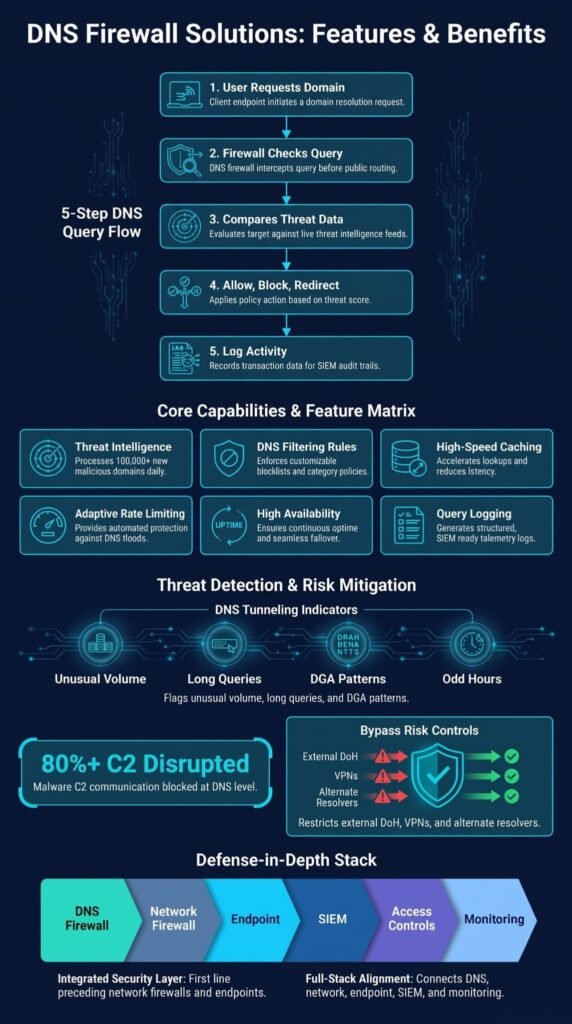
Yes. Users can bypass DNS filtering by using encrypted DNS services or VPNs that send traffic outside an organization’s network controls.
This can cause problems for organizations that use a managed DNS resolver to enforce access rules. When a device sends DNS queries to an external resolver, those requests may skip the organization’s DNS firewall.
| Bypass Method | Why It Creates a Problem | Possible Control |
| External DoH services | Sends DNS queries outside the managed resolver | Restrict unauthorized DoH endpoints |
| VPN connections | Routes traffic through another network | Apply approved VPN policies |
| Direct IP access | Avoids normal DNS lookups | Use network firewall rules |
| Alternative DNS resolvers | Bypasses organizational filtering | Allow only approved DNS destinations |
DNS filtering can be easier to bypass when users have access to external resolvers, encrypted DNS services, or VPN connections.
To reduce this risk, organizations should monitor DNS traffic and apply rules at the network gateway. Blocking known external DNS services can help, but encrypted connections and new services may make enforcement harder.
Create a list of approved services and access rules before restricting alternative connections. Consider legitimate business needs to avoid disrupting normal work. Network risk assessments can help identify gaps in these controls.
Which DNS Firewall Solutions and Approaches Suit Different Networks?
The best option depends on your network size, management needs, filtering goals, and existing equipment.
Some organizations need shared threat intelligence and detailed reports. Smaller networks may only need basic domain filtering, while advanced teams might need both DNS and IP-based controls. Keep in mind that these options offer different features and are not all full enterprise DNS firewall platforms.
| Solution or Approach | Best For | Main Advantage |
| Managed DNS filtering | Small businesses and distributed teams | Centralized policies |
| NextDNS | Configurable DNS protection | Real-time analysis and custom filtering |
| Pi-hole | Home networks and smaller environments | Flexible DNS filtering |
| AdGuard Home | Home and small office networks | network-wide DNS filtering, custom rules, and activity monitoring |
| pfBlockerNG | Advanced network environments | DNS and IP-based blocking |
| Cloudflare Gateway | Organizational network protection | Content categories and application policies |
| UniFi Gateway | Networks using integrated gateway management | Built-in firewall and content filtering |
Managed DNS filtering can save organizations from having to maintain their own DNS infrastructure. Self-hosted tools such as Pi-hole and AdGuard Home offer more control, but administrators must manage updates, settings, and ongoing maintenance.
For networks that need broader filtering, pfBlockerNG combines DNS controls with IP address blocking. This gives administrators more ways to restrict unwanted destinations. However, it requires compatible network equipment and some technical knowledge.
Match the solution to your network size, security requirements, and available IT resources. A small office may need basic DNS filtering, while a large organization may require centralized policies, detailed reporting, and broader threat detection.
How Should You Choose and Implement a DNS Firewall?
Check a DNS firewall’s security features, network fit, management needs, and monitoring tools before deployment.
A solution may offer advanced threat intelligence but still fail if it doesn’t work with your current network. We recommend checking these seven areas first:
- Security needs: Decide whether you need malware blocking, content filtering, or threat detection.
- Threat data: Check how often threat feeds update and what threats they cover.
- Filtering rules: Look for custom rules, allowlists, blocklists, and content controls.
- Compatibility: Make sure the solution works with your routers, firewalls, DNS systems, and SIEM tools.
- Performance: Test DNS speed and reliability.
- Bypass prevention: Restrict unapproved DNS servers and manage VPN access.
- Monitoring: Review query logs, blocked requests, and unusual activity.
Test new rules on a small group of devices first. This helps find errors and avoid blocking websites employees need. Adjust the rules before applying them across the network.
Follow established firewall policy practices when planning, testing, and managing DNS security rules. NIST’s Guidelines on Firewalls and Firewall Policy provide additional guidance.
What Should Organizations Monitor After Deploying a DNS Firewall?
Organizations should track DNS queries, blocked requests, policy violations, and unusual traffic to check if their DNS firewall works as expected.
Installing a DNS firewall is just the start. Regular monitoring of DNS query logs helps security teams identify unusual requests, investigate suspicious activity, and keep filtering rules up to date. Threats change, business needs shift, and filtering rules may block sites employees need.
Focus on these areas:
- Blocked queries: Track requests to harmful or restricted domains.
- Unusual query patterns: Check traffic spikes, repeated requests, and long queries.
- DNS tunneling: Look for patterns that may point to hidden data transfers.
- Policy violations: Track attempts to access blocked sites or content.
- DNS performance: Check response times, failed lookups, and service uptime.
- SIEM integration: Send DNS logs to security tools for review.
DNS logs can help teams link suspicious requests to other network alerts. For example, repeated requests to an unknown domain from one device may need a closer look, especially if endpoint protection also flags that device.
Review alerts instead of relying only on automatic blocking. Update filtering rules and document recurring issues to improve detection over time.
How Do DNS Firewall Solutions Support a Defense-in-Depth Strategy?
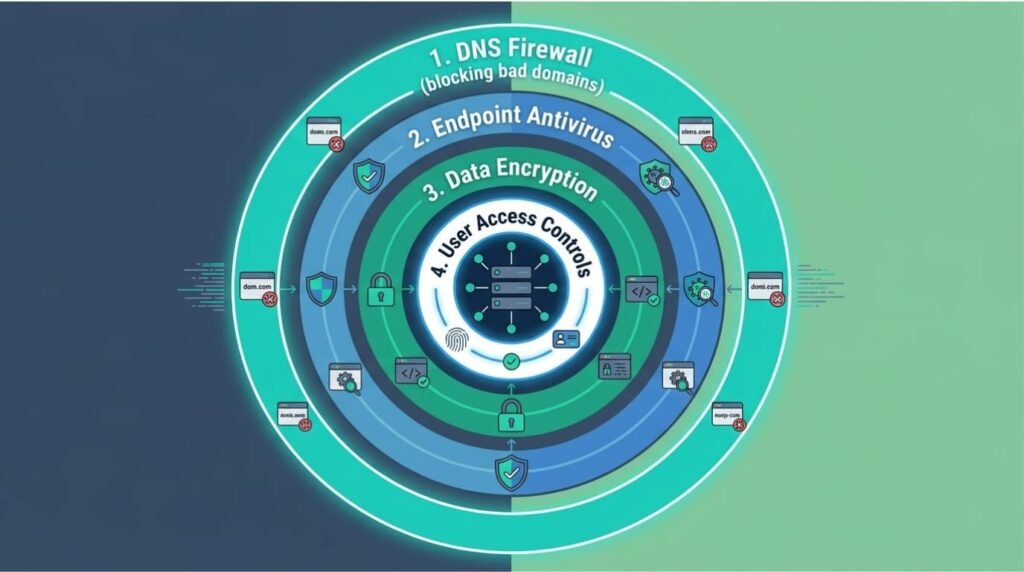
DNS firewalls provide stronger network protection when used with endpoint security, traditional firewalls, and ongoing monitoring.
No single security tool can stop every attack. DNS filtering can block known malicious domains, but it may miss threats that use direct IP connections, hacked legitimate websites, or other ways to communicate.
Using several security tools together helps cover these gaps. Each layer has a different job.
| Security Layer | Main Responsibility |
| DNS firewall | Blocks requests to malicious domains |
| Network firewall | Controls network traffic and connections |
| Endpoint protection | Detects threats on individual devices |
| SIEM | Collects and analyzes security events |
| Access controls | Prevents unauthorized access |
| Security monitoring | Tracks suspicious activity |
IP-based filtering controls access to specific destinations, endpoint security detects threats on individual devices, and SIEM tools help identify patterns across security events.
This is where Network Threat Detection supports a wider security plan. We focus on analyzing suspicious network activity and finding threats that domain filtering may miss. Our threat models and risk analysis tools also help teams review possible attack paths, identify weak points, and prepare for emerging threats.
Each layer should support the others. DNS firewalls block known harmful destinations, while network and endpoint tools help detect activity that gets past those filters. This gives security teams more information to investigate attacks and respond to them.
FAQ
How Does DNS Filtering Block Malicious Domains Before Connections?
DNS filtering checks domain requests before devices connect to websites or online services. When a user requests access to a known malicious domain, protective DNS can block the request and prevent the connection. This DNS-layer protection reduces exposure to malicious websites, phishing pages, and malware downloads before they reach users’ devices or internal network resources.
Can DNS Firewalls Detect DNS Tunneling and Unusual Query Patterns?
DNS firewalls monitor DNS traffic for unusual query patterns, request frequency, and suspicious domain activity. DNS tunneling can involve repeated requests or large amounts of encoded data hidden within DNS queries.
By detecting these patterns, security teams can investigate possible data theft, command-and-control communication, and other threats that traditional firewalls may not identify through standard traffic inspection.
Why Should Businesses Combine DNS Firewalls With Traditional Firewalls?
Traditional firewalls control network traffic based on rules, ports, and connection details, while DNS firewalls inspect domain requests. Combining both creates a layered defense that protects different parts of the network.
DNS-layer protection blocks access to known malicious domains before connections begin, while traditional firewalls control which network connections are allowed. This approach reduces reliance on a single security control.
How Does Real-Time Threat Intelligence Improve DNS Security?
Real-time threat intelligence helps DNS security systems identify newly reported malicious domains and changes in attack infrastructure. AI-driven threat intelligence can analyze DNS query patterns and compare suspicious activity with known threats.
Frequent intelligence updates help security teams respond to modern cyberattacks more quickly. However, teams must also review security alerts and update filtering rules to address emerging threats.
How Can Businesses Measure the Effectiveness of DNS-Layer Protection?
Track the number of blocked malicious queries, detected DNS tunneling attempts, security alerts, and malware incidents before and after deployment. Review DNS-layer activity to identify recurring threats and gaps in coverage.
Check whether the system blocks harmful domains without restricting legitimate websites. These measurements help security teams assess protection levels, adjust filtering policies, and improve their broader cybersecurity strategy.
Strengthen Network Protection With DNS Firewall Solutions
DNS firewalls block known harmful domains and help identify suspicious activity, but they cannot stop every attack. Combine DNS filtering with endpoint security, network controls, and regular monitoring for broader protection.
Network Threat Detection helps security teams find hidden risks through real-time threat modeling, risk analysis, and attack path simulations. It also supports vulnerability checks and security planning. Explore Network Threat Detection to see how it can help protect your network.
References
- Rose, Scott, Cricket Liu, and Ross Gibson. “Secure Domain Name System (DNS) Deployment Guide.” National Institute of Standards and Technology (NIST), March 19, 2026. Accessed November 3, 2026.
- “IEEE Xplore Document 11023297.” IEEE Xplore. Accessed November 3, 2026.