
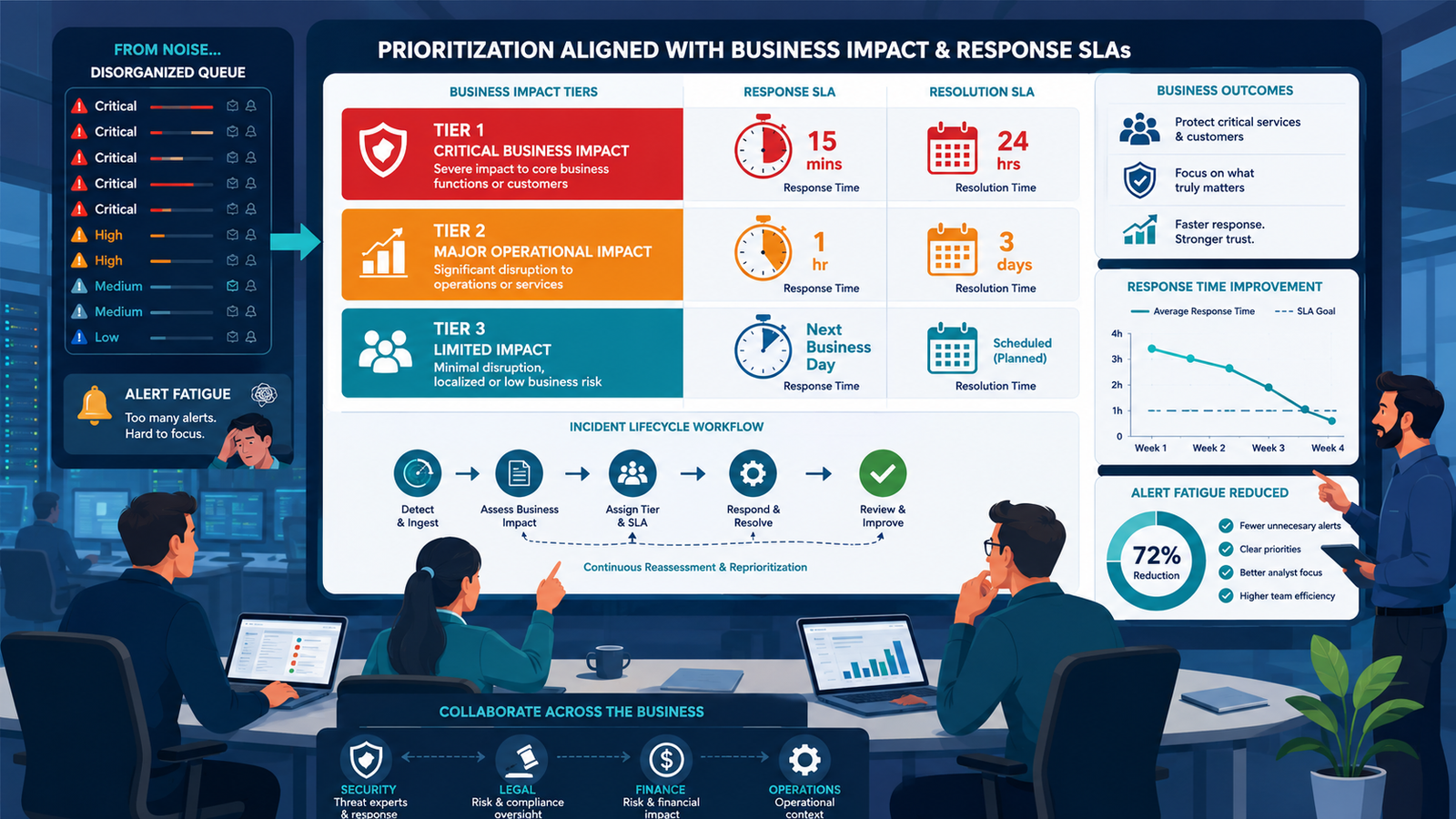
Every incident response program performs better when aligning prioritization incident response SLAs reflects actual business risk instead of generic technical ratings. At Network Threat Detection, we’ve seen organizations improve response consistency by connecting security priorities with operational impact, legal exposure, and critical business services.
This approach helps security teams respond faster to incidents that matter most while reducing wasted effort on low-impact alerts. The result is a response process that supports both security and business objectives. Keep reading.
What Actually Deserves Your Fastest Response?
Not every security incident deserves the same level of urgency. The most effective incident response programs prioritize events based on their potential impact on the business, ensuring critical threats receive immediate attention while lower-risk issues follow appropriate response timelines.
- Define incident severity using business impact instead of technical severity alone.
- Collaborate with Legal, Finance, Operations, and Security when establishing response SLAs.
- Standardize automated playbooks so responders know exactly how quickly each incident type must be handled.
What’s Wrong with Using Standard Severity Levels?
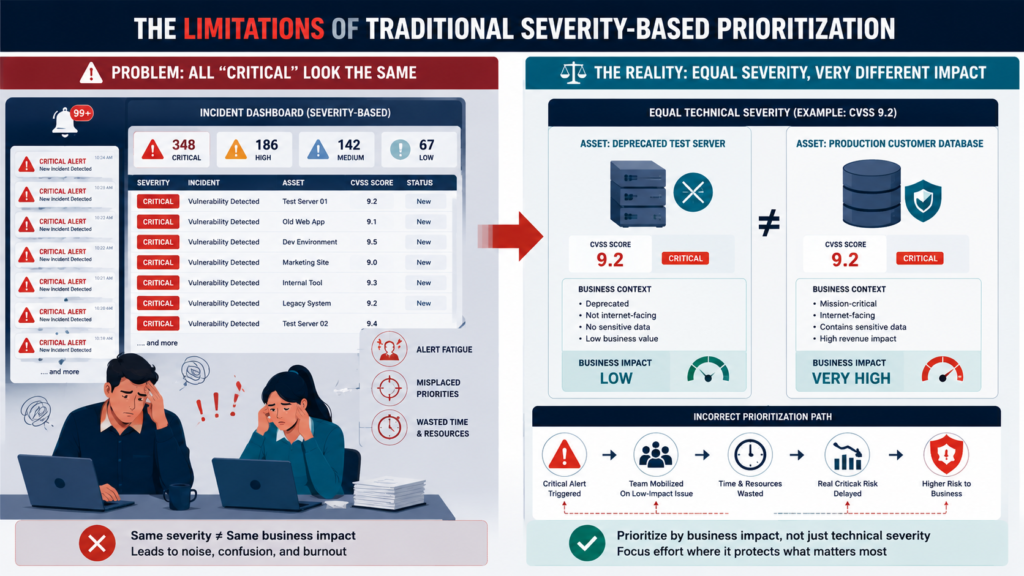
You’ve seen the chart. Severity 1: Critical. Severity 2: High. Severity 3: Medium. It looks professional, clean. But in practice, it’s often meaningless. A “critical” vulnerability in an internet-facing test server gets the same panic as a “critical” breach of the live customer database. The team burns out, the business loses faith, and real threats get lost in the noise.
The problem is abstraction. Standard levels are designed for vendors, not for your specific company’s heartbeat. A Severity 1 incident shouldn’t be a generic label, it should be a precise trigger tied to a business outcome you all agree is catastrophic.
“Incident prioritization is traditionally based on a set of static calculations, which are rarely adjusted. Especially since there is no explicit process to identify errors and improvements are made and evaluated manually on a best guess basis. This leads to incidents being incorrectly prioritized, leading to an increased and misplaced effort” – Ieeexplore
We used to declare Sev-1 for any incident with a CVSS score over 9.0. Then we had a 9.2 vulnerability in a deprecated marketing microsite. The whole team mobilized over a weekend.
The business impact? Zero. It was a textbook incident response, perfectly executed against the wrong target. That misalignment costs more than just overtime pay, it costs credibility.
- Generic severity levels create alert fatigue and misdirect effort.
- Technical scores (like CVSS) often don’t reflect actual business risk.
- Mobilizing for the wrong “critical” incident erodes trust with the business.
How Do You Define SLAs That the Business Cares About?
You start by locking the security team in a room with people who don’t know what a SIEM is. Bring in someone from Legal. From Finance risk scoring. Your goal isn’t to teach them about malware, it’s to learn from them about business pain.
Ask them: “If our systems went down, what’s the first function that must come back? What data breach would trigger a regulatory fine we can’t afford? What outage would break our key customer contracts?”
Their answers are your real SLAs. For us, the finance lead said a 15-minute outage during month-end closing would be a multi-million dollar accounting nightmare. The product head said a leak of their unannounced roadmap would be a competitive disaster. We took those scenarios and worked backwards.
We defined a “Business-Critical Severity 1” as any incident that: 1) Halts core revenue generation for >15 minutes, 2) Exposes regulated customer data, or 3) Compromises unreleased intellectual property. Everything else dropped a level.
“During incident lifetime, incident priority levels may be changed several times,” and incident prioritization should be based on “assessed importance, severity and urgency” with substantial bearing on the effectiveness of the IT support organization. – PMC.NCBI
This table became our bible:
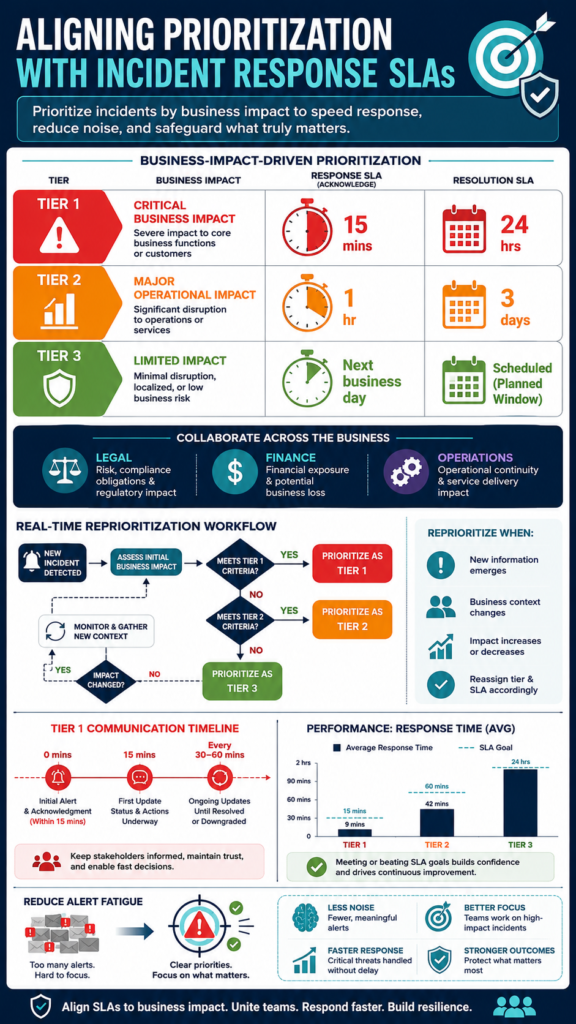
| Business Impact Tier | Definition & Examples | Response SLA (Time to Engage) | Resolution SLA Goal |
| Tier 1: Critical Business Impact | Active disruption of core revenue or legal violation. e.g., Production e-commerce outage, breach of regulated PII. | 15 minutes | 4 hours to contain, 24 hours to remediate. |
| Tier 2: Major Operational Impact | Significant degradation of internal operations. e.g., HR payroll system down, internal email compromised. | 1 hour | 8 hours to contain, 3 business days to remediate. |
| Tier 3: Limited or No Impact | Isolated issue with no core business function affected. e.g., Vulnerability in retired system, phishing test failure. | Next business day | Document and schedule based on risk. |
These timelines weren’t pulled from a vendor sheet. They were negotiated. The “15-minute engage” for a Tier 1 incident came from the finance team’s pain threshold. That alignment is everything. When you trigger a Sev-1 response now, you’re not just following a policy, you’re answering a direct business need.
Can Your Team Actually Aligning Prioritization Incident Response SLAs?
Defining SLAs with the business is the easy part. The hard part is building a response machine that can actually hit those clocks. A 15-minute engagement SLA is a fantasy without pre-built automation, clear role definition, and immediate visibility. You can’t be logging into five different consoles and calling people who are on vacation.
This is where your tooling and process must fuse. For Tier 1 incidents, your detection must be near-instantaneous and your playbooks must be one-click launches. We realized our old method, email alerts that piled up in an inbox, would never hit a 15-minute target.
We needed a system that could correlate alerts, pre-assign responders, and kick off containment workflows automatically. Our shift towards integrated network threat detection was driven by this SLA pressure. It wasn’t about buying a fancy tool, it was about solving for time.
We needed to see the lateral movement, the data exfiltration, the command-and-control callbacks, not in five minutes, but now. When every second is measured against a business-defined clock, your visibility tools become your most critical response lever.
The human element is just as important. Everyone on the response team must know their role cold. Who declares the incident? Who makes the call to isolate a server? Who contacts the legal team? We run quarterly “fire drills” using our real tools and playbooks, timed against our published SLAs.
The first few were ugly. We missed the clock. But that failure showed us where our process jammed, a missing escalation path, a confusing playbook step. Each drill smooths the machine. Now, when a real Tier 1 alert flashes, it’s not panic. It’s a well-rehearsed team executing a plan the business helped write.
How Does Prioritization Change During an Active Incident?
Credits: Nozomi Networks
This is the moment of truth. The alert is blaring. It’s been classified as a potential Tier 1. Your SLA clock started 60 seconds ago. Now, the team must switch from a pre-defined categorization to dynamic, real-time prioritization. The initial label is a hypothesis. The first minutes of response are about testing it.
The key is to ask the right questions immediately, in this order: 1) Is this real? (False positive or true malicious activity?). 2) What is the scope? (One endpoint or fifty?). 3) What is the business function affected? (Is it the public website or the internal HR wiki?). The answers directly dictate your next move and can change the incident’s tier on the fly.
We had an alert for ransomware-like behavior on a file server. Initial panic. Tier 1 was prepped. But within three minutes, our network detection showed the “encryption” traffic was only going to a test directory, and the source was a known automated engineering script that had gone haywire. The technical behavior was severe.
That ability to pivot, to re-prioritize based on live evidence, is what separates a chaotic response from a controlled one. Your playbooks must have these decision branches built in.
What Role Do Communications Play in SLA Alignment?
If you’re managing an incident but not communicating, you’re failing. The business stakeholders who helped set the SLAs are now waiting, watching their own clocks. Silence breeds fear, speculation, and a loss of confidence. Your communication plan must be as rigorous as your technical response.
We stick to a brutal, simple schedule for Tier 1 incidents. The first update goes out at T+15 minutes (when the SLA says we’re engaged), even if it’s just: “We have confirmed a security incident affecting [system]. The response team is actively investigating. Next update in 30 minutes. That initial message does more than inform, it validates the SLA process itself.
It tells the business, “We are on the clock, and we are working on it.” Subsequent updates follow like clockwork, every 30 to 60 minutes, with a clear template: Current Status, Actions Taken, Current Impact, Next Steps. No jargon.
This transparency turns stakeholders from anxious spectators into informed partners. They understand the pace, they see the progress. When we finally resolve the incident, the post-mortem isn’t a surprise. They’ve been on the journey with us. We’ve found this discipline also improves our own response.
Knowing you have to deliver a clear update in 28 minutes forces clarity of thought. You have to synthesize the technical chaos into a few coherent sentences for the CFO. That act alone often reveals the true priority of your next action.
How Do You Measure and Improve This Alignment?
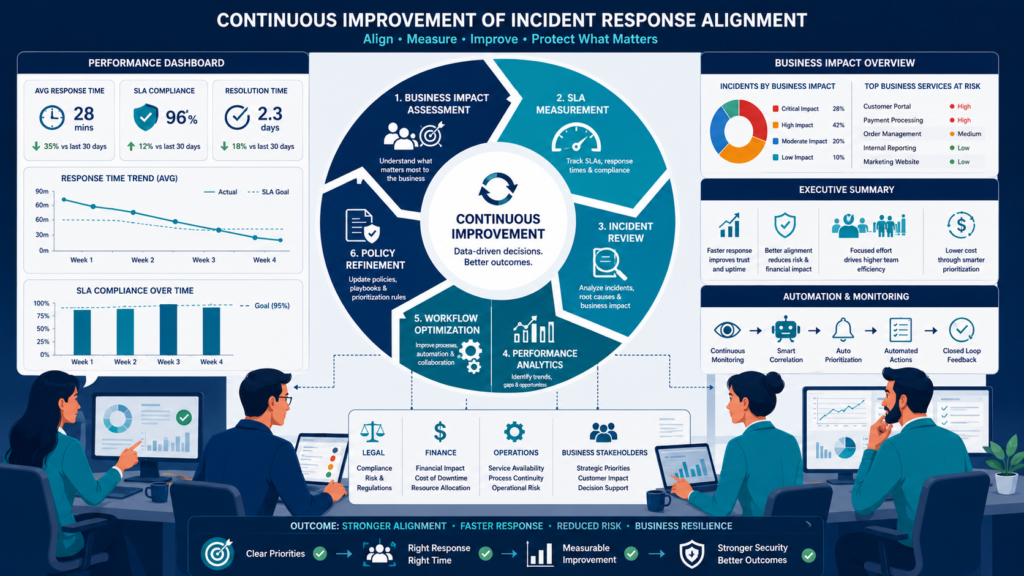
An SLA you don’t measure is just a hope. You need to track everything: time to detect, time to engage, time to contain, time to resolve. But the most important metric is one the business understands: Business Impact Duration. How long was the core function actually impaired?
We report on this quarterly. Not with graphs of alert volumes, but with a simple summary: “This quarter, we had 3 potential Tier 1 incidents. All were contained before impacting business operations. Our average time to engage was 12 minutes against a 15-minute SLA.
Our average time to contain was 3.5 hours against a 4-hour goal.” This shows we’re not just meeting technical promises, we’re preventing business harm. It also shows where we missed.
One quarter, our “time to engage” ballooned to 22 minutes because the primary responder was on a plane. That led to a process improvement: we now have a primary and two backups on call, with automatic escalations.
The final, crucial step is the blameless post-mortem after every Tier 1 and Tier 2 incident. The question isn’t “Who screwed up?” It’s “Why did our system allow this to happen, or respond this way?” Did our detection miss something? Did the playbook have a vague step? Was a critical piece of data not available?
These sessions, involving both technical and business representatives, are where real alignment grows. They turn individual incidents into systemic improvements, making the entire machine faster and smarter for the next time the clock starts.
FAQ
Should we have different SLAs for different times of day or week?
Absolutely, if your business operations vary. A production system outage at 3 AM on a Sunday might have a longer “engage” SLA than at 10 AM on a Tuesday, if no customers are active. Define these variations clearly with business units to set realistic expectations.
What happens if we consistently miss our SLAs?
First, diagnose why. Is the team overloaded? Are the tools too slow? Are the SLAs unrealistic? Present the data to business leadership with options: increase resources, invest in automation, or formally re-negotiate the SLA to a more achievable target based on current capabilities.
How do we handle a “gray area” incident that doesn’t clearly fit our tiers?
Err on the side of over-communication. Declare it at the higher tier, start the clock, and inform stakeholders you are investigating severity. It’s easier to stand down from a heightened state with transparency than to escalate a crisis that’s been burning unnoticed.
Do these SLAs apply to third-party vendors we rely on?
They must. Your SLA clock starts when your business is impacted, not when the vendor acknowledges the issue. Build these response-time requirements into your vendor contracts. Your incident response playbook should include immediate steps for engaging and escalating with critical vendors.
Building a Response Engine the Business Trusts
Network Threat Detection enables security teams to prioritize risks using real-time threat modeling, automated risk analysis, visual attack path simulations, CVE mapping, and executive-ready reporting built on frameworks like MITRE ATT&CK, STRIDE, and PASTA.
Explore the platform and see how it can help your organization reduce response times, improve prioritization, and strengthen cyber resilience by joining us here: Join Network Threat Detection.
References
- https://ieeexplore.ieee.org/abstract/document/10964806
- https://pmc.ncbi.nlm.nih.gov/articles/PMC8942060/
