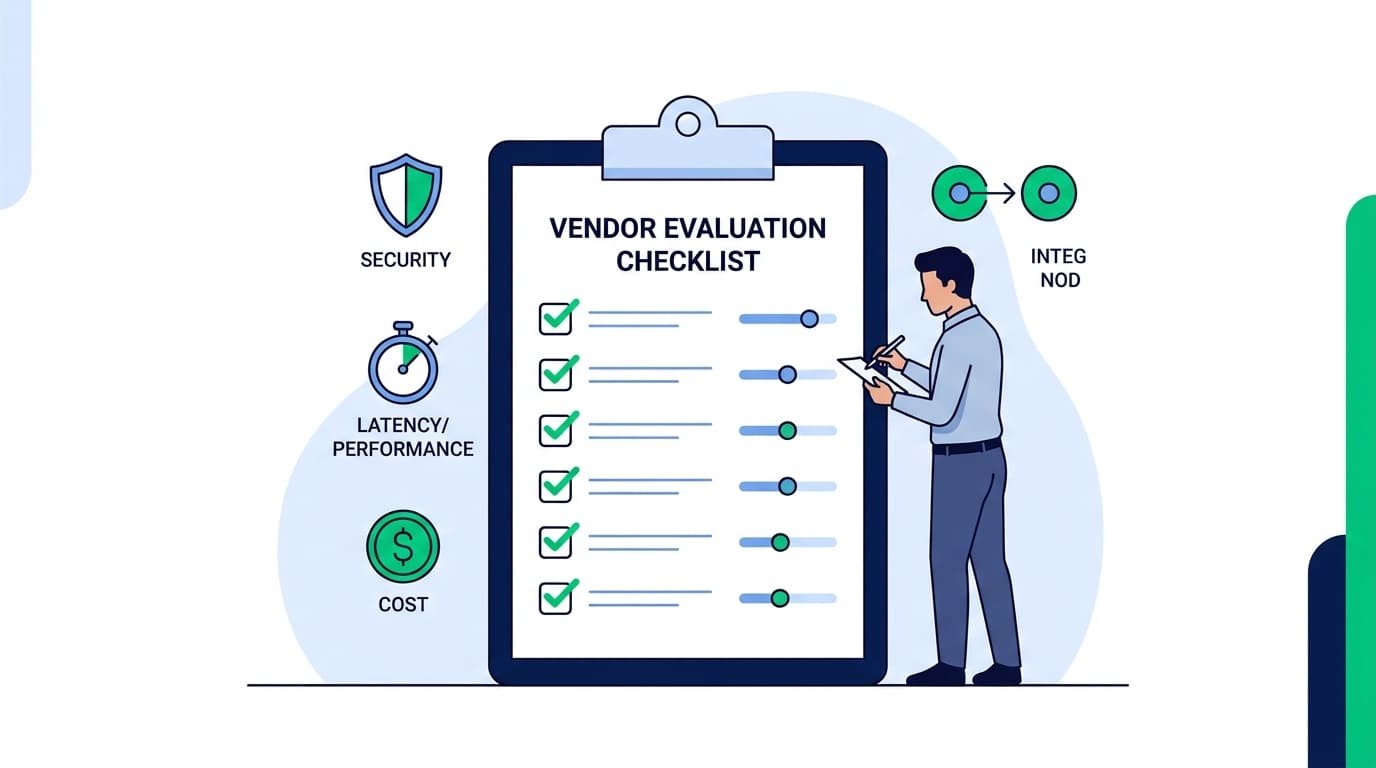
A reliable Web Application Firewall (WAF) must block malicious traffic without slowing down legitimate users. But choosing a vendor takes more than checking security features. Teams need to test threat detection, deployment options, operational demands, and pricing under real workloads.
Network Threat Detection should also be part of the evaluation, as it adds another layer of visibility into suspicious activity. So, before signing a contract, run a 2-4 week proof of concept (PoC). Test the product against actual traffic and daily operations. Check the results, compare costs, and see what holds up. Keep reading to learn what to assess before choosing a WAF vendor.
Quick Guide to Choosing the Right WAF Solution
- Prioritize security: Assess OWASP Top 10, API security, bot and DDoS protection, and false positives.
- Assess deployment fit: Compare deployment options, performance, scalability, automation, and integrations.
- Validate value: Run a 2-4 week PoC to test accuracy, latency, support, compliance, and total cost.
What Should You Evaluate Before Choosing a WAF Vendor?
Before choosing a web application firewall (WAF), consider four key factors: your application architecture, the threats you face, the people responsible for managing the tool, and its long-term cost. Choosing a WAF based on its feature list alone can lead to expensive mistakes. A structured evaluation helps you find a solution that fits your actual security needs.
We recommend documenting your requirements before attending any vendor demonstrations. Without a clear list, it’s easy to get distracted by impressive presentations and features you may never use. Written requirements also make vendor comparisons more consistent and help expose product limitations early.
Focus on these five areas:
1. Traffic and infrastructure: Understand your traffic volume, where the WAF will sit in your architecture, and which applications it needs to protect. Consider your existing infrastructure and deployment requirements.
2. Threat exposure: Identify the attacks your applications are most likely to face. These may include API abuse, malicious bots, distributed denial-of-service (DDoS) attacks, and application-layer exploits.
3. Compliance and data protection: Document the security standards and regulatory requirements your organization must follow. Include encryption requirements and restrictions on where sensitive data can be stored or processed.
4. Performance requirements: Define acceptable latency, expected traffic growth, scalability needs, and uptime targets. A WAF should protect applications without introducing unacceptable performance issues.
5. Operational requirements: Identify the systems the WAF must integrate with, the level of automation you need, and who will handle configuration, monitoring, troubleshooting, and ongoing maintenance.
The National Institute of Standards and Technology (NIST) developed the Cybersecurity Framework 2.0 to help organizations manage cybersecurity risks. It’s a useful reference for this evaluation because it encourages teams to focus on identifying and managing real risks rather than getting caught up in lengthy feature comparisons.
Which five requirements should you define first?
Start here. These give you a base for comparing both the tech and the cost. First, define your traffic profile by working out what your normal and peak traffic volumes are. Next, decide on deployment: will the WAF run in the cloud, on a CDN, as an appliance, or in a container? Then look at API coverage, meaning which REST, GraphQL, and other APIs need protection.
After that, consider your environments, including how many applications and environments need coverage. Finally, address compliance by identifying which security standards and residency rules apply.
Fuzzy requirements make buying harder. A vendor may have great features, but they don’t help if they don’t fit the risks you really have.
Which Security Capabilities Matter Most in a WAF?
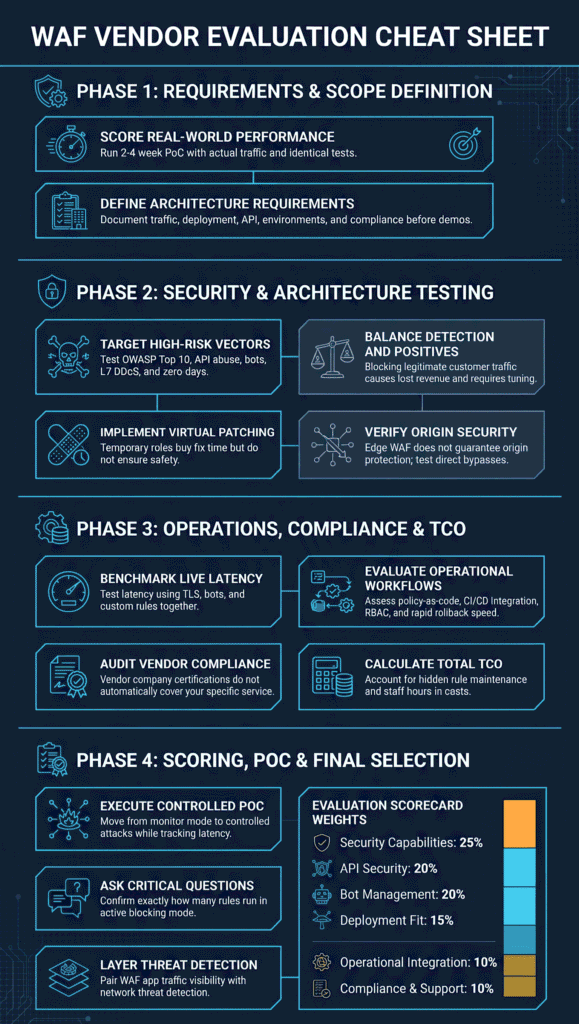
Look for four things. Does it catch real attacks? Does it block them? Does it leave good visitors alone? And can it cover a new weakness quickly? A good WAF stops known exploits and strange traffic without breaking your apps. Effective WAF protection also depends on how well the system handles application-layer attacks while keeping legitimate traffic flowing.
Our team builds threat models and risk analysis tools to help make networks safer and catch new threats. That work taught us that a WAF only sees part of the picture. Network Threat Detection helps fill the gaps by spotting odd activity across your whole network, not just inside single web requests. We think of it as a good first layer when you review your wider security needs.
For protecting the app itself, check OWASP Top 10 coverage, API security, bot control, and Layer 7 DDoS defense.
Data from OWASP Foundation demonstrates
“Injection is one of the most tested categories, with the greatest number of CVEs associated with the 38 CWEs in this category. Injection includes a range of issues from Cross-site Scripting (high frequency/low impact) to SQL Injection (low frequency/high impact) vulnerabilities.” – OWASP Foundation
Which threats should a WAF detect?
Ask every vendor to show how they handle these common attacks. Start with the OWASP Top 10, which covers SQL injection, cross-site scripting, and other common web attacks. Then move on to API abuse, including bad requests, access by the wrong people, and odd API behavior.
Next, look at bot attacks, such as credential stuffing, scraping, and other automated abuse. After that, cover DDoS, meaning floods of requests that wear an app down. Finally, ask about emerging threats, including zero-day-style attacks and unusual request patterns.
The OWASP Foundation maintains the OWASP Top 10, a list of the biggest web app risks. The 2025 version is a handy guide for building tests you can run again and again. You can read it on the official OWASP Top 10 page.
How should vendors demonstrate protection quality?
Ask for numbers, not promises. Vendors should also explain how signature-based detection, anomaly detection, machine learning, and behavior analysis work together.
When we review vendors, we look for detection rates in controlled attack tests, as well as false positive and false negative rates. We also check how well the rules cover known weaknesses and how the WAF handles unusual requests. Finally, we look at its threat intelligence feeds and IP reputation filtering.
If it fits your setup, test the WAF against apps that are made to be weak, using a tool like AppScan. Write down each attack it catches and each one it misses. Keep the test the same every time so the results are fair.
Why Are False Positives the Real WAF Buying Criterion?
A WAF that blocks real customers causes real harm. Sales can drop, and key services can stop working. Good protection has to go hand in hand with uptime.
We’ve seen this go wrong when a managed ruleset updates by itself. A new rule might stop a fresh attack, but it can also block normal requests that look a little alike. That’s why we see tuning as a job that never ends, not something you finish on launch day.
When you evaluate a WAF, start with detection accuracy by checking whether it can tell attacks from normal requests. Next, look at monitoring mode to see if your team can review alerts before blocking starts. Then examine exception handling, which means confirming that admins can quickly add safe exclusions.
After that, check rule updates to make sure managed updates are watched and shared with you. Finally, verify blocking control by asking whether you can turn on blocking for one rule at a time.
During your proof of concept (PoC), test with real edge cases, strange inputs, and steps that only your app uses. Then count how often the WAF raises a false alarm and how long it takes your admins to fix it.
Here’s one last tip. Ask the vendor’s reference customers how many of their rules actually run in blocking mode in production. Their answer shows how much they trust the product, and it tells you more than any long demo will.
How Important Is Virtual Patching When Selecting a WAF?
Sometimes a bug gets found and the fix can’t ship today. That’s where virtual patching helps. A WAF rule blocks the attack while your developers build the real fix.
Picture a new SQL injection bug. Your team might need three or four days to fix and test it. If a rule is ready, the bad requests get stopped in the meantime. On our own projects, that buffer is what keeps a weekend from turning into a fire drill.
Here’s what to look for in a vendor: fast rules for newly found vulnerabilities, custom rules for weak spots in your own app, protection without touching your code, rule updates that come with plain, clear notes, and a way to see which bugs are covered and what’s still open.
The CISA Known Exploited Vulnerabilities catalog lists bugs that attackers are using right now. We use it when we rank risks, and it works well for deciding what to patch first.
Keep one thing in mind, though. A virtual patch buys you time. It doesn’t replace code reviews, real fixes, or testing. When we review apps that lean only on patches like this, the same holes tend to show up again.
Which Deployment Architecture Fits Your Applications?
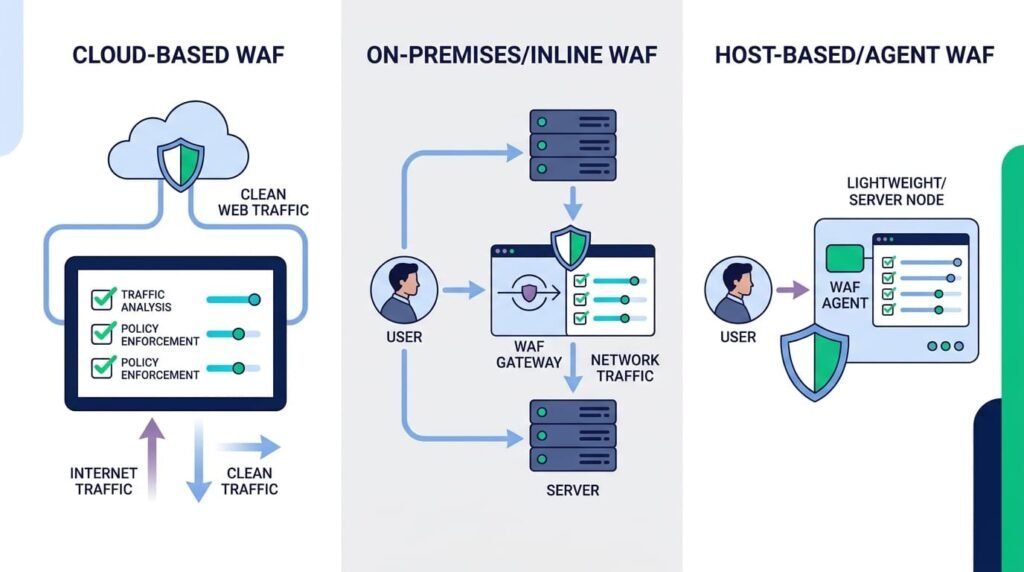
Start with how your systems actually run. Think about where your traffic goes, how much downtime you can live with, and how much work your team can take on. A good WAF shouldn’t slow your apps down or make life harder for admins.
WAFs usually come as cloud services, CDN-based tools, physical boxes, or containers. Each one gives you a different amount of control and a different amount of upkeep. A cloud WAF is a good fit if you want central management and easy scaling, while a CDN-integrated WAF keeps protection close to your users.
An appliance WAF gives you more control and customization, and a container-based WAF fits containerized workloads well. If your setup is spread across different environments, a hybrid WAF deployment can offer steady protection across all of them.
What deployment details should vendors demonstrate?
Picking a model is only step one. What matters just as much is how the WAF acts on a quiet day and on a bad one.
Ask vendors about inline mode versus monitoring-only mode, as well as TLS termination and certificate management. You should also ask about high availability and failover, multi-region deployment and traffic routing, and fail-open and fail-close behavior. It’s worth checking whether they support reverse proxy and transparent bridge modes, and how they handle origin protection and limits on direct access to the origin.
For a cloud WAF, ask what happens during traffic spikes, config changes, and outages. For an on-premises WAF, check the hardware power, the update process, the backups, and whether it fits your network.
A hybrid setup makes sense if you run apps in both a private data center and a public cloud. As you grow, though, it gets harder to keep policies the same everywhere. Central management becomes a big deal at that point.
Architecture warning: An edge WAF doesn’t protect an exposed origin server on its own. We’ve tested setups where we could reach the origin directly and skip the WAF completely. These WAF bypass techniques show why testing evasion methods and restricting direct origin access are essential. So ask for origin allowlists and network limits, then try to get around the WAF yourself.
How Should You Evaluate API Protection Capabilities?
A good WAF should find your APIs, understand how their requests are built, and notice odd behavior on REST and GraphQL endpoints.
Regular web rules often miss attacks aimed at APIs, so these need extra attention. These gaps reflect common WAF limitations, particularly when attackers exploit business logic flaws, broken object-level authorization, broken authentication, and unrestricted resource consumption. The OWASP API Security Project identifies these as important API security risks.
See if the vendor supports automatic API discovery, schema validation and enforcement, JSON and XML inspection, and REST and GraphQL protection. It should also be able to detect unusual API use, spot login and authentication abuse, and integrate with your API gateway.
Say a bank app shares customer data through a handful of REST endpoints. The WAF should flag broken requests and strange access patterns. It should still let real customers do their banking without trouble.
Our advice is to test with endpoints that nobody wrote down and with parameters the API doesn’t expect. That’s where we tend to find the gaps. Also check that your API rules are easy to manage across development, staging, and production.
How Can You Verify WAF Performance and Scalability?
Test with traffic that looks like your real traffic. Measure delay, speed, how many connections the WAF can hold, and how well it holds up under pressure. You want protection that doesn’t drag your site down.
Benchmarks matter most when you compare a cloud WAF to an on-premises one. A spec sheet can’t tell you how a product will behave under your actual load.
Which performance metrics should you compare?
Use the same measuring stick for every vendor.
- Latency: Extra time added to each response.
- Throughput: Requests and data handled per second.
- Capacity: Concurrent connections and active rules.
- Traffic spikes: How it acts when demand jumps suddenly.
- Resilience: Uptime during attacks and failures.
Ask each vendor to share which rules were turned on, what the traffic looked like, how they ran the test, and what hardware they used. A test with only basic signature checks will look far better than one with TLS inspection, bot management, and lots of custom rules.
Gartner has long treated application security and system performance as connected topics. So judge protection and speed together, not one at a time.
We suggest load testing with realistic request sizes, user sessions, and peak traffic. Run normal traffic first, then add simulated attacks. We’ve seen a WAF handle quiet traffic fine and then struggle once attack traffic gets mixed in.
Which WAF Operations Features Reduce Administrative Work?
A WAF only helps if your team can keep up with it. We’ve watched good products turn into a headache because even tiny changes ate up hours. Once that happens, people quit tuning the thing, and the protection fades.
What helps most? Automation, policies that stay consistent, and tools that work with how developers already ship code. Those choices also shape what the WAF costs you year after year.
We check for policy-as-code and configuration versioning, along with CI/CD and DevSecOps integration. We also look at management APIs and automated configuration, role-based access control (RBAC), and multi-environment policy management. Finally, we check how well the WAF supports rule tuning and exception workflows, as well as configuration backup and policy rollback.
Why does operability matter?
Messy policies are expensive to maintain, and they make incidents drag on. Say a team runs five apps. Each app might need its own filters, access rules, and custom rules. The test setup probably looks different from production, too.
A central console can lighten that load, but don’t take the sales pitch at face value. Ask if it supports multiple tenants. Ask if you can compare two configurations side by side. Ask if you can roll out changes in small, controlled steps.
When we test a WAF, we run a simple stopwatch drill. We time how long it takes to investigate a blocked request, edit a rule, and bring back an older configuration. Those three numbers say more than a long feature list.
The best tools help the security team without forcing developers to change how they already deploy.
What Visibility and Monitoring Capabilities Should a WAF Provide?
When something breaks, logs are where you start. They need to tell you what happened, which rules fired, and whether a real customer got blocked by mistake. Good logs show both the attacks that were stopped and the ones that slipped through. Seeing only one side leaves gaps. You miss real threats, and strange app problems stay unexplained.
Here’s what we want to see: detailed request and blocking logs, along with real-time alerting and notifications. We also look for SIEM and SOAR integration, plus log forwarding and export controls. Incident investigation tools matter as well, as do audit logging and records of admin activity. Finally, centralized security dashboards should bring it all together.
Picture an analyst looking into a pile of failed logins. In a few clicks, they should find the suspicious IP addresses, the pages that were hit, the pattern of requests, and the rule that fired. If one of those is missing, the work slows to a crawl. Logs also shouldn’t hold more private data than they need. We check for that balance, and it’s easy to get wrong.
NIST guidance on security operations points out that ongoing monitoring helps manage cybersecurity risk. So we don’t treat visibility as a nice reporting add-on. Our threat models and risk analysis tools run on log data, and without it, spotting new threats early gets much harder.
How Should You Evaluate WAF Vendor Support and Compliance?
Credits: 20i
Before you sign, look hard at the vendor’s support, how mature the product is, its certifications, and the contract terms. Strong support cuts downtime. It also saves you when a setup problem gets tangled.
Write down your support and compliance needs while you’re buying, not after launch. We’ve seen teams skip this and pay for it later. Every company’s needs differ based on industry, customers, and where they operate.
Insights from NIST indicate
“The organization’s cybersecurity risk management strategy, expectations, and policy are established, communicated, and monitored to ensure they support the organization’s mission and objectives.” – NIST
On the support side, look for 24/7 technical support, defined response SLAs, managed rule updates, threat intelligence, professional services, and a clear product roadmap. On the compliance side, check for PCI DSS, SOC 2, ISO 27001, data residency options, encryption controls, and audit logging and privacy features.
Ask every vendor to show proof of their support hours and how escalation works, along with service level agreement (SLA) goals for response and fixes. You should also ask how often managed rulesets get updated, which security certifications they hold, and whether they can offer customer references and similar deployments. Finally, ask about their maintenance and roadmap promises.
If you handle payment card data, check the PCI DSS rules. If you serve customers in Europe, look at GDPR readiness and your data protection duties.
Watch out for certification claims. A vendor might have a company-wide certificate, but that doesn’t mean every hosted service is covered. Confirm that it applies to the exact service and setup you’ll use.
How Should You Calculate the Total Cost of WAF Ownership?
Don’t just look at the license price. Total cost of ownership (TCO) includes setup, traffic, rule management, support, upkeep, and the hours your own staff spend.
A cheap plan can look great until the extra fees pile up. Some vendors charge by traffic, by number of requests, by policy, or by each managed rule.
| Cost Category | Initial Costs | Ongoing Costs |
| Licensing | Initial subscription or platform fees. | Recurring subscription and renewal fees. |
| Traffic and Usage | Initial bandwidth or request allocation. | Additional charges for traffic growth and request volume. |
| Implementation | Deployment, migration, and configuration. | Changes to infrastructure and application environments. |
| Rule Management | Initial policy setup and customization. | Rule tuning, updates, and false-positive investigation. |
| Support | Onboarding and professional services. | Premium support, maintenance, and SLA coverage. |
| Administration | Staff training and initial setup. | Monitoring, troubleshooting, and policy management. |
Rules are the cost people forget most often. AWS WAF is a good example, because its pricing includes fees for web ACLs and rules. Add more rules, and the bill goes up.
Ask vendors for a full price breakdown. It should cover traffic growth, new apps, API protection, and premium support.
Then count the work hours. If your team spends way more time managing policies and chasing false alarms, the cheaper plan may cost more in the end. We always count staff time, since it can end up being the biggest number in the budget.
How Should You Score and Compare WAF Vendors?
Make a scorecard before you watch a single demo. Give each thing you care about a weight based on your risk, your apps, and the people who will run the tool. Sales demos are built to impress you. A scorecard keeps you honest.
We usually put the most weight on security, API protection, and bots. But those numbers aren’t set in stone. When we talk with a new team, the weights almost always change once we see what they actually run. A company with a lot of public APIs will lean one way. A company with strict compliance rules will learn another.
What evaluation weights should you use?
Not all WAF criteria carry equal weight, so here is how we suggest scoring each one:
- Security efficacy and false-positive control: 25%
- API protection: 20%
- Bot management: 20%
- Deployment flexibility: 15%
- Operations and manageability: 10%
- Compliance: 10%
- Total: 100%
Score every vendor from 1 to 5 on the same requirements. Then do the math:
Weighted score = (Vendor score ÷ 5) × Criterion weight
Say a vendor gets a 4 out of 5 on security. Security is worth 25%, so that vendor earns 20 points.
Numbers help, but don’t let them make the call alone. A vendor can win the scorecard and still miss the one thing you can’t live without. If you run several customer-facing APIs, a WAF with weak API protection won’t work for you, even with a high total.
How Can You Run a WAF Proof of Concept Before Buying?
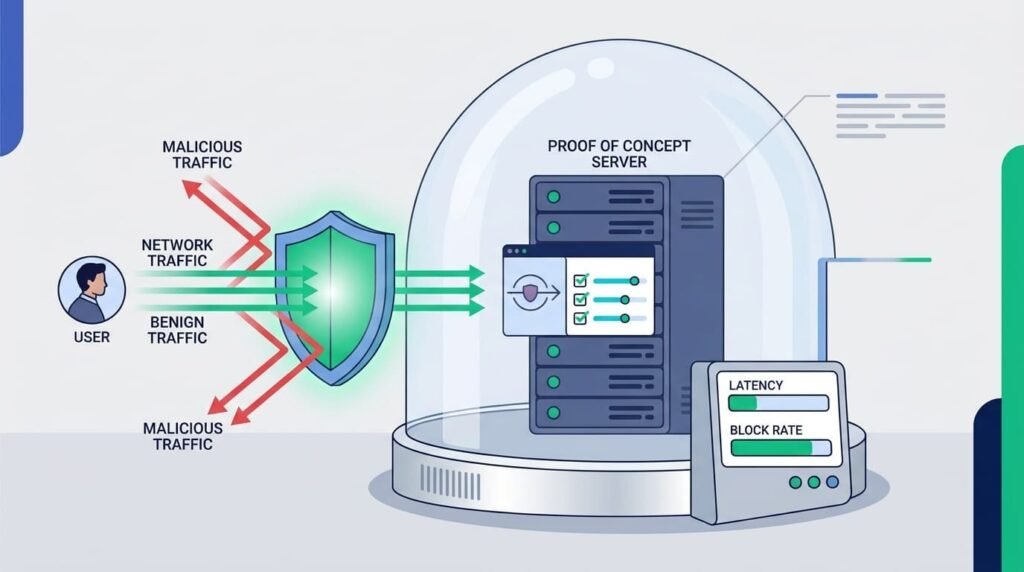
Test before you trust. A proof of concept (PoC) should run two to four weeks, using your real traffic, your real apps, and the same attacks for every vendor. That’s how you find out if the sales claims hold up.
Don’t leave the testing to the security team alone. Pull in developers, infrastructure admins, and someone from procurement. Each one catches something different. Developers see the broken login form. Admins see the painful setup. Buyers see the surprise bill.
Which steps should your WAF pilot include?
Use the same process for every vendor: start by choosing applications and traffic patterns that closely resemble your real environment, then turn the WAF on in monitoring mode. Next, run controlled attack tests and count both the attacks that were caught and the legitimate requests that were wrongly blocked.
After that, test speed and capacity under a normal workload, and assess how difficult it is to tune rules and integrate the WAF with your other tools. Finally, compare all vendors using the same scenarios so the results are consistent and fair.
Which measurements should determine the winner?
Grade every vendor with the exact same rubric so you can see who actually comes out on top. Inconsistent testing criteria distort product comparisons, so teams often end up buying the wrong tool. A firewall might block every SQL injection attempt, but it might drop valid customer form submissions. High detection rates mean very little when real users cannot access core services.
Look past vendor marketing summaries. Ask suppliers how many production rules actually run in active blocking mode. Many teams leave most signatures in passive monitoring mode. They do this because rule noise triggers constant internal support complaints.
Deploy enforcement rules through staged rollouts:
- Review existing exceptions: Identify all live application requests that rely on legacy whitelist rules.
- Prioritize a small group: Pick several stable signatures before activating the rest of the library.
- Enable blocking selectively: Track network drops after every minor change to maintain system stability.
- Watch application traffic: Check backend logs for unexpected session drops and HTTP error spikes.
- Keep a rollback plan: Document clear fallback steps so operators can revert bad filters immediately.
A single misconfigured rule can lock paying customers out of an application. Thorough staging tests keep production networks stable and prevent costly outages.
What Questions Should You Ask WAF Vendors Before Signing?
Before you sign, ask the questions that make vendors squirm a little. You want to know the limits, the gaps, and the risks hiding in the contract. Keep a written checklist so nothing slips by.
Bring these to your vendor calls:
- How many managed rules can run in blocking mode at once?
- How often do the managed rules change?
- How do you find and fix false positives?
- Can we test a policy before we turn it on?
- What happens if the WAF goes down?
- Can an attacker go around the WAF and reach our origin server?
- How does the price change when we add rules or traffic?
- What response times does your support SLA promise?
- Can we export logs and automate policy changes?
- Which customers run setups like ours in production?
Get the answers on failover, API coverage, TLS inspection, and configuration recovery in writing. People forget what was said on a call.
The best question, in our view, goes to the reference customers. Ask how many apps they protect and what share of the managed rules run in blocking mode. Their answer tells you if the product only shines in a demo or if real teams use it every day.
Why Should You Treat a WAF as One Layer of Application Security?
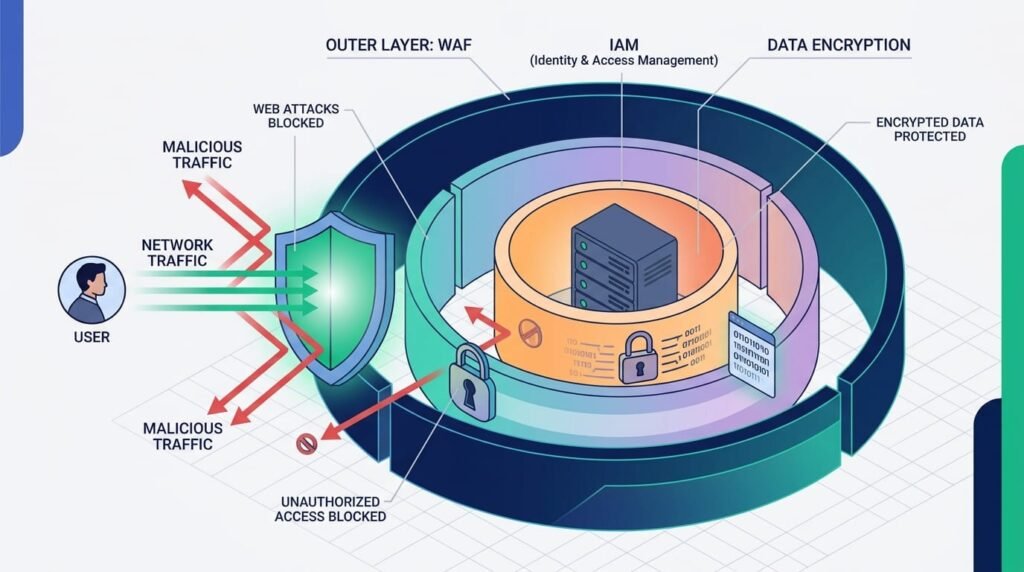
No WAF can fix bad code or an open network. It’s one layer, and it works best next to others. That’s the kind of work we do. Our threat models and risk analysis tools help teams tighten network security and get ready for new threats. Network Threat Detection is one piece of that, helping security teams spot strange activity on the network, including threats that never show up in one web request. For us, it works with a WAF, not instead of one.
To get the most from your WAF, pair it with secure coding and code reviews, dynamic application security testing, and rate limiting inside the app. Host firewalls and network limits add another layer, as does IDS/IPS monitoring where it makes sense. You should also lock down access to your origin servers and maintain incident response and constant monitoring.
A WAF reads application traffic, while network security groups mostly decide who can connect, using things like IP addresses, ports, and protocols. They do different jobs, so you need both. No single tool stops every kind of attack.
Control Versus Simplicity: Which WAF Approach Should You Choose?
It comes down to three things: how much you want to customize, how much you want to manage from one place, and how much skill your team has. Both a highly configurable platform and a managed cloud service can protect you well if they fit your needs.
Start by asking who will manage the policies, who will handle incidents, and how much control you really want over the infrastructure.
Here is how the highly configurable approach compares with the managed cloud approach across five evaluation dimensions:
- Customization
- Highly configurable approach: more control over policies
- Managed cloud approach: depends on the provider
- Administration
- Highly configurable approach: needs specialist skills
- Managed cloud approach: often simpler
- Infrastructure
- Highly configurable approach: more direct control
- Managed cloud approach: run by the provider
- Scalability
- Highly configurable approach: depends on your design
- Managed cloud approach: often grows on demand
- Maintenance
- Highly configurable approach: more work for your team
- Managed cloud approach: more handled for you
When should you prioritize each approach?
Go with a highly configurable setup if you need custom policies, want to own your infrastructure, or depend on special security controls.
A managed WAF, also called WAF as a service, suits teams that want one place to manage everything, extra room when traffic spikes, and less hardware to babysit. Smaller teams often end up here.
Your cloud provider, your staff, and the way your apps are built matter too. And neither choice is safer on its own. Judge each one on how well it protects you, how it handles rules, how much you can see, and what it does when something breaks.
FAQ
What should I look for when selecting a web application firewall vendor?
Start by identifying your WAF security requirements, including attack detection, API security protection, and OWASP Top 10 protection. Evaluate each vendor’s detection accuracy, false positive rate, and rule update frequency. You should also review deployment options, integration capabilities, technical support quality, and total cost of ownership before making a decision.
How do I compare cloud-based, on-premises, and hybrid WAF solutions?
Compare each WAF deployment option based on your infrastructure, security needs, and available IT resources. Cloud WAF evaluation should focus on scalability, maintenance, and service availability. On-premises WAF evaluation should consider infrastructure control and management requirements. Hybrid WAF deployment may suit organizations that need to protect applications across cloud and on-premises environments.
How can I test whether a WAF provides reliable threat protection?
Conduct proof of concept testing with realistic attack scenarios to measure how accurately the WAF detects and blocks threats. Test SQL injection prevention, cross-site scripting protection, zero-day attack protection, and bot mitigation. Measure false positive and false negative rates to determine whether the WAF blocks malicious requests without disrupting legitimate application traffic.
What performance factors should I check before choosing a WAF?
Evaluate traffic throughput, latency impact, scalability, and concurrent connection capacity under different traffic conditions. Use performance benchmarking and load testing to determine whether the WAF can handle normal workloads and traffic spikes. Also, check its high availability architecture and failover support to ensure that application protection continues during infrastructure failures.
What should a WAF procurement checklist include?
A WAF procurement checklist should cover security capabilities, deployment requirements, integration needs, compliance requirements, technical support, and pricing. Review the service level agreement, support response times, implementation costs, and subscription pricing. You should also check customer references, vendor security certifications, and WAF RFP requirements to compare vendors against consistent selection criteria.
How Do You Make the Final WAF Vendor Decision?
Choosing a WAF vendor takes more than comparing feature lists. You need proof that its protection works under real traffic without creating unnecessary work for your security team. Marketing claims aren’t enough.
Network Threat Detection can complement your WAF by adding broader network threat visibility. Before making your final decision, test the vendor’s security performance and confirm that the solution fits your operational needs and budget. Explore Network Threat Detection solutions and speak with the team about strengthening your security approach.
References
- “Introduction.” OWASP Top 10:2025, Accessed November 9, 2026.
- “CSF 2.0 Organizational Profiles.” National Institute of Standards and Technology (NIST), September 16, 2025. Accessed November 9, 2026.