

WHOIS information domain reputation lookup helps security teams evaluate domain risk by combining registration details with observed behavior. WHOIS records reveal when a domain was created, who manages it, and how its infrastructure is configured, while reputation data shows whether the domain has been linked to malicious or suspicious activity.
Looking at either source alone often provides an incomplete picture. In our experience, stronger assessments come from analyzing both together to identify patterns that might otherwise be missed. At Network Threat Detection, we use this combined approach to support threat analysis and risk investigations. Keep reading to learn how WHOIS and reputation data improve domain risk analysis.
Quick Reads: WHOIS and Domain Reputation Essentials
WHOIS records explain who owns a domain and how it is managed, while domain reputation data reveals how that domain behaves online. Together, these signals help security teams identify risks earlier, validate trustworthiness, and make more informed decisions during investigations.
- WHOIS lookup reveals domain ownership info, registrar information, domain age verification, and registration history.
- Domain reputation check evaluates trust signals, abuse history, blacklist status, malware associations, and email reputation.
- Combining WHOIS record analysis with reputation intelligence creates a more reliable domain risk assessment process.
What Is WHOIS Information and Why Does It Matter?

WHOIS records are a starting point. They show domain registration details, who owns it, which company registered it, and key dates like when it was created. The Internet Corporation for Assigned Names and Numbers (ICANN) oversees this system. Since 2018, privacy rules have hidden a lot of the owner’s personal contact info from public view.
Security teams use this data to build a basic profile of a domain. We look for clues about who might be behind it and whether its history looks normal. The most useful WHOIS details include the creation and expiration dates, the listed name servers, and the domain’s current status.
This information often provides the first hints during a phishing investigation or when checking for domain spoofing. Before you can judge a domain’s behavior, you need to know who registered it and when.
Core WHOIS Data Points Security Teams Review
We typically focus on a few specific things. Lifecycle timestamps are crucial, when a domain was created, updated, or when it expires. A very new domain, say under 30 days old, often gets extra scrutiny. We also check the registrar details and the authoritative name servers.
These infrastructure clues can reveal connections to other domains. Looking for sudden changes in these records is a common part of our domain age verification and DNS lookup work.
How WHOIS Privacy Changed Domain Investigations
Privacy protections definitely made our job harder. Many records now just show generic privacy service details instead of real names and addresses. So, we’ve had to adapt. We rely more on piecing together clues from the infrastructure itself.
We look at what other domains share the same name servers or IP addresses. We also use historical WHOIS snapshots when we can get them, because past records might show ownership patterns that current, privacy-shielded records hide.
These investigations become more effective when organizations are also adding user identity information to logs. It’s becoming easier to connect domain activity to specific users and systems during incident analysis.
Reverse WHOIS and Historical Record Analysis
This is a powerful technique. Reverse WHOIS lookup helps us find relationships between domains that share common registration attributes, like the same email or phone number.
Historical WHOIS data is gold. It can show a pattern of ownership changes or infrastructure swaps that a current, clean record might conceal. In our work assessing potential abuse networks, this historical view is often what connects the dots between seemingly unrelated domains.
What Is a Domain Reputation Lookup?
Credits: Chanura De Silva
A domain reputation lookup answers a different question: does this domain act safely? While WHOIS tells you who owns it and when it was born, reputation systems judge its behavior across the internet. Think of it like a credit score, but for websites and email senders.
Domains registered in the last 0 to 30 days are often riskier because attackers use new domains for short-lived phishing and malware campaigns. In our network threat detection work, reputation analysis regularly uncovers dangers that basic ownership data misses.
We look at factors like whether the domain is on any blacklists, its IP reputation score, and its history of abuse reports. A domain with perfectly normal registration details can still have a terrible reputation if it’s been caught sending spam or hosting malware.
Reputation Scoring Factors
Most reputation checkers evaluate a mix of signals. Domain age and infrastructure stability matter, a domain that constantly changes its name servers looks shaky. They check SSL certificate status and DNS consistency.
Traffic patterns and historical reputation trends are big factors. Most importantly, they aggregate data from global threat feeds about active malware, phishing, and botnet activity. Each piece contributes to an overall domain risk score.
Threat Intelligence and Abuse Indicators
This is where the rubber meets the road. Threat intelligence systems pull in data from actual attacks. If a domain appears in a feed of known phishing sites or is flagged by a spam trap, its reputation plummets.
We see this all the time. A domain might look fine on paper, but its presence in these abuse reports is a huge red flag. It means the domain is already actively involved in malicious activity.
Email Authentication Signals
For email, SPF, DKIM, and DMARC records are important. They help verify a sender’s identity, which improves trust. But here’s a key point we’ve learned: proper authentication doesn’t automatically mean a good reputation. A spammer can set up all the correct DNS records.
Reputation systems look beyond just the configuration to see how recipients actually engage with the mail, do they mark it as spam? Do they delete it without opening it? That behavioral data is critical.
How Do WHOIS Records and Domain Reputation Work Together?
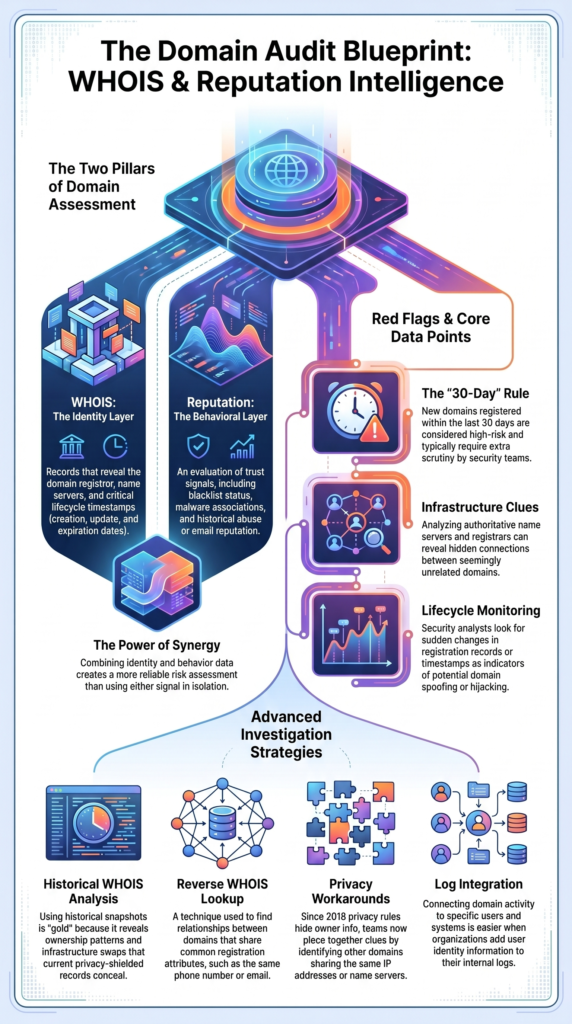
They’re two sides of the same coin. Smart security tools combine them to predict risk and spot suspicious patterns earlier. In our experience, network threat detection is much stronger when WHOIS data and reputation scoring work together, not separately.
Many security teams strengthen these workflows through data enrichment for contextual analysis. It combines domain intelligence with infrastructure, user, and threat data to improve risk assessment accuracy.
Registrar patterns matter too. If several suspicious domains all use the same obscure registrar, that’s a pattern worth noting. This convergence helps build better predictive models for figuring out which domains are safe and which are threats.
As noted by [SANS Internet Storm Center (ISC)]
“The corporate website of a bank is not often registered yesterday. A US bank is also not often registered by a contact in Nigeria. Some of the information can be checked for validity, such as zip codes and telephone numbers.” – SANS Internet Storm Center (ISC)
| WHOIS Signal | Reputation Impact | Risk Interpretation |
| Domain Age | High | New registrations |
| TLD | Medium | Extension-based risk |
| Registrar | Medium | Abuse handling history |
| Name Servers | High | Infrastructure associations |
| Registration Changes | Medium | Potential instability |
Why Can a Fully Authenticated Domain Still Have a Poor Reputation?
This confuses a lot of people. Setting up correct SPF, DKIM, and DMARC records verifies your identity. It proves you are who you say you are. But reputation is about your behavior. It’s possible to have a perfect ID and still have a bad reputation because of what you’ve done.
We see it happen. Common reasons include the domain being very new, with no positive sending history to balance things out. Sometimes a domain’s IP address was previously used for spam, and that bad history lingers.
Even low email volume can be a problem, as some reputation systems have less data to judge you on, which can work against you. From what we’ve observed, it can take a consistent 2 to 4 weeks of good behavior to recover a damaged reputation, even after all the technical settings are fixed.
Reputation vs. Authentication
Let’s be clear: authentication verifies identity. Reputation evaluates behavior. A domain can pass every DNS validation check with flying colors but still carry a poor trust score because it’s associated with past abuse or is sitting on a compromised server.
The Monitoring Blind Spot
Low-volume domains face a visibility challenge. Some monitoring systems don’t report detailed data if traffic is below a certain threshold. This means you might be operating in the dark, not knowing your domain’s true standing with various filters and security services.
Common Misdiagnosed Deliverability Issues
We often find teams troubleshooting DNS settings when the real problem is elsewhere. Overlooked causes include a bad domain history from a previous owner, a blacklisted IP address on a shared hosting server, or simply being a new domain that receivers aren’t familiar with yet. These issues can hurt trust long after your DNS records are perfectly configured.
How Can You Audit a Domain Before Trusting It?
Don’t just do one check. Use a structured process that looks at both ownership and behavior. We recommend reviewing at least five critical areas before deciding to trust a domain.
Step 1: Validate Registration Details
Start with the basics. Confirm the domain’s creation date, expiry date, and registrar. Check if WHOIS privacy is enabled. Look for inconsistencies. Why does a “long-established” brand have a domain that was created six months ago? These details set the stage.
Step 2: Review Infrastructure Signals
Look under the hood. Analyze the DNS records and name servers. Check the SSL certificate, is it valid and from a trusted authority? See where the domain’s IP address is located. Consistent, professional infrastructure usually indicates operational maturity. Shaky or constantly changing infrastructure is a red flag.
Step 3: Examine Historical Activity
What’s the domain’s past? Use historical lookups to see if ownership has changed hands frequently. Check web archives to see what content used to be on the site. A domain that once hosted a pharmacy blog and now claims to be a bank is suspicious. History often predicts future risk.
Step 4: Check Abuse Associations
This is critical. Run the domain through multiple blacklist checks. Search for any public abuse reports. Check its spam score. See if threat intelligence feeds have flagged it for malware or phishing. If the domain is already on watchlists, you have a clear answer.
Step 5: Evaluate Email Security Posture
If the domain will send email, assess its setup. Are SPF, DKIM, and DMARC records properly configured? Check its email domain reputation and sender score. In our network threat work, this final step often uncovers operational risks that earlier ownership analysis missed. According to ICANN, WHOIS data is foundational for resource identification.
Which WHOIS Signals Are Commonly Associated with High-Risk Domains?
We watch for specific patterns that often show up with malicious domains. The first 5 days after registration are a high-alert period. Domains that are very new, have suspicious registrar patterns, use inconsistent infrastructure, or change hands rapidly often indicate elevated risk.
Certain signals get our full attention. A domain might look fine but share name servers with domains that were recently taken down for phishing. That’s a strong connection.
Rapid changes to WHOIS records or constant DNS tweaks can suggest someone is actively trying to evade detection. In our threat detection work, these patterns serve as early warnings, often long before formal abuse reports are filed.
Insights from [SANS Internet Storm Center (ISC)] indicate
“The domain has been registered the 17th of March! Have a look at the email address (mail2tor.com). The reseller field contains Cyrillic characters.” – SANS Internet Storm Center (ISC)
| Signal | Risk Level | Reason |
| Very New Domain | High | Limited trust history |
| Frequent Changes | High | Potential abuse activity |
| Suspicious TLD Usage | Medium-High | Higher abuse prevalence |
| Reused Infrastructure | High | Campaign linkage risk |
How Do Security Teams Use WHOIS and Reputation Data for Threat Detection?

They combine them to block bad domains, prioritize investigations, and strengthen their overall security. Modern security operations use automated tools to correlate domain intelligence with behavioral analytics.
Teams often combine domain intelligence findings with vulnerability scanner data correlation. It identifies whether suspicious domains are interacting with exposed assets or known weaknesses inside the environment.
Email security teams monitor sender reputation to protect their deliverability. Organizations often treat domains with risk scores above 75 as severe, requiring immediate action.
Security Operations and Threat Hunting
SOC analysts correlate domain threat intelligence with WHOIS lookup results. They look for shared infrastructure or registrar patterns that link seemingly separate domains into a larger campaign. This helps them find threats that might slip past individual signature-based defenses.
Third-Party Risk Assessment
Before integrating a new vendor’s software or service, companies audit the vendor’s domains. They perform website security reviews, checking both the registration stability and the current reputation to gauge the vendor’s overall security hygiene.
Email Security Monitoring
Email teams don’t just set up authentication and forget it. They actively monitor sender reputation scores and watch for their domains or IPs appearing in blocklists. This proactive monitoring helps them catch issues before they cause major delivery problems.
Incident Response Investigations
During an active breach or attack, speed is everything. Investigators use WHOIS lookup tools and domain reputation APIs to rapidly assess potentially malicious domains identified in logs or alerts.
This quick intelligence helps them understand the threat and respond more effectively. Agencies like CISA emphasize this kind of proactive monitoring and threat intelligence use for reducing cyber risk.
FAQ
How can I verify a domain’s history before doing business with it?
Before trusting a domain, review its domain registration details, domain age verification, and domain registration history. A WHOIS lookup can reveal registrar information, domain ownership info, and the domain expiry date.
You should also perform a DNS record lookup and website security audit to identify unusual changes. These checks help you understand a domain’s background and support a more accurate domain risk assessment.
What should I do if a domain appears on a spam domain list?
If a domain appears on a spam domain list, investigate the reason before trusting it. Run a domain blacklist check, IP blacklist lookup, and malicious domain check to gather more information.
Review any available domain abuse reports, sender reputation scores, and email domain reputation data. A thorough domain reputation check helps determine whether the issue is historical, temporary, or linked to ongoing malicious activity.
Can a domain have a good website trust score but still be risky?
Yes, a domain can have a good website trust score and still present security risks. A domain safety check should include WHOIS record analysis, domain registration history, and domain threat intelligence.
Some domains appear trustworthy but may have suspicious ownership patterns, infrastructure changes, or recent domain flagging events. Reviewing multiple domain reputation metrics provides a more complete picture of potential risk.
How often should organizations perform domain reputation monitoring?
Organizations should perform domain reputation monitoring on a regular basis, especially for domains that support critical business operations. Continuous monitoring helps identify changes in IP address reputation, website credibility scores, and domain security scores.
Many security teams use a domain reputation monitoring tool to track new threats. Regular monitoring helps detect phishing activity, suspicious domains, and emerging security issues before they become larger problems.
What information can a WHOIS lookup tool reveal about a domain?
A WHOIS lookup tool can provide domain registration details, registrar information, domain expiry dates, and registrant contact information when it is publicly available. It can also support reverse WHOIS lookup, WHOIS database searches, and WHOIS data analysis.
When combined with a domain reputation checker tool, WHOIS information lookup helps organizations investigate ownership patterns, identify potential risks, and strengthen their cyber security domain check process.
Turn Domain Intelligence Into Actionable Risk Insights
Looking at WHOIS records or reputation scores alone can leave gaps in your analysis. A more reliable approach combines ownership details, registration history, infrastructure signals, and behavioral indicators to create a clearer picture of domain risk. This helps security teams identify suspicious activity sooner and make more informed decisions.
For teams that want deeper visibility into domain-related risks, strengthen your threat investigations with Network Threat Detection. Its advanced threat modeling and risk analysis capabilities help uncover hidden connections, prioritize security concerns, and support faster, more confident response efforts.
References
- https://isc.sans.edu/diary/2469
- https://isc.sans.edu/diary/Logical+Physical+Security+Correlation/22243
