
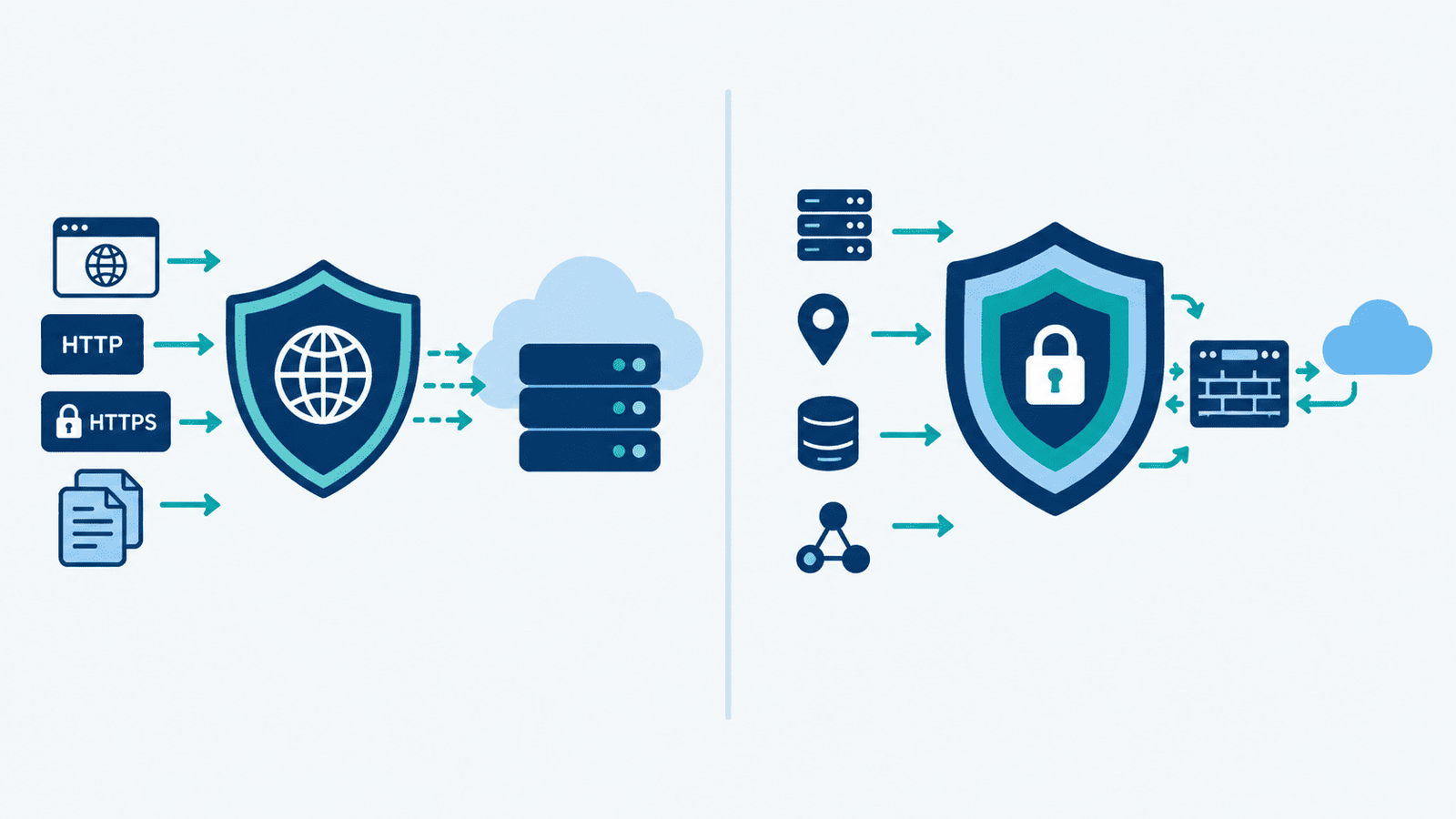
A Web Application Firewall (WAF) protects web apps and APIs from HTTP-based attacks, while a Next-Generation Firewall (NGFW) monitors network traffic and blocks threats across multiple layers. They serve different purposes, so using one doesn’t make the other unnecessary. But which should come first? Network Threat Detection helps identify suspicious traffic and possible attack paths before you decide where stronger controls are needed.
Check how each firewall handles threats, fits into your network, and affects security operations. The right choice depends on your applications, infrastructure, and existing defenses. Keep reading to compare WAF and NGFW capabilities and choose the right setup.
Quick Guide: Choosing Between WAF and NGFW
- WAF: Protects web applications from SQL injection, XSS, and API attacks.
- NGFW: Secures network traffic, access, and supported malware threats.
- Both: Provide layered protection. Evaluate cloud performance, costs, and compliance needs.
What Is the Difference Between a WAF and an NGFW?
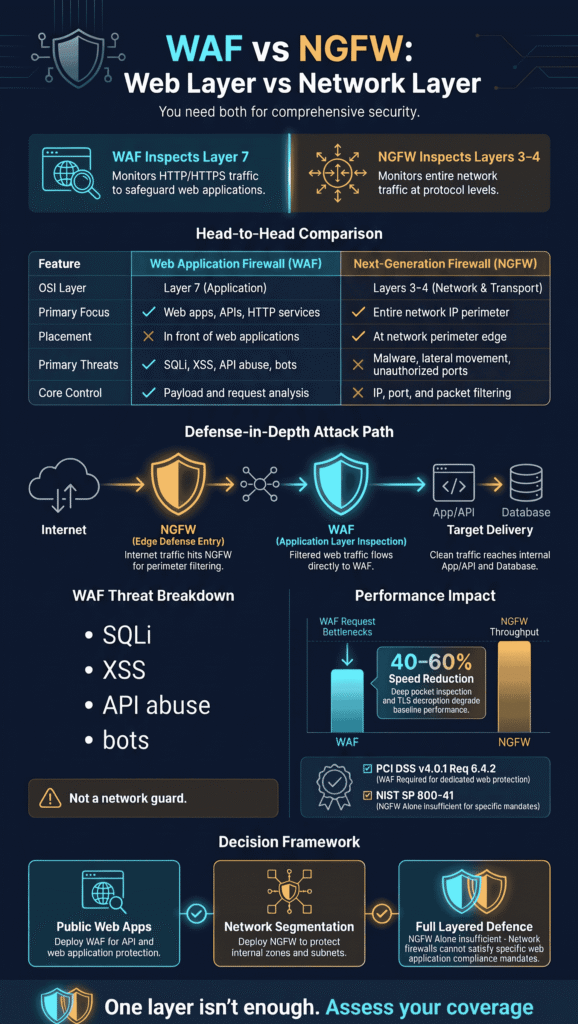
A WAF watches web traffic. An NGFW watches the whole network. That’s the short version. What really sets them apart is the kind of traffic each one can read and what it can do about it. Effective WAF protection focuses on identifying malicious web requests while complementing broader network security controls.
Key differences between a WAF and an NGFW include:
WAFs and NGFWs differ in several key areas, from their primary purpose to the threats they address:
- Primary purpose: A Web Application Firewall (WAF) protects web applications and APIs, while a Next-Generation Firewall (NGFW) protects networks and the systems connected to them.
- Traffic focus: A WAF inspects HTTP/HTTPS requests and responses. An NGFW monitors network traffic across multiple protocols.
- Inspection: A WAF examines web request patterns and payloads. An NGFW analyzes network flows, identifies applications, and detects known threats.
- OSI layers: A WAF primarily operates at Layer 7 (the application layer). An NGFW mainly operates at Layers 3 and 4, with some Layer 7 application awareness.
- Typical placement: A WAF usually sits in front of web applications. An NGFW typically operates at network boundaries and between security zones.
- Main threats: A WAF helps defend against SQL injection, cross-site scripting (XSS), path traversal, and API abuse. An NGFW helps address unauthorized access, malware, exploits, and lateral movement.
- Core controls: A WAF uses request filtering, virtual patching, and bot protection. An NGFW provides stateful firewalling, intrusion prevention, and application control.
- Typical scope: A WAF focuses on specific web applications or APIs. An NGFW protects broader network environments, hosts, and security zones.
Research from NIST CSRC shows
“These systems employ filtering mechanisms to intercept and reject requests that may be suitable to exploit XSS flaws and related vulnerabilities such as SQL injections. However, they generally do not offer complete protection and can often be bypassed using specifically crafted exploits.” – NIST CSRC
The National Institute of Standards and Technology (NIST) explains that firewalls control traffic between networks or hosts with different levels of trust. A WAF examines web requests more closely, but it does not replace broader network security controls. See NIST’s firewall guidance for more information.
When we first talk with a new team, the conversation often starts with which product to buy. Instead, we ask what threats they need to address. A web application receiving malicious JSON requests needs different protection from a server receiving unauthorized connection attempts. Once you identify the threat, choosing the right tool becomes easier.
When building a threat model, we divide the work into three areas:
- Application security: Inspect web requests and block known application-layer attacks.
- Network security: Restrict connections, isolate systems, and monitor known threats.
- Detection and response: Correlate suspicious events across applications, devices, and the network.
This approach helps teams avoid spending money on overlapping tools. It also reduces security gaps that can occur when each tool’s scope is unclear and teams assume another control will handle the threat.
How Does a WAF Protect Web Applications and APIs?
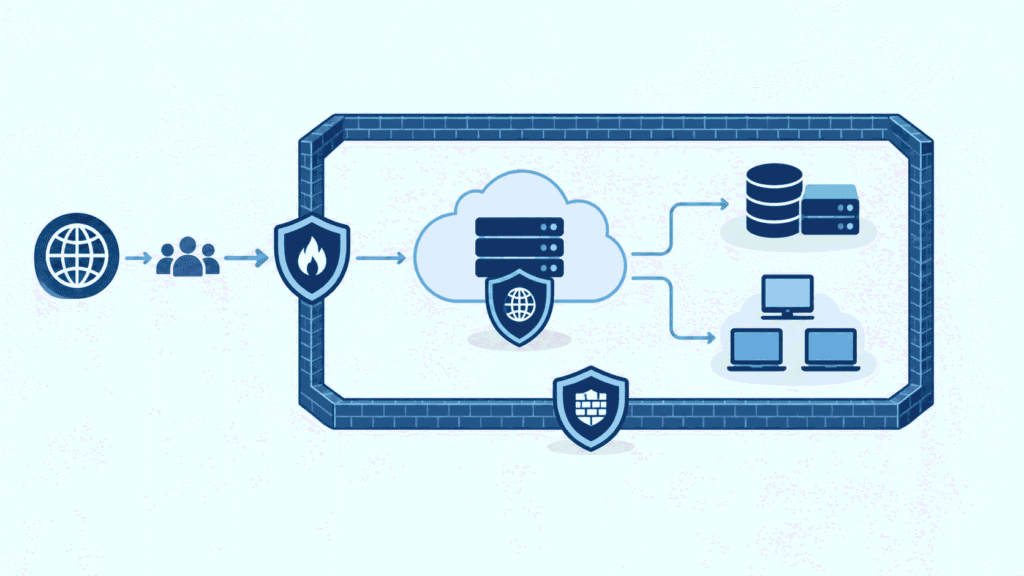
Every web request passes through the WAF first. It checks the request against rules made for web apps and blocks the bad ones before the app ever sees them. Its big strength is how closely it can inspect each request. Understanding how a WAF protects web applications helps teams assess whether their rules address the attacks their applications face.
Which attacks can a WAF detect?
With the right setup, a WAF can help catch many common web attacks:
- SQL injection: An attacker hides database commands inside a request.
- Cross-site scripting (XSS): An attacker plants a script in an input box or a page response.
- Path traversal: A request tries to open files outside the folders it’s allowed to use.
- API abuse: Strange payloads, broken requests, or one endpoint getting hit again and again.
- Malicious bots: Automated tools that scan, scrape, or flood a site.
The OWASP Top 10:2025 lists the 10 biggest kinds of web app risk, such as broken access control, security misconfiguration, and injection. Teams can use it to plan their testing. A WAF can’t fix every problem on the list, though. Review the OWASP Top 10.
What does WAF enforcement look like?
Say a login page keeps getting requests full of odd SQL. The WAF can block the ones that match its rules and save each one in a log, so someone can check it out later.
Tuning is where we’ve seen teams trip up the most. If nobody teaches the WAF what normal traffic looks like, it starts blocking real customers. Then someone panics and adds a big exception to make the complaints stop. That big exception is often the door an attacker walks through. So when we look at a WAF, we first ask whether it knows what a normal request to that app looks like.
A WAF can read URLs, headers, cookies, parameters, and many JSON or XML request bodies. It still can’t replace logins, permission checks, safe coding, or checks on business rules.
What Does an NGFW Protect That a WAF Does Not?
An NGFW decides who can reach what on a network. It keeps systems apart and looks for threats far beyond a single web request. Think of it as the guard at the network edge and at the doors between systems.
Which NGFW capabilities matter most?
An NGFW combines several security capabilities to monitor network traffic, detect threats, and control access. The most important capabilities include:
- Stateful packet inspection: Keeps track of open connections so it can apply traffic rules.
- Intrusion prevention system (IPS): Spots and blocks known attack patterns.
- Application protocol awareness: Tells which app is sending traffic and applies the right access rules.
- URL filtering: Limits which websites people can visit.
- Malware traffic inspection: Finds known bad files or harmful network activity.
- TLS inspection: Looks inside some encrypted traffic, when it’s set up and the law allows it.
- Network segmentation: Limits how different zones and sensitive systems can talk to each other.
Here’s a case we see a lot. An attacker takes over an employee’s computer, then tries to connect to a database full of private data. An NGFW with good segmentation rules can shut that connection down. The attacker gets stuck, and the damage stays small. But this only works if the network has clear zones, so we often help teams map those out first.
People also mix up detection and prevention, and we run into that all the time. Detection tells you something looks wrong. Prevention can actually block the traffic, but only if that feature is on and set up the right way.
An NGFW may also use threat intelligence feeds, spot command-and-control traffic, and set access rules based on who the user is. How much of this you get depends on the platform, the license, the settings, and how much traffic the device can handle.
Can an NGFW Replace a WAF?
Some NGFWs include web filtering or WAF-style features. However, that doesn’t mean they inspect web traffic as deeply as a dedicated WAF does.
The main deployment options have different advantages and limitations:
- NGFW only: This approach reduces the number of systems to manage and keeps network controls in one place. However, an NGFW may not inspect HTTP requests deeply enough or provide the application-specific tuning that web applications require.
- Dedicated WAF: A dedicated WAF is designed to inspect web requests, block application-layer attacks, and protect APIs. However, it requires separate configuration, maintenance, and ongoing management.
- NGFW plus WAF: Combining both provides network-level controls and dedicated web application protection. However, this approach costs more, requires additional configuration, and can generate more alerts for security teams to review.
When might an NGFW’s built-in features be enough?
For a small, low-risk app, the bundled features can work. We’d want proof first. Test whether the firewall looks at the request fields you care about, whether it has the attack rules you need, and whether your team can actually run it day to day.
Don’t let the marketing terms fool you, though. A firewall that can tell a connection is HTTP isn’t the same as one that understands your app. In our experience, “application awareness” often means the firewall knows what kind of traffic it sees, not whether a form field has been tampered with. It also won’t catch every case of business logic abuse, like someone gaming a discount code or skipping a checkout step. Reviewing the common web attacks a WAF prevents can help teams identify which application-layer threats need dedicated protection.
When should you keep a dedicated WAF?
Keep one if your public-facing apps need close request checking, API protection, virtual patching (blocking an attack before the code is fixed), or rules tuned to your app.
Our advice is simple: skip the feature checklists and run real attacks. When we help teams build threat models, this is the step that teaches them the most. Try SQL injection, odd-looking headers, and broken API payloads. Then send normal traffic too, so you can see what gets blocked by mistake. False positives annoy users fast.
Where Should You Deploy a WAF and an NGFW?
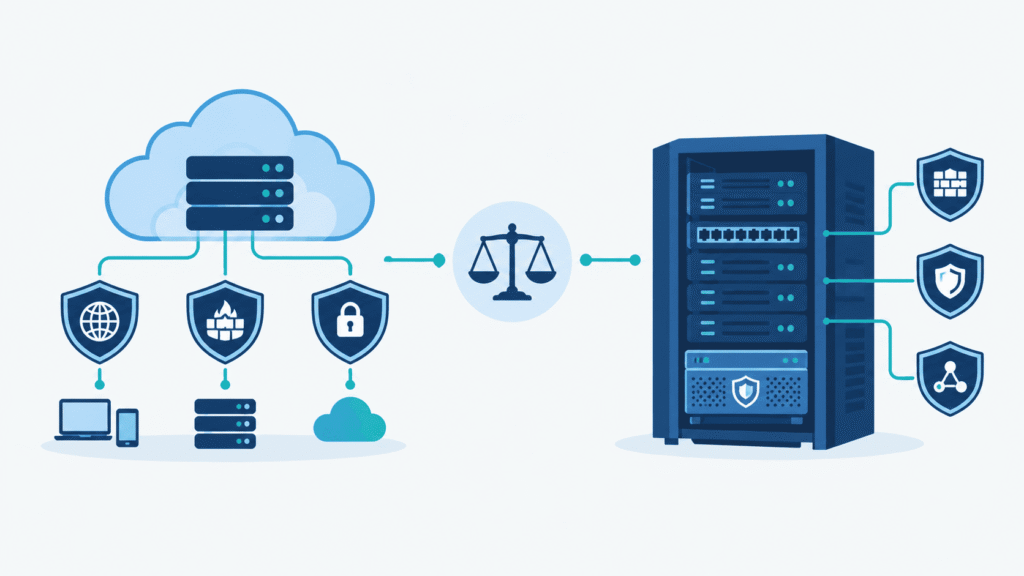
Put the NGFW at your network edges and between network segments. Put the WAF where web traffic enters your apps. The exact order depends on how your setup is built.
Here is a common traffic path:
- Internet and outside users
- NGFW
- Network access rules and traffic inspection
- WAF
- HTTP/HTTPS request and app-level inspection
- Web app or API
- Backend services and databases
- Limited access and internal segmentation
Think of this as an example, not a required layout. A cloud load balancer, CDN, reverse proxy, or managed WAF can change the order, and we’ve seen plenty of working setups that look different from this one.
A few rules help when you pick enforcement points:
- Network edge: Limit open ports, destinations, and connection types.
- Web ingress: Check HTTP/HTTPS requests and apply app-specific rules.
- Internal segments: Control who can reach each app tier and sensitive system.
- Monitoring layer: Pull events from network and app controls together so you can spot patterns.
A reverse proxy WAF sits in front of your app and checks the requests it passes along. An inline NGFW enforces network rules along the traffic path. Both only work well if traffic is routed the right way. Someone also has to own each set of rules, because we’ve watched gaps appear when two teams each assumed the other one was handling it.
How Do WAF and NGFW Performance Differ?
Credits: Go Cloud Architects
Performance depends on workload, inspection depth, and configuration rather than the firewall type alone.
- Main job: A WAF checks web requests and responses, while an NGFW inspects network traffic and enforces access rules.
- Biggest bottleneck: A WAF can struggle with high request volumes, complex rules, and large payloads. An NGFW can face limits in throughput, concurrent sessions, and enabled security features.
- What slows it down: A WAF may slow down due to rule checks, proxying, and request inspection. An NGFW may experience delays from intrusion prevention, TLS decryption, and malware scanning.
- What to scale first: For a WAF, focus on requests per second. For an NGFW, consider bandwidth, concurrent sessions, and inspection capacity.
- What to test: Test a WAF with normal and malicious web requests. Test an NGFW with realistic network traffic and its security features enabled.
What should teams benchmark?
Teams should benchmark performance under realistic traffic conditions to understand how security controls affect network speed and reliability. Focus on these key areas:
- Measure delay and throughput with traffic that looks like your real traffic.
- Test your busiest request rates and the most connections you expect at once.
- Turn on every security feature you plan to use before you run the test.
- See what happens during a failover and during a sudden traffic spike.
In our lab stress-testing environments, vendor datasheet throughput figures regularly collapse by 40% to 60% the moment Full SSL/TLS Decryption, Deep Packet Inspection (DPI), and custom OWASP Core Rule Sets (CRS v3.3) are enabled simultaneously.
When benchmarking for production readiness, never evaluate appliances at idle baseline; measure latency spikes under 80% peak connections per second (CPS) and inspect memory allocation during sudden traffic bursts to avoid silent packet drops. That lower number is the one you’ll actually live with.
Tuning matters just as much. Picture a WAF blocking a real customer at checkout. The sale is gone, and nobody notices until someone complains. An NGFW with loose rules has the opposite problem, since it lets traffic reach places it shouldn’t and weakens segmentation.
But we don’t think the answer is to lock everything down. Our threat models and risk analysis tools help teams see which rules are worth the slowdown, and which ones just add noise.
How Should You Choose Between Cloud and On Premises Protection?
Start with where your apps live and how traffic moves. Then consider what your team can manage and what it costs to scale.
- Main job: A cloud WAF protects web applications and APIs, while an on-premises or virtual NGFW controls network access and segmentation.
- Scaling: A cloud WAF often scales with cloud infrastructure. An NGFW is limited by the capacity of its physical appliance or virtual machine.
- Setup: A cloud WAF runs as a managed service or cloud-hosted software. An NGFW can run on a physical appliance, a virtual machine, or through a managed service.
- What drives cost: Cloud WAF costs depend on request volume, rules, traffic, and service tier. NGFW costs depend on licenses, throughput, hardware, and enabled security features.
- Best fit: A cloud WAF suits public websites and APIs. An NGFW suits network edges and traffic paths that your team controls.
What should teams consider in cloud environments?
Amazon Web Services (AWS) is a good example. A team there might run a WAF, DDoS protection, and network firewall controls all at once. Each one watches a different traffic path. So confirm where each control actually sits.
Cloud WAF pricing can depend on web access control lists, the number of rules, and how many requests come in. AWS also charges extra for some advanced features and related services.
Price tags can fool you. We add up the whole cost instead, including logging, traffic processing, support, incident response, scaling, and the hours spent keeping policies current. From what we’ve seen, those extras often cost more than the subscription itself. Sometimes a lot more.
On premises setups are a different story. Hardware appliances give you steady, predictable capacity, while software versions are easier to move and change. Which one is better? It depends on the gear you already own, your team’s skills, and how deep the inspection needs to go.
When Does Compliance Require a WAF?
It depends on which standard applies to you, your scope, how you set things up, and the proof you can show. A firewall’s label doesn’t decide it.
What should security teams verify?
Security teams should not assume that deploying a security tool automatically satisfies a compliance requirement. They need to check whether the solution meets the standard’s specific requirements and can demonstrate that it works in practice. The following steps can help verify compliance:
- Find the exact web app security control the standard asks for.
- Check whether the standard names a web application firewall or accepts an equivalent solution.
- Write down the control’s scope, settings, monitoring, and upkeep.
- Test the deployed tool against real web attack scenarios.
- Keep records of your tests, how alerts were handled, and how problems were fixed.
Does an NGFW automatically satisfy a WAF requirement?
No. Calling a product an NGFW doesn’t prove its web protection features meet a specific compliance rule.
During our recent PCI DSS v4.0.1 compliance audits, Requirement 6.4.2 was a frequent point of friction. Qualified Security Assessors (QSAs) strictly require an active, layer-7 automated technical solution, such as a managed WAF deployed in blocking mode, to intercept public-facing web traffic.
Simply running an NGFW with basic IPS rules fails QSA validation because it lacks continuous HTTP payload parsing and automated virtual patching logs required under NIST SP 800-41 Rev. 1 guidelines.
Auditors care about the control you actually have in place. Not the name on the box. If you handle payment data, check the current standard, the assessment method, and what counts as an accepted setup with your assessor before you decide.
Is a WAF Enough Without an NGFW?
Not really. A WAF can stop a lot of attacks on a web app, but it can’t decide which computers on your network are allowed to talk to each other.
When could a WAF-only design leave gaps?
If a WAF is all you have, other parts of your network may be wide open. We see the same problems again and again:
- Internal systems can still be reached through loose network paths.
- A hacked computer can connect to other systems.
- Services that don’t use HTTP may have no protection at all.
- Traffic leaving the network can skip inspection.
- Admin pages may stay open to people who shouldn’t see them.
Here’s a simple case. An app server is safe from SQL injection, but it can connect freely to a private database and a bunch of internal servers. The WAF blocks bad web requests just fine. It does nothing about a connection that never goes through the web at all. When we build a threat model with a customer, this is often the moment things click. Everyone thought the WAF had them covered, and then the model shows an open path sitting right behind it.
What should a layered design include?
Use the WAF to check web requests. Then add network controls to limit access, split the network into zones, and watch traffic. After that, add multifactor authentication (MFA), tight control over admin accounts, secure app design, and central logging where it makes sense.
In a recent analysis by Digital Security Authority
“NGFW vs. WAF: These are not mutually exclusive. An NGFW governs general network traffic policy; a WAF governs HTTP/HTTPS application traffic specifically. PCI DSS v4.0 Requirement 6.4 mandates WAF deployment as a distinct control from perimeter firewall coverage. Environments hosting public-facing web applications require both layers.” – Digital Security Authority
A WAF filters web requests, while network controls restrict communication between systems. Both are necessary when application and internal network threats require separate controls. Neither one takes the place of patching or testing your app.
When Is IPS Not Enough for a Public Web Application?
An intrusion prevention system (IPS) can block attacks it already knows about. However, it may not inspect web requests closely enough to protect a public application.
- Main focus: An IPS focuses on network threats and known attacks. A WAF inspects web (HTTP/HTTPS) requests and how the application handles them.
- Enforcement: An IPS blocks traffic that matches its rules. A WAF applies web-specific rules and checks incoming requests.
- Application context: An IPS’s application awareness depends on the product. A WAF is designed around the web applications and APIs it protects.
- Typical use: An IPS helps stop network intrusions. A WAF helps block injection attacks, tampered requests, and other forms of web abuse.
Here’s an example. An IPS might detect a known attack pattern, while a WAF can apply rules to a specific page, validate expected inputs, and check whether requests follow normal patterns.
However, the distinction is not always clear. Some IPS products inspect application traffic in depth, and some NGFWs include strong web protection. The actual protection depends on the features enabled and how well they have been tested.
Test your security controls with realistic attack scenarios. Submit malicious inputs, unexpected data types, and unusual request sequences. This helps reveal whether your tools can detect application-level attacks or whether you need dedicated web protection.
How Can You Manage WAF, NGFW, IPS, and SIEM Alerts?
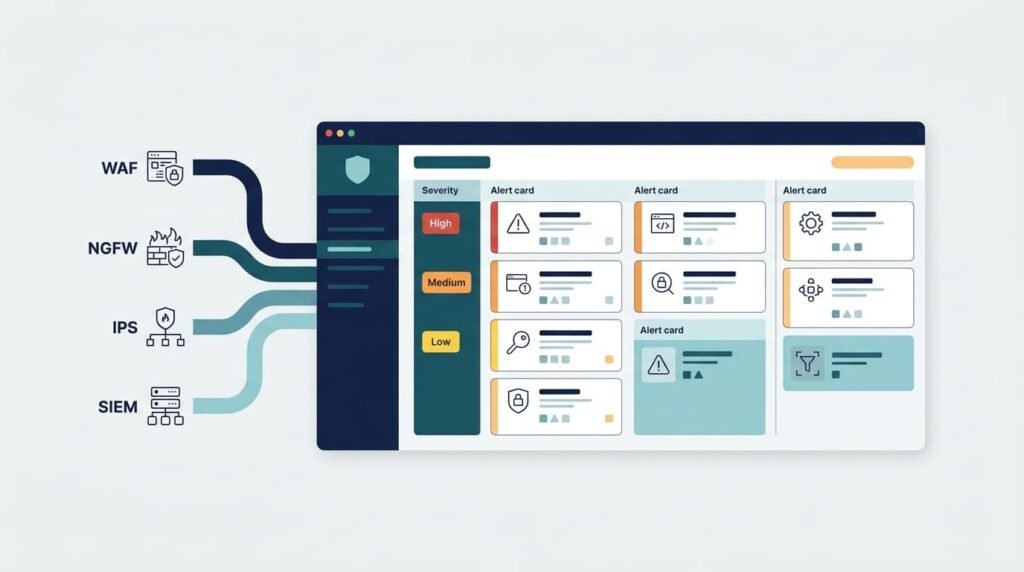
Collecting logs in one place helps teams see how a suspicious event on the network connects to one in the app.
What should the monitoring workflow include?
A consistent monitoring workflow helps security teams collect and review security events across WAF, NGFW, and IPS tools. It also makes it easier to identify suspicious activity, prioritize alerts, and respond to incidents before they affect business operations. The workflow should include these steps:
- Gather the key WAF, NGFW, and IPS events.
- Send those logs to a Security Information and Event Management (SIEM) platform.
- Match up times, source addresses, app pages, and event types.
- Sort alerts by how much they could hurt the business.
- Look into incidents and write down how you fixed them.
- Quiet noisy rules and check false alarms on a regular schedule.
How should teams check that it works?
Teams should test the monitoring process regularly to verify that alerts, event logs, and incident escalation work as expected. Key checks include:
- Run authorized penetration tests.
- Look at both blocked and allowed requests.
- Make sure security events really show up in your monitoring tool.
- Confirm who gets the escalation and who owns each incident.
A SIEM can spot patterns that one tool would miss. Say a server gets hit with lots of bad requests, and then it starts making strange outbound connections. That pair of events is worth a close look in both the app logs and the network logs.
There’s a cost, though. More tools can mean better coverage, but they also mean more upkeep and more alerts to sort through. We’ve seen teams get worn out by alert noise long before they ran out of money. Network Threat Detection can help you notice odd network activity and possible attack paths. Your app logs then show which requests came in just before something went wrong.
How Can You Build a WAF and NGFW Decision Framework?
Choose your controls by matching the type of traffic, where you enforce rules, and how deeply you need to inspect your real threat model.
| Security Requirement | Recommended Control | Reason |
| Protect a public website from SQL injection and XSS | WAF | Inspects web requests for application-layer attacks. |
| Filter and protect API requests | WAF with API security rules | Applies security checks to API traffic. |
| Restrict access between network segments | NGFW or other network controls | Enforces network access and segmentation rules. |
| Detect suspicious network connections | NGFW with appropriate security features and network monitoring | Helps identify and control potentially malicious traffic. |
| Protect public applications and internal systems | WAF plus NGFW | Combines application-layer inspection with network-level controls. |
| Meet a specific web application firewall compliance requirement | Verify the applicable standard and deployed controls | Ensures the solution meets the actual requirement rather than relying on its product label. |
What should teams check before buying?
A good selection process covers six areas:
- Which protocols and apps need coverage
- Speed, request volume, and delay
- Cloud fit and setup limits
- Logging, alerts, and who runs day-to-day operations
- Licensing, growth, and upkeep costs
- Test results against realistic attacks
Before we add anything new, we look at the firewall rules you already have. Unused features, too many exceptions, and rules that nobody owns can leave gaps, even for a team with a big budget.
Make the choice based on things you can measure, not on a promise that one box stops everything. A small public website needs a different setup than a big company with many APIs, internal app layers, and strict compliance rules. Our threat models and risk analysis tools help teams see that difference and get ready for new threats as they show up.
FAQ
How should a business choose between a WAF and an NGFW?
A business should choose a WAF or NGFW based on its security risks and infrastructure. A WAF protects web applications from attacks such as SQL injection and cross-site scripting. An NGFW controls network traffic and helps block malicious connections. Businesses that operate public-facing applications and manage complex networks may need both to cover application and network security risks.
Can a WAF and NGFW protect APIs against different types of attacks?
Yes. A WAF provides API security protection by inspecting API requests and blocking malicious HTTP traffic that matches its security rules. An NGFW controls network access and detects suspicious connections based on its configured policies. Neither replaces secure API design, authentication, or authorization. Businesses should assess API endpoints and network access rules to identify gaps in their existing security controls.
How do WAFs and NGFWs inspect encrypted traffic?
A WAF inspects HTTP and HTTPS requests after the traffic undergoes the necessary TLS processing. An NGFW can inspect encrypted traffic through configured SSL and TLS inspection capabilities. The exact functions depend on the firewall configuration and deployment. Before enabling encrypted traffic inspection, businesses should assess processing overhead, privacy requirements, certificate management, and the effect on application response times.
Why do WAFs and NGFWs sometimes block legitimate traffic?
WAFs and NGFWs can block legitimate traffic when security rules incorrectly identify normal requests or connections as threats. Common causes include overly strict policies, outdated signatures, and unusual but valid application behavior. Security teams can investigate logs, test rule changes, and adjust configurations to reduce false positives. They should verify that each change preserves protection against genuine attacks.
How can businesses measure WAF and NGFW performance?
Businesses can measure WAF and NGFW performance by tracking response latency, traffic throughput, blocked attacks, false positives, and resource usage. They should test both systems under normal traffic conditions and peak workloads to identify performance bottlenecks. Security teams should also review event logs and alerts to confirm that monitoring works correctly and provides enough information to investigate potential threats.
Should You Deploy Both a WAF and an NGFW?
Protecting internet-facing applications is difficult when network controls can’t address every application-level threat. One security layer isn’t always enough. A WAF inspects HTTP/HTTPS requests, while an NGFW controls network traffic and access.
Before investing in more tools, review where your current defenses fall short. Network Threat Detection can help you identify suspicious activity and assess potential attack paths. Use those findings to decide whether you need stronger application inspection or tighter network controls. Explore Network Threat Detection to take the next step toward assessing your security coverage.
References
1. “Combinatorially XSSing Web Application Firewalls.” NIST Computer Security Resource Center, May 28, 2021. Accessed November 3, 2026.
2. “Firewall Types and Reference.” Digital Security Authority. Accessed November 3, 2026.