
Threat modeling tools comparison Microsoft OWASP comes down to one question: which tool will your team actually keep using? Microsoft Threat Modeling Tool favor’s structure and automated reporting, while OWASP Threat Dragon supports developer-led, cross-platform collaboration.
At Network Threat Detection, we’ve seen well-built threat models become outdated simply because they didn’t fit how teams worked. The right choice isn’t about features alone. It’s about adoption, maintenance, and making threat modeling part of everyday development instead of a one-time exercise. Keep reading to see where each tool fits best and where teams often get stuck.
Threat Modeling Tools Comparison: Quick Decision Points
The right choice depends less on feature lists and more on whether your team can realistically maintain the process over time.
- Threat modeling adoption matters more than feature volume.
- Automated discovery accelerates analysis but can create alert fatigue.
- Cross-platform collaboration often determines long-term success
Which Threat Modeling Philosophy Fits Your Team?
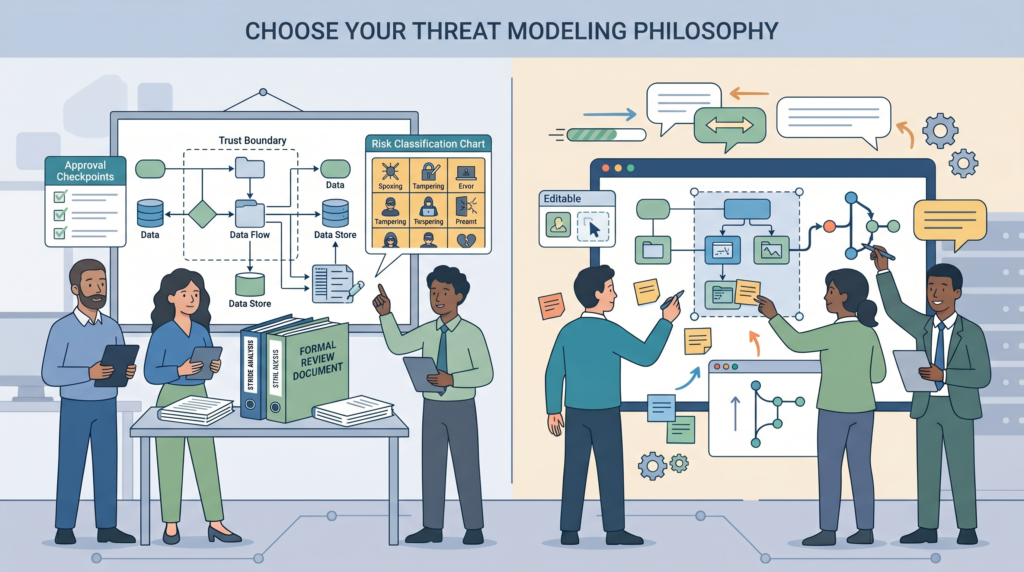
Microsoft’s tool comes from a world of strict processes and defined stages. It treats threat modeling like an engineering deliverable, something you produce, review, and sign off. The idea is that by breaking down a system methodically, you can systematically find and document risks.
OWASP Threat Dragon comes from the open-source community. Its philosophy is about making threat modeling accessible and something a development team can own. It’s less about producing a perfect document and more about starting a security conversation that continues.
This core difference shapes everything. Microsoft’s approach often appeals to security architects or teams in heavily regulated industries. There’s comfort in the structure. Threat Dragon tends to resonate with developers and agile teams who hate overhead and want to keep things in their existing tools, like Git.
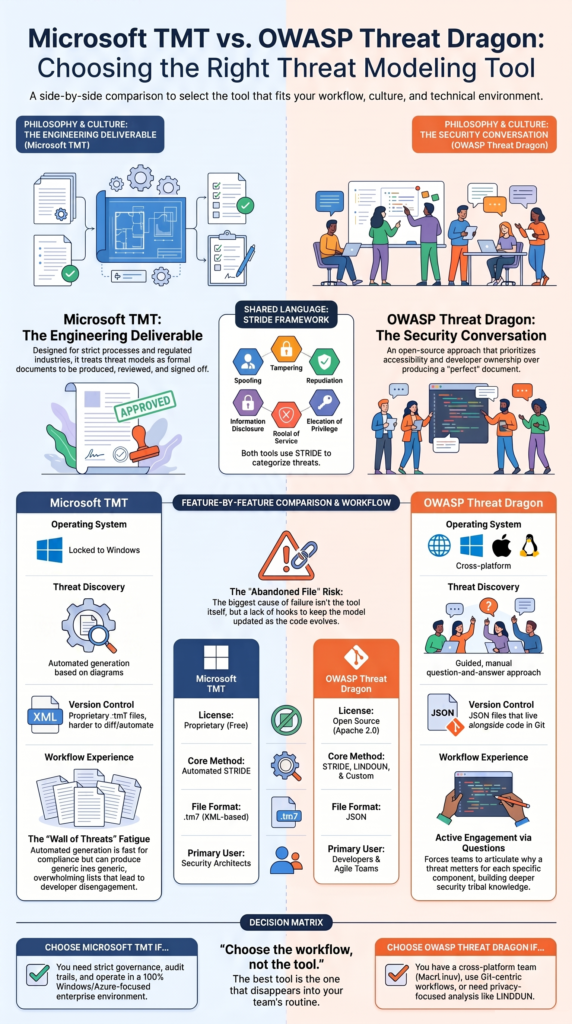
The STRIDE framework, Spoofing, Tampering, Repudiation, Information Disclosure, Denial of Service, Elevation of Privilege, is central to both. But how you apply it changes. One feels like filling out a form. The other feels like a guided discussion.
How Do Microsoft TMT and OWASP Threat Dragon Compare Feature by Feature?
You can’t just look at a features list. You have to see how those features impact daily work. Here’s a breakdown of where they diverge.
| Feature | Microsoft Threat Modeling Tool | OWASP Threat Dragon |
| Where it Runs | Only on Windows. | In a web browser or as a desktop app on Windows, Mac, or Linux. |
| Core Method | Heavily automated around STRIDE. | Supports STRIDE, but also LINDDUN for privacy and custom approaches. |
| How Threats Are Found | Automatically generates a list based on your diagram. | Guides you with questions to think through threats yourself. |
| File Format | Uses its own XML-based format. | Uses JSON files. |
| Fits with Developer Tools | Not really. It’s a separate desktop program. | Yes. JSON files can live right in your Git repository next to your code. |
| License | Free, but it’s Microsoft’s proprietary software. | Open source under the Apache 2.0 license. |
The choice here often comes down to your environment. If your whole company is on Windows and Azure, Microsoft’s tool feels native. If your team uses Macs, works from Linux, or lives in GitHub, Threat Dragon’s cross-platform and Git-friendly nature isn’t just a feature, it’s a requirement for adoption.
How Do Their Threat Modeling Workflows Differ?
Both tools start with drawing a picture of your system, called a Data Flow Diagram (DFD). You map out the Processes, Data Stores, External Entities, Data Flows, and Trust Boundaries. This is where the similarity ends.
With the Microsoft tool, once your diagram is done, you click a button. The software analyzes the diagram and pops out a list of potential threats, categorized by STRIDE.
Your job then is to sift through that list, decide what’s real, and plan mitigations. It’s fast, but it can feel passive. Teams new to the platform often benefit from a practical Microsoft threat modeling tool tutorial to understand how to move from automated findings to meaningful risk analysis.
Threat Dragon takes a different path. Instead of a big automated dump, it walks you through your diagram element by element. It asks, “For this web server, could someone spoof it? Could they tamper with data here?” It forces your team to actively engage with each component. Teams remember why a threat matters because they had to articulate it.
The Microsoft workflow is great for audit trails and coverage. The Threat Dragon workflow is better for building security understanding within the team itself.
Is Automated Threat Generation Helpful or Harmful?
Automation sounds perfect. You draw a diagram, get a list of risks, and move on. In practice, it’s a double-edged sword.
The help is obvious: speed and consistency. You can model a complex system quickly. Every “data store” gets the same set of potential “information disclosure” threats flagged. For compliance, this is gold. You can prove you considered certain risks.
The harm is subtler. That automated list is often huge and generic. It will flag things that don’t apply to your specific context. This causes “alert fatigue.” Developers get a 200-item list, their eyes glaze over, and they disengage. The security team becomes the bottleneck, having to triage every false positive.
Research from the National Institutes of Health
“The utilization of ontologies provides consistent risk and vulnerability assessments across AI-enabled systems… a comprehensive security knowledge base is offered to stakeholders, regardless of their varying security and AI expertise, ensuring uniform threat modelling across diverse AI systems.” – PLOS ONE / NIH
We’ve seen projects where the automated threats become noise, and the important, nuanced risks get lost in the pile. Automation is a powerful assistant, but it’s a terrible boss. It needs a human in the loop to provide context and judgment.
How Does Version Control Affect Threat Modeling Adoption?
Credits: OWASP Foundation
Microsoft’s tool creates .tm7 files. They’re not meant to be edited by hand or diffed in Git. The model lives separate from the code. Inevitably, the code changes, the diagram doesn’t, and the threat model becomes obsolete. It’s a document on a share drive.
Threat Dragon uses JSON files. This is a game-changer. You can save the threat model file right in your application’s code repository. When a developer changes the architecture, they update the diagram in the same commit. Reviewers can see the security impact alongside the code change.
The benefits are huge:
- The threat model is always where the developers are.
- You can see the history of changes.
- It encourages small, incremental updates instead of massive yearly overhauls.
This Git-centric approach aligns closely with using threat modeling secure design principles, where security decisions evolve alongside architecture changes rather than being revisited only during major reviews.
Yes, merging diagram changes in JSON can be tricky, but that’s a problem of engagement, it means people are actually editing it. We’d much rather have that problem than the silence of an abandoned file.
What Friction Do Practitioners Report in Real Projects?
Talking to teams using these tools, the complaints are telling.
For the Microsoft tool, the biggest friction is the Windows lock-in. In a mixed-OS or Mac-based development shop, it’s a non-starter. The second biggest is the “wall of threats” output, which overwhelms teams and kills momentum.
For Threat Dragon, the friction is sometimes the opposite, not enough automation. Teams with low security maturity might struggle to know what questions to ask. They want more guidance. Some also mention that the diagramming interface can be less polished than commercial tools.
But a common pain point transcends both tools: abandonment. Teams do a great threat model at the start of a project and then never touch it again. The tool didn’t fail; the process did. The threat model wasn’t woven into the ongoing development lifecycle. It was a one-time gate, not a living practice.
This is why at Network Threat Detection, we focus less on the initial creation and more on the habits and hooks that keep a threat model relevant.
Can These Tools Scale Within Modern DevSecOps Pipelines?
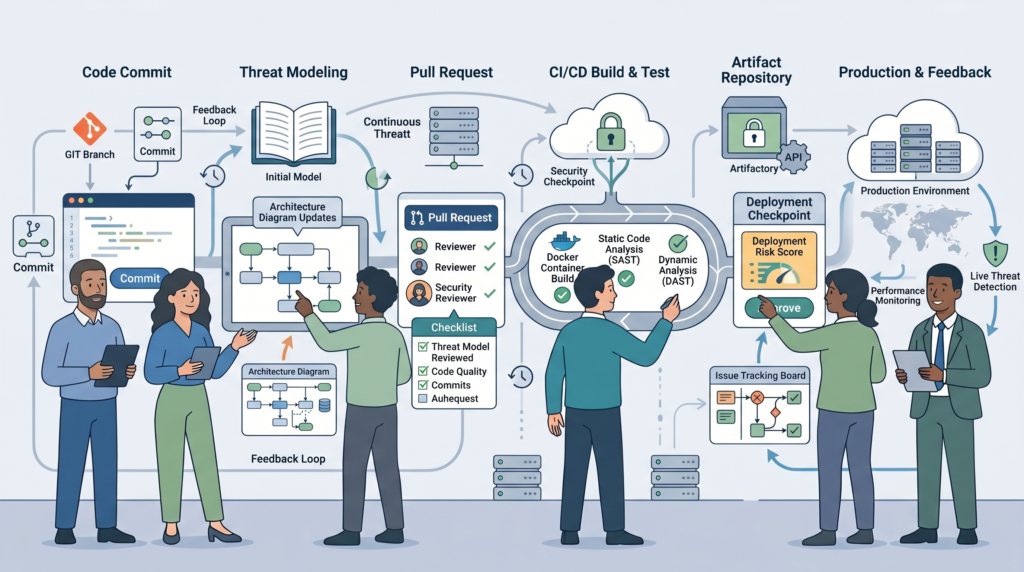
Scaling isn’t about drawing diagrams faster. It’s about making threat modeling a normal, lightweight part of shipping code.
Neither tool is a full “pipelines” solution out of the box. You need to build the workflow around them. The goal is to move from a project-phase activity to a continuous one.
A scalable workflow looks like this:
- A new feature branch is created.
- A developer updates the Threat Dragon JSON file to reflect the change.
- The updated threat model is reviewed in the pull request.
- Any new threats generate tasks in the team’s issue tracker (like Jira).
- Those tasks are addressed before the feature merges.
- The main branch always has a current threat model.
This type of continuous integration reflects the broader philosophy behind proactive network threat modeling, where teams anticipate security implications during development rather than reacting after deployment. You’re not re-modeling the whole application every time.
Threat Dragon’s JSON format is inherently more suited to this Git-centric world. Microsoft’s tool, being a separate desktop process, is harder to fit into this automated flow.
The teams that succeed are the ones that treat the threat model like code, maintained, versioned, and reviewed with every significant change.
Which Tool Should You Choose?
Don’t choose a tool. Choose the workflow that your team will actually sustain.
If your team needs enterprise reporting, is deeply integrated with the Microsoft ecosystem, and has dedicated security personnel to manage the process, the Microsoft Threat Modeling Tool is a strong fit. Its automation and structure support that world.
If your team is cross-platform, developer-led, uses Git daily, and wants to build security understanding organically, OWASP Threat Dragon is the clear path. Its flexibility and integration capabilities support a DevSecOps culture.
As noted by Shostack + Associates
“The best threat modeling tool for you is the one that solves a specific problem that you can articulate.” – Shostack + Associates Blog
Here’s a simple guide:
| If your priority is… | Choose… |
| Strict governance and audit trails | Microsoft Threat Modeling Tool |
| Working within an all-Windows, Azure-focused environment | Microsoft Threat Modeling Tool |
| Enabling developers on Mac, Linux, or Windows | OWASP Threat Dragon |
| Keeping the threat model in Git with the code | OWASP Threat Dragon |
| Privacy-focused analysis (like with LINDDUN) | OWASP Threat Dragon |
The best tool is the one that disappears into your team’s routine. The worst tool is the one that feels like a monthly compliance tax.
FAQ
How often should teams update their threat models?
Teams should update threat models whenever they introduce significant changes to applications, infrastructure, or workflows. Continuous threat modeling works best when it becomes part of the development process instead of a yearly exercise.
Regular updates improve threat modeling documentation, support DevSecOps threat modeling practices, and strengthen security architecture analysis as systems evolve.
Can threat modeling uncover security gaps before deployment?
Yes. Application security modeling helps teams identify weaknesses before attackers can exploit them. Through vulnerable system identification, teams can review trust boundaries, data flows, and dependencies to spot overlooked risks.
Security threat analysis tools also support stronger threat mitigation strategies by helping teams address issues earlier in the development lifecycle.
Which frameworks help teams categorize threats effectively?
Different threat categorization methods serve different purposes. STRIDE threat modeling helps teams identify common attack scenarios, while CIA triad threat modeling focuses on protecting confidentiality, integrity, and availability.
Using these approaches within a broader threat modeling methodology can improve software security evaluation and provide a more complete understanding of potential risks.
Is threat modeling valuable for cloud-native environments?
Yes. Cloud security threat modeling helps teams assess risks across distributed systems and shared environments.
AWS security modeling, GCP threat assessment, and infrastructure threat modeling can reveal issues related to permissions, configurations, and service interactions. Microservices threat modeling, Kubernetes security modeling, and API security threat analysis also help secure modern application architectures.
How can developers make threat modeling part of daily work?
Threat modeling for developers becomes more practical when it fits existing workflows. Security by design tools, data flow diagram threat modeling, and DFD security analysis help teams visualize risks during development.
Combining CI CD security integration with threat modeling pipeline automation and security testing tool integration encourages consistent reviews without creating unnecessary delays.
The Best Tool Is the One Your Team Uses
Even the most advanced platform won’t improve security if it never becomes part of daily work. Teams get better results when their tools support practical conversations, fit existing workflows, and evolve alongside changing systems. That’s what makes security habits stick.
Long-term success comes from consistency, not complexity. Ready to build a threat modeling approach your team will actually use? See how Network Threat Detection can help.
References
- https://pmc.ncbi.nlm.nih.gov/articles/PMC12714206/
- https://shostack.org/blog/threat-modeling-tools/
