

Proactive network threat modeling helps organizations identify, prioritize, and address security risks before attackers can exploit them. By mapping systems, evaluating trust boundaries, and analyzing potential attack paths, teams can reduce exposure and strengthen defenses across cloud, hybrid, and on-premises environments.
As networks become more complex, this approach supports better security decisions, regulatory readiness, and lower breach-related costs. Combined with insights from Network Threat Detection, threat modeling gives security teams the context needed to focus on the risks that matter most. Keep reading to see how proactive network threat modeling works in your security strategy.
Threat Modeling Fast Facts
Proactive network threat modeling works best when it becomes a regular practice rather than a one-time exercise. The points below summarize the core ideas covered throughout this guide.
- Proactive threat modeling helps teams identify risks before deployment, reducing opportunities for attackers to exploit weaknesses.
- Frameworks such as STRIDE, PASTA, and VAST provide structured ways to identify, prioritize, and address different types of threats.
- Integrating threat modeling into the software development lifecycle improves compliance efforts, lowers remediation costs, and strengthens long-term security outcomes.
How Do You Use the Microsoft Threat Modeling Tool?
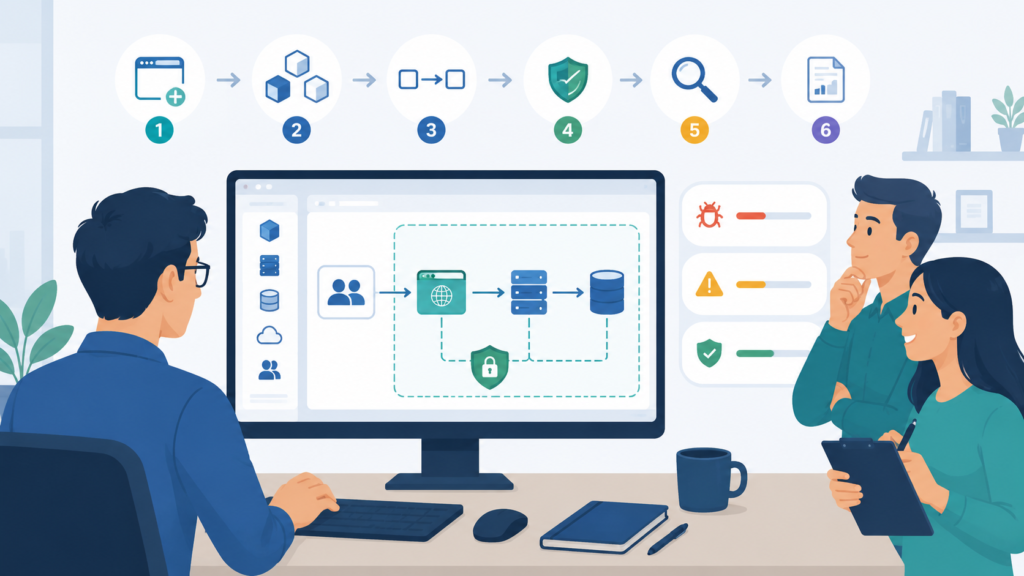
The Microsoft threat modeling tool is a popular starting point because it’s free. The process is pretty straightforward. Teams get the software, start a new project model, and follow a basic flow.
The workflow is fairly simple. Teams create a project, map the system, and then review the threats the tool identifies. A typical process includes:
- Creating a new threat model
- Adding components such as servers, applications, and databases
- Defining trust boundaries
- Mapping data flows between systems
- Setting system properties and assumptions
- Running automated threat analysis
- Reviewing findings and generating reports
One feature many users appreciate is the automatic generation of STRIDE-based threats. This helps teams spot common security issues without starting from scratch. The tool also offers different views that make it easier to organize findings and decide what needs attention first.
In our experience, automated results are most valuable when combined with human review. We regularly pair threat models with risk analysis tools to strengthen network security and uncover emerging threats. For teams new to threat modeling, this hands-on approach provides a solid foundation and helps build confidence over time.
What is the Network Threat Modeling Process?
Credits: SANS Institute
So how does the process actually work? The network threat modelling process follows a clear path that turns complex systems into a security model you can understand.
First, you list all the parts. What are the system components? Where are the trust boundaries? Who are the users? What apps, databases, cloud services, and communication channels are involved? We call this phase system modeling or application decomposition.
Next, you trace how data moves. Every connection is a potential road for an attacker. This step often shows hidden links that ordinary vulnerability scans miss.
Finally, you rank each found threat by how likely it is and how much damage it could do. You decide on fixes and make sure they work.
| Phase | Goal | What You Get |
| System Modeling | Understand the setup | A security model |
| Threat Identification | Find attack scenarios | A list of threats |
| Risk Analysis | Decide what matters most | Ranked threats |
| Mitigation Planning | Reduce exposure | Security controls |
| Validation | Check the fixes | Threat modeling reports |
A mature process isn’t a one-time check. It becomes a regular habit, a repeatable part of your security practice.
What Are the Benefits of Proactive Threat Modeling?
Why go through all this? A proactive threat modeling benefit cuts security risks earlier and cheaper than waiting for an alert. Research from Security Compass suggests organizations fix between 70% and 89% of the vulnerabilities they find through threat modeling. That kind of visibility is a massive advantage.
It also gets everyone talking the same language. Developers, architects, compliance staff, and security ops start working from the same blueprint. We’ve seen this improve teamwork again and again.
The main benefits we consistently see are:
- Finding vulnerabilities early in the design phase
- Helping prevent major data breaches
- Shrinking the attack surface
- Reducing the number of security incidents
- Making security improvements cost-effective
The money saved can be big. Studies show fixing a security flaw during design can cost far less than patching it after a system is live.
Threat modeling also helps with rules like GDPR. It creates a paper trail of your security decisions and risk assessments, which auditors like to see. Teams focused on network threat detection find their work gets better because analysts already know the likely attack paths and what needs the most protection.
How Does the STRIDE Threat Modeling Methodology Work?
STRIDE is one of the most common systems for sorting threats. Microsoft created it. It puts threats into six categories, and you check each part of your system against them.
| STRIDE Category | What It Means |
| Spoofing | Pretending to be someone else |
| Tampering | Changing something without permission |
| Repudiation | Denying you did something |
| Information Disclosure | Data getting out |
| Denial of Service | Overloading a resource so it stops working |
| Elevation of Privilege | Getting access you shouldn’t have |
The STRIDE’s framework makes threat assessments consistent. Security architects can use the same language to look at databases, APIs, login systems, cloud resources, and network services.
STRIDE’s strength is its simplicity. Even teams just starting with threat modeling training can pick it up quickly and apply it to what they already have. Many software development programs use STRIDE because it works for a small app or a huge enterprise network. Its structured approach turns vague worries into specific security tasks.
What Is the PASTA Threat Modeling Framework?
PASTA takes a different angle. It’s a risk-centered method that links technical security analysis with business goals. PASTA stands for Process for Attack Simulation and Threat Analysis. It doesn’t just look at technical holes; it thinks about how attackers would actually go after an organization’s assets and objectives.
The method has seven stages:
- Define your business objectives.
- Define the technical scope.
- Decompose the application.
- Analyze threats.
- Analyze vulnerabilities.
- Model possible attacks.
- Analyze the overall risk.
Research from University of Wisconsin-Madison, Computer Sciences Department
“PASTA is the Process for Attack Simulation and Threat Analysis. It was presented in 2015 as an alternative to the Microsoft Threat Modeling methodology and Security Development Lifecycle.” – University of Wisconsin-Madison, Computer Sciences Department
Each stage adds more context about your threat exposure. PASTA works well for organizations handling sensitive data, like in finance, healthcare, or other regulated fields, where business impact is just as important as technical risk. It also supports modeling threats in cloud setups and complex digital changes.
Because PASTA simulates attacker behavior, it often finds threat scenarios that checklist methods miss. Security leaders use its results to help executives make informed decisions about what risks to tackle first.
How Does the VAST Threat Modeling Approach Compare?
VAST stands for Visual, Agile, and Simple Threat modeling. It was designed for organizations that manage large numbers of applications, systems, and digital assets. As environments grow, keeping threat models updated becomes harder. We often see larger teams choose approaches that can scale without creating extra work.
What makes VAST different is its focus on automation and continuous threat discovery. This approach works well alongside analysis, intelligence & context, helping teams understand risks. Rather than treating threat modeling as a separate activity, it fits naturally into modern development practices and ongoing security operations.
Key strengths include:
- Support for DevSecOps workflows
- Compatibility with agile development methods
- Automated threat modeling processes
- Scalability across large environments
- Better visibility into enterprise-wide risks
Many organizations with rapid release cycles prefer approaches that integrate directly into existing workflows. In our experience, this helps teams identify risks earlier while keeping projects moving forward.
VAST vs. STRIDE vs. PASTA
| Framework | Main Focus | Best For |
| STRIDE | Sorting threats | Application security |
| PASTA | Analyzing business risk | Business-critical systems |
| VAST | Scale and automation | Large-scale DevSecOps |
We regularly combine threat models and risk analysis methods to improve network security and stay ahead of emerging threats. Many mature security programs do the same.
Why Are Data Flow Diagrams Important for Security?
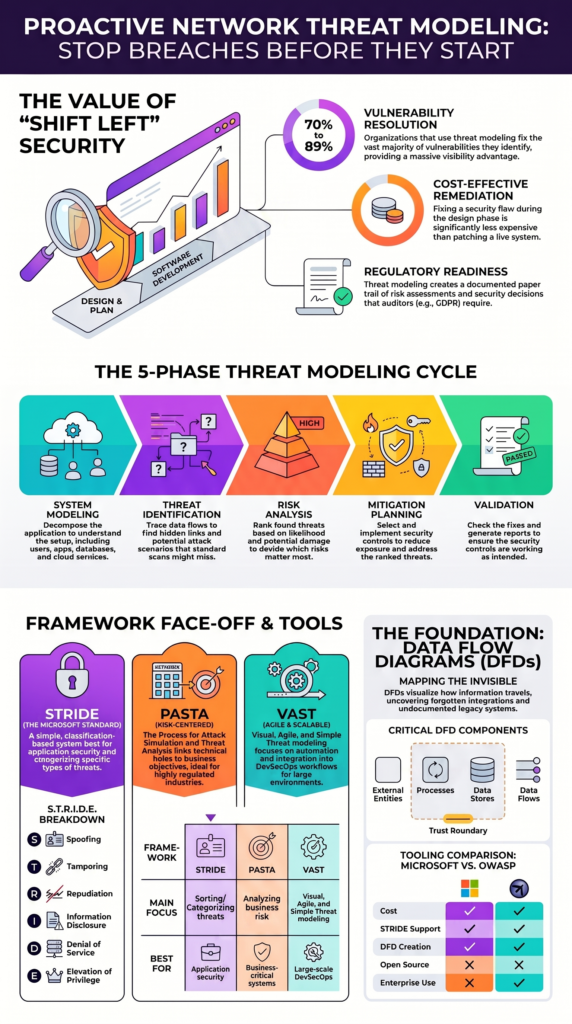
Data Flow Diagrams are a visual aid. They show how information travels through your systems and where threats might pop up. A DFD marks the processes, data stores, external entities, trust boundaries, and communication paths. It’s the starting point for most threat modeling.
We’ve noticed that drawing these diagrams often uncovers forgotten integrations, old legacy systems, and services no one documented, all of which can widen your attack surface.
The key parts of a DFD are:
- External entities (like a user or another company’s system)
- Processes (what happens to the data)
- Data stores (where information is kept)
- Data flows (the paths it takes)
- Trust boundaries (lines between zones of different trust)
Trust boundaries are especially important. Every time data crosses from one security zone to another, say, from a public web server to an internal database, the chance for exploitation goes up. This idea is central to analyzing data flows and modeling threats in cloud infrastructure.
Companies using AWS, Azure, or Kubernetes often lean on DFDs to picture these complex, spread-out architectures. What you get is a fuller, clearer view of your security exposure and where to focus your defenses.
How Can You Identify Potential Network Attack Vectors?
Figuring out the possible ways an attacker could get in is one of the most useful results of threat modeling.
First, network attack vectors. These are things like open ports, weak protocols, poor authentication, or misconfigured cloud services.
Second, content attack vectors. This covers malicious files, payload delivery methods, phishing content, or application-level exploits.
Third, human attack vectors, meaning social engineering. These campaigns target people, not technology, and they remain wildly successful.
Fourth, insider threats. Authorized users, whether by accident or on purpose, can sometimes bypass your security controls.
As highlighted by the U.S. Centers for Medicare & Medicaid Services (CMS)
“Threat modeling… involves identifying potential threats against vulnerabilities to an organization’s systems and data from a holistic, secure design perspective. This helps organizations develop impactful, cost-efficient countermeasures to prevent or mitigate these threats… Where the MITRE ATT&CK framework fits in is as a valuable tool for organizations to use in conjunction with threat modeling to classify potential attack vectors and tactics used by threat actors.” – U.S. Centers for Medicare & Medicaid Services (CMS)
In our practice, we often combine threat modeling with other tools to test our assumptions and get a real-world view.
How Does Threat Modeling Support Secure Design?
Using threat modeling during design lets you tackle security weaknesses before a single line of code is written. Choices made here shape your risk for years. Threat modeling points out flaws while changes are still cheap and easy.
Design decisions often stay with a system for years. A weak choice made early can create long-term security challenges. By building threat modeling into the planning process, organizations gain a clearer picture of potential risks and can strengthen security from the start.
Most teams apply threat modeling during several key stages:
- Requirements gathering
- Architecture reviews
- System design
- Security validation
Another advantage is better collaboration. Developers, architects, and security teams can discuss risks before major decisions are locked in. In our experience, these early conversations lead to stronger outcomes and fewer surprises later.
We regularly use threat models and risk analysis tools to help organizations improve network security and prepare for emerging threats. When security controls are considered during design rather than added afterward, cloud services, applications, APIs, and network infrastructure are often more resilient and easier to protect over time.
Why Should You Integrate Threat Modeling Into the SDLC?

Threat modeling shouldn’t be a one-and-done activity right before launch. Integrating threat modeling into the SDLC ensures security becomes an ongoing part of development rather than a last-minute checklist.
Modern development never stops, and new features, integrations, and cloud resources continuously introduce new risks. By embedding threat modeling throughout the software development lifecycle, teams can identify and address potential threats early, adapt to changing environments, and maintain stronger security as applications evolve.
Successful programs weave security reviews into every major development phase. A common approach includes a threat check during planning, an architecture review, a check during each sprint, validation before release, and continuous monitoring afterward.
When you combine proactive network threat modeling with network threat detection, your monitoring gets better context. Threat models help analysts know which alerts are most urgent and improve detection accuracy. Teams also add threat modeling libraries, interactive diagrams, analysis tools, and reports right into their development pipelines.
This continuous approach supports compliance, strengthens governance, and lifts your overall security maturity.
Threat Modeling Tools Comparison Microsoft OWASP
Choosing a threat modeling tool is not just about features. Teams also need to think about how well the tool fits their workflow, supports growth, and helps them manage risk over time. We have worked with organizations of different sizes, and the most successful teams usually pick tools that are easy to adopt and use consistently.
For those evaluating available options, our guide on threat modeling tools comparison Microsoft OWASP provides a closer look at key capabilities and common use cases.
The table below highlights some of the core differences:
| Capability | Microsoft Tool | OWASP Tools |
| Cost | Free | Free |
| STRIDE Support | Built-in | Available |
| DFD Creation | Strong | Strong |
| Reporting | Built-in | Available |
| Enterprise Use | High | High |
| Open Source | No | Yes |
Many organizations begin with free tools to build their threat modeling process and develop internal expertise. In our experience, the best choice is often the tool that teams will keep updated and actively use.
We regularly combine threat models with risk analysis tools to strengthen network security and address emerging threats. A simple, well-maintained model usually provides more value than a complex solution that sits unused.
FAQ
How does the network threat modeling process improve security planning?
The network threat modeling process gives teams a clear way to identify, assess, and address security risks before they turn into incidents. Teams map systems, review data flows, define trust boundaries, and examine possible attack paths.
This method strengthens security risk analysis network activities and supports risk ranking mitigations based on the threats that could cause the most damage.
What is the difference between STRIDE, PASTA, and VAST methodologies?
The STRIDE threat modeling methodology uses a threat classification system to categorize risks, including Spoofing Tampering Repudiation, Information Disclosure Denial Service, and Elevation of Privilege threats.
The PASTA threat modeling framework focuses on business risk and attack analysis. The VAST threat modeling approach supports large environments that need scalable and automated threat modeling practices.
Why are data flow diagrams useful during threat modeling?
Data flow diagrams security teams create show how information moves through systems, applications, and network components. Creating DFDs threat modeling exercises helps uncover hidden weaknesses, misplaced trust assumptions, and overlooked exposures.
These diagrams also improve data flows security analysis by helping teams understand where sensitive data travels and where stronger controls are needed.
How can threat modeling support agile and DevSecOps teams?
Integrating threat modeling SDLC practices into development workflows helps teams identify risks earlier and avoid costly fixes later. Threat modeling software development lifecycle activities fit well within agile environments by encouraging continuous threat identification.
Threat modeling for DevSecOps also promotes secure design threat modeling and better collaboration between development, operations, and security teams.
What threat modeling best practices should network teams follow?
Threat modeling best practices include conducting regular network security threat assessment activities, improving vulnerability identification network processes, and identifying attack vectors network environments commonly face.
Teams should document threat mitigation strategies, update models after major system changes, and focus on attack surface reduction. These steps support proactive threat detection, data breach prevention, and security incident reduction over time.
Build Resilience Before Threats Escalate
Security gaps often stay hidden until they become costly problems. Taking a proactive approach helps you uncover weaknesses early, strengthen decision making, and keep pace with risks that change as your environments expand.
Long-term protection depends on understanding where attackers may strike before they get the chance. Want a clearer view of your exposure? See how Network Threat Detection can support your efforts.
References
- https://research.cs.wisc.edu/mist/SoftwareSecurityCourse/Chapters/2_5-PASTA-ThreatModeling.pdf
- https://security.cms.gov/posts/how-use-mitre-attck-conjunction-threat-modeling
Related Articles
- https://networkthreatdetection.com/microsoft-threat-modeling-tool-tutorial/
- https://networkthreatdetection.com/microsoft-threat-modeling-tool-tutorial/
- https://networkthreatdetection.com/what-is-network-threat-modeling-process/
- https://networkthreatdetection.com/benefits-proactive-threat-modeling-security/
- https://networkthreatdetection.com/stride-threat-modeling-methodology-explained/
- https://networkthreatdetection.com/pasta-threat-modeling-framework-overview/
- https://networkthreatdetection.com/vast-threat-modeling-approach-comparison/
- https://networkthreatdetection.com/create-data-flow-diagrams-dfds-security/
- https://networkthreatdetection.com/identifying-potential-network-attack/
- https://networkthreatdetection.com/using-threat-modeling-secure-design/
- https://networkthreatdetection.com/integrating-threat-modeling-sdlc/
- https://networkthreatdetection.com/threat-modeling-tools-comparison-microsoft-owasp/
