
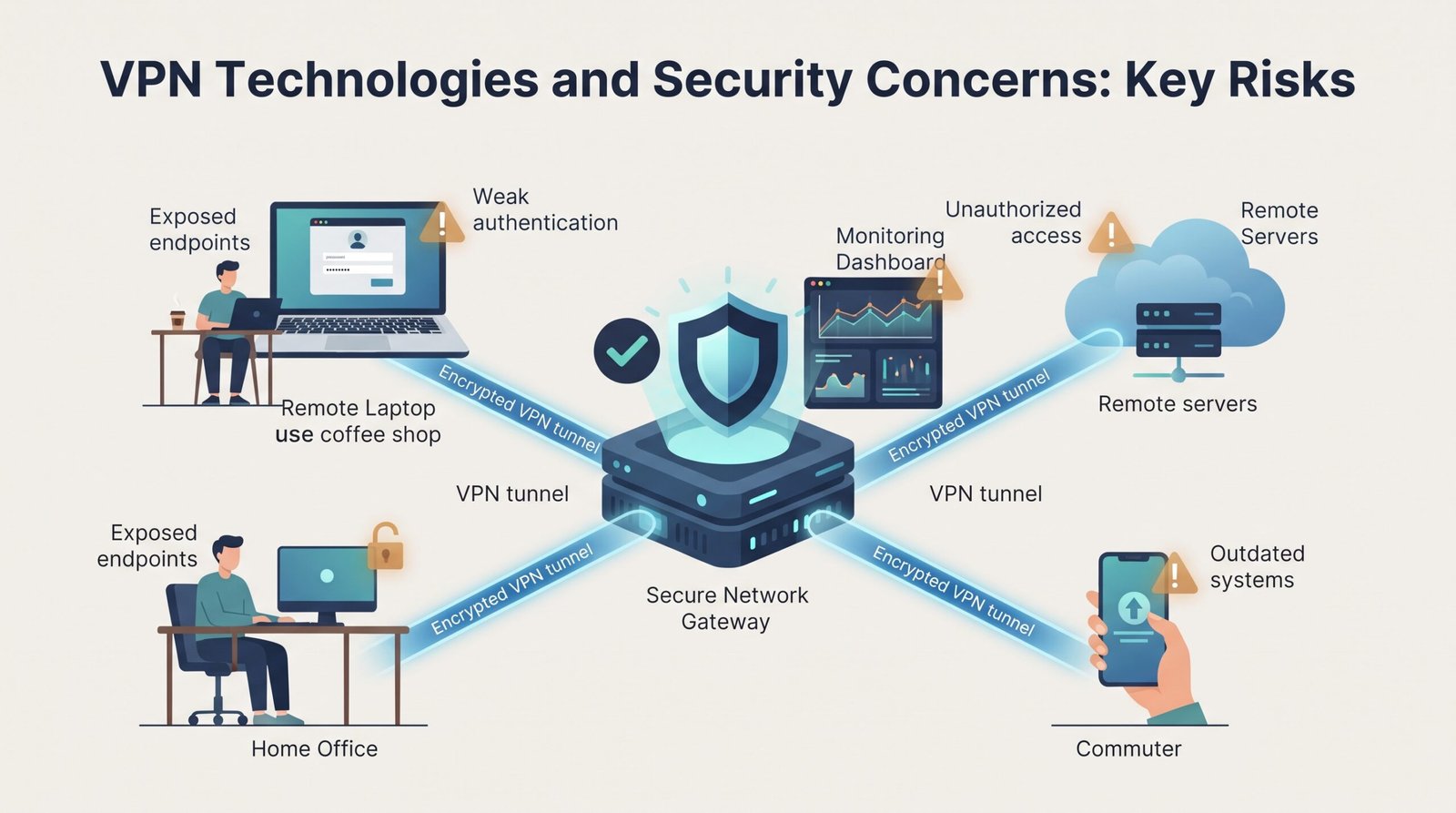
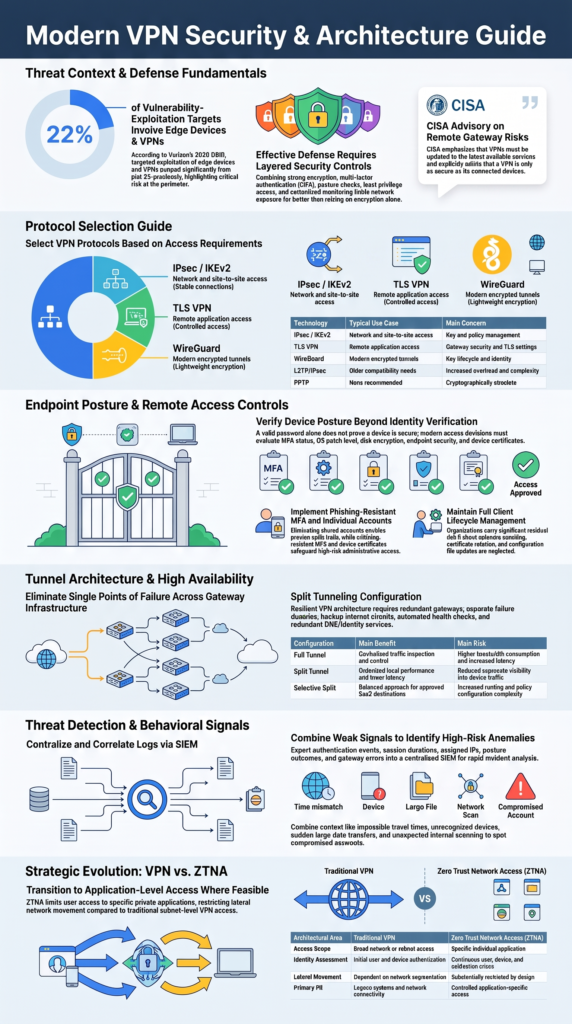
VPN technologies and security concerns go beyond encryption. A secure VPN also needs strong authentication, endpoint controls, network segmentation, monitoring, and timely patching. Verizon’s 2025 DBIR found that edge devices and VPNs accounted for 22% of targets in vulnerability-exploitation incidents, up from 3% previously.
That makes VPN security a broader network design issue. At Network Threat Detection, we focus on practical security controls that help identify weaknesses around VPN access and connected systems. The right setup limits exposure while keeping required access available. Keep reading for practical architecture and hardening guidance.
VPN Security: The Quick Wins
The main security lessons come down to protecting access, spotting unusual activity, and limiting exposure.
- Layer your controls: Use strong encryption, MFA, endpoint checks, least privilege, and centralized monitoring together.
- Watch VPN activity: Network Threat Detection can help us spot unusual behavior that authentication controls alone may miss.
- Limit network exposure: Combine resilient VPN architecture with application-level controls and ZTNA where appropriate.
Types of VPN Protocols: Which One Fits Your Needs?
The right VPN protocol depends on what the connection needs to do. For a broader types VPN protocols comparison IPsec SSL TLS, it helps to understand how each protocol handles different access needs.
IPsec VPNs operate at the network layer and are commonly used for site-to-site connections. IPsec commonly uses Internet Key Exchange, authentication, encryption, and the ESP protocol.
TLS VPNs are often used for remote access. The older term SSL VPN is still common, but modern deployments should use current TLS rather than obsolete SSL technology.
WireGuard VPN uses a smaller protocol design and modern cryptography, including ChaCha20-Poly1305. It can provide efficient encrypted tunnels on supported systems.
| Technology | Typical use | Main concern |
| IPsec / IKEv2 | Network and site-to-site access | Key and policy management |
| TLS VPN | Remote application access | Gateway security and TLS settings |
| WireGuard | Modern encrypted tunnels | Key lifecycle and identity |
| L2TP/IPsec | Older compatibility needs | More overhead and complexity |
| PPTP | None recommended | Cryptographically obsolete |
In our view, the access requirement should drive the protocol choice. IPsec fits stable network connections. TLS can suit controlled remote access. WireGuard can fit lightweight tunnel needs. ZTNA may be better when users only need a specific application.
When Do IPsec and TLS VPNs Fit Different Needs?
IPsec is a good fit when users or systems need access across routed networks. A branch office, for example, might need to reach several approved application servers. Building a separate connection for every application could add unnecessary complexity.
As noted by Internet Engineering Task Force (IETF)
“Assuming that the other constraints are met, IPsec is the security protocol of choice for VPN-like situations, including the remote access scenario where a single machine tunnels back into its home network over the internet using IPsec.” – Internet Engineering Task Force (IETF)
TLS-based access can be narrower. A contractor may need one internal web application but no reason to reach the rest of the corporate network.
So the practical split looks like this:
- IPsec: network-to-network access
- TLS VPN: controlled remote access
- WireGuard: lightweight encrypted tunnels
- ZTNA: application-level access
We’ve found that this way of thinking makes architecture reviews easier. Instead of asking which VPN is “best,” the team asks what level of access the user or system really needs.
A VPN connection should therefore have clear boundaries. Routes should be limited. Firewall rules should match the business requirement. User groups should not receive access simply because the VPN makes it technically possible.
How Do You Configure Site-to-Site VPN Tunnels Securely?
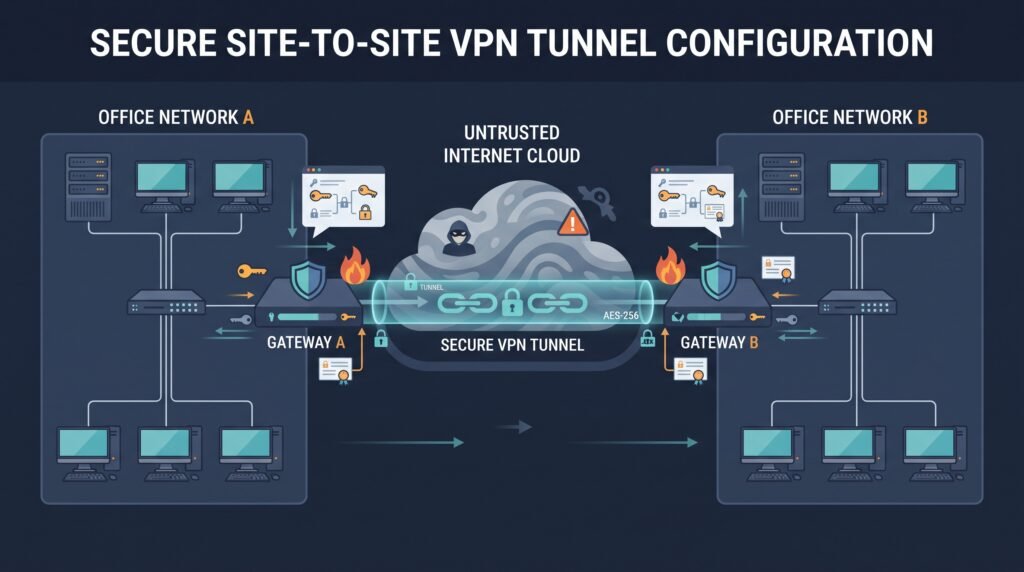
A site-to-site VPN should connect only the networks and services that need to communicate. Encryption protects the tunnel, but routing and firewall rules determine how much of the environment the tunnel can actually reach.
For a practical guide to configuring site-to-site VPN tunnels securely, start with Internet Key Exchange, then authentication, encryption, traffic selectors, routing, firewall policy, and logging. Each setting should have a clear reason.
For larger environments, certificate-based authentication can make identity management easier. Certificates can be issued, rotated, and revoked through a public key infrastructure. Pre-shared keys can still be suitable for tightly controlled connections, but each tunnel should have its own strong secret.
A secure deployment should address these areas:
- Use IKEv2 with approved cryptographic settings.
- Prefer authenticated encryption such as AES-GCM where supported.
- Use IPsec tunnel mode for network-to-network connections.
- Configure NAT traversal when required.
- Keep traffic selectors narrow.
- Use unique tunnel identities and credentials.
- Apply matching firewall rules.
- Log tunnel and authentication events.
- Protect gateway management interfaces.
- Require MFA for administrators.
The gateway itself should sit in a controlled security zone. If one tunnel connects a small branch to every internal server, the encrypted connection still creates a broad attack path.
How Can You Improve Remote Access VPN Client Security?
Remote access security depends on more than the VPN gateway. The user, device, identity system, client software, and access policy all affect the final risk.
A remote-access VPN should use individual accounts. Shared accounts make it harder to investigate incidents and identify who accessed a system.
But identity alone isn’t enough. A correct password does not prove that the device is patched, encrypted, managed, or free from malware.
A stronger access decision can check:
- MFA status
- Device ownership
- Operating-system version
- Patch status
- Disk encryption
- Endpoint security status
- Firewall status
- Device certificate
- User role
- Requested resource
Managed devices can receive broader access than unknown devices. Privileged users can face stricter requirements.
Our reviews also show why client lifecycle management matters. An organization may have strong MFA and still carry risk through outdated VPN clients, expired certificates, unsupported operating systems, or old configuration files. For more guidance, see our remote access VPN client security best practices.
VPN client security should include patching, vulnerability management, certificate lifecycle controls, endpoint hardening, and secure configuration. Privileged administrator sessions deserve extra protection through managed devices, phishing-resistant MFA, stronger posture checks, and limited network access.
What Are the Main Split Tunneling VPN Risks?
Split tunneling can improve performance, but it changes where traffic travels. Some traffic may bypass the corporate security stack and use the local network or internet connection instead.
A full tunnel VPN sends most or all client traffic through the organization’s security controls. This improves centralized visibility but may increase bandwidth use and latency.
Selective split tunneling takes a narrower approach. Approved corporate traffic uses the VPN while permitted internet or SaaS traffic uses local connectivity.
| Configuration | Main benefit | Main risk |
| Full tunnel | Centralized inspection | More bandwidth and latency |
| Split tunnel | Better performance | Less visibility |
| Selective split | Balanced approach | More policy complexity |
The main concerns include route leakage, DNS leakage, local-network exposure, and reduced traffic visibility. A compromised local network can add risk when a device connects to the corporate VPN.
Controls should include DNS leak prevention, endpoint firewall rules, EDR monitoring, explicit routes, and local-LAN restrictions where supported. For more detail, see split tunneling VPN risks configuration options.
Administrators and other high-risk users may require full tunneling. Standard managed devices might use selective split tunneling for approved SaaS destinations. Still, split tunneling isn’t automatically unsafe. Get the routing policy right first.
How Can VPN Concentrators Improve High Availability?
Credits: IT Audit Labs – Cybersecurity Media
VPN availability matters because a gateway failure can disconnect employees, branches, contractors, and partners at the same time. A resilient design should cover more than the VPN appliances themselves.
The surrounding services matter too. Identity systems, MFA, DNS, certificates, internet circuits, routing, and logging can all become failure points.
A resilient design may include:
- Two or more VPN gateways
- Separate failure domains
- Redundant internet connections
- Health checks
- Tested VPN failover
- Secure configuration backups
- Redundant identity services
- Redundant DNS
- Centralized logging
- Regular recovery tests
Active-active designs can provide more capacity, but they may add synchronization and routing complexity. Active-standby designs can be easier to operate for smaller teams if the recovery target is acceptable.
For a broader look at VPN concentrator high availability redundancy. The architecture should match session volume, business impact, recovery objectives, geographic needs, and available staff.
Don’t assume failover works because the dashboard says it does. Test gateway loss, identity failure, routing changes, certificate availability, log delivery, and user reconnection. The team should know how long recovery takes and what users experience.
High availability isn’t only about keeping the VPN online. It’s about keeping the whole access path usable when a component fails.
How Does VPN Encryption Affect Performance?
VPN performance depends on more than encryption. Gateway capacity, packet size, latency, packet loss, inspection services, concurrent sessions, and routing can all affect the user experience.
AES-256 provides strong encryption, while AES-GCM combines encryption and authentication efficiently on supported hardware. ChaCha20-Poly1305 can also perform well, especially on systems without strong hardware acceleration.
Encryption overhead is only part of the calculation. Tunnel encapsulation reduces the available payload size. Security inspection can also consume CPU and memory.
Teams should measure:
- VPN bandwidth
- Gateway CPU and memory
- Concurrent sessions
- Latency and jitter
- Packet loss
- MTU and MSS settings
- TCP retransmissions
- Fragmentation
- Log volume
A normal 1,500-byte Ethernet frame does not mean the VPN can carry a 1,500-byte application payload. Tunnel overhead can reduce that size. Poor MTU settings may then cause fragmentation or unstable connections. For more detail, see performance considerations vpn encryption overhead.
We should test with real workloads. Remote desktops, video meetings, large file transfers, cloud applications, and software downloads can behave very differently. Performance testing should use peak traffic, realistic applications, and expected user counts.
How Should You Monitor VPN User Activity and Logs?
VPN monitoring should help security teams detect misuse, investigate incidents, and confirm that access still matches business needs. VPN activity logs and VPN audit logs are therefore part of the security design. For more on this, see our guide to monitoring VPN user activity logs audits.
Useful records include authentication attempts, MFA results, assigned IP addresses, device identities, gateway selection, session duration, data volume, client versions, posture decisions, and administrative changes.
Logs should move to protected, centralized storage. SIEM integration can then correlate VPN events with identity, endpoint, DNS, firewall, and application data.
At minimum, monitor:
- Successful and failed logins
- MFA results
- User and device identity
- Certificate identity
- Connection start and end times
- Gateway and tunnel identifiers
- Data transferred
- VPN client version
- Device posture
- Configuration changes
- IKE, IPsec, and TLS errors
- HA failovers
- Certificate changes
Retention should follow business, legal, privacy, and incident-response requirements.
A regular VPN access audit can review dormant accounts, privileged users, contractor access, outdated clients, unusual exceptions, and unused VPN groups.
We should also test whether logs are useful during an incident. Accurate timestamps, stable user identifiers, and synchronized systems make investigations more reliable.
How Can You Detect Anomalous VPN Connection Behavior?
An unusual VPN connection does not always mean an account has been compromised. Context matters. A user might connect from a new location because of travel, while a new device followed by internal scanning is harder to explain.
This is where Network Threat Detection adds value. Authentication tells us that access was granted. It does not show whether activity after login matches normal behavior. Learn more about detecting anomalous VPN connection behavior.
Useful signals include:
- Impossible travel between sessions
- New or unknown devices
- Unusual login times
- Repeated failed logins
- Unexpected source networks
- Sudden data transfers
- New VPN certificates
- Internal network scanning
- Unexpected administrative access
- Changes to VPN policies
We should avoid treating every unusual event as an incident. Too many false alerts can overwhelm security teams. Instead, several weaker signals can be combined into a higher-risk event.
For example, a login from a new country may be low risk. Add a new device, an unusual login time, and access to sensitive servers, and the situation looks very different. Our approach assesses behavior across identity, device, network, and application activity.
How Can You Secure VPN Endpoints With MFA?
A secure VPN should verify more than a password. Multi-factor authentication gives us another layer, while phishing-resistant MFA and device certificates can provide stronger protection for sensitive access. For more on this approach, see securing VPN endpoints MFA strong authentication.
Passwords can be stolen through phishing, malware, password reuse, or compromised systems. An attacker with a valid password may therefore look like a normal user at first.
Organizations should prioritize:
- Phishing-resistant MFA
- Strong device authentication
- Certificate-based access
- Unique user identities
- Role-based permissions
- Least privilege
- Device posture checks
- Endpoint firewall controls
- Rapid patching
- VPN vulnerability management
Certificate-based authentication can help with managed devices because certificates can identify approved endpoints and be revoked when needed. Public key infrastructure can support this process, but it needs proper lifecycle management.
Endpoint security matters too. VPN client hardening should cover supported operating systems, disk encryption, endpoint detection, local firewall settings, secure client configuration, and regular patching.
The access decision should consider the user, device, resource, and current context. Strong authentication gets the user through the door. Endpoint controls help us decide whether that door should open at all.
How Does ZTNA Compare With a VPN?
Zero Trust Network Access vs. VPN usually comes down to the amount of access a user needs. A traditional VPN can provide network connectivity, while zero trust network access can limit users to specific applications.
A VPN remains useful when users need routed network access. Site-to-site connections, legacy systems, specialized protocols, and some administrative tasks may still require it.
ZTNA can make more sense when a user needs one private application. A contractor who only needs an internal web portal does not necessarily need access to an entire subnet.
| Area | VPN | ZTNA |
| Access | Network or subnet | Specific application |
| Identity | User and device | User, device, context |
| Lateral movement | Depends on segmentation | Usually narrower |
| Legacy systems | Strong fit | May need integration |
| Main use | Network connectivity | Application access |
We shouldn’t treat ZTNA as a replacement for every VPN. Some systems need network-level connectivity, and forcing every workload into an application-only model may add unnecessary complexity.
Microsegmentation, device posture checks, identity-based policies, and least privilege can also reduce unnecessary exposure around both models. In our security assessments, this distinction often reveals opportunities to reduce broad VPN access.
What Are the Best Practices for Modern VPN Remote Access?
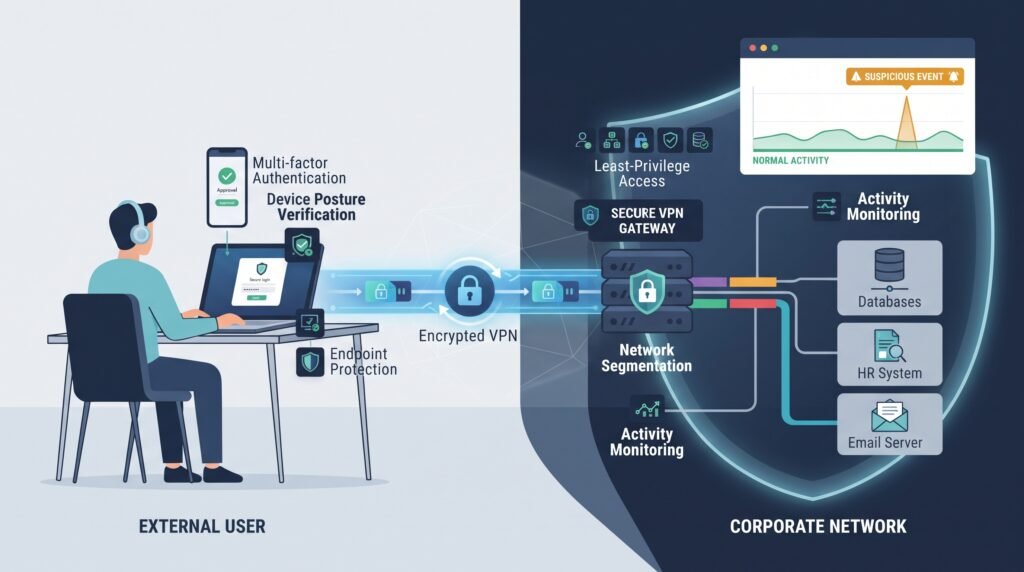
A modern VPN design should assign each control a clear job. Encryption protects traffic. Authentication verifies identity. Endpoint checks add device context. Segmentation limits reach. Monitoring helps us spot unusual behavior.
The baseline should include:
- Use IPsec and IKEv2 for suitable network-level connections.
- Use modern TLS for appropriate remote access.
- Require MFA for remote users.
- Prefer phishing-resistant MFA for privileged access.
- Use certificates for managed devices where practical.
- Apply least privilege and network segmentation.
- Check endpoint posture before sensitive access.
- Restrict and document split-tunnel exceptions.
- Centralize VPN logs.
- Connect VPN events to SIEM and threat detection.
- Patch exposed VPN systems quickly.
- Test high-availability and recovery procedures.
- Measure capacity under peak traffic.
- Use ZTNA where broad network access isn’t needed.
- Maintain an incident response plan for VPN compromise.
As highlighted by Cybersecurity and Infrastructure Security Agency (CISA)
“When remote access is required, use more secure methods, such as Virtual Private Networks (VPNs), recognizing VPNs may have vulnerabilities and should be updated to the most recent version available. Also recognize VPN is only as secure as its connected devices.” – (CISA)
Our reviews therefore look beyond configuration. We check patch ownership, vulnerability response times, exposed interfaces, authentication policies, logs, and recovery procedures.
FAQ
How should I choose between an IPsec VPN, TLS VPN, and IKEv2 VPN?
Choose based on how users and systems need to connect. An IPsec VPN works well for network-level traffic, while a TLS VPN can support remote application access. An IKEv2 VPN can suit mobile users who switch between networks. Compare authentication methods, device support, VPN encryption standards, latency, and your required VPN tunnel configuration before choosing.
Which authentication methods should I use for remote VPN access?
Use more than a password for VPN authentication. Multi-factor authentication adds another verification step, while phishing-resistant MFA helps protect against stolen credentials.
Certificate-based authentication can verify managed devices through digital certificates. You should also apply VPN access control, role-based access control, and least privilege access so users receive only the access they need.
Should I use split tunneling or a full tunnel VPN?
A full tunnel VPN sends all user traffic through the VPN, which gives administrators more control over security and monitoring. Split tunneling sends selected traffic outside the VPN, which can reduce bandwidth use but creates split tunneling risks.
Selective split tunneling can limit those risks. Consider DNS leak prevention, bandwidth requirements, and remote access security before choosing.
How can I keep VPN gateways available during an outage?
Use multiple gateways instead of relying on one system. VPN high availability keeps services running when a gateway fails, while VPN redundancy provides another connection path. VPN failover should move users to an available gateway when needed. Larger environments can also use VPN load balancing to spread connections across gateways and reduce the effect of heavy traffic.
What should I monitor after deploying a VPN?
Review VPN traffic monitoring, VPN activity logs, and VPN session logging to see how users connect and use the network. Watch for anomalous VPN behavior, suspicious VPN logins, and unusual access patterns. Keep VPN audit logs for security reviews and investigations. SIEM integration can bring these events together and help security teams respond to incidents faster.
Build a Safer VPN Access Model
VPNs remain useful, but an encrypted tunnel alone doesn’t provide complete security. You need controls that verify identity, protect endpoints, limit access, and detect suspicious activity. The right approach depends on the access needed and the level of risk.
A focused VPN access audit can reveal where exposure remains and what should change first. For teams ready to strengthen visibility and threat detection, explore Network Threat Detection to identify gaps and prioritize stronger remote access security.
References
- https://datatracker.ietf.org/doc/rfc3631/
- https://www.cisa.gov/news-events/ics-advisories/icsa-26-062-03
Related Articles
- https://networkthreatdetection.com/types-vpn-protocols-comparison-ipsec-ssl-tls/
- https://networkthreatdetection.com/configuring-site-to-site-vpn-tunnels-securely/
- https://networkthreatdetection.com/remote-access-vpn-client-security-best-practices/
- https://networkthreatdetection.com/split-tunneling-vpn-risks-configuration-options/
- https://networkthreatdetection.com/vpn-concentrator-high-availability-redundancy/
- https://networkthreatdetection.com/performance-considerations-vpn-encryption-overhead/
- https://networkthreatdetection.com/monitoring-vpn-user-activity-logs-audits/
- https://networkthreatdetection.com/detecting-anomalous-vpn-connection-behavior
- https://networkthreatdetection.com/securing-vpn-endpoints-mfa-strong-authentication
- https://networkthreatdetection.com/zero-trust-network-access-ztna-vs-vpn/