
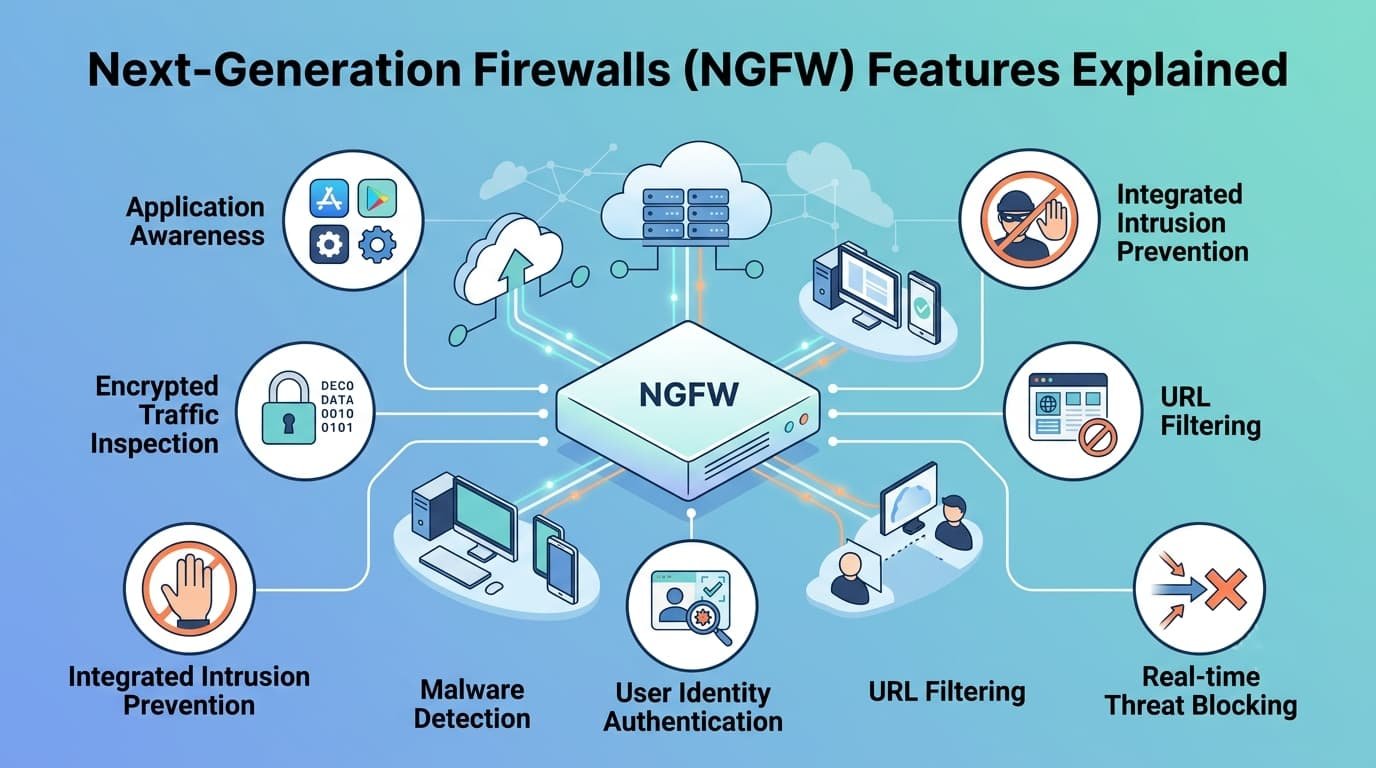
Forget old firewalls. Next-Generation Firewalls (NGFW) Features from Network Threat Detection act more like security guards who can read minds.
They identify users, decode applications, and inspect encrypted traffic, which accounts for over 90% of web traffic and masks roughly half of all malware communications. This deep look is non-negotiable for stopping modern attacks.
You need to know which features actually work. Let’s examine the key capabilities and how to roll them out effectively. Continue reading to get the details.
NGFW Essentials at a Glance
- Next-gen firewalls combine application control, user identity, and threat prevention in one box.
- Their power is wasted without disciplined rule management and proper sizing.
- Real security requires layering them with other tools, like network threat detection.
NGFW Vs Traditional Firewall Comparison
The old-school firewall is just a bouncer with a guest list. It checks your IP and port, and if you match a rule, you get in.
We’ve seen this model break down. Today, everything travels on the same few roads, all your email, video calls, and even malware use HTTPS. Telling a firewall to “allow port 443” is like leaving the city gates open because some merchants use that road. You have to check the cargo.
That’s where the next-gen firewall comes in. It’s the bouncer plus a detective. It doesn’t just check your ID. It listens to your conversation (the application), confirms who you are (user identity), and screens what you’re carrying (the content).
We use this deep inspection at Layer 7 to tell a legitimate Zoom call from a ransomware download, even though they use the same protocol.
The core difference is simple in an NGFW vs traditional firewall discussion:
- Traditional: Filters on IP, Port, Protocol.
- Next-Gen: Controls by Application, User, and Content.
For our team, building threat models on outdated rules is pointless. This shift isn’t an upgrade, it’s the only way to handle modern threats.
What Are the Key Features of Next-Generation Firewalls?
What makes a next-gen firewall work is consolidation. It bundles separate security tools, things like intrusion prevention, web filtering, and application control, into a single system.
These key features are what make next-generation firewalls far more effective than traditional perimeter defenses because they work together instead of operating in isolation.
According to CISA
“Next Generation Firewalls monitor and filter network traffic using application-, user-, device-, and content-aware policies to detect and block threats.” – CISA
In our threat models, we see how these pieces connect. The firewall first identifies the application, whether it’s Teams or a sketchy file transfer.
It then ties that traffic to a specific person by checking your directory service. This lets you create policies based on actual users, not just IP addresses.
Beyond that, core functions operate in tandem:
| Feature | Core Function |
| Integrated IPS | Scans for attack patterns and unusual behavior. |
| URL Filtering | Blocks malicious or inappropriate websites. |
| SSL Inspection | Decrypts, inspects, and re-encrypts web traffic. |
That last one, SSL inspection, is non-negotiable but heavy on resources. Without it, the firewall is blind to most modern threats hiding in encrypted traffic. The application awareness informs the IPS. The user identity shapes the web filter. It’s this integrated visibility, from one control point, that creates a practical defense.
What Is Application Awareness and Control in an NGFW?
The real shift happens here: security policy starts using business logic. With application awareness and precise application control, an NGFW lets you stop managing obscure rules like “Allow TCP 443 from subnet A to IP B.” Instead, you enforce a policy that says “Sales can use Salesforce, but no other SaaS apps.”
During a recent perimeter audit for a 2,000-user distribution hub, the client experienced severe WAN congestion. Legacy NetFlow data only showed a massive spike in generic TCP 443 traffic.
Once we deployed a Palo Alto Networks/Fortinet test unit in transparent mode, App-ID revealed that over 35% of their pipe was consumed by background P2P file sharing and 4K video streaming masked behind standard web ports.
We implemented QoS rules to prioritize Zoom/Webex video calls while throttling non-sanctioned media to 500 kbps, resolving the bottleneck in under an hour.
They didn’t have to block everything. They created a policy to guarantee bandwidth for Zoom and throttle Netflix. The control is that precise.
This granularity lets you:
- Identify and allow sanctioned apps like Office 365.
- Limit or block high-risk apps like peer-to-peer filesharing.
- Apply QoS rules to prioritize critical traffic.
In our risk analysis, this turns the network from a dumb pipe into a managed asset and strengthens network infrastructure visibility while improving network control across business applications. It also slams shut a major shadow IT loophole, because employees can’t just tunnel into an unauthorized cloud service anymore.
Integrated Intrusion Prevention System IPS
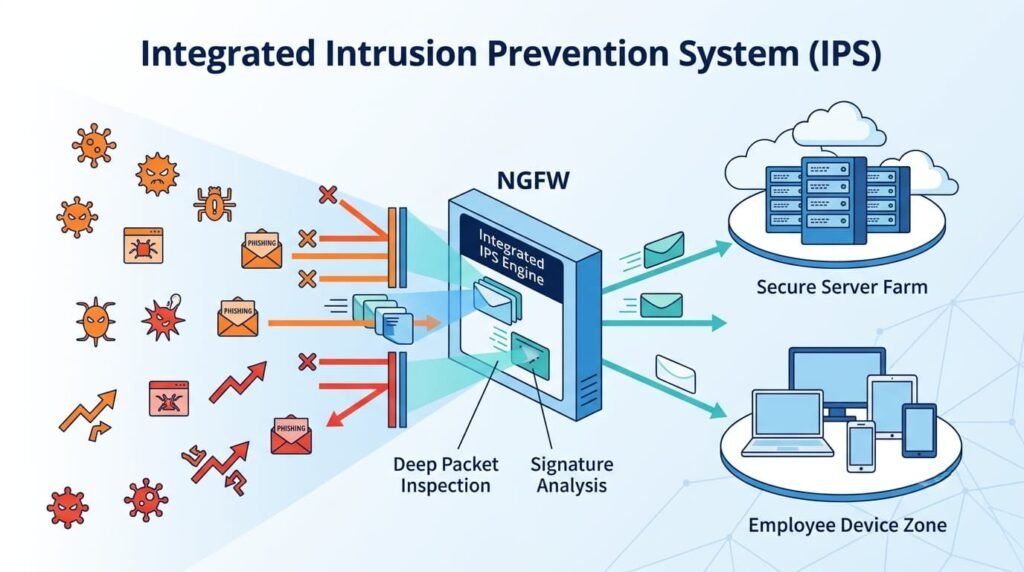
Putting an integrated intrusion prevention system inside the firewall itself makes a huge difference. Every packet checked against a firewall rule can also be scanned for attacks in one go, allowing the IPS to respond with greater context and accuracy.
There’s no performance hit from shuttling data to another box. More importantly, the IPS gets full context from the firewall’s other modules.
The firewall already knows if a connection is headed for a web server in your DMZ. The integrated IPS can then apply a stricter, web-focused set of attack signatures to that stream.
If the same internal IP is talking to a printer, a much lighter profile gets used. This context cuts down on false alarms.
When onboarding an IPS, run signatures in ‘Alert-Only’ (Monitor) mode for at least 14 days to establish a baseline. Review high-frequency alerts against your application profile, suppress false positives, and link your policy to dynamic CISA Known Exploited Vulnerabilities (KEV) feeds that automatically update every 24 hours.
Switch signatures to ‘Prevent/Block’ only after tuning out benign network noise, and re-evaluate rule efficacy quarterly.
Only after that should you switch it to start blocking. A badly tuned IPS causes more operational pain than it prevents. But one that’s informed by the NGFW’s awareness of applications and users becomes a formidable block against known exploits.
User Identity Awareness Firewall Policies
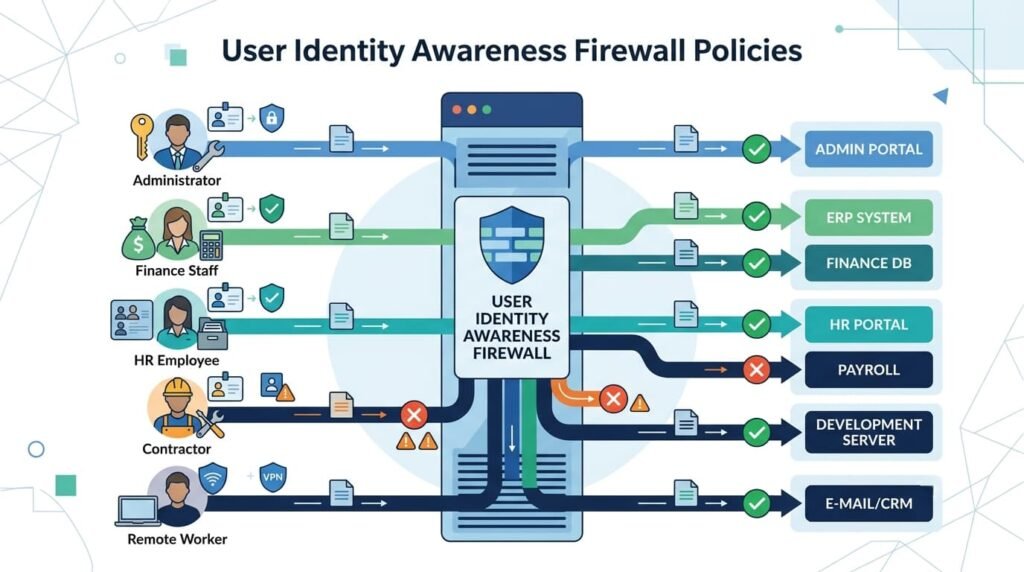
User identity awareness is central to frameworks like Zero Trust because modern firewall policies work best when they follow users instead of changing IP addresses.
Rules based on IP addresses are fragile. People move, devices swap, and DHCP leases roll over. A policy tied to a person’s identity is stronger and much more accurate.
The firewall does this by connecting to your directory service, like Active Directory. When someone logs into their computer, the firewall links their current IP address to their identity. Now rules can be written for people.
“The Finance group can reach the payroll server.” “Interns cannot touch the source code.” It doesn’t matter if the finance user is at a desk in the office or on a laptop at home. The policy sticks with them.
We saw this work cleanly on a recent project. A client needed to lock down a sensitive financial system. Using old IP-based rules would have meant creating a special VPN subnet and constantly updating an IP whitelist.
With an identity-aware firewall, they just made a rule for the “CFO” and “Controllers” Active Directory groups. Access was seamless. Auditing became simple, because the logs showed usernames instead of anonymous machine addresses.
What Are the Best Practices for Managing a Firewall Rule Base?
Credits: Liquid Web by Nexcess
All the advanced features mean nothing if the firewall rule base is a disaster. A next-gen firewall with bad policies is like a race car in the hands of a new driver, you won’t see the performance, and you’ll probably wreck.
Keeping the rule base organized is what allows advanced security features to work as intended. Good firewall hygiene has always mattered, but it’s essential now with the complexity an NGFW adds.
Start with a default deny rule. Block everything first, then make every other rule a specific exception. That’s your security foundation. Next, apply least privilege.
Each rule should grant the bare minimum access required. Does that server truly need to talk to the whole internet on all ports? Probably not.
Our reviews often find the same basic problems. To keep things sane:
- Give every rule and network object a clear, descriptive name.
- Assign an owner and a review date to each rule.
- Audit the rule base quarterly to kill old rules.
- Avoid using “ANY” for source, destination, or service.
The most common error we see is the “lift-and-shift.” Companies take hundreds of overly broad rules from their old firewall and dump them straight into the new NGFW. They’ve bought a scalpel but are using it like a hammer.
You have to redesign the policy to use the new context, application, user, content. It’s work, but that’s where the real security return comes from.
NGFW Deployment Dodes Configuration Options
How you install the firewall matters as much as the model you choose. Choosing the right NGFW deployment mode and understanding the available configuration optionshelp these devices fit into existing networks without creating unnecessary complexity.
The classic method is Routed Mode. The firewall acts as a Layer 3 gateway. You’d use this at the main perimeter between your network and the internet, or to separate internal zones like your office from a data center.
Often, a less invasive option is better. Transparent (or Bridge) Mode puts the firewall in-line like a bump in the wire. It inspects traffic without acting as a router, so you don’t have to reconfigure a single IP address. We use this to slide security in front of an existing segment, like a sensitive server cluster.
| Mode | Best For | Key Trait |
| Routed | Perimeter, internal segmentation | Acts as a gateway/router |
| Transparent | Existing segments, server farms | In-line, no IP changes needed |
| Virtual (Cloud) | AWS, Azure VPCs | Protects cloud subnet traffic |
Other modes like Virtual Wire exist for specific visibility jobs. The choice always comes from the goal, are you building a new perimeter, segmenting internally, or protecting cloud workloads? We match the mode to the objective, not the other way around.
How Do You Size an NGFW for Performance and Throughput?
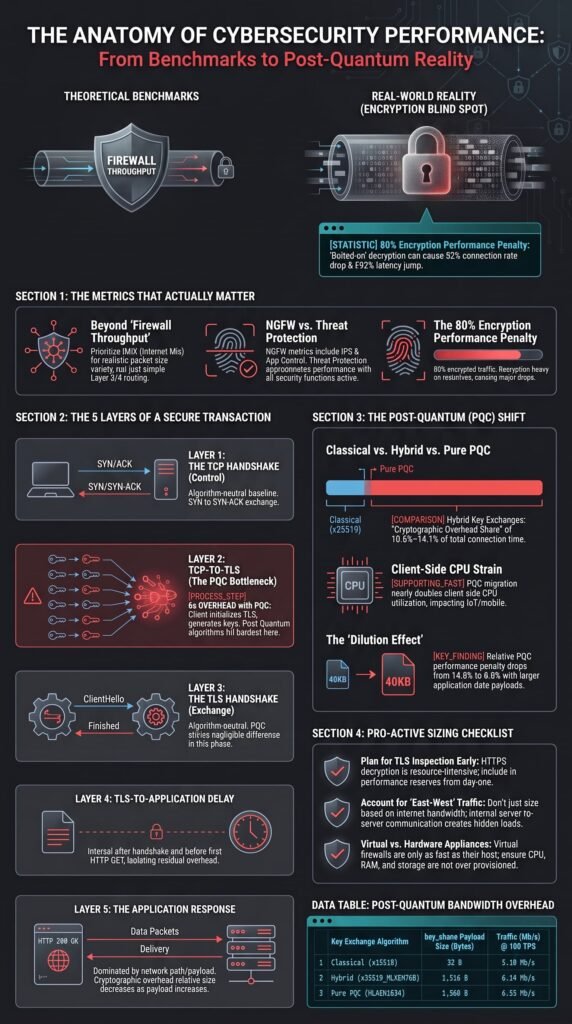
Vendor datasheets love to advertise huge throughput numbers, 10 Gbps or more. What they usually don’t highlight is that this is for raw traffic with all the security features turned off.
Once you enable deep packet inspection (DPI), IPS signatures, and SSL decryption simultaneously, expect real-world throughput to drop by 50% to 80%.
When offloading heavy TLS 1.3 ciphers (like ECDHE-RSA-AES128-GCM-SHA256) without dedicated hardware ASIC accelerators, CPU utilization spikes rapidly, meaning a box rated for 10 Gbps stateful firewalling might choke at 2 Gbps of full threat inspection.
Proper NGFW performance depends on accurate throughput sizingrather than raw pipe bandwidth alone. Small average packet sizes (under 512 bytes) increase CPU packet-processing overhead. Complex TLS 1.3 ciphers multiply hardware decryption load.
Network engineers must size appliances based on peak encrypted concurrent sessions rather than vendor datasheet best-case scenarios.
We always tell clients to ignore the “Firewall Throughput” spec. Look at the “Threat Prevention Throughput” number instead. If you need to inspect 1 Gbps of real traffic, you probably need a box rated for 2 Gbps or more of threat prevention capacity.
Getting this wrong causes latency, dropped connections, and a bad choice: turning off critical security just to keep the network up. That misses the point entirely.
Managing NGFW Policies Effectively Complexity
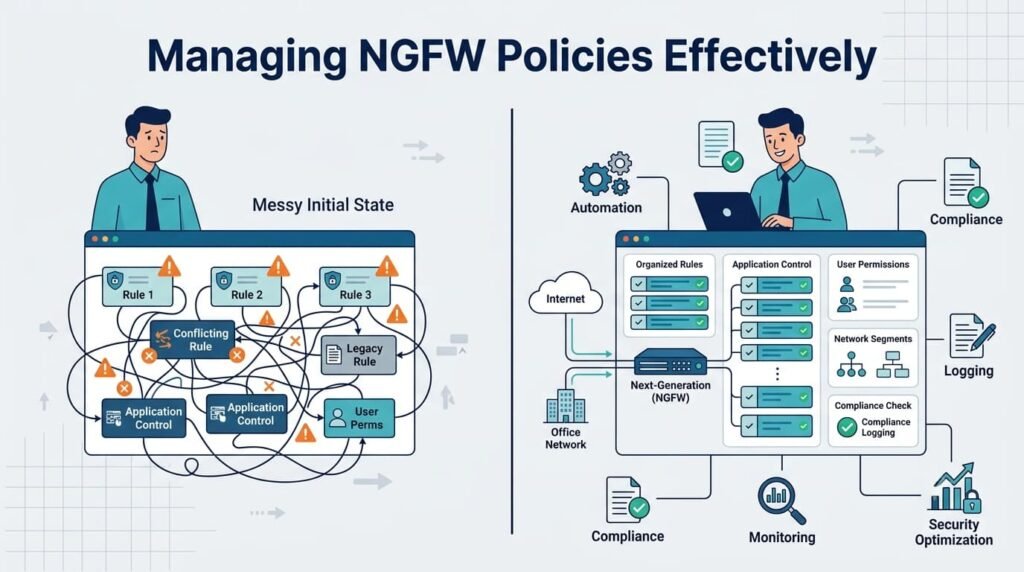
A next-gen firewall’s policy complexity is its biggest advantage, and its greatest risk. Successfully managing NGFW policies means keeping rules organized as they specify the user, application, destination, and which security profiles to use. This power can spiral.
We’ve seen rule bases with thousands of entries where no one knew what half of them did.
Governance has to start on day one. For multiple firewalls, centralized management is mandatory. Use it to push consistent policy templates. Enforce a formal change process, no more “temporary” fixes that become permanent.
Tag every single rule with metadata: “Business Owner: Finance,” “Ticket: INC-12345.” This turns a quarterly audit from a nightmare into a routine task.
Automate the cleanup. Use tools that analyze logs to show which rules are actually used and which are dormant. Those unused rules aren’t just clutter; they’re hidden liabilities, possibly granting unintended access.
The cleanest, most documented, and regularly reviewed policy is what makes an NGFW deployment work. The technology provides control, but human discipline makes it secure.
NGFW Vendor Comparison Solutions Market
The market has solid leaders and capable challengers. A thorough NGFW vendor comparison should look past the basic feature list because the best solutions stand out through their ecosystem, automation, and how they fit your team’s workflow.
Some vendors are strongest in the data center with robust hardware. Others have tightly woven their NGFW into SD-WAN, which is ideal for branch offices.
Then there’s the shift to cloud-delivered models like Firewall-as-a-Service (FWaaS), which moves inspection to the edge for remote users. You have to ask about your own future: Is your strategy cloud-first? Do you need deep API support for automation?
Our evaluations always drill into a few areas:
- Management & Automation: Is there a single console? How functional are the APIs for infrastructure-as-code?
- Ecosystem Integration: How well does it connect to your identity provider, SIEM, and cloud platforms?
- Operational Reality: Is the threat intelligence useful and current? What’s the true total cost, including licenses and the staff skill needed?
The best firewall isn’t the one with the most checkmarks. It’s the one your team can actually configure, manage, and tune in your specific environment.
What Are the Limitations of NGFW Encrypted Traffic Inspection?
TLS inspection is the firewall’s necessary evil. One of the biggest NGFW limitationsis balancing visibility with privacy during encrypted traffic inspection, which creates real legal and ethical questions.
According to National Institute of Standards and Technology (NIST SP 1800-16D)
“Organizations have concluded that the visibility into their internal traffic provided by TLS inspection is worth the trade-off of the weaker encryption and other risks that come with such inspection. For these organizations, TLS inspection may be considered standard practice and may represent a critical component of their threat detection and service assurance strategies.” – National Institute of Standards and Technology (NIST SP 1800-16D)
Decrypting outbound user traffic introduces serious legal and compliance risks under frameworks like GDPR, HIPAA, and PCI-DSS Requirement 4.
To avoid intercepting Personally Identifiable Information (PII) or banking credentials, we configure strict bypass rules for sensitive categories (Financial Services, Health & Medicine) and hardcode exceptions for applications using SSL/TLS certificate pinning (like financial APIs or Apple services) to prevent app breakage.
Applications employing SSL/TLS certificate pinning or client-side authentication will break during interception, requiring dedicated SSL bypass rules. Managing this list of exceptions is a constant job. In some places, you might even need employee consent.
The real limitation is philosophical. You can’t inspect everything. A practical strategy is to inspect the highest-risk traffic completely, while accepting some blind spots. This is why a layered defense is non-negotiable.
Our approach pairs the NGFW’s network-level inspection with endpoint detection (EDR) and robust network threat detection. The firewall enforces policy and catches wide threats.
The dedicated detection systems hunt for the subtle, advanced attacks that might slip through the exceptions or use other tricks. Each layer informs the other, building a safety net.
FAQs
How Do You Size a Next Generation Firewall for Business Growth?
Picking a next-gen firewall starts with your network traffic, user actions, and apps. You must size it for expected concurrent sessions, sessions per second, and throughput. Check latency under peak load. Correct sizing prevents bottlenecks, maintains performance, and allows for growth.
Which Firewall Deployment Mode Fits Your Network Best?
Your network setup determines the best NGFW mode. Transparent mode protects traffic without altering IPs. Routed mode directs traffic between different networks. Virtual wire mode offers inline security with almost no network reconfiguration. Choosing the right one makes your deployment more effective.
Why Should You Optimize Firewall Rules Regularly?
Optimizing firewall rules regularly makes your network both more secure and efficient. Review policies, audit the setup, and clean out old or duplicate rules.
This cuts down on unnecessary complexity, makes troubleshooting easier, and helps your team enforce policies consistently across the network.
How Can a Firewall Help Meet Compliance Requirements?
A firewall aids compliance by logging and monitoring network activity. For better visibility, integrate it with a SIEM system and use its built-in compliance features for reports.
Good change management creates an audit trail, which is key for meeting standards like PCI DSS and proving consistent security controls.
How Can a Firewall Secure Cloud and Hybrid Environments?
To secure hybrid infrastructure, use a cloud firewall, virtual firewall, or FWaaS with your on-premises controls. Add network segmentation and east-west traffic inspection for better workload visibility.
This strengthens security, supports scalable growth, and protects workloads across all your distributed environments.
Build Smarter Security That Lasts
Your firewall is only as strong as the way you use it. The right policies, regular updates, and clear visibility into your network make the biggest difference. That’s the reality. Modern threats don’t stop changing, so your security approach can’t stay the same if you want to keep attackers out.
If you want a simpler way to strengthen your security program, Network Threat Detection gives your team real-time threat modeling, automated risk analysis, and practical insights that help you act faster.
Have you encountered hardware decryption bottlenecks in your recent NGFW rollouts? Submit your deployment feedback or request a policy review with our engineering team at security review Network Threat Detection.
References
- https://www.cisa.gov/topics/cybersecurity-best-practices/zero-trust
- https://www.nccoe.nist.gov/publication/1800-16/VolB/index.html
Related Articles
- https://networkthreatdetection.com/network-infrastructure-and-control/
- https://networkthreatdetection.com/firewall-rule-base-best-practices/
- https://networkthreatdetection.com/ngfw-vs-traditional-firewall-comparison/
- https://networkthreatdetection.com/key-features-next-generation-firewalls/
- https://networkthreatdetection.com/application-awareness-control-ngfw/
- https://networkthreatdetection.com/integrated-intrusion-prevention-system-ips/
- https://networkthreatdetection.com/user-identity-awareness-firewall-policies/
- https://networkthreatdetection.com/ngfw-deployment-modes-configuration-options/
- https://networkthreatdetection.com/ngfw-performance-throughput-considerations-sizing/
- https://networkthreatdetection.com/managing-ngfw-policies-effectively-complexity/
- https://networkthreatdetection.com/ngfw-vendor-comparison-solutions-market/
- https://networkthreatdetection.com/ngfw-limitations-encrypted-traffic-inspection/
